1. හැඳින්වීම
This manual provides detailed instructions for the safe and efficient use of your Gembird TWST-01-W Transparent Bluetooth Earbuds. These earbuds feature a unique transparent design, offering up to 4 hours of listening time per charge. Key functionalities include automatic music muting for incoming calls, an LCD battery indicator, and a color-changing backlight. Please read this manual thoroughly before operating the device.
2. පැකේජ අන්තර්ගතය
පහත ලැයිස්තුගත කර ඇති සියලුම අයිතම ඔබේ පැකේජයේ ඇති බවට වග බලා ගන්න:
- Gembird TWST-01-W Transparent Bluetooth Earbuds (Left and Right)
- අයකිරීමේ නඩුව
- Charging Cable or Connector
- උපදෙස් අත්පොත
3. නිෂ්පාදන අවසන්view
Familiarize yourself with the components of your Gembird TWST-01-W earbuds.

රූපය 3.1: The Gembird TWST-01-W Transparent Bluetooth Earbuds shown within their charging case. The case features a clear design, revealing the internal components and an LCD display indicating battery levels for both earbuds (L and R) and the case itself.
ප්රධාන ලක්ෂණ:
- විනිවිද පෙනෙන නිර්මාණය: Unique clear housing for both earbuds and charging case.
- දීර්ඝ සවන්දීම: Up to 4 hours of continuous listening per charge.
- ඇමතුම් කළමනාකරණය: Automatically mutes music for incoming calls.
- බැටරි දර්ශකය: LCD display on the charging case shows battery levels.
- ගතික පසුබිම් ආලෝකය: Charging case features a color-changing backlight.
- ස්පර්ශ පාලනය: Intuitive touch-sensitive controls for various functions.
- වතුර කාන්දු නොවන: ඉසින සහ දහඩියට ඔරොත්තු දෙන ලෙස නිර්මාණය කර ඇත.
4. පිහිටුවීම
4.1 මූලික ආරෝපණය
පළමු භාවිතයට පෙර, ඉයර්බඩ් සහ ආරෝපණ පෙට්ටිය සම්පූර්ණයෙන්ම ආරෝපණය කරන්න.
- ආරෝපණ පෙට්ටිය තුළට ඉයර්බඩ් දෙකම තබන්න.
- ආරෝපණ කේබලය නඩුවේ ආරෝපණ වරායට සහ USB බල ප්රභවයකට සම්බන්ධ කරන්න.
- The LCD display on the case will show the charging status. Allow sufficient time for a full charge.

රූපය 4.1: පැත්ත view of the Gembird TWST-01-W charging case, highlighting its transparent construction and the integrated LCD battery display. The charging port is typically located at the bottom or rear of the case.
4.2 බ්ලූටූත් යුගල කිරීම
ඔබගේ ඉයර්බඩ් උපාංගයකට සම්බන්ධ කිරීමට:
- ඉයර්බඩ් ආරෝපණය කර ආරෝපණ පෙට්ටියේ තබා ඇති බවට වග බලා ගන්න.
- ආරෝපණ පෙට්ටිය විවෘත කරන්න. ඉයර්බඩ් ස්වයංක්රීයව යුගල කිරීමේ ප්රකාරයට ඇතුළු වනු ඇත (ඉයර්බඩ් මත දැල්වෙන ලයිට් මගින් දක්වනු ලැබේ).
- ඔබගේ උපාංගයේ (ස්මාර්ට්ෆෝන්, ටැබ්ලටය, ආදිය), බ්ලූටූත් සැකසුම් වෙත ගොස් බ්ලූටූත් ක්රියාත්මක කරන්න.
- ඒ සඳහා සොයන්න available devices and select "Gembird TWST-01-W" from the list.
- සම්බන්ධ වූ පසු, ඉයර්බඩ් සාර්ථක යුගලනය පෙන්නුම් කරයි (උදා: හඬ විමසුමක් හෝ ස්ථාවර ආලෝකයක්).
- පසුකාලීන භාවිතය සඳහා, ඉයර්බඩ් නඩුවෙන් ඉවත් කළ විට අවසන් වරට යුගල කළ උපාංගයට ස්වයංක්රීයව සම්බන්ධ වේ.
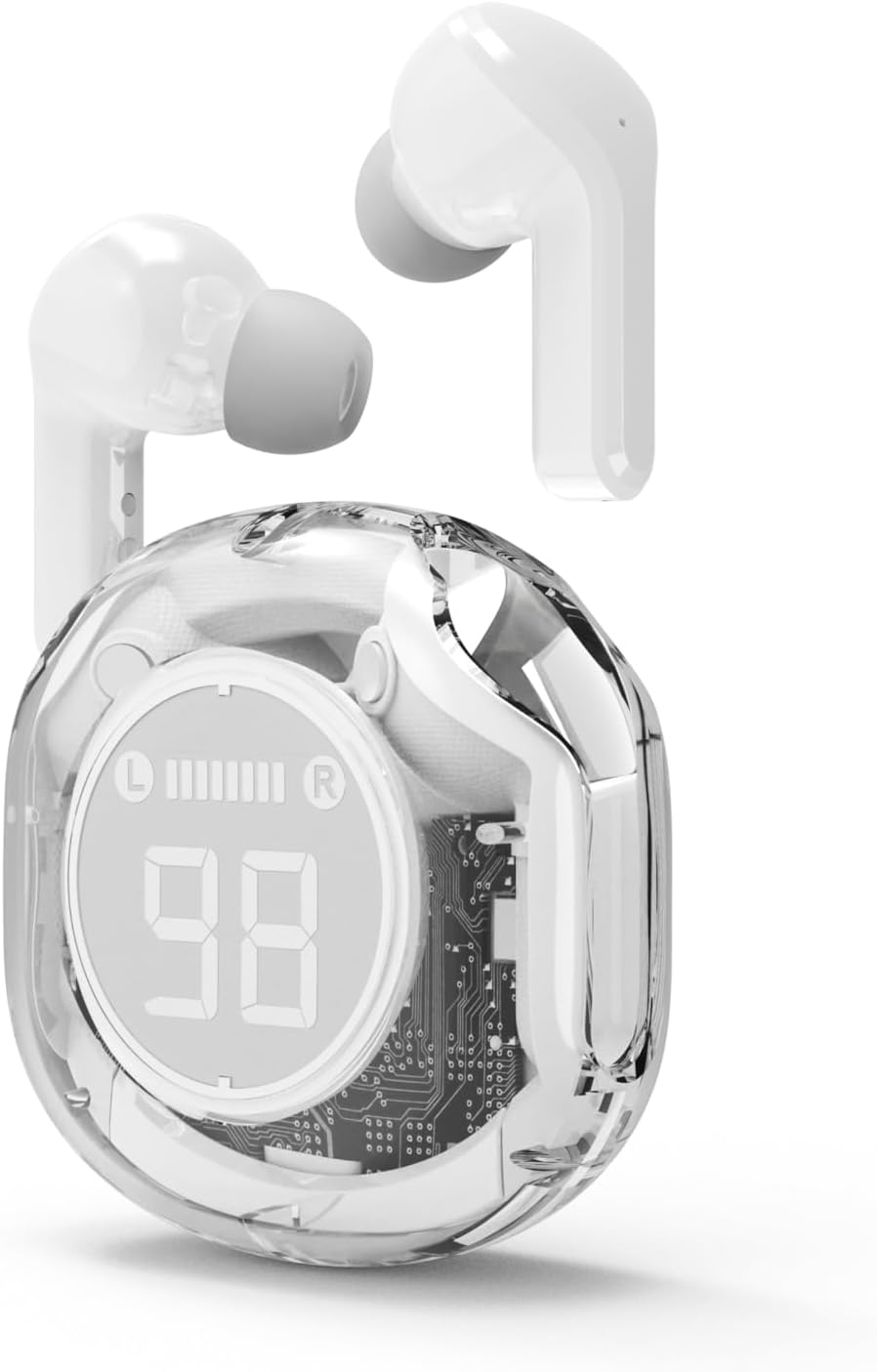
රූපය 4.2: The Gembird TWST-01-W Transparent Bluetooth Earbuds shown outside their charging case, ready for use or pairing. The transparent design of the earbuds themselves is visible.
5. මෙහෙයුම් උපදෙස්
The Gembird TWST-01-W earbuds utilize touch controls. Specific gestures may vary slightly; refer to the quick start guide included in your package for precise commands.
| කාර්යය | Action (Touch Control) |
|---|---|
| පවර් ඔන් | Remove from charging case. |
| බලය අක්රියයි | නැවත ආරෝපණ පෙට්ටියට දමන්න. |
| සංගීතය වාදනය/විරාම කරන්න | ඉයර්බඩ් දෙකෙන් එකක් මත එක තට්ටු කරන්න. |
| ඊළඟ ධාවන පථය | දකුණු ඉයර්බඩ් එක දෙවරක් තට්ටු කරන්න. |
| පෙර ධාවන පථය | වම් ඉයර්බඩ් එක දෙවරක් තට්ටු කරන්න. |
| ඇමතුමට පිළිතුරු දෙන්න/අවසන් කරන්න | ලැබෙන ඇමතුමක් අතරතුර ඉයර්බඩ් දෙකෙන් එකක් මත එක් වරක් තට්ටු කරන්න. |
| ඇමතුම ප්රතික්ෂේප කරන්න | ලැබෙන ඇමතුමක් අතරතුර ඉයර්බඩ් දෙකෙන් එකක් තත්පර 2ක් ඔබාගෙන සිටින්න. |
| හඬ සහායක සක්රිය කරන්න | Triple tap on either earbud (functionality depends on device support). |
Note: Touch control sensitivity and specific functions may vary. Experiment to find the optimal touch points.
6. ආරෝපණය කිරීම
6.1 ඉයර්බඩ් ආරෝපණය කිරීම
To charge the earbuds, simply place them into their designated slots within the charging case. Ensure the charging contacts align. The LCD display on the case will show the individual battery levels of the left (L) and right (R) earbuds.
6.2 නඩුව අය කිරීම
When the charging case battery is low, connect the provided charging cable to the case's charging port and to a standard USB power adapter (not included) or a computer's USB port. The LCD display will show the charging progress of the case. The color-changing backlight indicates active charging.
A full charge for the case typically takes a few hours. The earbuds provide up to 4 hours of listening time, and the fully charged case can provide multiple additional charges, extending total playback time.
7. නඩත්තු කිරීම
7.1 පිරිසිදු කිරීම
- ඉයර්බඩ් සහ ආරෝපණ පෙට්ටිය පිරිසිදු කිරීමට මෘදු, වියලි, ලින්ට් රහිත රෙද්දක් භාවිතා කරන්න.
- උල්ෙල්ඛ පිරිසිදු කරන්නන්, මධ්යසාර හෝ රසායනික ද්රාවක භාවිතා නොකරන්න.
- Gently clean the charging contacts on both the earbuds and the case to ensure proper connection.
7.2 ගබඩා කිරීම
- ඉයර්බඩ් ආරක්ෂා කිරීමට සහ ඒවා ආරෝපණය කර තබා ගැනීමට භාවිත නොකරන විට ඒවායේ ආරෝපණ පෙට්ටියේ ගබඩා කරන්න.
- අධික උෂ්ණත්ව (උණුසුම් හෝ සීතල) හෝ අධික තෙතමනය සහිත පරිසරයක ගබඩා කිරීමෙන් වළකින්න.
7.3 ජල ප්රතිරෝධය
The earbuds are water resistant, meaning they can withstand splashes and sweat. They are not designed for submersion in water. Do not use them while swimming or showering. Ensure the earbuds are dry before placing them back into the charging case to prevent damage.
8. දෝශ නිරාකරණය
ඔබ ගැටළු වලට මුහුණ දෙන්නේ නම්, පහත විසඳුම් උත්සාහ කරන්න:
| ගැටලුව | විසඳුම |
|---|---|
| ඉයර්බඩ් යුගල නොවේ |
|
| එක් ඉයර්බඩ් එකකින් ශබ්දයක් නැත |
|
| අයකිරීමේ ගැටළු |
|
| දුර්වල ශ්රව්ය ගුණාත්මක භාවය |
|
9. පිරිවිතර
| විශේෂාංගය | විස්තර |
|---|---|
| ආකෘතිය | TWST-01-W |
| වෙළඳ නාමය | මැණික් කුරුල්ලා |
| ද්රව්ය | ප්ලාස්ටික් |
| බර | 80 ග්රෑම් |
| බැටරි වර්ගය | Lithium Ion (1 AAAA battery included) |
| සවන්දීමේ කාලය | එක් අයකිරීමකට පැය 4ක් දක්වා |
| පාලන ක්රමය | ස්පර්ශ කරන්න |
| ස්පීකර් විෂ්කම්භය | 5 සෙ.මී |
| ජල ප්රතිරෝධය | Water resistant (splash and sweat proof) |
| සම්බන්ධතාවය | Bluetooth (USB for charging) |
| නිර්දේශිත භාවිතය | ගෘහස්ථ |
10. වගකීම් සහ සහාය
Your Gembird TWST-01-W Transparent Bluetooth Earbuds come with a වසර තුනක වගකීමක් against manufacturing defects. This warranty covers defects in materials and workmanship under normal use.
For warranty claims or technical support, please contact your retailer or the official Gembird support channels. Keep your proof of purchase for warranty validation.


