හැඳින්වීම
Thank you for choosing the GOBOULT Soniq Over Ear Bluetooth Headphones. These headphones are designed to provide a superior audio experience with features like 70 hours of playtime, 40mm bass drivers, Zen™ ENC microphone, Type-C fast charging, and dual device pairing. This manual will guide you through the setup, operation, and maintenance of your new headphones to ensure optimal performance.
පෙට්ටියේ ඇති දේ
සියලුම අයිතම පවතින බව සහතික කර ගැනීමට කරුණාකර පැකේජයේ අන්තර්ගතය පරීක්ෂා කරන්න:
- Soniq Headphone
- Type-C ආරෝපණ කේබලය
- පරිශීලක අත්පොත
- කන් කුෂන් (පෙර-ස්ථාපිත)
- වගකීම් කාඩ්පත
නිෂ්පාදන විශේෂාංග අවසන්view
The GOBOULT Soniq headphones come equipped with several advanced features:
- දිගු කළ ක්රීඩා කාලය: Up to 70 hours of audio playback on a single charge.
- Customizable EQ Modes: ශබ්ද වෘත්තීය සකසන්නfiles for bass boost, balanced audio, or vocal clarity.
- පාරිසරික ශබ්ද අවලංගු කිරීම (ENC): Enhances call clarity by reducing background noise.
- ද්විත්ව උපාංග යුගලනය: Seamlessly connect and switch between two devices simultaneously.
- Powerful Audio Drivers: 40mm bass-boosted drivers for rich sound.
- නවතම බ්ලූටූත් තාක්ෂණය: Bluetooth 5.4 for faster pairing and stable connections.
- සුවපහසු නිර්මාණය: Lightweight build with cushioned earcups for prolonged wear.
- ජල ප්රතිරෝධය: IPX5 rating for splash, rain, and sweat protection.
- Tactile Controls: Easy-to-use physical buttons for volume, playback, and mode switching.
- AI හඬ සහායක සහාය: Compatible with Google Assistant and Siri.

රූපය: අවසන්view of key features including 70H battery, EQ modes, ENC, dual pairing, 40mm drivers, and Bluetooth 5.4.

Image: Close-up of the GOBOULT Soniq headphone earcup highlighting the 40mm power-packed bass neodymium drivers with BoomX™ Technology and Memory Foam.
සැකසුම් මාර්ගෝපදේශය
1. හෙඩ්ෆෝන් ආරෝපණය කිරීම
Before first use, fully charge your GOBOULT Soniq headphones. Use the provided Type-C charging cable to connect the headphones to a compatible USB power source.
- සම්පූර්ණ ආරෝපණයක් මඟින් පැය 70 ක් දක්වා ක්රීඩා කාලයක් ලබා දේ.
- Fast charging feature: 10 minutes of charge provides approximately 8 hours of playtime.
- LED දර්ශකය ආරෝපණ තත්ත්වය පෙන්වන අතර සම්පූර්ණයෙන්ම ආරෝපණය වූ විට අක්රිය හෝ වර්ණය වෙනස් කරයි.

Image: GOBOULT Soniq headphones connected via Type-C cable, illustrating 70 hours playtime and fast charging capability.
2. බල ගැන්වීම / අක්රිය කිරීම
To power on, press and hold the Power button for approximately 3 seconds until the LED indicator lights up. To power off, press and hold the Power button again for 3 seconds until the LED indicator turns off.
3. බ්ලූටූත් යුගලනය
ඔබගේ හෙඩ්ෆෝන් බ්ලූටූත් සක්රීය උපාංගයක් සමඟ යුගල කිරීමට මෙම පියවර අනුගමනය කරන්න:
- හෙඩ්ෆෝන් සම්පූර්ණයෙන්ම ආරෝපණය වී ක්රියා විරහිත කර ඇති බවට සහතික වන්න.
- යුගල කිරීමේ මාදිලිය දක්වමින් LED දර්ශකය රතු සහ නිල් මාරුවෙන් මාරුවට දැල්වෙන තෙක් බල බොත්තම තත්පර 5-7ක් ඔබාගෙන සිටින්න.
- ඔබගේ උපාංගයේ (ස්මාර්ට්ෆෝන්, ටැබ්ලටය, ලැප්ටොප්), බ්ලූටූත් සක්රීය කර පවතින උපාංග සොයන්න.
- Select "GOBOULT Soniq" from the list of found devices.
- සම්බන්ධ වූ පසු, LED දර්ශකය සෙමෙන් නිල් පැහැයෙන් දැල්වෙයි හෝ තද නිල් පැහැයෙන් පවතී.

Image: GOBOULT Soniq headphones highlighting Bluetooth 5.4 for fast and stable connection.
මෙහෙයුම් උපදෙස්
1. මූලික පාලනයන්
The headphones feature tactile buttons for easy control:
- බල බොත්තම: බලය සක්රිය/අක්රිය කිරීමට ඔබා අල්ලාගෙන සිටින්න. වාදනය/විරාමය සඳහා කෙටි ඔබන්න.
- පරිමාව වැඩි කරන්න (+): ශබ්දය වැඩි කිරීමට කෙටි ඔබන්න. ඊළඟ ධාවන පථය සඳහා දිගු ඔබන්න.
- ශබ්දය අඩු කිරීම (-): ශබ්දය අඩු කිරීමට කෙටි ඔබන්න. පෙර ධාවන පථය සඳහා දිගු ඔබන්න.
- Multi-function Button (often combined with Power or a dedicated button): Answer/End calls, activate voice assistant.

Image: Close-up of the right earcup showing tactile button controls for volume and play/pause.
2. EQ මාදිලි
Customize your audio experience with multiple EQ modes. Press the dedicated EQ button (or a specific combination, refer to quick start guide if available) to cycle through modes:
- බාස් බූස්ට් ප්රකාරය: ගැඹුරු බාස් ශබ්දයක් සඳහා අඩු සංඛ්යාත වැඩි දියුණු කරයි.
- සමබර මාදිලිය: උදාසීන ශබ්ද වෘත්තිකයෙකු සපයයිfile විවිධ ප්රභේද සඳහා සුදුසු වේ.
- හඬ ප්රකාරය: පැහැදිලි කටහඬ සඳහා මධ්යම පරාස සංඛ්යාත ප්රශස්ත කරයි.
- ක්රීඩා ප්රකාරය: Reduces latency for a more synchronized gaming audio experience (60ms ultra-low latency).
- සංගීත මාදිලිය: සම්මත ශ්රව්ය වෘත්තීයfile සාමාන්ය සංගීත සවන්දීම සඳහා.
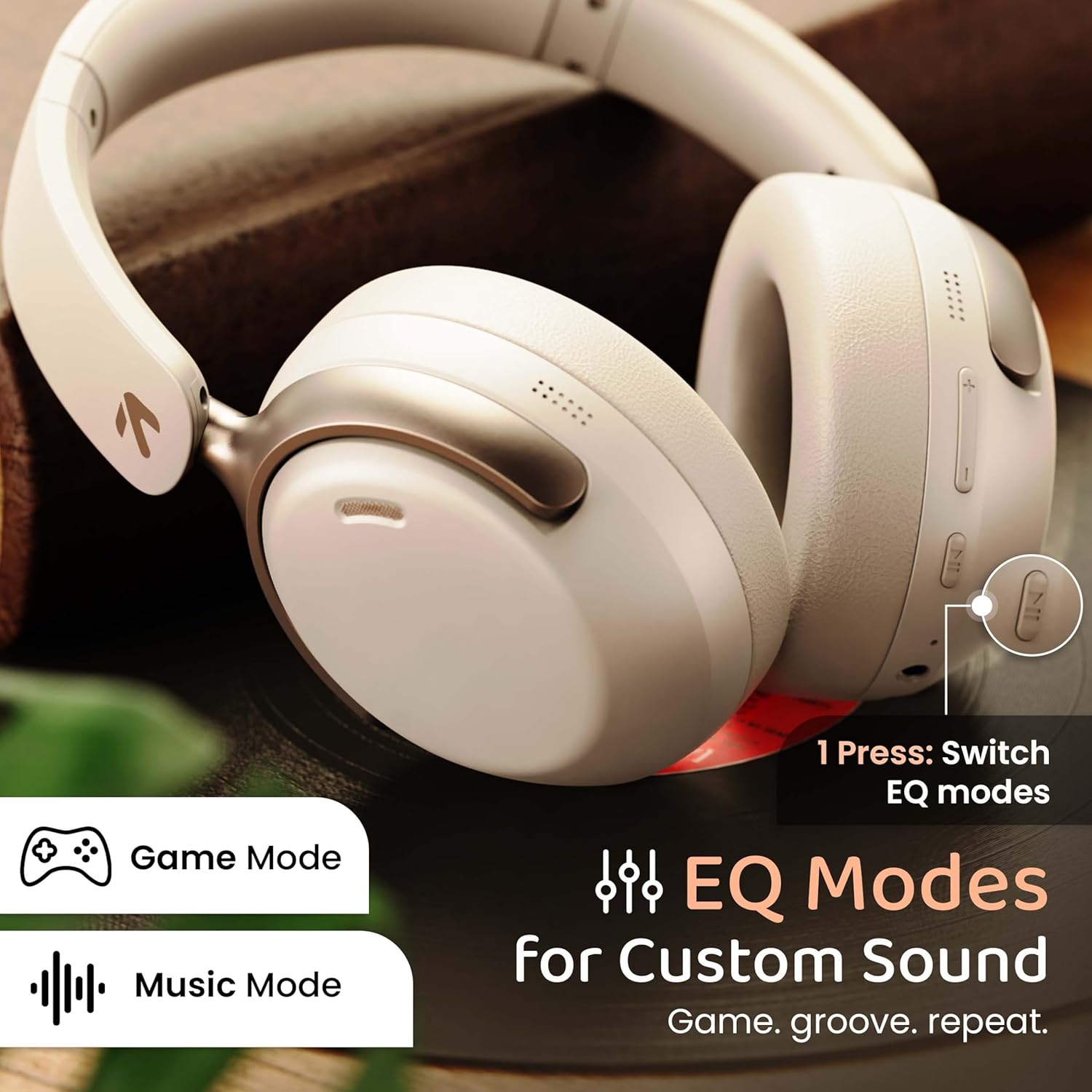
Image: GOBOULT Soniq headphones illustrating the EQ modes for custom sound, including Game Mode and Music Mode.

Image: GOBOULT Soniq headphones highlighting Combat™ Gaming Mode with 60ms ultra-low latency, tailored for mobile gaming and real-time sound accuracy.
3. ද්විත්ව උපාංග යුගලනය
The headphones support dual device pairing, allowing you to connect to two devices simultaneously and switch between them seamlessly.
- Pair the headphones with the first device as described in the "Bluetooth Pairing" section.
- පළමු උපාංගයේ බ්ලූටූත් අක්රීය කරන්න.
- දෙවන උපාංගය සමඟ හෙඩ්ෆෝන් යුගල කරන්න.
- පළමු උපාංගයේ බ්ලූටූත් නැවත සක්රිය කරන්න. හෙඩ්ෆෝන් ස්වයංක්රීයව උපාංග දෙකටම සම්බන්ධ විය යුතුය.
- Audio will play from the device currently active. To switch, pause audio on the first device and start playing on the second.

Image: GOBOULT Soniq headphones demonstrating dual device connectivity with a laptop and a smartphone.
4. Wired Mode (AUX)
For a wired connection, use a standard 3.5mm AUX cable (not included) to connect the headphones to your audio source. In wired mode, the headphones operate passively, and the built-in microphone will not function.

Image: GOBOULT Soniq headphones showing the option for wireless mode and an optional wired mode via AUX cable, noting that the mic is off in wired mode.
5. ඇමතුම් සඳහා පාරිසරික ශබ්ද අවලංගු කිරීම (ENC)
The Zen™ ENC microphone technology helps reduce ambient noise during calls, ensuring clearer conversations. This feature is automatically active during phone calls.

Image: Close-up of the GOBOULT Soniq headphone earcup highlighting the Zen™ ENC Mic for processed calling, ambient noise isolation, enhanced call experience, and sharper voice clarity.
6. හඬ සහායක
Activate your device's voice assistant (Google Assistant or Siri) by pressing the multi-function button (or specific button, refer to quick start guide) for approximately 2 seconds.

Image: GOBOULT Soniq headphones with icons for Google Assistant and Siri, indicating personalized AI assistant support.
නඩත්තු කිරීම සහ රැකවරණය
- පිරිසිදු කිරීම: මෘදු වියළි රෙද්දකින් හෙඩ්ෆෝන් පිස දමන්න. උල්ෙල්ඛ පිරිසිදු කරන්නන් හෝ ද්රාවක භාවිතා නොකරන්න.
- ජල ප්රතිරෝධය: The headphones are IPX5 water resistant, meaning they are protected against splashes, rain, and sweat. Do not submerge them in water or expose them to strong jets of water.
- ගබඩා: භාවිතයේ නොමැති විට, හෙඩ්ෆෝන් සෘජු හිරු එළියෙන් සහ අධික උෂ්ණත්වයන්ගෙන් ඈත්ව සිසිල්, වියළි ස්ථානයක ගබඩා කරන්න. නැමිය හැකි සැලසුම සංයුක්ත ගබඩා කිරීම සඳහා ඉඩ සලසයි.
- බැටරි සත්කාර: බැටරි ආයු කාලය දීර්ඝ කිරීම සඳහා, හෙඩ්ෆෝන් නිතර නිතර සම්පූර්ණයෙන්ම විසර්ජනය කිරීමෙන් වළකින්න. නිරන්තරයෙන් භාවිතයේ නොමැති වුවද, ඒවා නිතිපතා ආරෝපණය කරන්න.
Image: GOBOULT Soniq headphones illustrating IPX5 water resistance, indicating protection against splash, rain, and sweat.

Image: GOBOULT Soniq headphones showcasing their adjustable headband, foldable design, and movable earcups for maximum comfort and portability.
දෝෂගවේෂණය
| ගැටලුව | හැකි විසඳුම |
|---|---|
| හෙඩ්ෆෝන් ක්රියාත්මක නොවේ. | හෙඩ්ෆෝන් ආරෝපණය කර ඇති බවට වග බලා ගන්න. Type-C කේබලය භාවිතයෙන් බල ප්රභවයකට සම්බන්ධ කරන්න. |
| උපාංගය සමඟ යුගල කළ නොහැක. |
|
| ශබ්දයක් නැත හෝ අඩු පරිමාවක් නැත. |
|
| රැහැන්ගත ප්රකාරයේදී මයික්රෆෝනය ක්රියා නොකරයි. | The built-in microphone is not active when using the AUX wired connection. This is normal operation. |
| අතරමැදි සම්බන්ධතාවය. |
|
පිරිවිතර
| විශේෂාංගය | විස්තර |
|---|---|
| මාදිලියේ නම | එයාර්බස් |
| සම්බන්ධතා තාක්ෂණය | බ්ලූටූත්, රැහැන්ගත, රැහැන් රහිත |
| රැහැන් රහිත සන්නිවේදන තාක්ෂණය | බ්ලූටූත් 5.4 |
| බ්ලූටූත් පරාසය | මීටර් 10 |
| ශ්රව්ය ධාවක ප්රමාණය | මිලිමීටර 40 යි |
| ශ්රව්ය ධාවක වර්ගය | ගතික ධාවකය |
| බැටරි ආයු කාලය | පැය 40 යි |
| ආරෝපණ වරාය | Type-C වේගවත් ආරෝපණ ජැක් |
| ශබ්ද පාලනය | පාරිසරික ශබ්ද අවලංගු කිරීම (ඊඑන්සී) |
| ජල ප්රතිරෝධක මට්ටම | IPX5 (Splash, Rain, Sweat Proof) |
| ශ්රව්ය ගුප්ත විද්යාව | මිලි තත්පර 60 (ක්රීඩා ප්රකාරය) |
| ඉයර්පීස් හැඩය | කනට උඩින් |
| ද්රව්ය | Memory Foam (Ear Cushions) |
| අයිතමයේ බර | ග්රෑම් 227 යි |
| නිෂ්පාදන මානයන් (LxWxH) | 17 x 5.5 x 19 සෙ.මී |
| පාලක වර්ගය | Button, Google Assistant |
| සම්බාධනය | 32 ඕම් |
| සංවේදීතාව | 118 dB |
වගකීම් සහ සහාය
Your GOBOULT Soniq Over Ear Bluetooth Headphones come with a වසර 1ක නිෂ්පාදක වගකීම from the date of purchase. This warranty covers manufacturing defects and ensures the reliability of your product.
For warranty claims, technical support, or any inquiries, please refer to the contact information provided on the warranty card included in your package or visit the official GOBOULT support webඅඩවිය.
වගකීම් වලංගු කිරීම සඳහා මිලදී ගැනීමේ සාක්ෂියක් ලෙස කරුණාකර ඔබගේ මිලදී ගැනීමේ රිසිට්පත තබා ගන්න.


