හැඳින්වීම
This manual provides comprehensive instructions for the assembly, operation, and maintenance of your Perlegear Dual Monitor Stand with Integrated Power Strip, model PGTVS41B. This freestanding monitor stand is designed to support two monitors, enhancing your workspace ergonomics and organization. Please read this manual thoroughly before installation and use to ensure proper setup and safe operation.
ආරක්ෂිත තොරතුරු
- එකලස් කිරීමට පෙර සියලුම සංරචක පවතින බවත් හානි නොවී ඇති බවත් සහතික කර ගන්න. කිසියම් කොටසක් අස්ථානගත වී හෝ දෝෂ සහිත නම් භාවිතා නොකරන්න.
- Verify that your monitors' weight and VESA patterns are within the specified limits (up to 22 lbs per arm, VESA 75x75mm or 100x100mm).
- Do not overtighten screws during assembly to prevent damage to components.
- එකලස් කිරීමේදී ළමයින් සහ සුරතල් සතුන් ඈත් කර තබන්න. කුඩා කොටස් හුස්ම හිරවීමේ අවදානමක් ඇති කළ හැකිය.
- ඇලවීම වැළැක්වීම සඳහා ස්ථාවරය ස්ථාවර, සමතලා මතුපිටක් මත තබන්න.
- Do not exceed the electrical ratings of the integrated power strip.
පැකේජයේ අන්තර්ගතය
කරුණාකර පහත සඳහන් සියලුම සංරචක ඔබේ පැකේජයට ඇතුළත් කර ඇත්දැයි පරීක්ෂා කරන්න:
- වීදුරු පදනම
- Main Support Pole with Integrated Power Strip
- ද්විත්ව නිරීක්ෂක ආයුධ
- VESA Plates (x2)
- Hardware Kit (screws, washers, spacers, Allen wrenches)
- Power Cable (6.5ft)
- කේබල් කළමනාකරණ ක්ලිප්
සැකසුම් උපදෙස්
Follow these steps to assemble your Perlegear Dual Monitor Stand:
- Step 1: Assemble the Base and Pole
Attach the main support pole to the glass base using the provided screws and Allen wrench. Ensure it is securely fastened and stable.

Image: Fully assembled Perlegear Dual Monitor Stand, showing the main pole, monitor arms, and glass base.
- Step 2: Attach Monitor Arms
Slide the dual monitor arms onto the main support pole. Adjust their height to your preference and secure them with the locking mechanism.
- පියවර 3: මොනිටර වලට VESA තහඩු සවි කරන්න.
Carefully attach the VESA plates to the back of your monitors using the appropriate screws, washers, and spacers from the hardware kit. Ensure the VESA pattern (75x75mm or 100x100mm) matches your monitor.

Image: Diagram illustrating VESA compatibility (75x75mm, 100x100mm) and supported monitor sizes (13-32 inches) and weight (22 lbs per arm).
- Step 4: Mount Monitors
With assistance if needed, carefully slide the monitors (with attached VESA plates) onto the monitor arms. Ensure they click into place securely.
- Step 5: Connect Power Strip
Plug the provided 6.5ft power cable into the integrated power strip on the main pole, then connect it to a wall outlet. The power strip includes 1 USB-A port (5V/2.1A), 1 USB-C port (5V/2.1A), and 3 AC outlets (120V/12A).
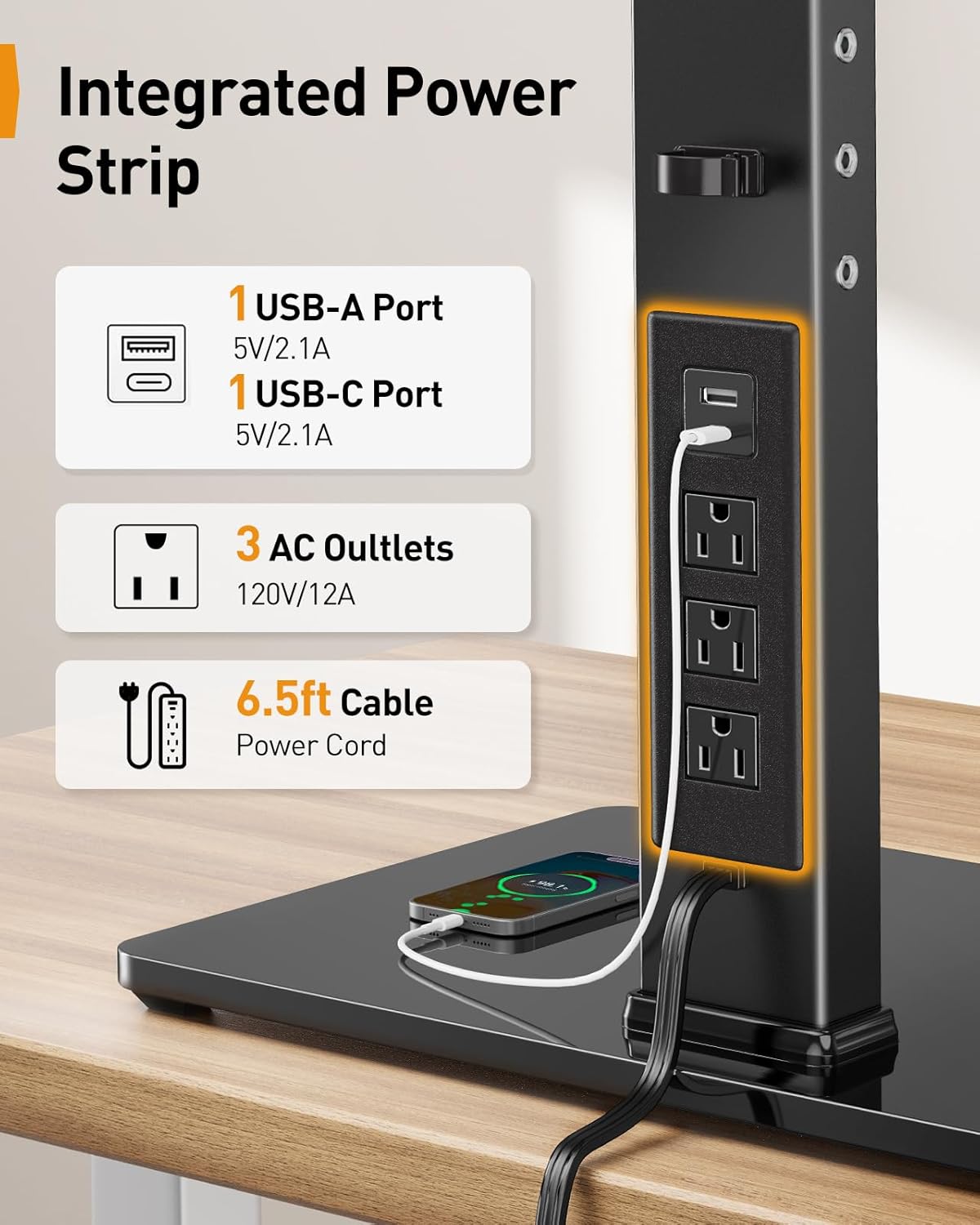
රූපය: සමීප රූපය view of the integrated power strip, detailing the USB-A, USB-C, and three AC outlets, along with the 6.5ft power cable.
- පියවර 6: කේබල් කළමනාකරණය
Route monitor cables and power cords through the integrated cable management clips on the pole and arms to maintain a tidy workspace.

රූපය: හිටපු කෙනෙක්ample of a streamlined workspace utilizing the monitor stand's cable management features, showing monitors, keyboard, and other peripherals.
මෙහෙයුම් උපදෙස්
The Perlegear Dual Monitor Stand offers various adjustments for optimal viewසැනසිල්ල.
- උස ගැලපීම: The monitor stand has four height settings, allowing you to adjust the screen height from 10.79 inches to 14.92 inches. This helps achieve an ergonomic viewing angle, reducing neck and eye strain.
- ඇල ගැලපීම: Each monitor can be tilted ±45° to reduce glare and find your preferred viewing කෝණය.
- කැරකෙන ගැලපීම: Monitors can swivel ±90° horizontally, allowing for easy screen sharing or multi-user setups.
- භ්රමණ ගැලපීම: Rotate your monitors 360° to switch between landscape and portrait orientation effortlessly.
- නම්යශීලී අත ස්ථානගත කිරීම: The monitor arms feature multiple joints that allow for flexible positioning, including ±105° articulation at the main arm joints and ±90° swivel at the monitor attachment point.
- බල තීරුව භාවිතා කිරීම: Plug your devices into the USB-A, USB-C, or AC outlets on the integrated power strip for convenient desktop power access.
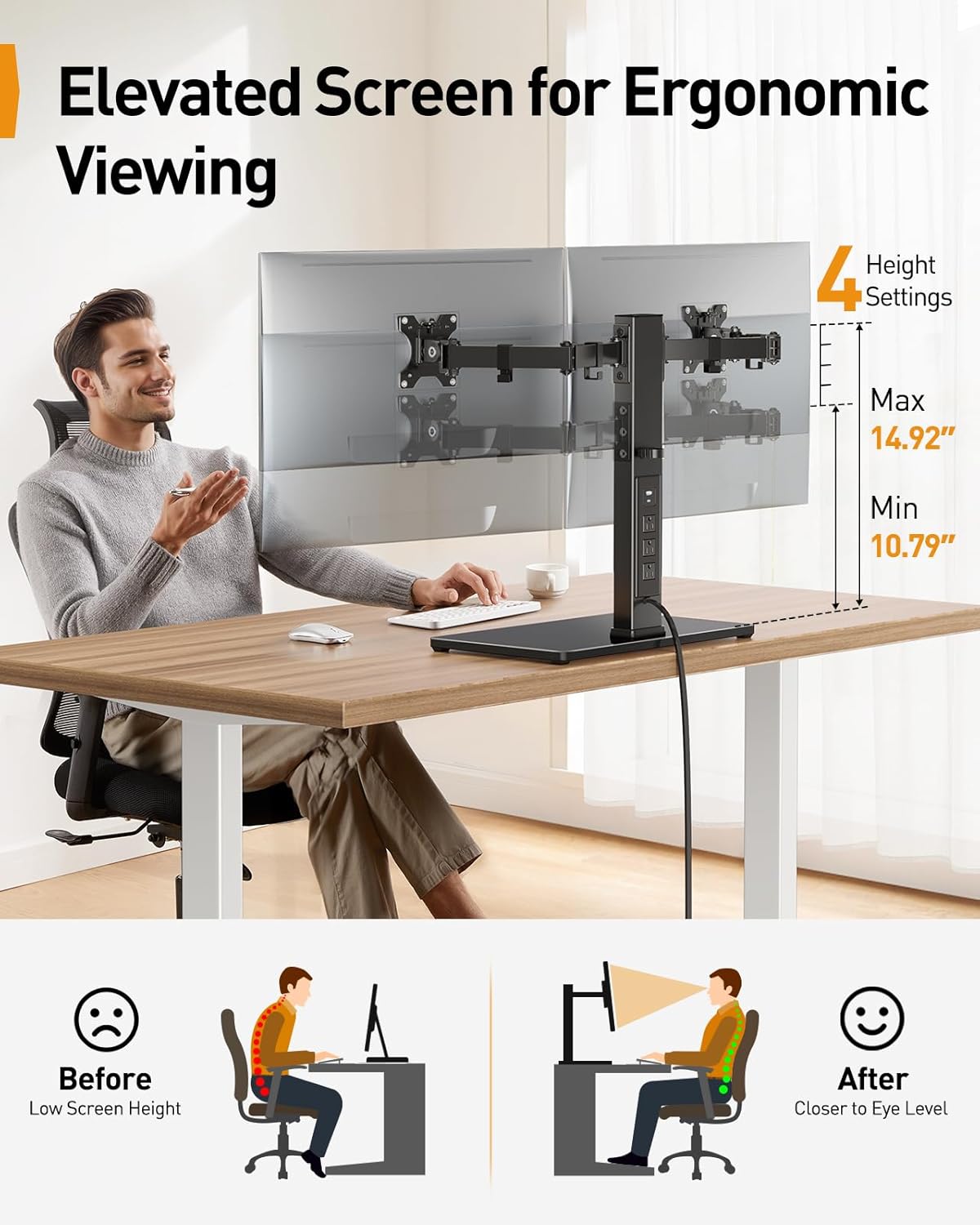
Image: Illustration demonstrating the ergonomic benefits of adjustable screen height, showing a user with correct posture and the stand's height range (10.79" to 14.92").

Image: Diagrams illustrating the ±45° tilt, ±90° swivel, and 360° rotation capabilities of the monitor mounts.

රූපය: උඩින් view demonstrating the flexible articulation of the monitor arms, showing ±105° movement at various joints and ±90° swivel for screen positioning.
නඩත්තු කිරීම
To ensure the longevity and proper function of your monitor stand:
- පිරිසිදු කිරීම: Wipe the stand and base with a soft, dry cloth. For stubborn marks, a slightly damp රෙදි භාවිතා කළ හැකි අතර පසුව වියළා ගත හැකිය. උල්ෙල්ඛ පිරිසිදු කරන්නන් හෝ ද්රාවක භාවිතා නොකරන්න.
- වරින් වර පරීක්ෂා කිරීම්: සියලුම ඉස්කුරුප්පු සහ සම්බන්ධතා තදින් සහ ආරක්ෂිතව පවතින බව සහතික කර ගැනීම සඳහා වරින් වර පරීක්ෂා කරන්න. අවශ්ය නම් නැවත තද කරන්න.
- කේබල් කළමනාකරණය: Ensure cables are not pinched or excessively strained. Adjust cable routing as needed.
දෝෂගවේෂණය
If you encounter issues with your monitor stand, refer to the following common solutions:
- ස්ථාවරය සෙලවෙමින් තිබේ: Ensure the base is on a flat, stable surface. Check all assembly screws, especially those connecting the pole to the base and the arms to the pole, are securely tightened.
- මොනිටර මට්ටමේ නැත: Adjust the tilt and height of individual monitor arms to align them. Ensure VESA plates are securely attached to monitors.
- Power strip not working: Verify the main power cable is securely plugged into both the stand and a functional wall outlet. Check if the wall outlet is receiving power. Ensure devices are properly plugged into the power strip.
- මොනිටරයේ පිහිටීම සකස් කිරීමේ අපහසුතාව: Loosen the adjustment screws slightly, make the adjustment, then retighten to secure the position. Do not force adjustments.
පිරිවිතර
| ආකෘතිය | PGTVS41B |
| අනුකූලතාව අධීක්ෂණය කරන්න | 13" - 32" Flat or Curved Screens |
| බර ධාරිතාව | අතකට රාත්තල් 22 (කිලෝග්රෑම් 10) දක්වා |
| VESA Patterns | 75x75mm, 100x100mm |
| උස ගැලපුම් පරාසය | 10.79" - 14.92" (සෙ.මී. 27.4 - සෙ.මී. 37.9) |
| ඇලවීමේ කෝණය | ±45° |
| කැරකෙන කෝණය | ±90° |
| භ්රමණය | 360° |
| ඒකාබද්ධ බල තීරුව | 1x USB-A (5V/2.1A), 1x USB-C (5V/2.1A), 3x AC Outlets (120V/12A) |
| බල කේබල් දිග | අඩි 6.5 (මීටර් 2) |
| ද්රව්ය | කාබන් වානේ, තෙම්පරාදු වීදුරු |
| වර්ණය | කළු |
වගකීම් සහ සහාය
Perlegear products are designed for durability and performance. For warranty information or technical support, please refer to the contact details provided with your purchase or visit the official Perlegear website. Our customer service team is available to assist you with any questions or concerns regarding your product.


