1. නිෂ්පාදන අවසන්view
The ORICO 6-in-1 USB C Docking Station (Model: PW11-6PR) is a versatile multiport adapter designed to expand the connectivity of your USB-C enabled devices. It provides essential ports for display output, high-speed data transfer, network connectivity, and power delivery, enhancing productivity and convenience for users of Windows, Mac, and other compatible systems.

Figure 1: ORICO 6-in-1 USB C Hub Overview
2. පැකේජ අන්තර්ගතය
- ORICO 6-in-1 USB C Docking Station (Model: PW11-6PR)
- පරිශීලක අත්පොත
3 උපාංග පිරිසැලසුම
The docking station features a compact design with clearly labeled ports for easy identification and connection.

Figure 2: Port Layout of the Docking Station
- USB-C Input Cable: ඔබගේ සත්කාරක උපාංගයට (ලැප්ටොප්, ටැබ්ලටය, ස්මාර්ට් ජංගම දුරකථනය) සම්බන්ධ වේ.
- 3 x USB-A 3.0 Ports: For connecting USB peripherals such as keyboards, mice, external hard drives, or USB flash drives. Supports data transfer speeds up to 5 Gbps.
- HDMI වරාය: For connecting to an external display (monitor, TV, projector). Supports resolutions up to 4K@30Hz.
- Ethernet (RJ45) Port: Provides stable wired network connectivity with speeds up to 1 Gbps.
- USB-C PD (Power Delivery) Port: For connecting a power adapter to charge your host device and power the docking station. Supports up to 100W power input.
4. විශේෂාංග
- 6-in-1 Multiport Hub: Expands a single USB-C port into 6 functional ports: 4K@30Hz HDMI, 3 USB-A 3.0, 1G Ethernet, and 100W PD.
- 4K@30Hz HDMI Output: Supports high-resolution video output to external displays, backward compatible with 1080P@60Hz and 720P@60Hz.
- 5 Gbps Data Transfer: Three USB-A 3.0 ports enable rapid data transfer, allowing a 1GB video file to be transferred in seconds.
- 100W බල සැපයුම: The PD port allows simultaneous charging of your laptop while using other connected USB accessories, eliminating the need to choose between charging and connectivity.
- 1G High-Speed Ethernet: Provides a stable and fast wired internet connection (10 Mbps–1 Gbps), ideal for streaming, video calls, and large file downloads. A Cat 5e cable is recommended for optimal performance.
- පුළුල් අනුකූලතාව: Compatible with Windows 11/10/8/7, Mac OS X, and Linux. Supports laptops, tablets, and smartphones with a compatible USB-C port.
- සංයුක්ත සහ අතේ ගෙන යා හැකි නිර්මාණය: Features a sleek, lightweight aluminum alloy build, making it easy to carry for business trips, mobile work, or meetings.
5. සැකසුම් උපදෙස්
- සත්කාරක උපාංගයට සම්බන්ධ වන්න: Plug the integrated USB-C cable of the docking station into a compatible USB-C port on your laptop, tablet, or smartphone. Ensure your device's USB-C port supports DisplayPort Alternate Mode for video output.
- බල සම්බන්ධතාවය (විකල්ප නමුත් නිර්දේශිත): For stable operation and to charge your host device, connect your original USB-C power adapter to the USB-C PD port on the docking station.
- පර්යන්ත සම්බන්ධ කරන්න:
- HDMI සංදර්ශකය: Connect an HDMI cable from your monitor/TV to the HDMI port on the docking station.
- ඊතර්නෙට් ජාලය: Connect an Ethernet cable (Cat 5e or higher recommended) from your router/modem to the RJ45 Ethernet port on the docking station.
- USB උපාංග: Plug your USB-A peripherals (e.g., mouse, keyboard, USB drive) into the USB-A 3.0 ports.
- ධාවක ස්ථාපනය: The docking station is plug-and-play for most operating systems and typically does not require additional drivers. If prompted, follow on-screen instructions.

Figure 3: Broad Compatibility of the Docking Station
6. මෙහෙයුම් උපදෙස්
6.1. Video Output via HDMI
Connect an HDMI-enabled display to the docking station's HDMI port. Your host device should automatically detect the external display. You can configure display settings (e.g., mirror, extend) through your operating system's display settings.

Figure 4: 4K@30Hz HDMI Display Connection
6.2. Data Transfer via USB-A 3.0 Ports
Plug your USB devices into the three USB-A 3.0 ports. These ports support data transfer speeds up to 5 Gbps, allowing for quick synchronization and file මාරුවීම්.

රූපය 5: අධිවේගී දත්ත හුවමාරුව
6.3. Wired Network Connection via Ethernet
Connect an Ethernet cable to the RJ45 port for a stable and fast wired internet connection. This is particularly useful in environments with unreliable Wi-Fi or for tasks requiring high bandwidth.
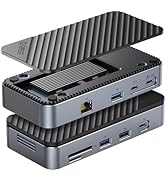
Figure 6: 1Gbps Ethernet Connection
6.4. බල සැපයුම් (PD) ආරෝපණය
Connect your laptop's USB-C power adapter to the docking station's USB-C PD port. The docking station will pass through up to 85W of power to charge your laptop while simultaneously powering the hub and connected devices.

Figure 7: 100W Power Delivery
7. ගැළපුම
The ORICO 6-in-1 USB C Docking Station is designed for broad compatibility. Please ensure your host device's USB-C port supports the necessary functions for optimal performance.
- සත්කාරක උපාංග අනුකූලතාව: Devices with a full-featured USB-C port (supporting data, power delivery, and DisplayPort Alternate Mode). This includes many modern laptops (e.g., MacBook Pro/Air, Dell XPS, Surface Pro, ThinkPad/Yoga), tablets (e.g., iPad Pro/Air), and some smartphones.
- පද්ධති අනුකූලතාව: Windows 11/10/8/7, macOS X, Linux, Android.
- Important Note on USB-C Ports: Not all USB-C ports are created equal. Please confirm your laptop's USB-C port supports DisplayPort Alternate Mode for video output.

Figure 8: Understanding USB-C Port Functionality
8. දෝශ නිරාකරණය
- වීඩියෝ ප්රතිදානය නැත:
- ඔබගේ සත්කාරක උපාංගයේ USB-C port එක DisplayPort Alternate Mode සඳහා සහය දක්වන බවට වග බලා ගන්න.
- Check the HDMI cable connection between the docking station and the display.
- Verify the display input source is set correctly.
- ඔබගේ සත්කාරක උපාංගය නැවත ආරම්භ කිරීමට උත්සාහ කරන්න.
- හඳුනා නොගත් USB උපාංග:
- Ensure the docking station is properly connected to your host device.
- Try connecting the USB device directly to your host device to confirm it functions independently.
- If using high-power USB devices, ensure the docking station is connected to an external power source via its PD port.
- ඊතර්නෙට් සම්බන්ධතාවයක් නැත:
- ඩොකින් ස්ටේෂන් සහ ඔබේ රවුටරය/මොඩමය යන දෙකටම ඊතර්නෙට් කේබල් සම්බන්ධතාවය පරීක්ෂා කරන්න.
- Verify your network settings on your host device.
- ඔබේ රවුටරය/මොඩමය නිවැරදිව ක්රියාත්මක වන බවට වග බලා ගන්න.
- අයකිරීමේ ගැටළු:
- Ensure your USB-C power adapter is connected to the PD port and is capable of providing sufficient power (e.g., 100W).
- Check if your host device supports USB-C Power Delivery.
9. පිරිවිතර
| විශේෂාංගය | පිරිවිතර |
|---|---|
| නිෂ්පාදන මානයන් | අඟල් 3.74 x 1.75 x 0.67 |
| අයිතමයේ බර | අවුන්ස 3.52 කි |
| ආදර්ශ අංකය | PW11-6PR |
| වෙළඳ නාමය | ඔරිකෝ |
| වර්ණය | අළු |
| දෘඩාංග අතුරුමුහුණත | Ethernet, HDMI, USB 3.0 Type A, USB-C PD |
| විශේෂ ලක්ෂණය | Powered, Plug and Play |
| HDMI ප්රතිදානය | 4K@30Hz (backward compatible with 1080P@60Hz, 720P@60Hz) |
| USB-A 3.0 Data Transfer Speed | 5 Gbps දක්වා |
| ඊතර්නෙට් වේගය | 10 Mbps / 100 Mbps / 1 Gbps |
| USB-C PD අයකිරීම | Up to 100W input (85W output to host) |
10. නඩත්තු කිරීම
- උපාංගය පිරිසිදුව හා දූවිලි වලින් තොරව තබා ගන්න. පිරිසිදු කිරීම සඳහා මෘදු වියළි රෙද්දක් භාවිතා කරන්න.
- ඩොකින් ස්ටේෂන් එක අධික උෂ්ණත්වයන්ට, ආර්ද්රතාවයට හෝ සෘජු හිරු එළියට නිරාවරණය වීමෙන් වළකින්න.
- උපාංගය ඔබම විසුරුවා හැරීමට හෝ අලුත්වැඩියා කිරීමට උත්සාහ නොකරන්න. සහාය සඳහා පාරිභෝගික සහාය අමතන්න.
- Disconnect the device when not in use for extended periods.
11 ආරක්ෂිත තොරතුරු
- මෙම උපාංගය ගෘහස්ථ භාවිතය සඳහා පමණක් අදහස් කෙරේ.
- උපාංගය ජලය හෝ වෙනත් දියර වලට නිරාවරණය නොකරන්න.
- උපාංගය ප්රබල බලපෑම්වලට වැටීමෙන් හෝ යටත් කිරීමෙන් වළකින්න.
- දරුවන්ට ළඟා විය නොහැකි ලෙස තබා ගන්න.
- Use only compatible power adapters and cables.
12. නිල නිෂ්පාදන වීඩියෝව
Video: ORICO 6-in-1 USB C Docking Station with 1G Ethernet. This video demonstrates the features and connectivity of the ORICO 6-in-1 USB C Docking Station, including its HDMI, Ethernet, USB-A, and PD charging capabilities.
13. වගකීම් සහ සහාය
ORICO products come with a standard manufacturer's warranty. For detailed warranty information, technical support, or customer service inquiries, please refer to the official ORICO website or contact your retailer. Please retain your proof of purchase for warranty claims.