හැඳින්වීම
This manual provides essential information for setting up, operating, and maintaining your HP 17.3" FHD Laptop. Designed for productivity and connectivity, this laptop features an Intel Core i3-N305 processor, a Full HD IPS anti-glare display, and runs on Windows 11 Pro. Please read this manual thoroughly to ensure proper use and to maximize your laptop's performance.
පෙට්ටියේ ඇති දේ
සියලුම අයිතම පැකේජයේ ඇති බව තහවුරු කරගන්න:
- 1 x HP 17.3" FHD Laptop
- 1 x බල ඇඩැප්ටරය
- 1 x උපදෙස් අත්පොත (මෙම ලේඛනය)
- 1 x Accessory Kit (includes 32GB USB Flash Drive, Bluetooth Earbuds, Electronic Cleaning Kit, USB-C Hub, 3-in-1 Charging Cable, USB-C Cable)
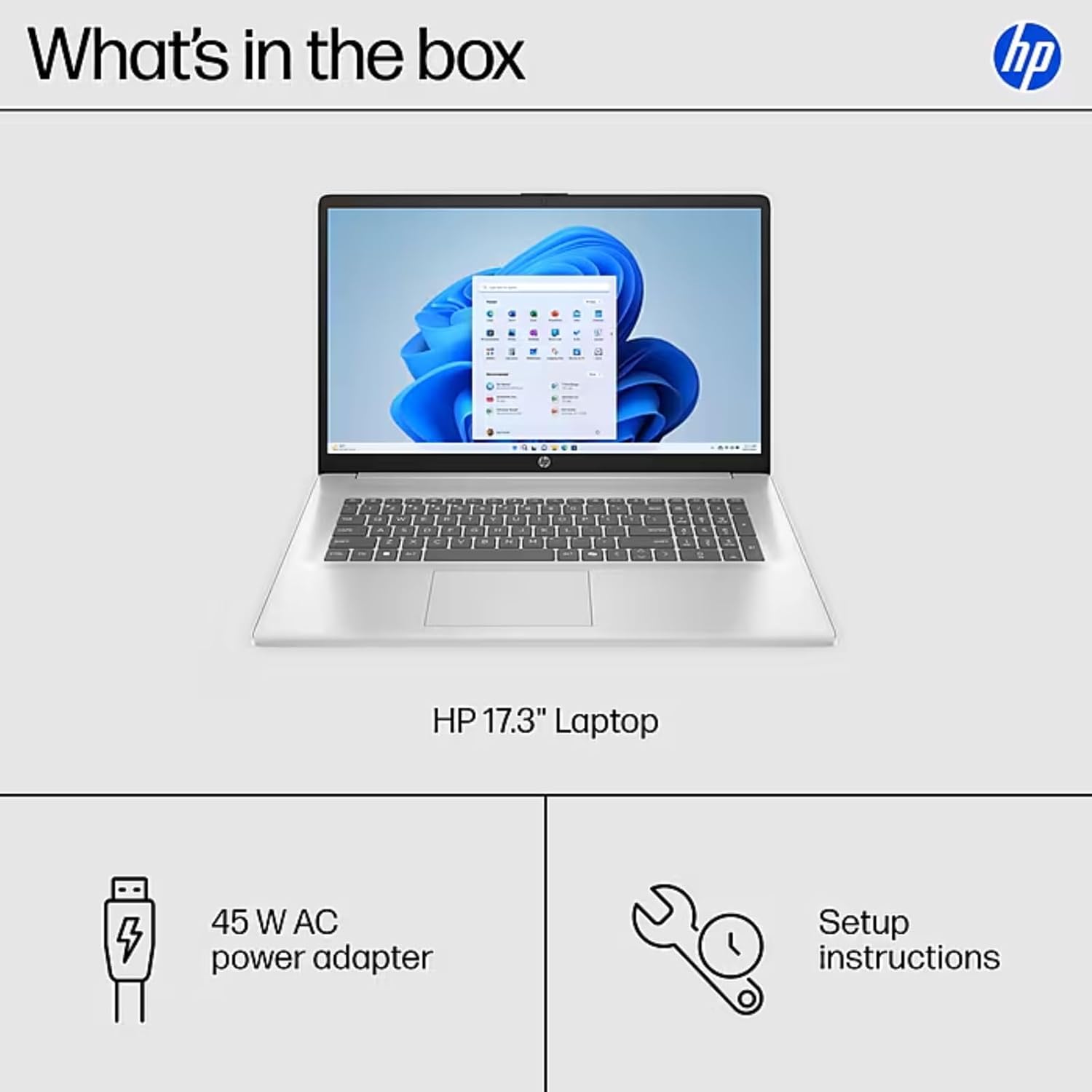
Image: The contents of the HP 17.3" Laptop box, including the laptop, power adapter, and a separate accessory kit.
සැලසුම
- ලැප්ටොප් එක ඉවත් කරන්න: ලැප්ටොප් පරිගණකය සහ සියලුම උපාංග ඇසුරුම්කරණයෙන් ප්රවේශමෙන් ඉවත් කරන්න.
- සම්බන්ධක බලය: Plug the power adapter into the laptop's AC Smart Pin port and then into a power outlet. Allow the battery to charge for at least 30 minutes before initial use.
- ආරම්භක ආරම්භය: Open the laptop lid and press the power button. The laptop will guide you through the Windows 11 Pro setup process. Follow the on-screen instructions to configure your language, region, network, and user account.
- Wi-Fi වෙත සම්බන්ධ වන්න: During the initial setup, you will be prompted to connect to a wireless network. Select your network and enter the password.
- යාවත්කාලීන ස්ථාපනය කරන්න: After setup, it is recommended to check for and install any available Windows updates to ensure optimal performance and security.
ඔබේ ලැප්ටොප් පරිගණකය ක්රියාත්මක කිරීම
සංදර්ශක විශේෂාංග
The HP 17.3" laptop features a Full HD (1920 x 1080) IPS anti-glare display. This screen provides vibrant colors and wide 178° viewing angles, reducing reflections for comfortable viewing in various lighting conditions. The large screen size is ideal for multitasking, document review, and media consumption.
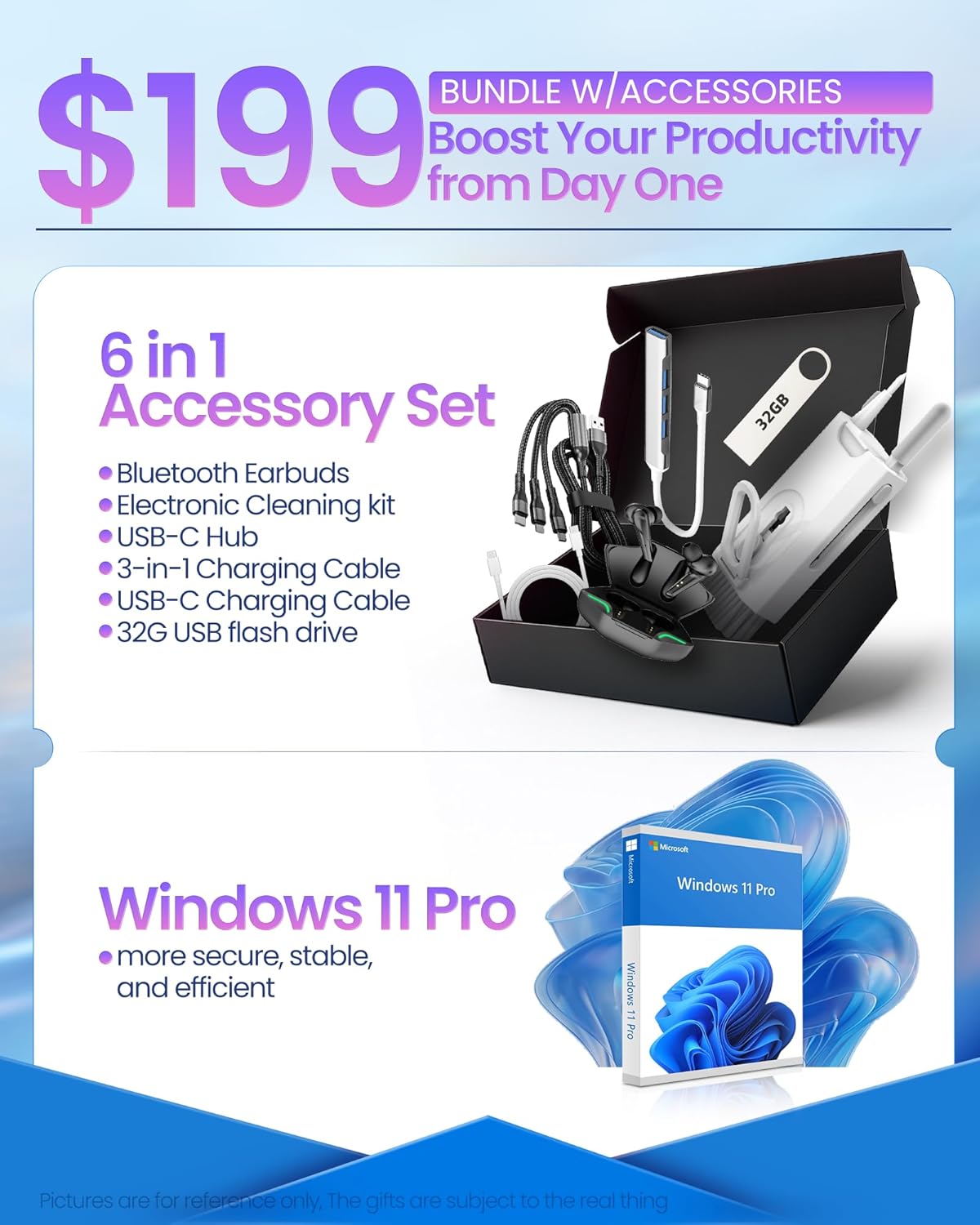
Image: The HP 17.3" laptop showcasing its Full HD display.
සකසනය සහ කාර්ය සාධනය
Equipped with an Intel Core i3-N305 processor (8 cores, up to 3.9 GHz turbo) and Intel UHD Graphics, this laptop delivers efficient performance for daily tasks, schoolwork, and business applications. The 32GB DDR4 RAM ensures smooth multitasking, while the 2TB NVMe SSD provides fast storage access and quick boot times.

Image: The HP laptop running multiple applications, illustrating its multitasking performance.
Copilot AI Key
The dedicated Copilot AI Key provides instant access to AI-powered productivity tools within Windows 11 Pro. Press this key to quickly get assistance with writing, brainstorming, or finding information, streamlining your workflow.

රූපය: සමීප ඡායාරූපයක් view of the Copilot key on the HP laptop keyboard.
වරාය සහ සම්බන්ධතාවය
The laptop offers a variety of ports for connecting peripherals and external displays:
- 1 x USB 2.0 Type-A
- 1 x USB 3.2 Gen 1 Type-A
- 1 x USB 3.2 Gen 1 Type-C (5 Gbps)
- 1 x HDMI 1.4b
- 1 x Headphone/Mic Combo Jack
- 1 x AC Smart Pin
For wireless connectivity, the laptop supports Wi-Fi 6 and Bluetooth 5.4.

රූපය: විස්තරාත්මක view ලැප්ටොප් පරිගණකයේ පැති තොටුපළවල් වලින්.
නිෂ්පාදනය අවසන්view වීඩියෝ
වීඩියෝ: නිලධාරියෙක් අවසන්view of the HP 17.3" HD Laptop for Student & Business with Windows 11 Pro, highlighting its features and benefits.
නඩත්තු කිරීම
- පිරිසිදු කිරීම: තිරය සහ බාහිර පෙනුම පිරිසිදු කිරීම සඳහා මෘදු, ලින්ට් රහිත රෙද්දක් භාවිතා කරන්න. මුරණ්ඩු සලකුණු සඳහා, තරමක් dampරෙදි කැබැල්ල වතුරෙන් හෝ තිර ආරක්ෂිත පිරිසිදුකාරකයකින් සෝදන්න. රළු රසායනික ද්රව්ය වලින් වළකින්න.
- බැටරි සත්කාර: බැටරි ආයු කාලය දීර්ඝ කිරීම සඳහා, අධික උෂ්ණත්වයන්ගෙන් වළකින්න. ඉඳහිට බැටරිය 20% ට වඩා අඩුවෙන් විසර්ජනය කර සම්පූර්ණයෙන්ම ආරෝපණය කිරීම නිර්දේශ කෙරේ.
- මෘදුකාංග යාවත්කාලීන: Regularly install operating system and driver updates to ensure security and optimal performance.
- ගබඩා කළමනාකරණය: වරින් වර අනවශ්ය දේ ඉවත් කරන්න files and applications to maintain sufficient free storage space on your SSD.
- භෞතික ආරක්ෂාව: Transport your laptop in a protective sleeve or bag to prevent scratches and damage.
දෝෂගවේෂණය
If you encounter issues with your HP laptop, consider the following common solutions:
- ලැප්ටොප් එක ක්රියාත්මක නොවේ:
- බල ඇඩැප්ටරය ලැප්ටොප් පරිගණකයට සහ ක්රියාකාරී බල අලෙවිසැලකට ආරක්ෂිතව සම්බන්ධ කර ඇති බවට වග බලා ගන්න.
- වෙනත් උපාංගයක් සම්බන්ධ කිරීමෙන් බල සැපයුම ක්රියාකාරී දැයි පරීක්ෂා කරන්න.
- දෘඪ යළි පිහිටුවීමක් සිදු කිරීමට බල බොත්තම තත්පර 15-20ක් අල්ලාගෙන සිටීමට උත්සාහ කරන්න.
- Screen Issues (No Display, Flickering):
- Connect an external monitor to the HDMI port to check if the issue is with the laptop's display or graphics output.
- ලැප්ටොප් එක Restart කරන්න.
- Ensure display drivers are up to date via Windows Update or HP Support Assistant.
- Wi-Fi සම්බන්ධතා ගැටළු:
- Toggle Wi-Fi off and on in Windows settings.
- ඔබේ රවුටරය සහ මොඩමය නැවත ආරම්භ කරන්න.
- Ensure Wi-Fi drivers are updated.
- ජාලය අමතක කර නැවත සම්බන්ධ කරන්න.
- මන්දගාමී කාර්ය සාධනය:
- පසුබිමේ ධාවනය වන අනවශ්ය යෙදුම් වසා දමන්න.
- ඉහළ CPU හෝ RAM පරිභෝජනය කරන ක්රියාවලීන් සඳහා කාර්ය කළමනාකරු පරීක්ෂා කරන්න.
- වින්ඩෝස් සහ ධාවක යාවත්කාලීනව පවතින බවට වග බලා ගන්න.
- ගබඩා ඉඩ නිදහස් කර ගැනීමට තැටි පිරිසිදු කිරීමක් ක්රියාත්මක කරන්න.
For more advanced troubleshooting or persistent issues, please refer to the HP support webවෙබ් අඩවිය හෝ පාරිභෝගික සේවාව අමතන්න.
පිරිවිතර
| වෙළඳ නාමය | HP |
| මාදිලියේ නම | HP 17 inch Laptop (B5RH2UA#ABA) |
| මෙහෙයුම් පද්ධතිය | Windows 11 Pro |
| තිර ප්රමාණය | අඟල් 17.3 |
| තිර විභේදනය | 1920 x 1080 පික්සල (සම්පූර්ණ HD) |
| සංදර්ශක වර්ගය | IPS, Anti-glare, LED, 178° wide viewing කෝණ |
| ප්රොසෙසරය | Intel Core i3-N305 (8 cores, up to 3.9 GHz) |
| ග්රැෆික්ස් | Integrated Intel UHD Graphics |
| RAM | 32GB DDR4 (3200 MHz) |
| ගබඩා කිරීම | 2TB NVMe SSD |
| රැහැන් රහිත සම්බන්ධතාව | Wi-Fi 6, බ්ලූටූත් 5.4 |
| වරායන් | 1x USB 2.0 Type-A, 1x USB 3.2 Gen 1 Type-A, 1x USB 3.2 Gen 1 Type-C, 1x HDMI 1.4b, 1x Headphone/Mic Combo, 1x AC Smart Pin |
| බැටරි ආයු කාලය | Up to 9.5 hours (Average: 9 hours) |
| මානයන් (L x W x H) | 15.78" x 10.15" x 0.78" |
| බර | රාත්තල් 4.6 |
| වර්ණය | රිදී |
වගකීම් සහ සහාය
Your HP 17 FHD Laptop comes with a standard manufacturer's warranty. For detailed information regarding warranty terms, coverage, and duration, please refer to the warranty card included with your product or visit the official HP support webඅඩවිය.
For technical assistance, driver downloads, and frequently asked questions, please visit the HP Support webඅඩවිය: support.hp.com. You can also contact HP customer service directly for personalized support.