1. හැඳින්වීම සහ අවසන්view
Thank you for choosing the OHAYO A7 Clip-On Open Ear Headphones. These headphones are designed to provide a comfortable and immersive audio experience while keeping you aware of your surroundings. Featuring Bluetooth 5.4 connectivity, a lightweight clip-on design, and extended battery life, the A7 is suitable for various activities, from daily commutes to workouts.
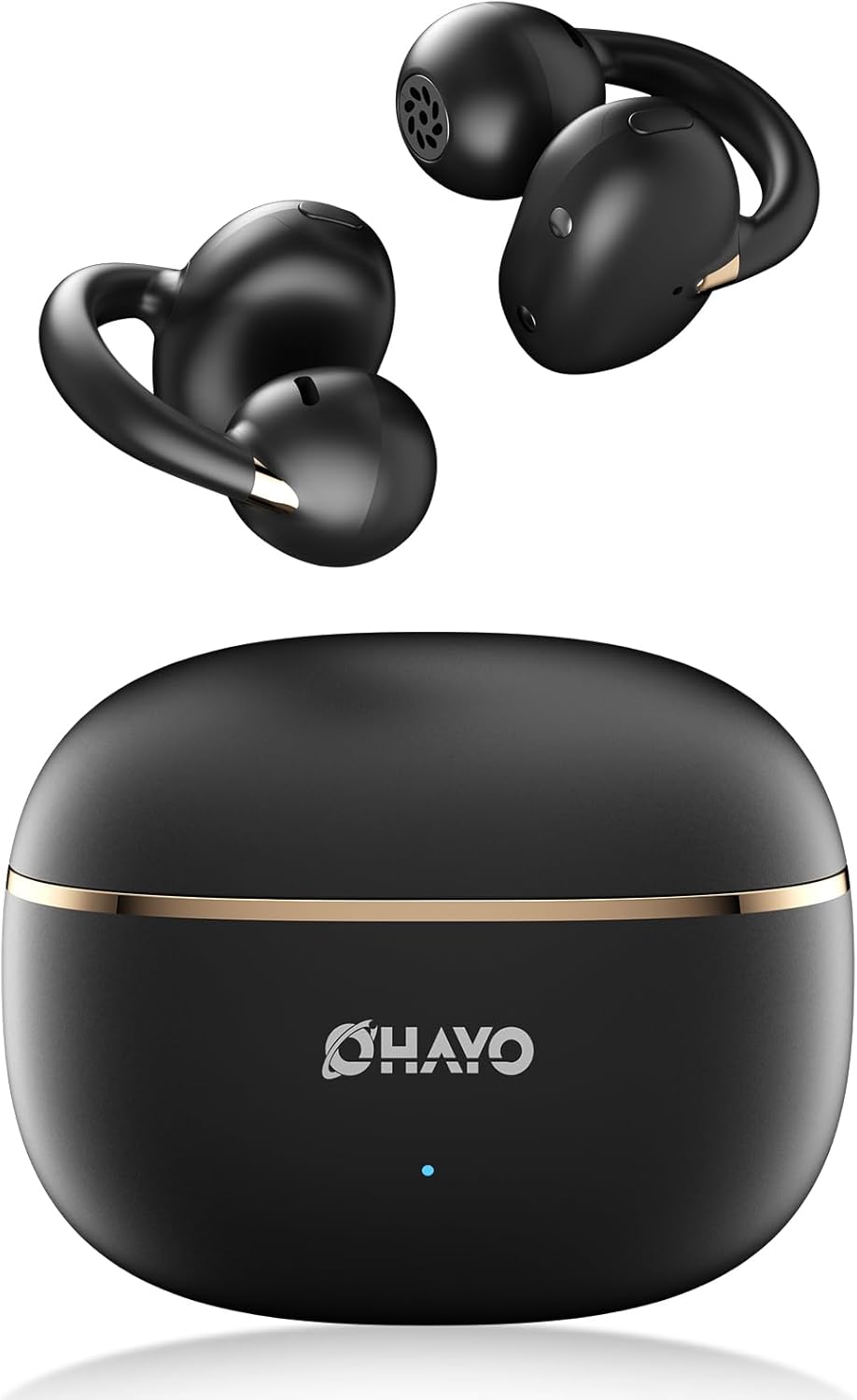
Image 1.1: The OHAYO A7 Clip-On Open Ear Headphones and their charging case. The earbuds feature a black finish with gold accents, designed for an open-ear fit. The compact charging case is also black with a gold stripe and the OHAYO logo.
ප්රධාන ලක්ෂණ ඇතුළත් වේ:
- විවෘත කන් නිර්මාණය: Allows you to hear your audio while remaining aware of ambient sounds.
- අතිශය සැහැල්ලු: Each earbud weighs approximately 4.7g for comfortable, extended wear.
- බ්ලූටූත් 5.4: Provides stable and efficient wireless connectivity with low latency.
- 12mm ගතික ධාවක: Delivers clear audio with enhanced bass.
- දිගු කළ ක්රීඩා කාලය: Up to 6.5 hours on a single charge, with a total of 40 hours using the charging case.
- IPX6 ජල ප්රතිරෝධය: Protects against sweat and splashes, suitable for active use.
2. පෙට්ටියේ ඇති දේ
සියලුම අයිතම පවතින බව සහතික කර ගැනීමට කරුණාකර පැකේජයේ අන්තර්ගතය පරීක්ෂා කරන්න:
- OHAYO A7 Clip-On Open Ear Headphones (Left and Right)
- රැහැන් රහිත ආරෝපණ නඩුව
- USB-C ආරෝපණ කේබලය
- පරිශීලක අත්පොත

Image 2.1: The package contents for the OHAYO A7 headphones, including the earbuds, charging case, USB-C cable, and user manual.
3. නිෂ්පාදන රූප සටහන
Familiarize yourself with the components of your OHAYO A7 headphones:

රූපය 3.1: සමීප ඡායාරූපයක් view of a single OHAYO A7 earbud, highlighting its clip-on design and speaker grille.

Image 3.2: The OHAYO A7 earbuds placed inside their open charging case, showing the charging contacts and the compact design.
4. පිහිටුවීම
4.1 හෙඩ්ෆෝන් ආරෝපණය කිරීම
පළමු භාවිතයට පෙර, හෙඩ්ෆෝන් සහ ආරෝපණ පෙට්ටිය සම්පූර්ණයෙන්ම ආරෝපණය කරන්න.
- Connect the provided USB-C charging cable to the charging port on the case and to a USB power source.
- නඩුවේ දර්ශක ආලෝකය ආරෝපණ තත්ත්වය පෙන්වයි. නඩුව සඳහා සම්පූර්ණ ආරෝපණයක් ආසන්න වශයෙන් පැය 1.5 ක් ගතවේ.
- ඉයර්බඩ් ආරෝපණ පෙට්ටියට දමන්න. ඒවා ස්වයංක්රීයව ආරෝපණය වීමට පටන් ගනී.

Image 4.1: The OHAYO A7 charging case with a USB-C cable inserted, indicating the charging process. The image also shows the earbuds and charging times.
A 10-minute quick charge can provide up to 2 hours of playtime.
4.2 බ්ලූටූත් යුගල කිරීම
To connect your OHAYO A7 headphones to a device:
- ඉයර්බඩ් ආරෝපණය කර ආරෝපණ පෙට්ටියේ තබා ඇති බවට වග බලා ගන්න.
- Open the charging case. The earbuds will automatically enter pairing mode, indicated by a flashing LED light (if applicable).
- ඔබගේ උපාංගයේ (ස්මාර්ට්ෆෝන්, ටැබ්ලටය, ලැප්ටොප්), බ්ලූටූත් සැකසුම් වෙත ගොස් බ්ලූටූත් ක්රියාත්මක කරන්න.
- ඒ සඳහා සොයන්න available devices and select "OHAYO A7" from the list.
- Once connected, the LED indicator on the earbuds will turn off or show a solid light, and you will hear a confirmation tone.

Image 4.2: A smartphone screen displaying Bluetooth settings, with "OHAYO A7" listed as an available device for pairing.
The OHAYO A7 uses Bluetooth 5.4 for a stable connection up to 20 meters.
5. උපදෙස් පැළඳීම
ප්රශස්ත ශබ්ද ගුණාත්මකභාවය සහ සුවපහසුව සඳහා, ඉයර්බඩ් නිවැරදිව පැළඳ සිටින බවට වග බලා ගන්න.
- වම් (L) සහ දකුණු (R) ඉයර්බඩ් හඳුනා ගන්න.
- Gently clip each earbud onto the corresponding ear, positioning the open-ring joint horizontally.
- Adjust the earbud slightly until it feels secure and comfortable, ensuring the speaker is aligned with your ear canal for the best sound delivery.

Image 5.1: A visual guide demonstrating the correct way to wear the OHAYO A7 clip-on earbuds, contrasting it with unstable, misaligned, and reversed fits.
The ergonomic C-shaped design and lightweight construction (4.7g per earbud) are engineered for comfort and stability, even for users with glasses or sensitive ears.
6. Operating Instructions (Button Controls)
The OHAYO A7 headphones feature physical buttons for easy control of various functions:

Image 6.1: A detailed diagram illustrating the various button controls on the OHAYO A7 earbuds for music playback, calls, and other functions.
| ක්රියාව | කාර්යය |
|---|---|
| තනි ටැප් (L හෝ R) | සංගීතය වාදනය කරන්න/විරාම කරන්න, ඇමතුමට පිළිතුරු දෙන්න/අවසන් කරන්න |
| Press and hold 1.5s (L) | පෙර ධාවන පථය |
| Press and hold 1.5s (R) | ඊළඟ ධාවන පථය |
| දෙවරක් තට්ටු කරන්න (L) | වෙළුම - |
| දෙවරක් තට්ටු කරන්න (R) | වෙළුම + |
| Triple tap (R) | හඬ සහායක සක්රිය කරන්න |
| Triple tap (L) | ක්රීඩා ප්රකාරය සක්රිය / අක්රිය |
| Press and hold (L or R) during incoming call | ඇමතුම ප්රතික්ෂේප කරන්න |
7. පිරිවිතර
Detailed technical specifications for the OHAYO A7 Clip-On Open Ear Headphones:
| විශේෂාංගය | විස්තර |
|---|---|
| මාදිලියේ නම | A7 |
| සම්බන්ධතා තාක්ෂණය | රැහැන් රහිත (බ්ලූටූත් 5.4) |
| බ්ලූටූත් පරාසය | මීටර් 20 දක්වා |
| ශ්රව්ය ධාවක ප්රමාණය | 12 මි.මී. ගතික ධාවක |
| සංඛ්යාත ප්රතිචාරය | 20 KHz (Upper limit provided) |
| සංවේදීතාව | 85 dB |
| සම්බාධනය | 32 ඕම් |
| ශ්රව්ය ගුප්ත විද්යාව | 6 Milliseconds (35ms in pro-gaming mode) |
| ශබ්ද පාලනය | Adaptive Noise Cancellation (ENC for calls) |
| Earbud Playtime | 6.5 - 8 Hours (single charge) |
| මුළු ක්රීඩා කාලය (අවස්ථාව සමඟ) | පැය 40 දක්වා |
| ආරෝපණ කාලය (නඩුව) | පැය 1.5 යි |
| ආරෝපණ කේස් ධාරිතාව | 500 mAh |
| ජල ප්රතිරෝධය | IPX6 (Waterproof/Sweatproof) |
| Earbud බර | ග්රෑම් 4.7 (එක් එක්) |
| නඩු මානයන් | අඟල් 2.4 x 1.96 x 1.18 |
| ද්රව්ය | ABS, ප්ලාස්ටික් |
| ගැළපෙන උපාංග | ජංගම දුරකථන, ඩෙස්ක්ටොප්, ලැප්ටොප් |
8. නඩත්තු කිරීම
Proper care will extend the lifespan of your OHAYO A7 headphones:
- පිරිසිදු කිරීම: මෘදු, වියලි, ලින්ට් රහිත රෙද්දකින් ඉයර්බඩ් සහ ආරෝපණ පෙට්ටිය නිතිපතා පිස දමන්න. උල්ෙල්ඛ ද්රව්ය හෝ රළු රසායනික ද්රව්ය භාවිතා කිරීමෙන් වළකින්න.
- ගබඩා: භාවිතයේ නොමැති විට, හෙඩ්ෆෝන් දූවිලි හා හානිවලින් ආරක්ෂා කර ගැනීම සඳහා ඒවායේ ආරෝපණ පෙට්ටියේ ගබඩා කරන්න.
- ජල නිරාවරණය: While the headphones are IPX6 water-resistant, avoid submerging them in water. Dry them thoroughly if they get wet from sweat or splashes before placing them back in the charging case.

Image 8.1: The OHAYO A7 earbuds shown with water droplets, demonstrating their IPX6 waterproof and splashproof capabilities.
9. දෝශ නිරාකරණය
If you encounter issues with your OHAYO A7 headphones, refer to the following common solutions:
- ශබ්දයක් නැත:
- හෙඩ්ෆෝන් නිසි ලෙස යුගල කර ඔබගේ උපාංගයට සම්බන්ධ කර ඇති බවට වග බලා ගන්න.
- හෙඩ්ෆෝන් සහ ඔබේ සම්බන්ධිත උපාංගය යන දෙකෙහිම ශබ්ද මට්ටම් පරීක්ෂා කරන්න.
- Make sure the earbuds are correctly seated in your ears.
- යුගල කළ නොහැක:
- ඔබගේ උපාංගයේ බ්ලූටූත් සබල කර ඇති බව සහතික කර ගන්න.
- Place the earbuds back in the charging case, close the lid, wait a few seconds, then open it again to re-enter pairing mode.
- Try forgetting "OHAYO A7" from your device's Bluetooth list and re-pairing.
- ඉයර්බඩ් ආරෝපණය කර ඇති බව සහතික කර ගන්න.
- අයකිරීමේ ගැටළු:
- ආරෝපණ කේබලය නඩුවට සහ බල ප්රභවයට ආරක්ෂිතව සම්බන්ධ වී ඇති බව තහවුරු කර ගන්න.
- ඉයර්බඩ්වල සහ කේස් එක ඇතුළත ආරෝපණ සම්බන්ධතා පිරිසිදු හා සුන්බුන් වලින් තොර බව සහතික කර ගන්න.
- වෙනත් USB-C කේබලයක් හෝ බල ඇඩැප්ටරයක් භාවිතා කිරීමට උත්සාහ කරන්න.
- අතරමැදි සම්බන්ධතාවය:
- Reduce the distance between the headphones and your device.
- Avoid environments with significant wireless interference (e.g., near Wi-Fi routers, microwaves).
- හෙඩ්ෆෝන් සහ ඔබගේ උපාංගය අතර භෞතික බාධා නොමැති බවට වග බලා ගන්න.
10. වගකීම් සහ සහාය
OHAYO provides a 1-Year Care Plan for your A7 Clip-On Open Ear Headphones. This includes:
- Industry-leading 24/7 customer support.
- Lifetime technical updates.
For warranty claims, technical assistance, or any other inquiries, please contact OHAYO customer support through the official channels provided at the time of purchase or on the OHAYO webඅඩවිය.
Image 10.1: An illustration highlighting the 1-Year Care Plan offered by OHAYO, alongside the product packaging and accessories.


