1. හැඳින්වීම
ස්තූතියි, උදව් කළාටasing the ZEBRONICS Zeb Paradise Neo Wireless Headphones. This manual provides detailed instructions for setup, operation, and maintenance of your device. Please read this manual carefully before use to ensure proper functionality and to maximize your listening experience.
Key features of your Zeb Paradise Neo headphones include 40mm drivers for clear audio, up to 50 hours of playback, rapid charging, a dedicated gaming mode with low latency, three EQ modes, Environmental Noise Cancellation (ENC), and dual pairing capability.

Image 1.1: ZEBRONICS Zeb Paradise Neo Wireless Headphones. This image shows a front-side view of the black ZEBRONICS Zeb Paradise Neo wireless headphones, highlighting their sleek design and on-ear form factor.
2. පැකේජ අන්තර්ගතය
සියලුම අයිතම පැකේජයේ ඇති බවට වග බලා ගන්න:
- ZEBRONICS Zeb Paradise Neo Wireless Headphones (1 Unit)
- USB Type-C Charging Cable (1 Unit)
- AUX Cable (1 Unit)
- QR Code Guide (1 Unit)
3. නිෂ්පාදන අවසන්view
හෙඩ්ෆෝන් සංරචක පිළිබඳව ඔබව හුරු කර ගන්න:
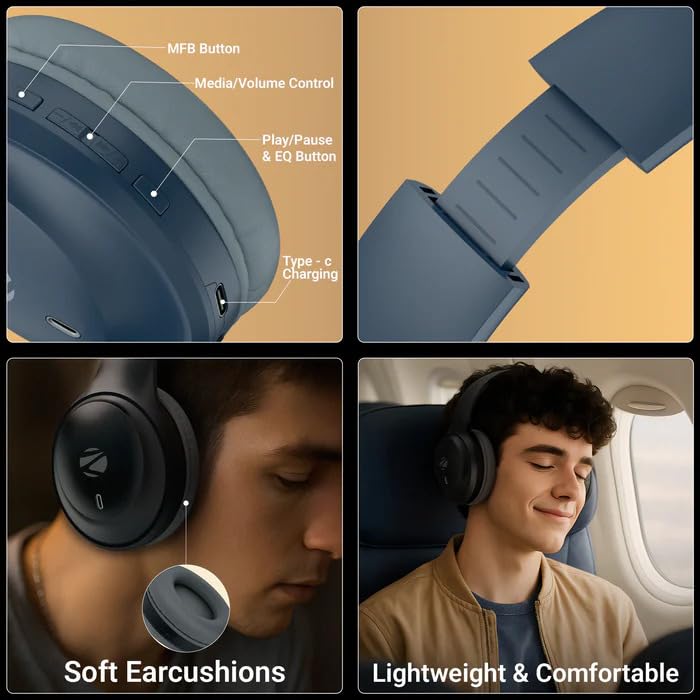
Image 3.1: Headphone Controls and Features. This image displays the various control buttons and features on the ZEBRONICS Zeb Paradise Neo headphones. It highlights the MFB (Multi-Function Button), Media/Volume Control buttons, Play/Pause & EQ Button, and the Type-C Charging port. It also shows the soft ear cushions and the lightweight, comfortable design.
- MFB බොත්තම: Multi-Function Button for power, pairing, and call management.
- Media/Volume Control: Buttons for adjusting volume and navigating tracks.
- Play/Pause & EQ Button: Controls playback and switches between EQ modes.
- Type-C Charging Port: ආරෝපණ කේබලය සම්බන්ධ කිරීම සඳහා.
- AUX වරාය: රැහැන්ගත ශ්රව්ය සම්බන්ධතාවය සඳහා.
- මයික්රෆෝනය: For call function and voice assistant.
4. පිහිටුවීම සහ ආරෝපණය කිරීම
4.1 මූලික ආරෝපණය
Before first use, fully charge the headphones. Connect the supplied USB Type-C charging cable to the headphone's charging port and the other end to a USB power adapter (not included) or a computer's USB port.
- A red LED indicator will illuminate during charging.
- The LED indicator will turn off once charging is complete.
- ආරෝපණ කාලය ආසන්න වශයෙන් පැය 1.5 කි.
- Rapid charging provides approximately 7 hours of use from a 10-minute charge.
4.2 බල ගැන්වීම සක්රිය / අක්රිය කිරීම
- බල ගැන්වීම: Press and hold the MFB button for approximately 3 seconds until the LED indicator flashes blue.
- විදුලිය විසන්ධි කිරීම: Press and hold the MFB button for approximately 5 seconds until the LED indicator flashes red and then turns off.
5. මෙහෙයුම් උපදෙස්
5.1 බ්ලූටූත් යුගල කිරීම
- හෙඩ්ෆෝන් සම්පූර්ණයෙන්ම ආරෝපණය වී ක්රියා විරහිත කර ඇති බවට සහතික වන්න.
- Press and hold the MFB button for approximately 5-7 seconds until the LED indicator flashes red and blue alternately. This indicates pairing mode.
- ඔබගේ ජංගම උපාංගයේ, බ්ලූටූත් සබල කර පවතින උපාංග සොයන්න.
- Select "ZEB-PARADISE NEO" from the list of found devices.
- Once paired, the LED indicator will flash blue intermittently.
The headphones will automatically attempt to connect to the last paired device when powered on.
5.2 Dual Pairing
The Zeb Paradise Neo supports dual pairing, allowing connection to two Bluetooth devices simultaneously.
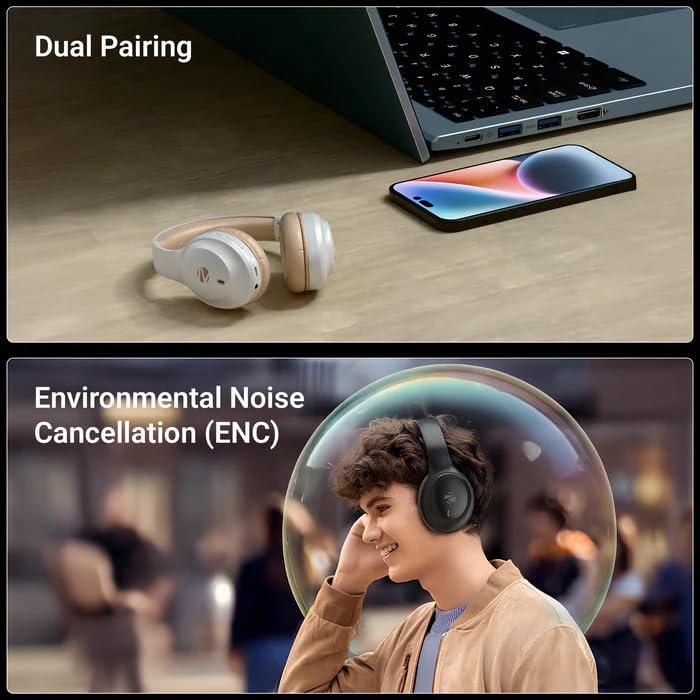
Image 5.1: Dual Pairing Capability. This image illustrates the dual pairing feature of the ZEBRONICS Zeb Paradise Neo headphones, showing them connected to both a laptop and a smartphone simultaneously. This allows seamless switching between audio sources.
- Pair the headphones with the first device (e.g., smartphone) as described in Section 5.1.
- පළමු උපාංගයේ බ්ලූටූත් අක්රිය කරන්න. හෙඩ්ෆෝන් යුගල කිරීමේ ප්රකාරයට නැවත ඇතුළු වනු ඇත.
- Pair the headphones with the second device (e.g., laptop).
- Re-enable Bluetooth on the first device. The headphones should now be connected to both devices.
Audio will play from the device that is actively transmitting sound. You may need to manually select the headphones as the output device on one of the connected sources.
5.3 ඇමතුම් කාර්යය
- පිළිතුර/අවසන් ඇමතුම: MFB බොත්තම වරක් ඔබන්න.
- ඇමතුම ප්රතික්ෂේප කරන්න: Press and hold the MFB button for approximately 2 seconds.
- අවසාන අංකය නැවත අමතන්න: Double-press the MFB button.
5.4 EQ මාදිලි
The headphones feature 3 Equalizer (EQ) modes to customize your audio experience. Press the Play/Pause & EQ button to cycle through the available modes (e.g., Bass Boost, Balanced, Treble Boost).
5.5 ක්රීඩා මාදිලිය (අඩු ප්රමාදය)
Activate Gaming Mode for reduced audio latency, ideal for gaming. Refer to the QR code guide for specific instructions on activating and deactivating Gaming Mode, as this may vary.
5.6 AUX Mode (Wired Connection)
To use the headphones with a wired connection, connect the supplied 3.5mm AUX cable to the headphone's AUX port and the other end to your audio source's 3.5mm audio jack. The headphones will automatically switch to AUX mode.
6. නඩත්තු කිරීම
- පිරිසිදු කිරීම: හෙඩ්ෆෝන් පිරිසිදු කිරීම සඳහා මෘදු වියළි රෙද්දක් භාවිතා කරන්න. රළු රසායනික ද්රව්ය හෝ උල්ෙල්ඛ ද්රව්ය භාවිතා නොකරන්න.
- ගබඩා: හෙඩ්ෆෝන් සෘජු හිරු එළියෙන් සහ අධික උෂ්ණත්වයන්ගෙන් ඈත්ව සිසිල් වියළි ස්ථානයක ගබඩා කරන්න.
- බැටරි සත්කාර: බැටරි ආයු කාලය දීර්ඝ කිරීම සඳහා, හෙඩ්ෆෝන් නිතර නිතර සම්පූර්ණයෙන්ම විසර්ජනය කිරීමෙන් වළකින්න. දිගු කාලයක් භාවිතයේ නොතිබුණත්, නිතිපතා ඒවා ආරෝපණය කරන්න.
- ජල නිරාවරණය: These headphones are not waterproof. Avoid exposure to water or moisture.
7. දෝශ නිරාකරණය
| ගැටලුව | හැකි විසඳුම |
|---|---|
| Headphones not powering on. | හෙඩ්ෆෝන් ආරෝපණය කර ඇති බවට වග බලා ගන්න. බල ප්රභවයකට සම්බන්ධ කර නැවත උත්සාහ කරන්න. |
| උපාංගය සමඟ යුගල කළ නොහැක. |
|
| ශබ්දයක් නැත හෝ අඩු පරිමාවක් නැත. |
|
| අතරමැදි සම්බන්ධතාවය. |
|
8. පිරිවිතර
| මාදිලියේ නම | Paradise Neo (ZEB-WHP 11) |
| බ්ලූටූත් අනුවාදය | 5.4 |
| රැහැන් රහිත පරාසය | මීටර් 10 (බාධක නොමැතිව) |
| රියදුරු ප්රමාණය | 40 මි.මී |
| ස්පීකර් සම්බාධනය | 32Ω |
| සංඛ්යාත ප්රතිචාරය | 20Hz - 20kHz |
| සංවේදීතාව | 99dB ± 3dB |
| මයික්රෆෝන සම්බාධනය | 2.2kΩ |
| මයික්රොෆෝන සංවේදීතාව | -38dB±3dB |
| ආරෝපණ කාලය | පැය 1.5 යි |
| පසුධාවන කාලය | Up to 50 hours* (at 50% volume) |
| කතා කාලය | පැය 40 දක්වා* |
| ශුද්ධ බර | ග්රෑම් 161 |
| නිෂ්පාදන මානයන් (W x D x H) | 18.8 x 8.4 x 21.5 cm (Package dimension) |
*Battery life may vary based on usage, volume levels, and environmental factors.
9. වගකීම් සහ සහාය
වගකීම් තොරතුරු සහ පාරිභෝගික සහාය සඳහා, කරුණාකර ඔබේ පැකේජයේ ඇතුළත් QR කේත මාර්ගෝපදේශය බලන්න හෝ නිල ZEBRONICS වෙත පිවිසෙන්න. webඅඩවිය. වගකීම් හිමිකම් සඳහා ඔබේ මිලදී ගැනීමේ රිසිට්පත තබා ගන්න.
Manufacturer: Zebronics India Pvt Ltd.
Country of Origin: India.


