1. නිෂ්පාදන අවසන්view
The WOLFBOX Level 2 EV Charger is a high-performance electric vehicle charging station designed for efficient and convenient home charging. It offers smart app control, allowing users to schedule charging sessions, adjust amperage, and monitor charging status. This charger is engineered for safety and reliability, featuring multiple layers of electrical protection and robust construction suitable for various environmental conditions. It is universally compatible with all J1772 electric vehicle models, providing a fast and secure charging solution.

Image: The WOLFBOX Level 2 EV Charger unit shown alongside a smartphone displaying its smart app interface, highlighting its modern design and connectivity features.
2. පිහිටුවීම සහ ස්ථාපනය
Proper installation is crucial for the safe and optimal operation of your WOLFBOX EV Charger. This unit is designed for hardwired installation and requires a dedicated 240V circuit. For the 50 Amp model, it should be installed on a circuit breaker rated at 50A or greater. While the installation process is straightforward, it is highly recommended to consult a licensed electrician to ensure compliance with local electrical codes and safety standards.
2.1 පැකේජයේ අන්තර්ගතය
ස්ථාපනය ආරම්භ කිරීමට පෙර, සියලුම සංරචක පැකේජයේ ඇති බව තහවුරු කර ගන්න:
- WOLFBOX Level 2 EV Charger Unit
- 2 PCS RFID Charging Cards
- පරිශීලක අත්පොත
- වෝල් මවුන්ට් අච්චුව
- Self-tapping Screw M6 (2 PCS)
- Plastic Expansion Bolts M10 (2 PCS)
- Machine Screw M4 (1 PCS)
- වෝල් මවුන්ට් වරහන
- වත්මන් ආදාන කේබලය

Image: A detailed layout of all items included in the WOLFBOX Level 2 EV Charger package, including the charger unit, cables, mounting hardware, RFID cards, and user manual.
2.2 ස්ථාපන පියවර
- සවිකරන ස්ථානය: Choose a suitable indoor or outdoor location near your parking area with access to a dedicated 240V circuit. Ensure the surface is sturdy enough to support the charger's weight.
- වරහන සවි කිරීම: Use the provided wall mount template to mark drilling points. Secure the wall mount bracket to the wall using the appropriate screws and expansion bolts.
- රැහැන් සම්බන්ධතාවය: Connect the charger's current inlet cable to your NEMA 14-50 outlet or hardwired electrical supply. Ensure all connections are secure and follow local electrical codes.
- චාජර් සවි කිරීම: Carefully attach the WOLFBOX EV Charger unit to the installed wall mount bracket.
- Current Adjustment (DIP Switches): The charger allows for adjustable current settings (50A, 48A, 40A) via internal DIP switches. Refer to the diagram below and adjust the switches according to your circuit breaker rating and desired charging current.

රූපය: සමීප ඡායාරූපයක් view of the internal DIP switches on the WOLFBOX EV Charger, illustrating how to set the maximum load current to 50A, 48A, or 40A based on the circuit rating.

Image: A person wearing a hard hat is shown in the process of installing the WOLFBOX EV Charger unit onto a wall, demonstrating the physical installation step.
3. මෙහෙයුම් උපදෙස්
The WOLFBOX EV Charger offers flexible operating modes to suit your preferences, including plug-and-go, RFID card activation, and smart app control.
අයකිරීමේ ක්රම
- Plug-and-Go: Simply plug the J1772 connector into your electric vehicle's charging port to initiate charging. The charger will automatically begin charging if no other control method is active.
- RFID Card Activation: Tap one of the provided RFID cards against the designated sensor on the charger to start or stop a charging session. This is ideal for households with multiple users.
- ස්මාර්ට් යෙදුම් පාලනය: For advanced features and scheduling, use the WOLFBOX smart app.
3.2 ස්මාර්ට් යෙදුම් විශේෂාංග
The WOLFBOX smart app provides comprehensive control and monitoring capabilities:
- අයකිරීම් කාලසටහන්ගත කරන්න: Set up to 4 groups of charging sessions, with 3 time slots per group, to optimize charging during off-peak electricity hours.
- සකස් කරන්න Ampකෝපය: Fine-tune the charging current directly from the app to match your vehicle's needs or home electrical capacity.
- තත්ය කාලීන අධීක්ෂණය: View live data such as charging duration, power consumption, voltage, ධාරාව සහ උෂ්ණත්වය.
- පිරිවැය ගණනය කිරීම: Input your electricity rates to estimate charging costs and savings.
- Charging Records: Access historical charging data and statistics for better energy management.
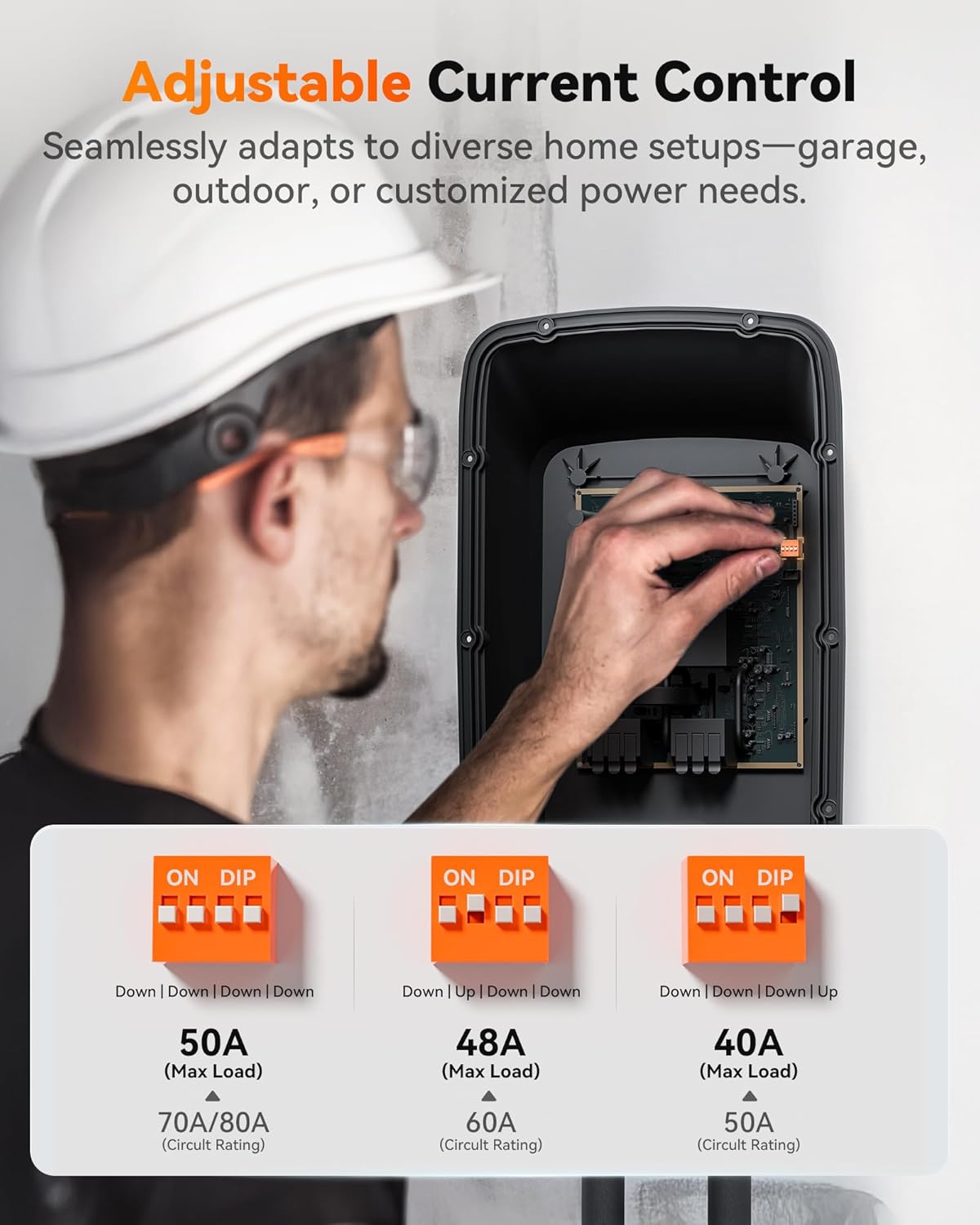
Image: A smartphone screen displaying the WOLFBOX app's scheduling interface, showing options to set charging times and days of the week.

Image: A user interacting with the WOLFBOX app, which displays real-time charging insights including voltage, current, temperature, energy increase, and mileage increase.
4. නඩත්තුව සහ ආරක්ෂාව
Regular maintenance and adherence to safety guidelines ensure the longevity and safe operation of your WOLFBOX EV Charger.
4.1 සාමාන්ය නඩත්තුව
- Keep the charger unit and cable clean and free from dust and debris.
- Inspect the charging cable and connector regularly for any signs of wear, damage, or fraying. Do not use if damaged.
- Ensure the charger is securely mounted and all connections remain tight.
4.2 Safety Features and Certifications
The WOLFBOX EV Charger is built with multiple safety protections and holds important certifications:
- 8-Layer Electrical Protection: Includes surge protection, overcurrent protection, short-circuit protection, ground fault protection, low voltage protection, overcharge protection, high voltage protection, and thermal protection.
- සහතික: CSA & FCC certified, and meets UL2594 safety standards.
- කාලගුණ ප්රතිරෝධය: Rated IPX6 for waterproofing (down to -22°F) and IP6X for dustproofing (up to 122°F), making it suitable for outdoor installation.

Image: A diagram illustrating the eight layers of electrical protection integrated into the WOLFBOX EV Charger, including ground fault, over-current, leakage current, thermal, high voltagඊ, අඩු වෙළුමtage, overcharge, and lightning protection.

Image: Visual representation of the WOLFBOX EV Charger's weather resistance, showing its IPX6 waterproof rating for cold conditions and IP6X dustproof rating for hot conditions, along with CSA and FCC certifications.
5. දෝශ නිරාකරණය
If you encounter issues with your WOLFBOX EV Charger, refer to the following common troubleshooting steps. If the problem persists, please contact customer support.
| ගැටලුව | විය හැකි හේතුව | විසඳුම |
|---|---|---|
| චාජරය ක්රියාත්මක නොවේ | No power from outlet; Circuit breaker tripped; Loose connection | Check outlet power; Reset circuit breaker; Ensure all connections are secure. |
| ආරෝපණය ආරම්භ නොවේ | Vehicle not properly connected; RFID card not detected; App setting preventing charge | Ensure J1772 connector is fully inserted; Re-tap RFID card; Check app for scheduled charging or current limits. |
| මන්දගාමී ආරෝපණ වේගය | Amperage set too low; Vehicle's charging limit; Electrical supply issue | සකස් කරන්න amperage via app or DIP switches; Consult vehicle manual; Have an electrician check home wiring. |
| දෝෂ දර්ශක ආලෝකය | Internal fault; Over-temperature; Ground fault | Unplug and re-plug the charger; Allow unit to cool down; If persistent, contact customer support. |
6. පිරිවිතර
Detailed technical specifications for the WOLFBOX Level 2 EV Charger (Model WE50).
| විශේෂාංගය | විස්තර |
|---|---|
| ආකෘතිය | WE50 |
| ආරෝපණ මට්ටම | 2 මට්ටම |
| Ampකෝපය | 50 Amp (Adjustable to 48 Amp, 40 Amp) |
| සම්බන්ධක වර්ගය | J1772 (NACS adapter required for Tesla EVs) |
| කේබල් දිග | අඩි 25 |
| ආදාන වෙළුමtage | 240V |
| අයිතමයේ බර | රාත්තල් 19.81 කි |
| පැකේජ මානයන් | අඟල් 19.5 x 13.8 x 10.5 |
| ගැළපුම | All J1772 electric vehicle models (e.g., Chevrolet Bolt, Jeep Wrangler 4xe, Ford Mach E, Kia Niro, Hyundai IONIQ 5, Mercedes EQS, BMW i3) |
| සහතික | CSA, FCC, UL2594 compliant |
| කාලගුණ ශ්රේණිගත කිරීම | IPX6 Waterproof, IP6X Dustproof (NEMA4 standards) |

Image: A visual representation of the WOLFBOX EV Charger's broad compatibility with various electric vehicle brands in the US, noting that Tesla EVs require a NACS adapter.
7. වගකීම් සහ සහාය
WOLFBOX is committed to providing reliable products and excellent customer service.
7.1 නිෂ්පාදන වගකීම්
The WOLFBOX Level 2 EV Charger comes with a 3-year warranty from the date of purchase, covering manufacturing defects and malfunctions under normal use. Please retain your proof of purchase for warranty claims.
7.2 ප්රතිලාභ ප්රතිපත්තිය
A 7-day return policy is available for products returned within seven days of receipt. Returns are accepted for defects in materials or workmanship.
7.3 පාරිභෝගික සහාය
For any questions, technical assistance, or warranty claims, please contact WOLFBOX customer support. Our team is available 24/7 to provide lifetime assistance.
- විද්යුත් තැපෑල: support@wolfbox.com
- දුරකථනය: Refer to the official WOLFBOX webකලාපීය සම්බන්ධතා අංක සඳහා අඩවිය.
- සබැඳි සම්පත්: වෙත පිවිසෙන්න WOLFBOX Store on Amazon නිතර අසන ප්රශ්න සහ අමතර නිෂ්පාදන තොරතුරු සඳහා.


