හැඳින්වීම
The QCY Watch S7 is an advanced active smartwatch designed to enhance your daily life and fitness journey. It features a vibrant 1.4-inch AMOLED display with a sharp 466x466 pixel resolution, ensuring clear visibility even in bright sunlight. The watch boasts a sleek design, measuring 46.5 x 12.5 mm and weighing 55.5 grams, with a comfortable 22 mm strap.
Equipped with a 300 mAh battery, the QCY Watch S7 supports convenient magnetic charging. It offers comprehensive health monitoring capabilities, including a heart rate sensor, blood oxygen saturation (SpO2) tracking, sleep monitoring, and stress level assessment. For fitness enthusiasts, it provides over 120 training modes and can automatically detect 5 different sports activities such as walking, running, and cycling.
Stay connected with Bluetooth call functionality and enjoy music playback directly from your wrist. Personalize your device with over 200 watch face options. The QCY Watch S7 operates seamlessly with the dedicated QCY APP and is compatible with Android 8.0+ and iOS 13.0+ systems. It also supports multiple languages for a user-friendly experience.
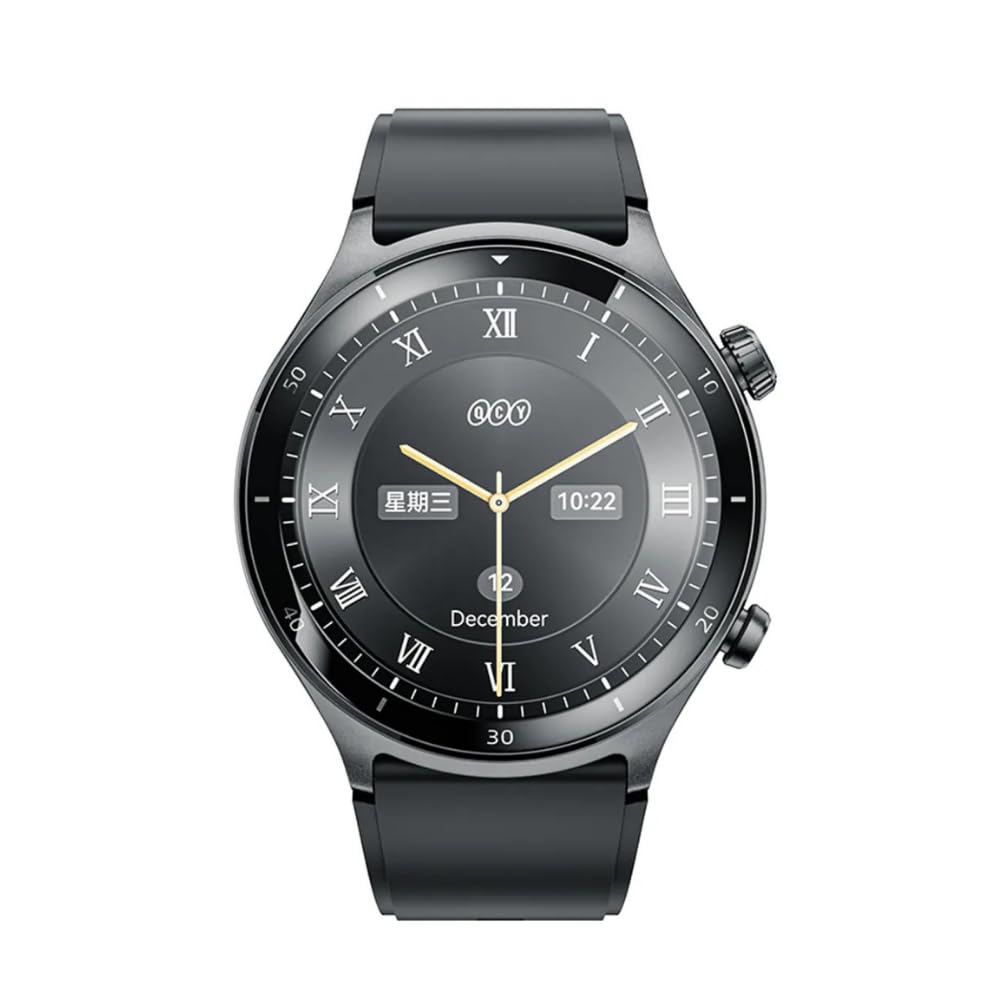
රූපය 1: QCY Watch S7 Active Smartwatch. This image shows the front view of the QCY Watch S7, highlighting its circular AMOLED display and sleek design.
සැලසුම
1. පෙට්ටි ඉවත් කිරීම සහ මූලික ගාස්තුව
- Carefully remove the QCY Watch S7 and its accessories from the packaging.
- ඔරලෝසුවේ පිටුපස ඇති ආරෝපණ සම්බන්ධතා වලට චුම්බක ආරෝපණ කේබලය සම්බන්ධ කරන්න.
- Plug the USB end of the charging cable into a compatible USB power adapter (not included) or a computer's USB port.
- Allow the watch to charge fully before first use. A full charge typically takes approximately 2 hours. The battery icon on the screen will indicate charging status.
2. බල ගැන්වීම / අක්රිය කිරීම
- බල ගැන්වීමට: Press and hold the side button for a few seconds until the QCY logo appears.
- බලය අක්රිය කිරීමට: From the watch face, swipe down to access quick settings, or navigate to සැකසීම් > පද්ධතිය > බලය අක්රියයි. ඔබේ තේරීම තහවුරු කරන්න.
3. යෙදුම් ස්ථාපනය සහ යුගල කිරීම
- බාගත කරන්න QCY යෙදුම ඔබගේ ස්මාර්ට් ජංගම දුරකථනයේ යෙදුම් වෙළඳසැලෙන් (Android සඳහා Google Play Store, iOS සඳහා Apple App Store).
- ඔබගේ ස්මාර්ට් ජංගම දුරකථනයේ බ්ලූටූත් සක්රීය කර ඇති බවට වග බලා ගන්න.
- Open the QCY APP and follow the on-screen instructions to create an account or log in.
- In the app, select "Add Device" or similar option to search for your QCY Watch S7.
- Select "QCY Watch S7" from the list of available devices.
- ඔබගේ ඔරලෝසුව සහ ස්මාර්ට් ජංගම දුරකථනය යන දෙකෙහිම යුගල කිරීමේ ඉල්ලීම තහවුරු කරන්න.
- Once paired, the app will guide you through initial settings and data synchronization.
ගැළපුම: The QCY APP requires Android 8.0 or later, or iOS 13.0 or later.
මෙහෙයුම් උපදෙස්
1. මූලික සංචාලනය
- ස්පර්ශ තිරය: Swipe left/right to cycle through widgets, swipe up for notifications, swipe down for quick settings.
- පැති බොත්තම: Press once to return to the watch face or enter the app list. Press and hold for power options or to activate a specific function (customizable in settings).
2. ඇමතුම් ලබා ගැනීම සහ ලබා ගැනීම
- Ensure your watch is connected to your smartphone via Bluetooth.
- ඇමතුම් ලබා ගැනීම: ඇමතුමක් ආරම්භ කිරීමට ඔබගේ ඔරලෝසුවේ ඩයලර් හෝ සම්බන්ධතා ලැයිස්තුවට ප්රවේශ වන්න.
- ඇමතුම් ලැබීම: ඇමතුමක් පැමිණි විට, ඔබට ඔබේ ඔරලෝසුවෙන් කෙලින්ම එයට පිළිතුරු දීමට හෝ ප්රතික්ෂේප කිරීමට හැකිය.
3. සංගීතය නැවත ධාවනය
- Control music playing on your smartphone directly from your watch. Functions include play, pause, skip tracks, and volume adjustment.
4. සෞඛ්ය නිරීක්ෂණය
- හෘද ස්පන්දන වේගය: ඔරලෝසුව ඔබේ හෘද ස්පන්දන වේගය අඛණ්ඩව නිරීක්ෂණය කරයි. View real-time data and historical trends in the QCY APP.
- රුධිර ඔක්සිජන් (SpO2): Measure your blood oxygen levels on demand. For accurate readings, ensure the watch is snug on your wrist.
- නින්ද ලුහුබැඳීම: The watch automatically tracks your sleep patterns, including deep sleep, light sleep, and awake times. Review your sleep quality in the app.
- ආතතිය නිරීක්ෂණය: දවස පුරාම ඔබේ ආතති මට්ටම් නිරීක්ෂණය කරන්න.
- කාන්තා සෞඛ්ය නිරීක්ෂණය: The watch includes features for tracking female physiological cycles.
5. ක්රීඩා ක්රම
- Access over 120 professional sports modes from the app list.
- The watch can automatically detect 5 common sports activities: walking, running, cycling, elliptical, and rowing.
- During workouts, the watch tracks metrics such as duration, distance, calories burned, and heart rate.
6. Watch Faces and Language
- මුහුණු බලන්න: Choose from over 200 watch face options via the QCY APP to personalize your device.
- භාෂාව: The watch supports multiple languages. Adjust the language setting in the watch's settings menu or through the QCY APP.
නඩත්තු කිරීම
1. ඔබේ ඔරලෝසුව පිරිසිදු කිරීම
- ඔරලෝසු තිරය සහ බඳ මෘදු, ලින්ට් රහිත රෙද්දකින් පිස දමන්න.
- මුරණ්ඩු පැල්ලම් සඳහා, ඩීampරෙදි කැබැල්ල වතුරෙන් තරමක් පිස දමන්න. සැර රසායනික ද්රව්ය හෝ උල්ෙල්ඛ ද්රව්ය භාවිතා කිරීමෙන් වළකින්න.
- නිසි ආරෝපණය සහතික කිරීම සඳහා ආරෝපණ සම්බන්ධතා නිතිපතා පිරිසිදු කරන්න.
2. ජල ප්රතිරෝධය
- The QCY Watch S7 has a 3 ATM water resistance rating, making it suitable for swimming and other water-based activities.
- Avoid using the watch in hot showers, saunas, or steam rooms, as steam can damage the seals.
- ලුණු වතුරට නිරාවරණය වීමෙන් පසු, ඔරලෝසුව මිරිදිය ජලයෙන් සෝදා හොඳින් වියළා ගන්න.
3. බැටරි රැකවරණය
- බැටරි ආයු කාලය දීර්ඝ කිරීම සඳහා, ඔරලෝසුව නිතර නිතර සම්පූර්ණයෙන්ම විසර්ජනය කිරීමෙන් වළකින්න.
- දිගු කාලයක් භාවිතයේ නොමැති විට ඔරලෝසුව සිසිල් වියළි ස්ථානයක ගබඩා කරන්න.
- සපයා ඇති චුම්බක ආරෝපණ කේබලය පමණක් භාවිතා කරන්න.
දෝෂගවේෂණය
1. ඔරලෝසුව ක්රියාත්මක නොවීම
- ඔරලෝසුව සම්පූර්ණයෙන්ම ආරෝපණය කර ඇති බවට වග බලා ගන්න. අවම වශයෙන් විනාඩි 30ක්වත් එය චාජරයට සම්බන්ධ කරන්න.
- නැවත ආරම්භ කිරීමට බල කිරීම සඳහා පැති බොත්තම තත්පර 10-15ක් ඔබාගෙන සිටීමට උත්සාහ කරන්න.
2. ස්මාර්ට් ජංගම දුරකථනය සමඟ යුගල කිරීමට නොහැකි වීම
- ඔබගේ ස්මාර්ට් ජංගම දුරකථනයේ සහ ඔරලෝසුවේ බ්ලූටූත් සක්රීය කර ඇති බවට වග බලා ගන්න.
- Ensure the QCY APP is installed and running.
- ඔරලෝසුව සහ ස්මාර්ට් ජංගම දුරකථනය එකිනෙකට සමීප කරන්න.
- ඔරලෝසුව සහ ඔබගේ ස්මාර්ට් ජංගම දුරකථනය යන දෙකම නැවත ආරම්භ කරන්න.
- If previously paired, try unpairing the device from your phone's Bluetooth settings and then re-pairing through the QCY APP.
- Verify your smartphone's operating system meets the compatibility requirements (Android 8.0+ or iOS 13.0+).
3. සාවද්ය සෞඛ්ය දත්ත
- ඔරලෝසුව ඔබේ මැණික් කටුවේ හොඳින් පැළඳ සිටින බවටත්, මැණික් කටුවේ අස්ථියට ඉහළින් එක් ඇඟිල්ලක පළලක් පමණ ඇති බවටත් සහතික වන්න.
- Avoid excessive movement during measurements (e.g., SpO2).
- ඔරලෝසුවේ පිටුපස ඇති සංවේදක නිතිපතා පිරිසිදු කරන්න.
4. කෙටි බැටරි ආයු කාලය
- තිරයේ දීප්තිය අඩු කරන්න.
- Disable continuous heart rate monitoring or set it to a less frequent interval if not needed.
- ඔරලෝසුවට ලැබෙන දැනුම්දීම් ගණන සීමා කරන්න.
- සෑම අවස්ථාවකදීම ඔරලෝසුව සම්පූර්ණයෙන්ම ආරෝපණය කර ඇති බවට වග බලා ගන්න.
පිරිවිතර
| විශේෂාංගය | විස්තර |
|---|---|
| වෙළඳ නාමය | QCY |
| මාදිලියේ නම | S7 ක්රියාකාරී |
| සංදර්ශක ප්රමාණය | අඟල් 1.43 |
| සංදර්ශක වර්ගය | AMOLED, 466x466 pixels |
| මානයන් | 46.5 x 12.5 mm (Watch body) |
| බර | ග්රෑම් 55.5 කි |
| පටි පළල | 22 මි.මී |
| බැටරි ධාරිතාව | 300 mAh |
| ආරෝපණ ක්රමය | චුම්බක ආරෝපණය |
| සම්බන්ධතාවය | බ්ලූටූත් |
| මෙහෙයුම් පද්ධතිය | Proprietary (Bluetooth OS) |
| ගැළපුම | Android 8.0+ / iOS 13.0+ |
| ජල ප්රතිරෝධය | ATM 3ක් (පිහිනීමට සුදුසු) |
| විශේෂ ලක්ෂණ | Heart Rate Monitor, SpO2 Sensor, Sleep Tracker, Stress Monitor, 120+ Sports Modes, Bluetooth Calls, Multi-language Support, 200+ Watch Faces, Female Health Tracking |
| GPS | ඇතුළත් GPS නැත |
වගකීම් සහ සහාය
For detailed warranty information, please refer to the warranty card included with your product or visit the official QCY webවෙබ් අඩවිය. වගකීම් නියමයන් සහ කොන්දේසි කලාපය සහ සිල්ලර වෙළෙන්දා අනුව වෙනස් විය හැකිය.
If you encounter any issues not covered in this manual or require further assistance, please contact QCY customer support or the retailer from whom you purchased the device.
You can also visit the official QCY store for more product information and support: Amazon හි QCY වෙළඳසැල.


