1. හැඳින්වීම
The JDIAG HD10 is a versatile diagnostic scan tool designed for comprehensive analysis of both 12V gasoline/diesel vehicles and 24V diesel heavy-duty trucks. This device supports a wide range of diagnostic functions, including reading and clearing Diagnostic Trouble Codes (DTCs), displaying live data, and performing various system checks. Its ergonomic design and user-friendly interface aim to provide efficient vehicle diagnostics.

Figure 1: JDIAG HD10 Diagnostic Scan Tool with included 6-pin and 9-pin adapters.
2 ආරක්ෂිත තොරතුරු
Always observe the following safety precautions when operating the JDIAG HD10 diagnostic tool:
- Ensure the vehicle is in a safe, well-ventilated area.
- Wear appropriate personal protective equipment, such as eye protection.
- Avoid contact with hot engine components or moving parts.
- Do not operate the tool while driving.
- Keep the tool dry and away from extreme temperatures.
- Refer to the vehicle's service manual for specific diagnostic procedures and warnings.
3. පැකේජ අන්තර්ගතය
සියලුම අයිතම පැකේජයේ ඇති බව තහවුරු කරගන්න:
- HD10 heavy duty scanner tool
- 6-pin adapter (for trucks)
- 9-pin adapter (for trucks)
- USB දත්ත කේබලය
- පරිශීලක අත්පොත
4. උපාංගය අවසන්view
The JDIAG HD10 features a 2.4-inch color screen and intuitive button layout for easy navigation. Its robust design includes non-slip grips and a durable integrated cable.

Figure 2: Ergonomic design features including silicone buttons, non-slip sides, durable cable, and OBD2 connector.
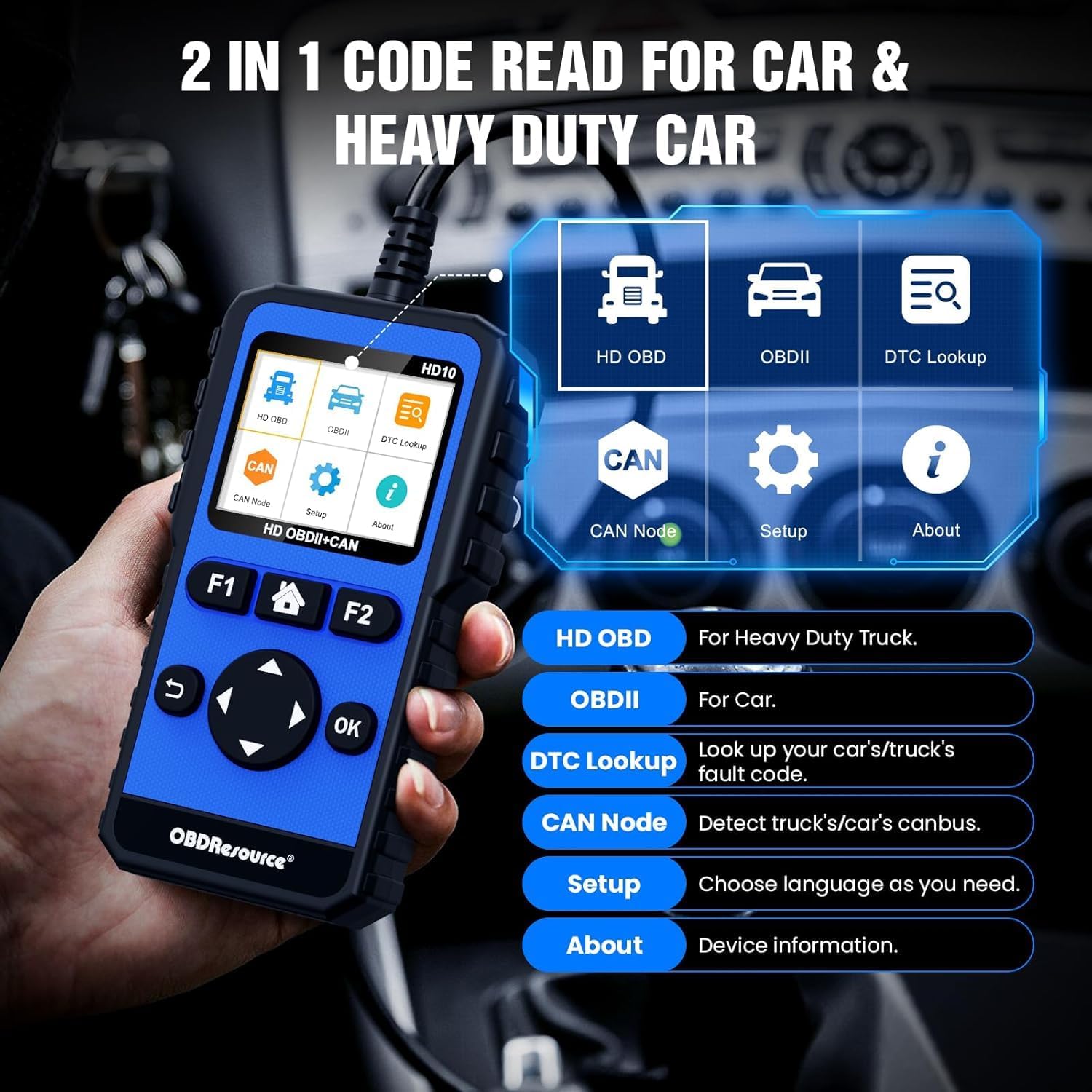
Figure 3: Main menu interface of the HD10 device.
4.1. භෞතික ලක්ෂණ
- සංදර්ශකය: 2.4-inch TFT Color Screen (320 x 240 resolution).
- බොත්තම්: Clearly arranged silicone physical buttons for high sensitivity and fast response.
- නිවාස: Anti-slip design on both sides for secure handling.
- කේබල්: Integrated, thick, and durable wire (up to 105 cm).
- සම්බන්ධක: Standard OBD2 connector, with included 6-pin and 9-pin adapters for heavy-duty vehicles.
5. පිහිටුවීම
5.1. වාහනයට සම්බන්ධ වීම
- Locate the vehicle's Diagnostic Link Connector (DLC). For 12V vehicles, this is typically a 16-pin OBD2 port. For heavy-duty 24V vehicles, it will be a 6-pin or 9-pin connector.
- If diagnosing a heavy-duty vehicle, attach the appropriate 6-pin or 9-pin adapter to the HD10's main cable, then connect to the vehicle's DLC. For 12V vehicles, connect the standard OBD2 connector directly.
- Ensure the connection is secure. The device will power on automatically once connected to the vehicle's power supply.

Figure 4: The HD10 displaying live data, illustrating its 2.4-inch color screen.
5.2. මූලික සැකසුම්
පළමු භාවිතයේදී හෝ නැවත සැකසීමෙන් පසු, ඔබට මූලික සැකසුම් වින්යාස කිරීමට අවශ්ය විය හැකිය:
- වෙත සංචාලනය කරන්න සැලසුම menu using the directional buttons and press OK.
- තෝරන්න භාෂාව to choose your preferred language.
- Other settings like unit of measurement (e.g., Metric/Imperial) may also be available in the Setup menu.
6. මෙහෙයුම් උපදෙස්
The JDIAG HD10 offers various diagnostic functions accessible through its main menu.
6.1. ප්රධාන මෙනු සංචාලනය
දිශානුගත බොත්තම් භාවිතා කරන්න (Up, පහළට, වම, හරි) to highlight menu options and press the OK තේරීමක් තහවුරු කිරීමට බොත්තම. ආපසු button (curved arrow) navigates back to the previous screen.
6.2. HD OBD (Heavy Duty On-Board Diagnostics)
This mode is for diagnosing heavy-duty trucks and supports protocols like SAE J1939, SAE J1587/J1708, ISO15765, ISO 14230, and ISO 9141-2.

Figure 5: Full system diagnostic capabilities for heavy-duty vehicles.
- කේත කියවන්න: Retrieves Diagnostic Trouble Codes (DTCs) from various vehicle systems (Engine, Transmission, Drivetrain, Suspension, Braking System, Cab Climate, Body Control, Dashboard, Fuel System, etc.).
- කේත මකන්න: Clears DTCs from the vehicle's computer after repairs have been made.
- සජීවී දත්ත: Displays real-time operational parameters of the vehicle's systems.
- සම්පූර්ණ පද්ධති රෝග විනිශ්චය: Accesses and diagnoses all supported electronic control units (ECUs) in 24V diesel vehicles.
6.3. OBDII (Standard On-Board Diagnostics)
This mode is for diagnosing 12V gasoline/diesel vehicles and supports standard OBD2 protocols including SAE J1850.

රූපය 6: අවසන්view of full OBD2 functions available.
- කේත කියවන්න: Retrieves current, pending, and permanent DTCs.
- කේත මකන්න: DTC ඉවත් කර අක්රියතා දර්ශකය L අක්රිය කරයි.amp (MIL).
- මම/එම් සූදානම: විමෝචනයට අදාළ මොනිටරවල සූදානම පරීක්ෂා කරයි.
- දත්ත ධාරාව: Displays live sensor data in text or graph format.
- කැටි රාමුව: Records a snapshot of vehicle conditions when an emission-related fault occurs.
- O2 සංවේදක පරීක්ෂණය: O2 සංවේදක නිරීක්ෂණ පරීක්ෂණ ප්රතිඵල ලබා ගනී.
- යානය තුළම අධීක්ෂණය: Retrieves results for on-board diagnostic monitoring tests of specific components/systems.
- EVAP පද්ධති පරීක්ෂණය: වාෂ්පීකරණ විමෝචන පාලන පද්ධතිය පරීක්ෂා කිරීම ආරම්භ කරයි.
- වාහන තොරතුරු: Displays the vehicle's Vehicle Identification Number (VIN), Calibration ID (CALID), and Calibration Verification Number (CVN).
6.4 DTC සෙවීම
The built-in DTC Lookup function allows you to search for definitions of diagnostic trouble codes directly on the device, helping to understand the nature of a fault without external resources.
6.5. CAN Node Detection
This function helps quickly detect CANBUS nodes and identify faulty modules or lines by checking existing nodes, improving diagnostic efficiency.
6.6. BAT Test (Battery Test)
The BAT Test function allows for basic battery voltage checks, providing quick insights into the vehicle's battery health.
6.7. මෘදුකාංග යාවත්කාලීන කිරීම
The JDIAG HD10 supports lifetime free software updates. Connect the device to a computer via the USB data cable and follow the instructions on the manufacturer's website to download and install the latest software. This ensures expanded fault coverage and up-to-date functionality.
වීඩියෝ 1: ඕවරයක්view of the JDIAG HD10's diagnostic capabilities for cars and trucks, demonstrating its interface and functions.
7. නඩත්තු කිරීම
7.1 පිරිසිදු කිරීම
උපාංගය මෘදු, ඩී සමඟ පිස දමන්නamp රෙදි. උල්ෙල්ඛ පිරිසිදු කරන්නන් හෝ ද්රාවක භාවිතා නොකරන්න. ගබඩා කිරීමට හෝ ඊළඟ භාවිතයට පෙර උපාංගය වියළී ඇති බවට වග බලා ගන්න.
7.2. ගබඩා කිරීම
Store the JDIAG HD10 in a clean, dry environment, away from direct sunlight and extreme temperatures. Keep it in its original packaging or a protective case when not in use to prevent damage.
8. දෝශ නිරාකරණය
| ගැටලුව | විය හැකි හේතුව | විසඳුම |
|---|---|---|
| උපාංගය බලගන්වන්නේ නැත. | Loose connection to vehicle DLC; vehicle battery low; faulty cable. | Ensure the cable is securely connected. Check vehicle battery voltage. Try a different vehicle if possible to rule out a device issue. |
| Communication error with vehicle. | Incorrect protocol selected; vehicle ignition off; faulty vehicle DLC; device software outdated. | Verify vehicle ignition is ON. Ensure the correct vehicle type (12V/24V) and protocol are selected. Check the DLC for damage. Update device software. |
| DTC හිස් කළ නොහැක. | Underlying fault still present; vehicle ignition off; specific vehicle system requirements. | Ensure the underlying issue causing the DTC has been resolved. Verify ignition is ON. Some vehicles require specific conditions for DTC clearing. |
| තිරය අඳුරු හෝ කියවිය නොහැක. | Environmental lighting; display settings. | Adjust screen brightness in the Setup menu. Move to an area with less direct sunlight or glare. |
9. පිරිවිතර
- වෙළඳ නාමය: JDIAG
- ආකෘතිය: HD10 (Item model number) / CC0147HD10 (Manufacturer Model)
- මෙහෙයුම් පද්ධතිය: ලිනක්ස්
- වාහන ගැළපුම් වර්ගය: Universal Fit
- Supported Protocols (Heavy Duty): SAE J1939, SAE J1587/J1708, ISO15765, ISO 14230, ISO 9141-2
- Supported Protocols (OBD2): SAE J1850 (VPW/PWM), ISO9141, ISO14230 (KWP), ISO15765-4 (CAN)
- සංදර්ශකය: අඟල් 2.4 වර්ණ TFT තිරය
- අයිතමයේ බර: රාත්තල් 1.15 කි
- පැකේජ මානයන්: අඟල් 7.48 x 6.69 x 1.57

Figure 7: Compatibility table for various heavy-duty truck brands and protocols.
10. වගකීම් තොරතුරු
For detailed warranty information regarding your JDIAG HD10 diagnostic tool, please refer to the documentation included with your purchase or contact JDIAG customer support directly. Protection plans may be available for extended coverage.
11. සහාය
If you encounter any issues or have questions regarding the operation of your JDIAG HD10, please contact the JDIAG technical support team. They are available to provide assistance and operational guidance.
- නිෂ්පාදකයා: JDIAG
- තාක්ෂණික සහාය: Refer to the contact information provided in your product packaging or on the official JDIAG webඅඩවිය.


