හැඳින්වීම
Thank you for choosing the MIATONE Seattle T-01A PRO Bluetooth Headphones. This manual provides essential information for setting up, operating, and maintaining your headphones. Please read it carefully before use to ensure optimal performance and longevity of your device.
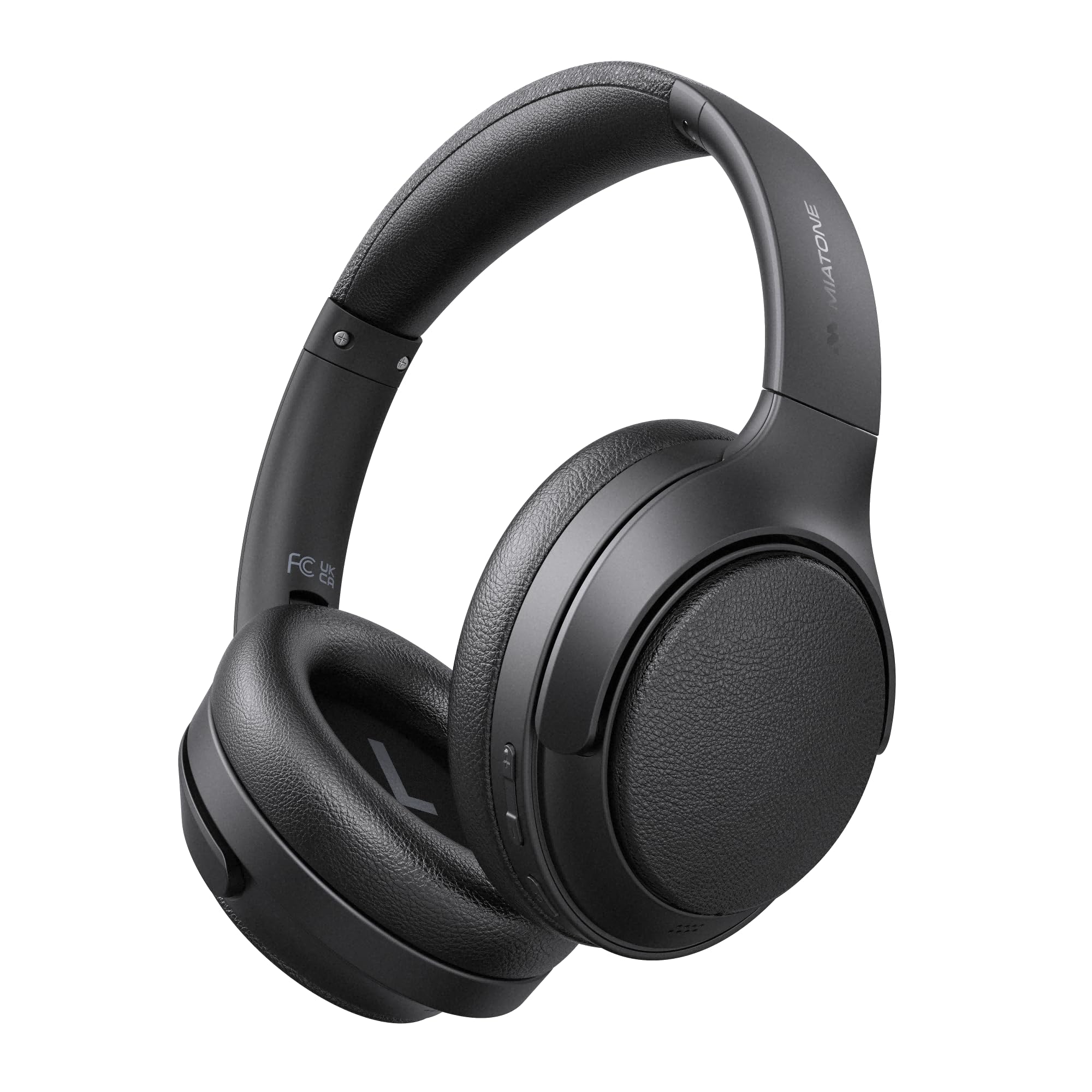
Image: MIATONE Seattle T-01A PRO Bluetooth Headphones in black, showcasing ඔවුන්ගේ සිනිඳු නිර්මාණය.
පැකේජයේ අන්තර්ගතය
සියලුම අයිතම පැකේජයේ ඇති බවට වග බලා ගන්න:
- MIATONE Seattle T-01A PRO Headphones x 1
- USB-C to USB-A Charging Cable x 1
- 3.5mm AUX ඕඩියෝ කේබල් x 1
- රැගෙන යන නඩුව x 1
- පරිශීලක අත්පොත x 1

Image: Contents of the MIATONE Seattle T-01A PRO package, including headphones, cables, carrying case, and manual.
නිෂ්පාදනය අවසන්view
The MIATONE Seattle T-01A PRO headphones feature a comfortable, foldable design with soft earcups and an adjustable headband for extended wear. They incorporate advanced audio technology for a superior listening experience.
ප්රධාන ලක්ෂණ:
- දෙමුහුන් ක්රියාකාරී ශබ්ද අවලංගු කිරීම (ANC): අවට ශබ්දය 48dB දක්වා අඩු කරයි.
- 5 AI Microphones: Ensures clear voice calls even in noisy environments.
- Dual Dynamic Drivers: 40mm and 10mm LCP drivers deliver rich bass and clear treble.
- දිගු බැටරි ආයු කාලය: Up to 60 hours of playback (45 hours with ANC).
- බහු ලක්ෂ්ය සම්බන්ධතාවය: එකවර උපාංග දෙකකට සම්බන්ධ වන්න.
- Wired & Wireless Modes: Supports Bluetooth 5.4 and 3.5mm AUX connection.

Image: Diagram illustrating the adjustable headband, foldable shaft, multi-axis rotation, and soft earpads for enhanced comfort and portability.

රූපය: පුපුරා ගියේය view of the headphone earcup, highlighting the 40mm and 10mm LCP dual dynamic drivers.
සැලසුම
1. හෙඩ්ෆෝන් ආරෝපණය කිරීම
Before first use, fully charge the headphones. Connect the provided USB-C charging cable to the headphone's charging port and the other end to a USB power adapter (not included) or a computer's USB port. The LED indicator will show charging status and turn off when fully charged.
- A 5-minute quick charge provides up to 10 hours of playback.
- සම්පූර්ණ ආරෝපණය ආසන්න වශයෙන් පැය 2 ක් ගතවේ.

Image: Visual representation of the headphones' extended battery life, indicating up to 60 hours of playback.
2. බලය සක්රිය / අක්රිය කරන්න
- බල ගැන්වීම: LED දර්ශකය දැල්වෙන තුරු බල බොත්තම තත්පර 2ක් ඔබාගෙන සිටින්න.
- විදුලිය විසන්ධි කිරීම: LED දර්ශකය ක්රියා විරහිත වන තෙක් බල බොත්තම තත්පර 3ක් ඔබාගෙන සිටින්න.
3. බ්ලූටූත් යුගලනය
When powered on for the first time, the headphones will automatically enter pairing mode. The LED indicator will flash blue and red alternately.
- ඔබගේ උපාංගයේ (ස්මාර්ට් ජංගම දුරකථනය, ටැබ්ලටය, පරිගණකය) බ්ලූටූත් සක්රීය කරන්න.
- ඒ සඳහා සොයන්න "MIATONE Seattle" in the list of available devices.
- Select "MIATONE Seattle" to connect. The LED indicator will turn solid blue when connected.
4. බහු ලක්ෂ්ය සම්බන්ධතාවය
The headphones support connecting to two Bluetooth devices simultaneously.
- Pair the headphones with the first device (e.g., smartphone).
- පළමු උපාංගයේ බ්ලූටූත් අක්රිය කරන්න. හෙඩ්ෆෝන් යුගල කිරීමේ ප්රකාරයට නැවත ඇතුළු වනු ඇත.
- Pair the headphones with the second device (e.g., PC).
- පළමු උපාංගයේ බ්ලූටූත් නැවත සක්රිය කරන්න. හෙඩ්ෆෝන් ස්වයංක්රීයව උපාංග දෙකටම සම්බන්ධ වේ.
Note: Audio playback will only come from one device at a time. You can switch between devices by pausing playback on one and starting it on the other.

Image: Diagram showing the headphones connected simultaneously to a smartphone and a laptop via multipoint Bluetooth.
5. රැහැන්ගත සම්බන්ධතාවය (AUX මාදිලිය)
To use the headphones in wired mode, connect one end of the 3.5mm AUX audio cable to the headphone's AUX port and the other end to your audio source's 3.5mm jack. The headphones will automatically switch to AUX mode. Bluetooth functions will be disabled in wired mode.

Image: Illustration of both wired (AUX) and wireless (Bluetooth 5.4) connection options for the headphones.
මෙහෙයුම් උපදෙස්
1. Active Noise Cancelling (ANC) Modes
The headphones offer Hybrid ANC and Ambient Sound modes.
- ANC මත: Press the ANC button once to activate Active Noise Cancelling. This mode reduces external noise by up to 48dB, ideal for travel or noisy environments.
- සංසරණ ශබ්ද ප්රකාරය: Press the ANC button again to switch to Ambient Sound mode. This allows you to hear your surroundings while still enjoying your audio.
- ANC අක්රිය: Press the ANC button a third time to turn off all noise control features.

Image: A woman wearing the headphones, demonstrating the -48dB noise reduction capability in various environments like trains, airplanes, and cafes.
2. ඇමතුම් කාර්යයන්
The integrated 5 AI microphones ensure clear communication.
- පිළිතුර/අවසන් ඇමතුම: බහු ක්රියාකාරී බොත්තම වරක් ඔබන්න.
- ඇමතුම ප්රතික්ෂේප කරන්න: බහුකාර්ය බොත්තම තත්පර 2ක් ඔබාගෙන සිටින්න.
- හ oice සහකාර සක්රිය කරන්න: බහුකාර්ය බොත්තම දෙවරක් ඔබන්න.

Image: A woman wearing the headphones, illustrating the effectiveness of the 5 AI microphones and AI noise cancelling for clear calls in various settings.
3. සංගීතය නැවත ධාවනය
- වාදනය/විරාමය: බහු ක්රියාකාරී බොත්තම වරක් ඔබන්න.
- ඊළඟ ධාවන පථය: ශබ්දය වැඩි කිරීමේ බොත්තම තත්පර 2ක් ඔබාගෙන සිටින්න.
- පෙර ධාවන පථය: ශබ්දය අඩු කිරීමේ බොත්තම තත්පර 2ක් ඔබාගෙන සිටින්න.
4. වෙළුම් පාලනය
- පරිමාව: ශබ්දය වැඩි කිරීමේ බොත්තම වරක් ඔබන්න.
- ශබ්දය පහළට: Volume Down බොත්තම වරක් ඔබන්න.
නඩත්තු කිරීම
1 පිරිසිදු කිරීම
- මෘදු වියළි රෙද්දකින් හෙඩ්ෆෝන් පිස දමන්න.
- උල්ෙල්ඛ පිරිසිදු කරන්නන් හෝ ද්රාවණ භාවිතා නොකරන්න.
- ආරෝපණ වරාය දූවිලි හා සුන්බුන් වලින් තොරව තබා ගන්න.
2. ගබඩා කිරීම
- භාවිතයේ නොමැති විට, දූවිලි හා හානිවලින් ආරක්ෂා වීම සඳහා හෙඩ්ෆෝන් සපයා ඇති රැගෙන යන පෙට්ටියේ ගබඩා කරන්න.
- අධික උෂ්ණත්වයේ හෝ අධික ආර්ද්රතාවයේ ගබඩා කිරීමෙන් වළකින්න.

Image: Hands placing the foldable MIATONE Seattle headphones into their protective carrying case for convenient storage and transport.
දෝෂගවේෂණය
| ගැටලුව | විය හැකි හේතුව | විසඳුම |
|---|---|---|
| බලය සක්රිය කළ නොහැක | අඩු බැටරි | හෙඩ්ෆෝන් සම්පූර්ණයෙන්ම ආරෝපණය කරන්න. |
| බ්ලූටූත් හරහා යුගල කළ නොහැක. | Headphones not in pairing mode / Bluetooth disabled on device | Ensure headphones are in pairing mode (flashing blue/red). Enable Bluetooth on your device and search again. |
| ශබ්දයක් නැත | Volume too low / Not connected / AUX cable inserted | Increase volume. Ensure headphones are connected. If using Bluetooth, remove AUX cable. |
| ANC ඵලදායී නොවේ | ANC not activated / High-frequency noise | Press the ANC button to activate. ANC is most effective against low-frequency noise. |
| දුර්වල ඇමතුම් ගුණාත්මකභාවය | Microphone obstructed / Weak Bluetooth signal | Ensure microphones are clear. Move closer to your connected device. |
පිරිවිතර
| විශේෂාංගය | පිරිවිතර |
|---|---|
| මාදිලියේ නම | T-01A PRO |
| ශබ්ද පාලනය | Hybrid Active Noise Cancelling (up to 48dB) |
| සම්බන්ධතා තාක්ෂණය | රැහැන් රහිත (බ්ලූටූත් 5.4), රැහැන්ගත (3.5mm AUX) |
| රියදුරු ප්රමාණය | 40mm + 10mm Dual Dynamic Drivers |
| සම්බාධනය | 32 ඕම් |
| බැටරි ආයු කාලය | පැය 60ක් දක්වා (ANC අක්රියයි), පැය 45ක් දක්වා (ANC ක්රියාත්මකයි) |
| මයික්රොෆෝන | 5 AI Microphones for calls |
| විශේෂ ලක්ෂණ | Multipoint Connection, Ambient Sound Mode, Foldable Design |
| මානයන් | 22.4 x 17.7 x 7.5 සෙ.මී |
| බර | 540 ග්රෑම් |
වගකීම් සහ සහාය
MIATONE products are designed for reliability and performance. For warranty information and customer support, please refer to the warranty card included in your package or visit the official MIATONE webඅඩවිය. වගකීම් හිමිකම් සඳහා ඔබේ මිලදී ගැනීමේ රිසිට්පත තබා ගන්න.
For further assistance, please contact MIATONE customer service.


