හැඳින්වීම
මෙම අත්පොත ඔබගේ FIREBAT ක්රීඩා ලැප්ටොප් පරිගණකයේ සැකසුම, ක්රියාත්මක කිරීම, නඩත්තු කිරීම සහ දෝශ නිරාකරණය සඳහා අත්යවශ්ය තොරතුරු සපයයි. ප්රශස්ත ක්රියාකාරිත්වය සහ කල්පැවැත්ම සහතික කිරීම සඳහා උපාංගය භාවිතා කිරීමට පෙර කරුණාකර මෙම අත්පොත හොඳින් කියවන්න.
වැඩිදුර සහාය සඳහා, කරුණාකර මෙම අත්පොතෙහි සපයා ඇති සහාය සම්බන්ධතා තොරතුරු වෙත යොමු වන්න.
නිෂ්පාදනය අවසන්view
ප්රධාන ලක්ෂණ
- ග්රැෆික් කාර්ය සාධනය: Blackwell ගෘහ නිර්මාණ ශිල්පය සහිත NVIDIA RTX 5060 ලැප්ටොප් GPU, AI-බලයෙන් ක්රියාත්මක වන කාර්ය සාධනය 572 TOPS දක්වා, 4th Gen RT Cores සහ 5th Gen Tensor Cores උසස් චිත්රක විශ්වසනීයත්වය සඳහා ලබා දෙයි.
- සකසනය: බලගතු 13 වන පරම්පරාවේ Intel Core i7-13700HX ප්රොසෙසරය, මධ්ය 16ක් (කාර්ය සාධන-හර 8ක්, කාර්යක්ෂම-හර 8ක්), නූල් 24ක් සහ 5.0 GHz උපරිම තනි-හර ටර්බෝ සංඛ්යාතයක් සහිතව.
- සංදර්ශකය: 16:10 දර්ශන අනුපාතයක්, 100% sRGB වර්ණ ගැමට්, 300Hz නැවුම් කිරීමේ අනුපාතය සහ ඉහළ විභේදන, ඉහළ නැවුම් ක්රීඩා සඳහා nits 500 කට වැඩි දීප්තියක් සහිත අඟල් 16 QHD (2560x1600) IPS සංදර්ශකය.
- සිසිලන පද්ධතිය: ඉතා කාර්යක්ෂම තාප ග්රීස් සහිත ACD සම්පූර්ණ ලෝහ නිර්මාණය, ද්විත්ව විදුලි පංකා, පේළිගත තාප පයිප්ප තුනක් සහ ද්විත්ව වායු පිටවීම් සහිත නිහඬ අභ්යන්තර සිසිලන පද්ධතියක්, ආසන්න වශයෙන් 48dB ක අඩු ශබ්ද මට්ටමක් පවත්වා ගනී.
- මතකය සහ ගබඩාව: 32GB (16GBx2) DDR5 මතකය (ද්විත්ව නාලිකාව, 96GB දක්වා පුළුල් කළ හැකි) සහ 1TB PCIe 4.0 M.2 SSD (ද්විත්ව දෘඪ තැටි අතුරුමුහුණත, පුළුල් කළ හැකි) වලින් සමන්විතය.
- ජාල සම්බන්ධතාවය: WiFi AX (6E) ප්රොටෝකෝලය (2.4/5/6GHz, MU-MIMO) සහ බ්ලූටූත් 5.3 සඳහා සහය දක්වන Intel AX210 ද්විත්ව කලාප රැහැන් රහිත ජාල කාඩ්පතක් සහිත 2.5Gbps අනුවර්තන රැහැන් රහිත ජාල කාඩ්පතක්.
- වරාය: 1x mini DP 2.1a (40Gbps), 1x HDMI 2.1 (48Gbps), 3x USB-A 3.2 Gen1 (5Gbps), 1x USB-C (පසුපස) 10Gbps/DP1.4/PD 140W, 1x USB-C (වමේ) 10Gbps/DP1.4/PD 100W, 1x Kensington Lock, සහ 1x 3.5mm 2-in-1 Audio Jack ඇතුළු පුළුල් සම්බන්ධතාවයක්.
- අමතර විශේෂාංග: RGB පසුබිම් යතුරුපුවරුව සහ HD පෞද්ගලිකත්වය webකැමරාව.
සංරචක
ඔබගේ FIREBAT ක්රීඩා ලැප්ටොප් පැකේජයට ඇතුළත් වන්නේ:
- FIREBAT ක්රීඩා ලැප්ටොප්
- බල ඇඩැප්ටරය (සැහැල්ලු සිලිකන් කාබයිඩ් ඇඩැප්ටරය)
- පරිශීලක අත්පොත (මෙම ලේඛනය)
- කථිකයන්
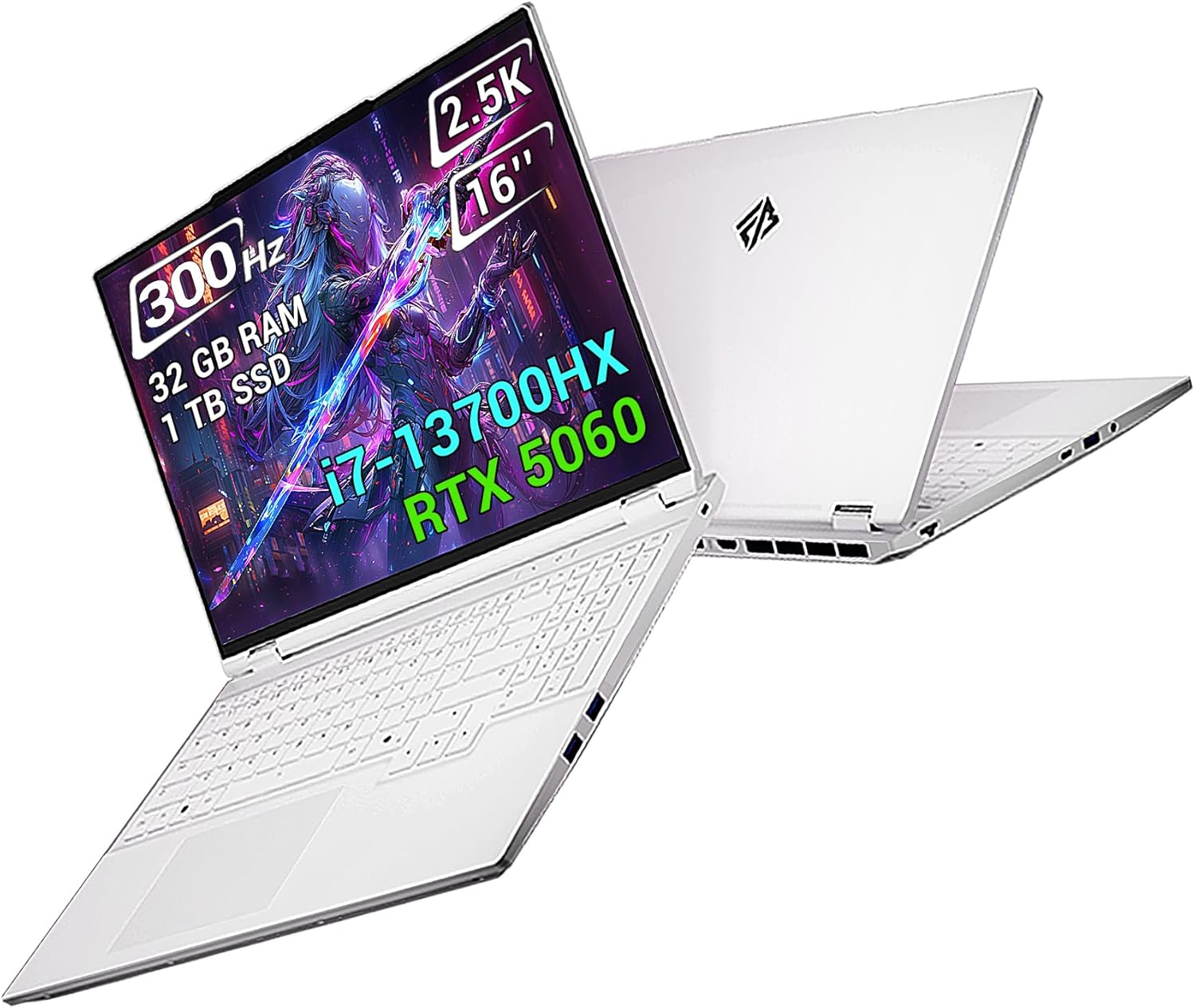
රූපය: FIREBAT ක්රීඩා ලැප්ටොප්, showcasing එහි සිනිඳු නිර්මාණය සහ විචිත්රවත් සංදර්ශකය. තිරය එහි 300Hz නැවුම් කිරීමේ අනුපාතය, 2.5K විභේදනය, අඟල් 16 ප්රමාණය, 32GB RAM, 1TB SSD, i7-13700HX ප්රොසෙසරය සහ RTX 5060 ග්රැෆික්ස් ඉස්මතු කරයි.
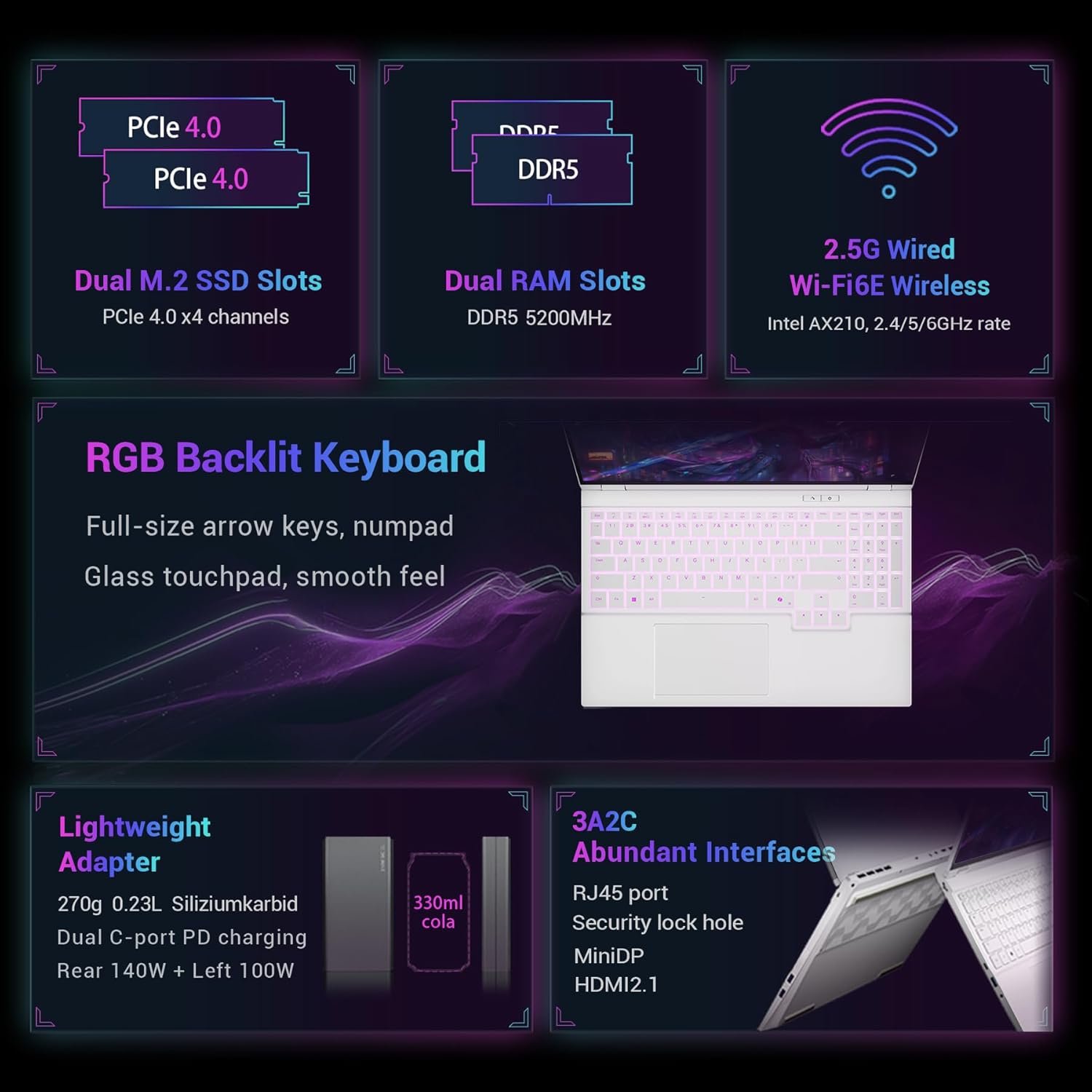
රූපය: Dual M.2 SSD Slots (PCIe 4.0), Dual RAM Slots (DDR5 5200MHz) සහ 2.5G Wired Wi-Fi6E Wireless (Intel AX210) වැනි අභ්යන්තර සංරචක නිරූපණය කරන සවිස්තරාත්මක රූප සටහනක්. එය RGB Backlit Keyboard, Lightweight Adapter සහ RJ45, MiniDP, සහ HDMI2.1 ඇතුළු බහුල අතුරුමුහුණත් ද ඉස්මතු කරයි.
සැලසුම
මුලික බලය සක්රිය
- ලැප්ටොප් එක සහ සියලුම උපාංග පෙට්ටියෙන් ඉවත් කරන්න.
- බල ඇඩැප්ටරය ලැප්ටොප් පරිගණකයේ බල ආදාන තොටට සම්බන්ධ කර පසුව බල අලෙවිසැලකට සම්බන්ධ කරන්න.
- ලැප්ටොප් පියන විවෘත කරන්න. ලැප්ටොප් පරිගණකය ස්වයංක්රීයව ක්රියාත්මක විය හැකිය, නැතහොත් ඔබට බල බොත්තම එබීම අවශ්ය විය හැකිය.
- භාෂාව, කලාපය, ජාල සම්බන්ධතාවය සහ පරිශීලක ගිණුම් නිර්මාණය ඇතුළුව මූලික වින්ඩෝස් සැකසුම සම්පූර්ණ කිරීමට තිරයේ ඇති උපදෙස් අනුගමනය කරන්න.
පර්යන්ත සම්බන්ධ කිරීම
බාහිර උපාංග සම්බන්ධ කිරීම සඳහා ඔබේ ලැප්ටොප් පරිගණකයේ ඇති විවිධ වරායන් භාවිතා කරන්න.
- USB-A වරාය: මීයන්, යතුරුපුවරු සහ බාහිර ධාවක වැනි සම්මත USB උපාංග සම්බන්ධ කිරීම සඳහා.
- USB-C වරාය: දත්ත හුවමාරුව සඳහා, වීඩියෝ ප්රතිදානය (DisplayPort 1.4), සහ බල සැපයුම (PD 100W/140W).
- HDMI 2.1 සහ කුඩා DP 1.4: බාහිර මොනිටර හෝ ප්රක්ෂේපක සම්බන්ධ කිරීම සඳහා.
- RJ45 LAN වරාය: රැහැන්ගත අන්තර්ජාල සම්බන්ධතාවය සඳහා.
- 3.5mm ඕඩියෝ ජැක්: හෙඩ්ෆෝන් හෝ බාහිර කථිකයන් සඳහා.

රූපය: FIREBAT ක්රීඩා ලැප්ටොප් පරිගණකයේ "සුඛෝපභෝගී අතුරුමුහුණත් වින්යාසය" විස්තර කරන නිදර්ශනයක්, එක් එක් වරායේ පිහිටීම සහ වර්ගය පෙන්වයි: USB-C (පසුපස) 10Gbps/DP1.4/PD 140W, බල අතුරුමුහුණත, Mini DP 1.4, HDMI 2.1, ආරක්ෂක අගුළු ස්ලොට්, 2.5Gbps RJ45 LAN, USB-C (වමේ) 10Gbps/DP1.4/PD 100W, 2x USB-A 3.2 Gen 1, 3.5mm හෙඩ්ෆෝන්/මයික්රොෆෝන් සංයුක්ත ජැක්, සහ 1x USB-A 3.2 Gen 1.
මෙහෙයුම් උපදෙස්
බල කළමනාකරණය
ලැප්ටොප් පරිගණකයේ විශාල 5200mAh 80Wh බැටරියක් ඇත. ප්රශස්ත ක්රියාකාරිත්වය සඳහා, ක්රීඩා කිරීම හෝ වීඩියෝ සංස්කරණය වැනි දැඩි කාර්යයන් අතරතුර ලැප්ටොප් පරිගණකය පේනුගත කර තබා ගැනීම නිර්දේශ කෙරේ.
කාර්ය සාධන මාදිලි
ඔබේ FIREBAT ලැප්ටොප් පරිගණකය විවිධ භාවිත අවස්ථා සඳහා ප්රශස්තිකරණය කිරීම සඳහා වෙනස් කාර්ය සාධන ක්රම හතරක් ඉදිරිපත් කරයි. මෙම ක්රම එක්-යතුරු ශ්රිතයක් හරහා මාරු කළ හැකි අතර, එමඟින් බුද්ධිමත් කාලසටහන්ගත කිරීම සහ අභිරුචි වෙන් කිරීම යන දෙකටම ඉඩ සලසයි.
- අභිරුචි ප්රකාරය: උපරිම කාර්ය සාධන විභවය මුදාහරින්න.
- රැජින් ප්රකාරය: බලවත් කාර්ය සාධනයක් අනුගමනය කරන්න.
- සූදු ප්රකාරය: කාර්ය සාධනය සහ පරිශීලක අත්දැකීම සමතුලිත කරයි.
- කාර්යාල ආකාරය: දිගු බැටරි ආයු කාලයක් සමඟ නිහඬ අත්දැකීමක් ලබා දෙයි.
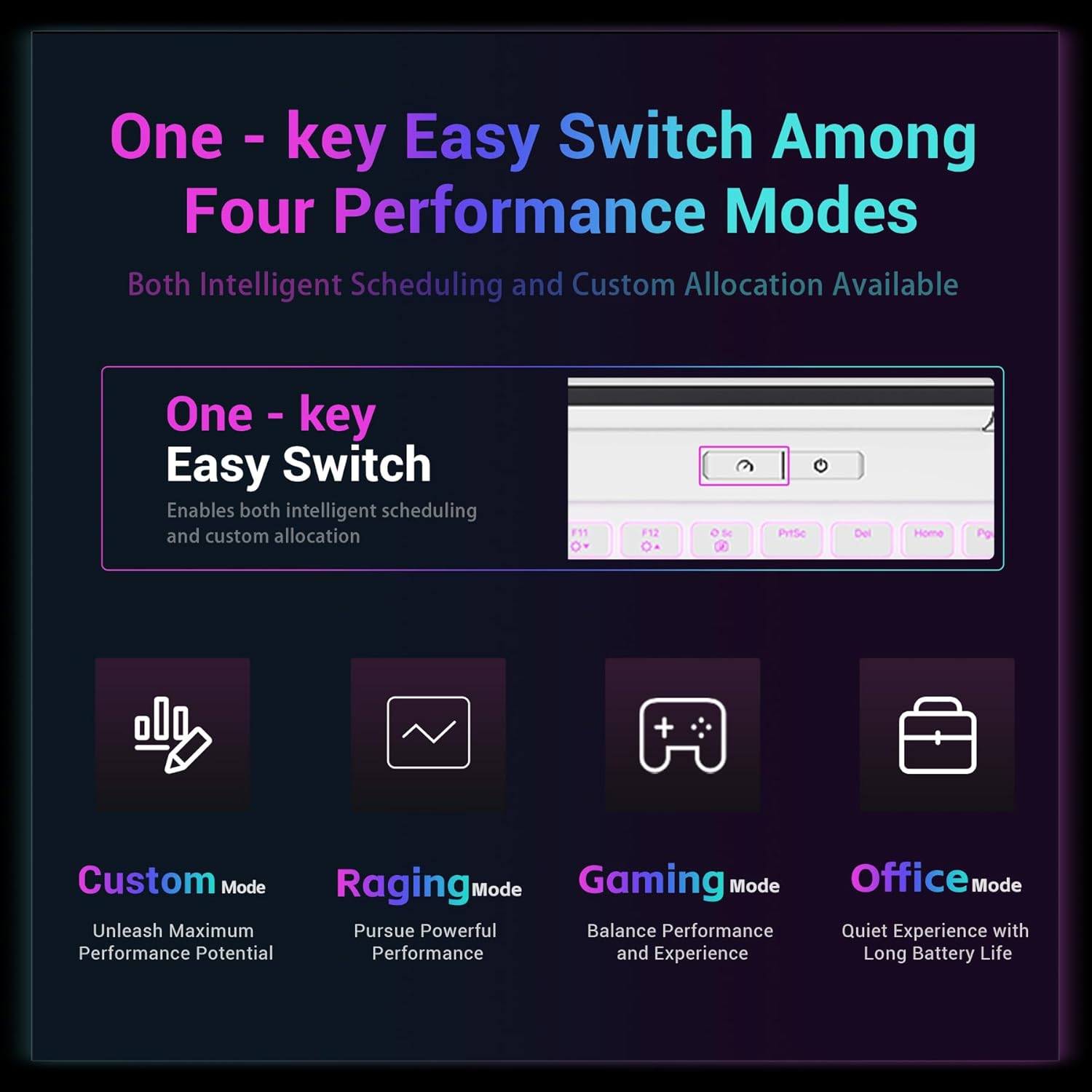
රූපය: FIREBAT ක්රීඩා ලැප්ටොප් පරිගණකයේ ඇති "One-key Easy Switch Among Four Performance Modes" හි දෘශ්ය නිරූපණයක්, එහි අරමුණ පිළිබඳ කෙටි විස්තරයක් සහිත, අභිරුචි මාදිලිය, Raging මාදිලිය, ක්රීඩා මාදිලිය සහ කාර්යාල මාදිලිය ඇතුළුව.
සංදර්ශක මාදිලි
විවිධ භාවිත අවස්ථා සපුරාලීම සඳහා ලැප්ටොප් පරිගණකය සංදර්ශක දෙකක් සහ මාතයන් තුනක් අතර නම්යශීලී මාරුවීමට සහය දක්වයි. මෙම මාතයන් ස්වාධීන සංදර්ශක සෘජු සම්බන්ධතාවය, මිශ්ර ප්රතිදානය සහ මූලික සංදර්ශක ප්රතිදානය සකස් කරයි.
- න්යෂ්ටික සංදර්ශක ප්රතිදානය: ව්යාපාරික චාරිකා සහ කාර්යාල කටයුතු සඳහා කදිමයි, බැටරි ආයු කාලය උපරිම කරයි.
- අද්විතීය සංදර්ශක සෘජු සම්බන්ධතාවය: ක්රීඩා විශේෂීකරණය සඳහා ප්රශස්ත කර ඇත, කාර්ය සාධන ප්රතිදානය උපරිම කරයි.
- මිශ්ර ප්රතිදානය: දෛනික භාවිතය සඳහා සුදුසු, බැටරි ආයු කාලය සහ කාර්ය සාධනය නම්යශීලී ලෙස මාරු කිරීම ලබා දෙයි.

රූපය: "සංදර්ශක දෙකක්, නම්යශීලී මාරු කිරීමේ ක්රම තුනක්" යන මාතෘකාවෙන් යුත් රූප සටහනක්, ලැප්ටොප් පරිගණකයට විවිධ අවස්ථා සඳහා සංදර්ශක ප්රතිදානය සකස් කළ හැකි ආකාරය නිරූපණය කරයි: න්යෂ්ටික සංදර්ශක ප්රතිදානය (ව්යාපාරික චාරිකා), අද්විතීය සංදර්ශක සෘජු සම්බන්ධතාවය (ක්රීඩා විශේෂීකරණය) සහ මිශ්ර ප්රතිදානය (දෛනික භාවිතය).
යතුරු පුවරුව සහ ටච් පෑඩ්
ලැප්ටොප් පරිගණකයේ සම්පූර්ණ ප්රමාණයේ ඊතල යතුරු සහ අංක පෑඩ් සහිත RGB පසුබිම් ආලෝකය සහිත යතුරු පුවරුවක් ඇත. වීදුරු ස්පර්ශ පෑඩ් සුමට ස්පර්ශ අත්දැකීමක් ලබා දෙයි.

රූපය: සමීප ඡායාරූපයක් view FIREBAT Gaming Laptop හි RGB Backlit Keyboard සහ Glass Touchpad හි විශේෂාංග, එහි සම්පූර්ණ ප්රමාණයේ තනි කලාප RGB පසුබිම් ආලෝකය, සුමට ස්පර්ශ වීදුරු ස්පර්ශ පෑඩ් සහ අංක පෑඩ් සහිත සම්පූර්ණ උස ඊතල යතුරු ඉස්මතු කරයි.
නඩත්තු කිරීම
පිරිසිදු කිරීම
ලැප්ටොප් පරිගණකයේ බාහිර පෙනුම පිරිසිදු කිරීම සඳහා, මෘදු, ලින්ට් රහිත රෙද්දක් භාවිතා කරන්න.ampජලය හෝ මෘදු පිරිසිදු කිරීමේ ද්රාවණයකින් ආලේප කර ඇත. රළු රසායනික ද්රව්ය වලින් වළකින්න. තිරය සඳහා, කැපවූ තිර පිරිසිදු කරන්නෙකු සහ මයික්රෝ ෆයිබර් රෙද්දක් භාවිතා කරන්න.
සිසිලන පද්ධති සත්කාරය
ලැප්ටොප් පරිගණකයේ කාර්යක්ෂම සිසිලන පද්ධතිය පැහැදිලි වායු විවරයන් මත රඳා පවතී. වායු ප්රවාහයට බාධා කරන සහ අධික උනුසුම් වීමට හේතු විය හැකි දූවිලි එකතු වීම වැළැක්වීම සඳහා නිතිපතා වායු විවරයන් පරීක්ෂා කර පිරිසිදු කරන්න. ක්රියාත්මක වන අතරතුර වා විවරයන් අවහිර නොකරන්න.

රූපය: FIREBAT ක්රීඩා ලැප්ටොප් පරිගණකයේ "ශ්රේණි බහු-ස්ථර තාප විසර්ජන පද්ධතිය" නිරූපණය කරන රූප සටහනක්, CPU (125W), GPU (115W) සහ Extreme Raging Mode Dual Roast (170W) සඳහා ඉහළ බල බරක් හැසිරවීමේ හැකියාව පෙන්වයි.
බැටරි සත්කාර
බැටරි ආයු කාලය දීර්ඝ කිරීම සඳහා, බැටරිය නිතර නිතර සම්පූර්ණයෙන්ම විසර්ජනය කිරීමෙන් වළකින්න. ලැප්ටොප් පරිගණකය දිගු කාලයක් ගබඩා කරන්නේ නම්, බැටරිය 50-60% පමණ ආරෝපණය කර ඇති බවට වග බලා ගන්න.
මෘදුකාංග යාවත්කාලීන
ප්රශස්ත කාර්ය සාධනය, ආරක්ෂාව සහ ගැළපුම සහතික කිරීම සඳහා ඔබේ මෙහෙයුම් පද්ධතිය, ධාවක සහ යෙදුම් නිතිපතා යාවත්කාලීන කරන්න.
දෝෂගවේෂණය
පොදු ගැටළු සහ විසඳුම්
| කලාපය | විය හැකි හේතුව | විසඳුම |
|---|---|---|
| ලැප්ටොප් පරිගණකය ක්රියාත්මක නොවේ. | බැටරිය බැස ගොස් ඇත, බල ඇඩැප්ටරය නිසි ලෙස සම්බන්ධ වී නොමැත, බල බොත්තම දෝෂ සහිතය. | බල ඇඩැප්ටරය ආරක්ෂිතව සම්බන්ධ කර වැඩ කරන අලෙවිසැලකට සම්බන්ධ කර ඇති බවට වග බලා ගන්න. අවම වශයෙන් මිනිත්තු 30 ක් බැටරිය ආරෝපණය කරන්න. වෙනත් බල අලෙවිසැලක් උත්සාහ කරන්න. ගැටළුව දිගටම පවතින්නේ නම්, සහාය අමතන්න. |
| භාවිතයේදී අධික උනුසුම් වීම. | අවහිර වූ වායු විවරයන්, දැඩි යෙදුම්, දූවිලි ගොඩනැගීම. | වායු විවරයන් පැහැදිලි බවත් ඒවා අවහිර නොවන බවත් සහතික කර ගන්න. ලැප්ටොප් පරිගණකය තද, පැතලි මතුපිටක් මත භාවිතා කරන්න. වාතාශ්රයන්ගෙන් දූවිලි පිරිසිදු කරන්න. අඩු ඉල්ලුමක් ඇති කාර්ය සාධන මාදිලියකට මාරු වන්න. |
| බාහිර මොනිටරයේ සංදර්ශකයක් නොමැත. | වැරදි කේබලයක්, මොනිටරයේ වැරදි ආදානයක් තෝරාගෙන ඇත, දර්ශන සැකසුම්. | HDMI/Mini DP කේබල් සම්බන්ධතාවය පරීක්ෂා කරන්න. බාහිර මොනිටරය ක්රියාත්මක කර නිවැරදි ආදාන ප්රභවයට සකසා ඇති බව සහතික කර ගන්න. ඔබන්න වින්ඩෝස් යතුර + පී සංදර්ශක මාදිලි හරහා චක්රීය කිරීමට. |
| Wi-Fi සම්බන්ධතා ගැටළු. | Wi-Fi අක්රිය කර ඇත, ධාවක ගැටළු, රවුටර ගැටළු. | Windows සැකසුම් තුළ Wi-Fi සක්රීය කර ඇති බවට වග බලා ගන්න. ලැප්ටොප් සහ රවුටරය නැවත ආරම්භ කරන්න. Wi-Fi ධාවක යාවත්කාලීන කරන්න. |
පිරිවිතර
| විශේෂාංගය | විස්තර |
|---|---|
| මාදිලියේ නම | i7-5060-32GB/1TB |
| ප්රොසෙසරය | Intel Core i7-13700HX (cores 16, නූල් 24, 5.0 GHz දක්වා) |
| ග්රැෆික් කාඩ්පත | NVIDIA RTX 5060 (8GB GDDR7) |
| RAM | 32GB DDR5 (5200MHz, 96GB දක්වා පුළුල් කළ හැකි) |
| ගබඩා කිරීම | 1TB PCIe 4.0 M.2 SSD (ද්විත්ව තව්, 8TB දක්වා පුළුල් කළ හැකි) |
| ප්රදර්ශනය කරන්න | අඟල් 16 QHD (2560x1600) IPS, 300Hz නැවුම් කිරීමේ අනුපාතය, 500 nits, 100% sRGB |
| රැහැන් රහිත සම්බන්ධතාව | ඉන්ටෙල් AX210 WiFi 6E, බ්ලූටූත් 5.3 |
| රැහැන්ගත සම්බන්ධතාවය | 2.5Gbps RJ45 LAN |
| වරායන් | 1x කුඩා DP 2.1a, 1x HDMI 2.1, 3x USB-A 3.2 Gen1, 2x USB-C (DP1.4 සහ PD සමඟ), 1x කෙන්සිංටන් ලොක්, 1x 3.5mm ඕඩියෝ ජැක් |
| බැටරි | 5200mAh 80Wh |
| බර | රාත්තල් 4.7 (කිලෝ ග්රෑම් 2.15) |
| මානයන් (LxWxH) | අඟල් 14 x 9.7 x 0.9 |
| මෙහෙයුම් පද්ධතිය | පෙරනිමි (වින්ඩෝස්) |
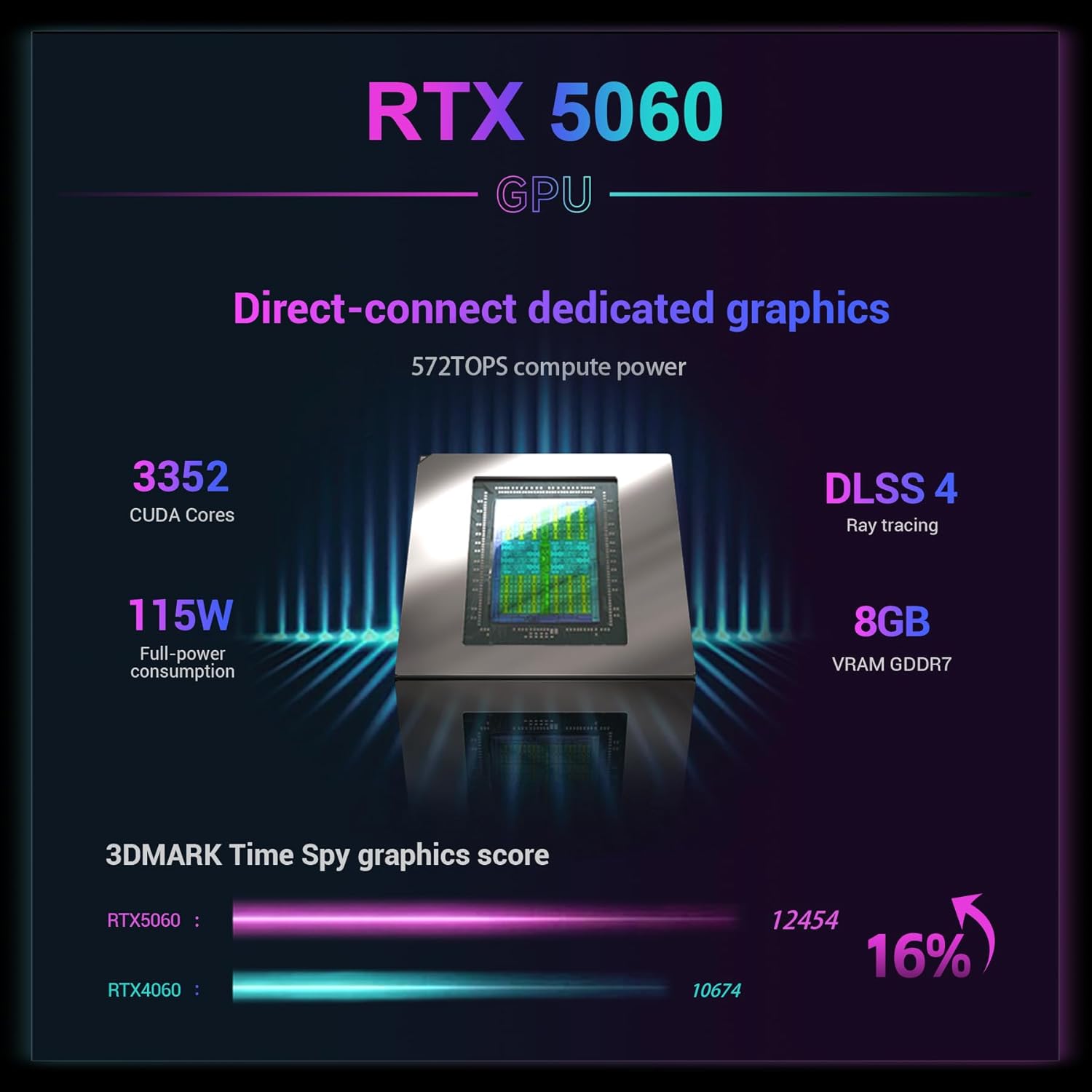
රූපය: RTX 5060 GPU හි පිරිවිතරයන් විස්තර කරන ග්රැෆික් එකක්, එයට CUDA Cores 3352, 115W පූර්ණ බල පරිභෝජනය, Ray tracing සහිත DLSS 4, 8GB VRAM GDDR7, සහ 3DMARK Time Spy ග්රැෆික් ලකුණු සංසන්දනයක් ඇතුළත් වේ.
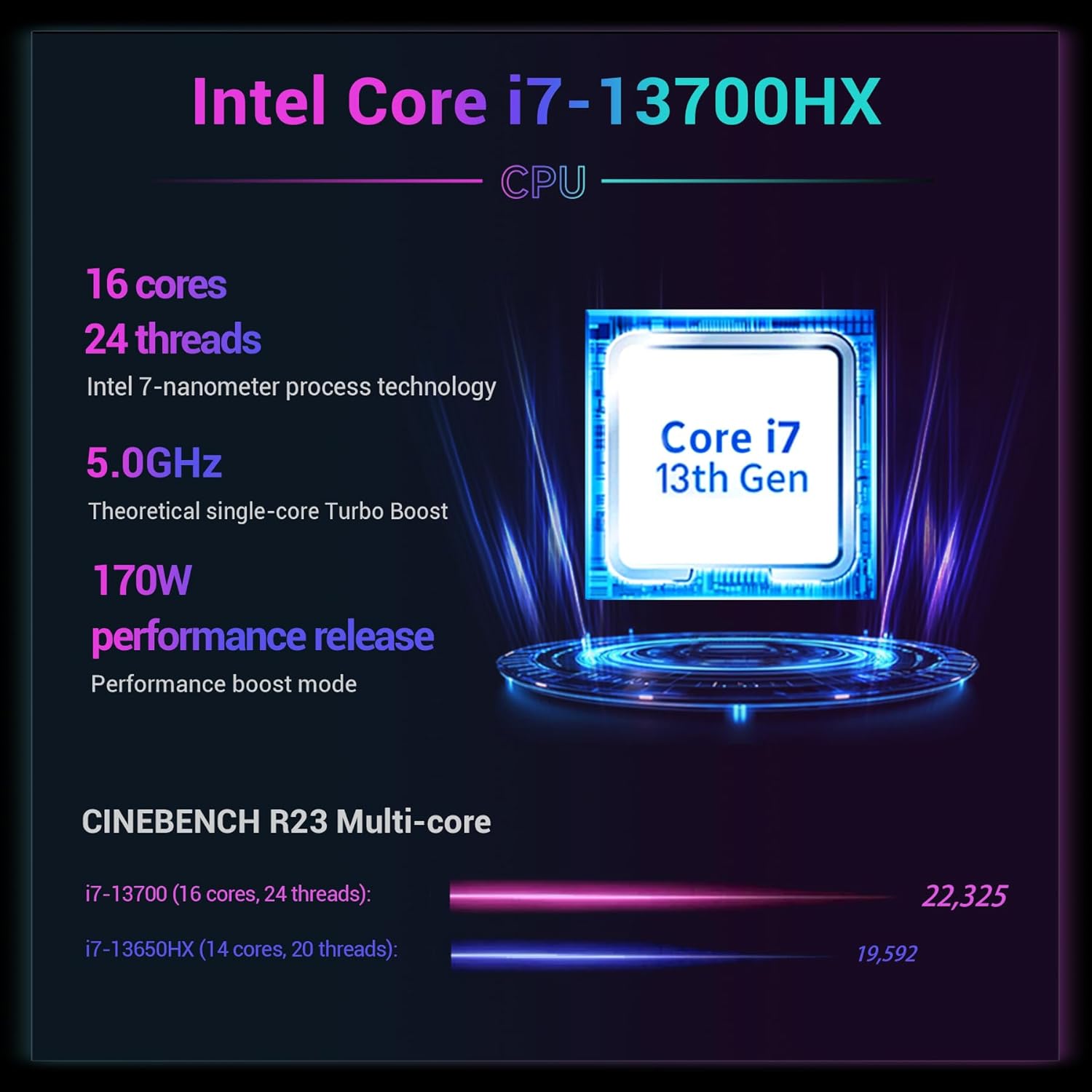
රූපය: Intel Core i7-13700HX CPU හි පිරිවිතරයන් විස්තර කරන ග්රැෆික් එකක්, එයට මධ්ය 16ක්, නූල් 24ක්, Intel 7-නැනෝමීටර ක්රියාවලි තාක්ෂණය, 5.0GHz න්යායාත්මක තනි-හර ටර්බෝ බූස්ට්, 170W කාර්ය සාධන නිකුතුව සහ CINEBENCH R23 බහු-හර ලකුණු ඇතුළත් වේ.

රූපය: 2.5K අල්ට්රා-විභේදන පුළුල්-වර්ණ-ගැමට් ක්රීඩා තිරයේ දෘශ්ය නිරූපණයක්, එහි අතිශය ඉහළ විභේදනය, පුළුල් වර්ණ ගැමට්, ඉහළ දීප්තිය, ඉහළ නැවුම් කිරීමේ අනුපාතය සහ ඉහළ තිර-ශරීර අනුපාතය ඉස්මතු කරයි.

රූපය: සුමට ක්රීඩා සඳහා 300Hz අතිශය ඉහළ නැවුම් කිරීමේ අනුපාතයක සහ පැහැදිලි දෘශ්ය සඳහා nits 500 ක ඉහළ දීප්තියේ ප්රතිලාභ, විශේෂයෙන් අඳුරු ප්රදේශවල පෙන්නුම් කරන සංසන්දනයක්.

රූපය: "Massive Storage Swift Response" හැකියාවන් නිරූපණය කරන රූප සටහනක්, ද්විත්ව M.2 SSD Slots (PCIe 4.0, 8TB දක්වා පුළුල් කළ හැකි) සහ ද්විත්ව SO-DIMM RAM Slots (DDR5 4800MHz, 96GB දක්වා පුළුල් කළ හැකි) සහ 80Wh බැටරි ධාරිතාවය සමඟින් පෙන්වයි.
වගකීම් සහ සහාය
වගකීම් තොරතුරු සහ තාක්ෂණික සහාය සඳහා, කරුණාකර FIREBAT සෘජුවම අමතන්න.
විද්යුත් තැපෑල: support@firebatpc.com
Webඅඩවිය: www.firebatpc.com වෙබ් අඩවිය
ඔබට Amazon හි මිලදී ගැනීමට ඇති ආරක්ෂණ සැලසුම් වෙතද යොමු විය හැකිය:
වීඩියෝව: FIREBAT වෙතින් නිල නිෂ්පාදන වීඩියෝවක්, showcasing ක්රීඩා ලැප්ටොප් පරිගණකයේ විශේෂාංග සහ හැකියාවන්. මෙම වීඩියෝව දෘශ්ය විස්තරයක් සපයයි.view ලැප්ටොප් පරිගණකයේ සැලසුම, ක්රියාකාරිත්වය සහ පරිශීලක අත්දැකීම්.


