හැඳින්වීම
The BIGBEN EPOK REWIND+ BTTAPEBL is a portable cassette player and recorder designed to combine the classic audio experience of cassette tapes with modern Bluetooth 5.4 wireless technology. This device allows for both playback and recording of audio cassettes, offering versatile connectivity options including an integrated speaker, 3.5mm headphone jack, and bidirectional Bluetooth functionality. It features an auto-reverse mechanism for uninterrupted listening and is powered by a rechargeable USB-C battery.
පැකේජයේ අන්තර්ගතය
Before use, please ensure all items are present in the package:
- BIGBEN EPOK REWIND+ Cassette Player
- වින්tage-style Wired Headphones (3.5mm jack)
- Blank Audio Cassette
- USB-C ආරෝපණ කේබලය
- Wooden Pencil (for manual tape winding)

The product packaging clearly displays the cassette player and its included accessories: headphones, a blank cassette, and a USB-C cable.

ඕවර් එකක්view of the BIGBEN EPOK REWIND+ components: the blue cassette player, orange-padded wired headphones, a blank audio cassette, and a wooden pencil.
සැලසුම
1. උපාංගය ආරෝපණය කිරීම
The EPOK REWIND+ features a built-in 1200mAh rechargeable battery. Before first use, fully charge the device.
- Connect the supplied USB-C charging cable to the USB-C port on the side of the player.
- කේබලයේ අනෙක් කෙළවර සම්මත USB බල ඇඩැප්ටරයකට (ඇතුළත් කර නැත) හෝ පරිගණකයේ USB පෝට් එකකට සම්බන්ධ කරන්න.
- ආරෝපණ දර්ශක ආලෝකය දැල්වෙනු ඇත. සම්පූර්ණයෙන්ම ආරෝපණය වූ පසු, මාදිලිය අනුව ආලෝකයේ වර්ණය වෙනස් වීමට හෝ නිවා දැමීමට හැකිය.
2. කැසට් පටයක් ඇතුළු කිරීම
- Locate the 'OPEN' switch or button on the player and slide/press it to open the cassette compartment door.
- Insert an audio cassette with the exposed tape facing towards the player's head mechanism. Ensure the cassette fits securely.
- කැසට් මැදිරියේ දොර නිසි තැනට වැටෙන තුරු තදින් වසා දමන්න.
3. Connecting Headphones (Optional)
For private listening, connect the included 3.5mm wired headphones or any compatible headphones to the 3.5mm headphone jack on the side of the player.

A user holding the EPOK REWIND+ cassette player while listening through wired headphones, demonstrating portable use.
මෙහෙයුම් උපදෙස්
Basic Cassette Playback
- Insert a cassette as described in the Setup section.
- ඔබන්න සෙල්ලම් කරන්න නැවත ධාවනය ආරම්භ කිරීමට බොත්තම.
- Adjust the volume using the rotary volume knob.
- නැවත ධාවනය නැවැත්වීමට, ඔබන්න නවත්වන්න බොත්තම.
- වේගයෙන් ඉදිරියට යාමට, ඔබන්න FF බොත්තම. ඔබන්න නවත්වන්න to cease fast forwarding.
- රිවයින්ඩ් කිරීමට, ඔබන්න REW බොත්තම. ඔබන්න නවත්වන්න to cease rewinding.
ස්වයංක්රීය-ප්රතිලෝම ශ්රිතය
The EPOK REWIND+ features an auto-reverse function, allowing continuous playback of both sides of a cassette without manual flipping.
- During playback, the player will automatically switch to the other side of the cassette once the current side ends.
- To manually reverse the tape direction, press the DIR (Direction) button.
Bluetooth Connectivity (5.4)
The device supports bidirectional Bluetooth 5.4, functioning as both a transmitter (TX) and a receiver (RX).
Transmitter Mode (TX): Streaming Cassette Audio to Bluetooth Headphones/Speakers
- Slide the Bluetooth mode selector switch to the TX තනතුර.
- ඔබගේ බ්ලූටූත් හෙඩ්ෆෝන් හෝ ස්පීකරය යුගල කිරීමේ මාදිලියේ ඇති බව සහතික කර ගන්න.
- The EPOK REWIND+ will automatically search for and connect to nearby Bluetooth audio devices. A successful connection will be indicated by a specific LED light pattern or audio cue.
- Begin cassette playback. The audio will now stream wirelessly to your connected Bluetooth device.
Receiver Mode (RX): Playing Smartphone Audio through the Player's Speaker/Headphones
- Slide the Bluetooth mode selector switch to the RX තනතුර.
- On your smartphone or other audio source, search for Bluetooth devices and select "EPOK REWIND+" to pair.
- Once connected, audio from your smartphone will play through the EPOK REWIND+'s integrated speaker or connected wired headphones.
කැසට් පටයට පටිගත කිරීම
The EPOK REWIND+ allows recording from two sources: an integrated microphone or a Bluetooth audio source (in RX mode).
Recording from Integrated Microphone
- Insert a blank or recordable cassette.
- ඔබන්න REC (පටිගත කරන්න) බොත්තම. සෙල්ලම් කරන්න බොත්තම ද එකවර ක්රියාත්මක වේ.
- Speak into the integrated microphone or place the player near the sound source you wish to record.
- පටිගත කිරීම නැවැත්වීමට, ඔබන්න නවත්වන්න බොත්තම.
Recording from Bluetooth Source (Mixtape Creation)
- Insert a blank or recordable cassette.
- Set the Bluetooth mode selector switch to RX and pair your smartphone or audio source as described above.
- Start playing audio on your smartphone.
- ඔබන්න REC button on the EPOK REWIND+. The සෙල්ලම් කරන්න බොත්තම ද ක්රියාත්මක වනු ඇත.
- The audio from your smartphone will now be recorded onto the cassette.
- පටිගත කිරීම නැවැත්වීමට, ඔබන්න නවත්වන්න බොත්තම.

සවිස්තරාත්මක view of the EPOK REWIND+ cassette player, highlighting the cassette window and control buttons for playback and recording.
නඩත්තු කිරීම
උපාංගය පිරිසිදු කිරීම
- ක්රීඩකයාගේ බාහිර පෙනුම පිස දැමීමට මෘදු වියළි රෙද්දක් භාවිතා කරන්න.
- For the tape head and pinch rollers, use a cotton swab lightly dampened with isopropyl alcohol. Gently clean these components to ensure optimal sound quality and prevent tape damage. Perform this cleaning periodically, especially after extended use.
- පිරිසිදු කිරීමට පෙර උපාංගය ක්රියා විරහිත කර ඕනෑම බල ප්රභවයකින් විසන්ධි කර ඇති බවට සහතික වන්න.
කැසට් සත්කාර
- දූවිලි හා භෞතික හානිවලින් ආරක්ෂා වීම සඳහා කැසට් පට ඒවායේ ආවරණවල ගබඩා කරන්න.
- Avoid exposing cassettes to extreme temperatures or direct sunlight.
- If a tape becomes loose, use the included wooden pencil to manually wind the tape taut before inserting it into the player. Insert the pencil into one of the cassette's spools and rotate it gently.

A hand demonstrates the traditional method of using a pencil to manually wind a cassette tape, a useful technique for tape maintenance.
බැටරි සත්කාර
- බැටරි ආයු කාලය දීර්ඝ කිරීම සඳහා, බැටරිය නිතර නිතර සම්පූර්ණයෙන්ම විසර්ජනය කිරීමෙන් වළකින්න.
- If storing the device for an extended period, charge it to approximately 50% capacity.
දෝෂගවේෂණය
- බලය නැත: Ensure the device is charged. Connect the USB-C cable and check the charging indicator.
- No Sound from Cassette:
- Check if headphones are properly plugged in or if Bluetooth is connected (in TX mode).
- Ensure the volume knob is turned up.
- Verify the cassette is inserted correctly and the tape is not tangled or damaged.
- Clean the tape head and pinch rollers.
- Bluetooth Not Connecting (TX Mode):
- Ensure the Bluetooth mode selector is in the TX තනතුර.
- Put your receiving Bluetooth device (headphones/speaker) into pairing mode.
- උපාංග එකිනෙකට සමීපව ගෙන යන්න.
- Turn off and on both devices to reset Bluetooth.
- Bluetooth Not Connecting (RX Mode):
- Ensure the Bluetooth mode selector is in the RX තනතුර.
- On your smartphone, ensure Bluetooth is enabled and search for "EPOK REWIND+".
- Forget the device on your smartphone and re-pair if issues persist.
- පටිගත කිරීමේ ගැටළු:
- Ensure a recordable cassette is inserted and the record protection tabs are intact.
- Verify the audio source (microphone or Bluetooth in RX mode) is active and providing sound.
- Check microphone placement for clear voice recording.
පිරිවිතර
| විශේෂාංගය | විස්තර |
|---|---|
| වෙළඳ නාමය | බිග්බෙන් |
| ආදර්ශ අංකය | BTTAPEBL |
| සම්බන්ධතාවය | Bluetooth 5.4 (Bidirectional TX/RX) |
| ශ්රව්ය ප්රතිදානය | ඒකාබද්ධ ස්පීකර්, 3.5mm හෙඩ්ෆෝන් ජැක් |
| පටිගත කිරීම | Integrated Microphone, Bluetooth (RX mode) |
| විශේෂ ලක්ෂණ | ස්වයංක්රීය ආපසු හැරවීම |
| බැටරි | Rechargeable 1200mAh (USB-C charging) |
| මානයන් (ආසන්න වශයෙන්) | 11 cm (Length) x 7.7 cm (Height) x 2.4 cm (Width) |
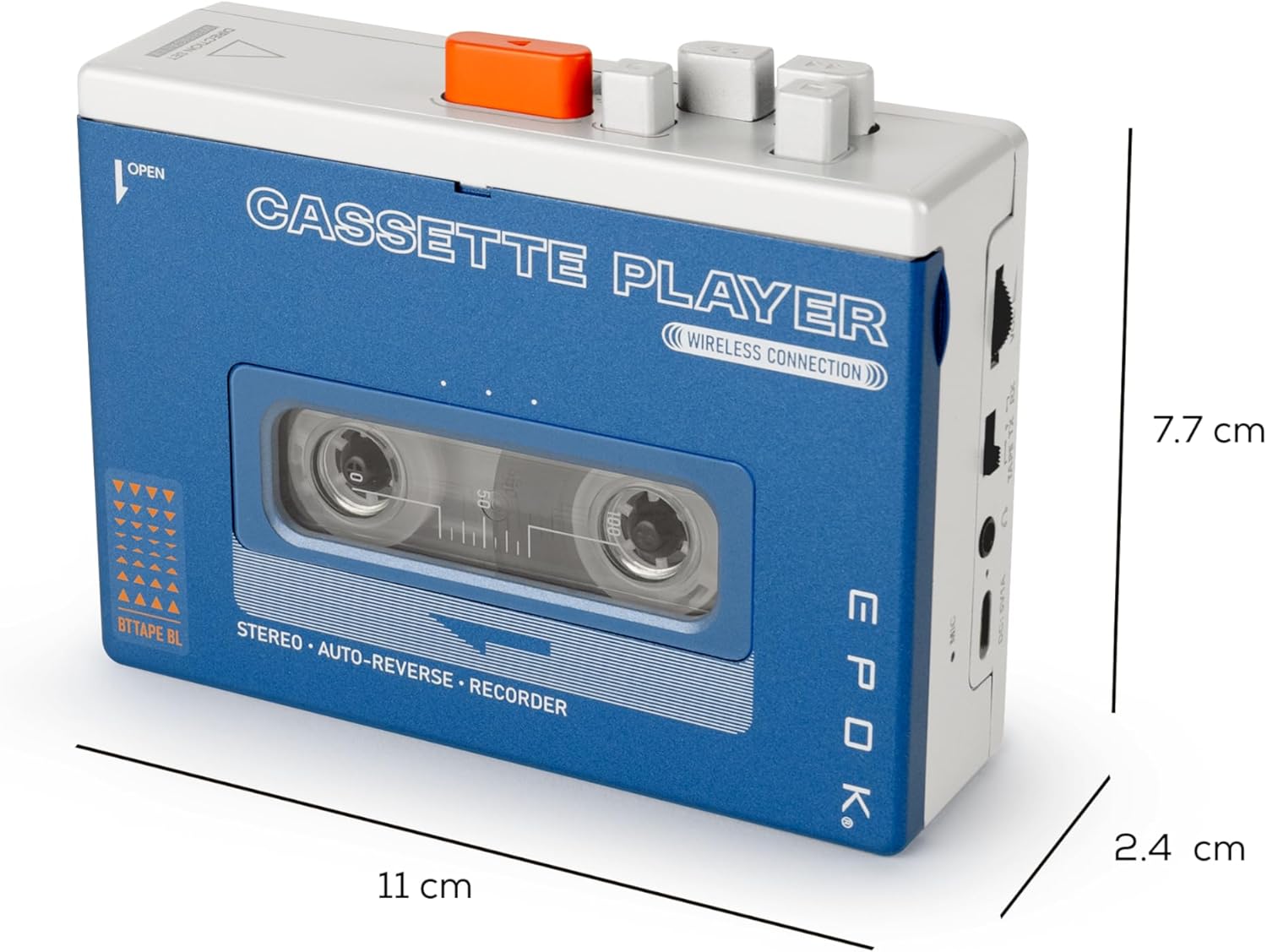
The EPOK REWIND+ cassette player shown with its approximate dimensions: 11 cm in length, 7.7 cm in height, and 2.4 cm in width.


