1. හැඳින්වීම
The SmallRig RM 03 Macro Photography LED Light is a versatile and portable lighting solution designed for close-up photography and videography. It features an adjustable beam angle, multiple color options, and various mounting accessories to provide precise illumination for small subjects. This manual provides essential information for the safe and effective use of your RM 03 light.
2. පැකේජ අන්තර්ගතය
පහත ලැයිස්තුගත කර ඇති සියලුම අයිතම ඔබේ පැකේජයට ඇතුළත් කර ඇති බව තහවුරු කරගන්න:
- RM 03 LED Light x 1
- විසරණය x 1
- Four-Leaf Barndoor x 1
- හෙවි ඩියුටි Clamp x 1
- බිම් කොටස් x 1
- Cold Shoe Mount x 1
- ස්පොට්ලයිට් x 1
- Film Slide x 10
- USB-C කේබල් x 1
- පරිශීලක අත්පොත x 1

Image: The SmallRig RM 03 Macro Photography LED Light with its various accessories, including the flexible arm light, diffuser, barndoor, clamp, ground stake, cold shoe mount, spotlight, film slides, and USB-C cable.
3. නිෂ්පාදන අවසන්view
The RM 03 features a flexible gooseneck design with an integrated LED light head and a control handle. The light head allows for beam angle adjustment and accepts various light modifiers.
ප්රධාන සංරචක:
- LED Light Head: Contains five 3W high-brightness LED lamps (cold white, warm white, red, green, blue).
- නම්යශීලී හස්තය: High-strength, fatigue-resistant metal spring for precise positioning.
- පාලන හසුරුව: Integrated power and control buttons, USB-C charging port, and 1/4"-20 threaded hole.
- විසරණය: Softens light output.
- Four-Leaf Barndoor: Controls light spill and shapes the beam.
- අවධානය යොමු කිරීම: Concentrates the light beam.
- Film Slides: 10 different patterns for creative lighting effects.
4. පිහිටුවීම
Before initial use, ensure the RM 03 light is fully charged.
4.1 උපාංගය ආරෝපණය කිරීම
- Locate the USB-C charging port on the control handle.
- Connect the provided USB-C cable to the port and a compatible 5V/1A USB power source (not included).
- The charging indicator light will show charging status. A full charge provides approximately 140 minutes of runtime.

Image: The SmallRig RM 03 light connected to a power bank via its USB-C cable, demonstrating its ability to charge during use for extended runtime.
5. මෙහෙයුම් උපදෙස්
5.1 බලය සක්රිය/අක්රිය කිරීම සහ දීප්තිය ගැලපීම
- Press and hold the power button on the control handle to turn the light on or off.
- Short press the brightness adjustment button to cycle through 5 levels of brightness.

Image: A visual representation of the 5-level brightness adjustment feature, showing a small mushroom illuminated with increasing intensity from left to right.
5.2 වර්ණ තෝරා ගැනීම
The RM 03 offers five distinct colors:
- Cold White (6500K)
- උණුසුම් සුදු (2200K)
- රතු
- කොළ පාටයි
- නිල්
Use the color selection button on the control handle to cycle through these options.

Image: A demonstration of the five available colors (Cold, Warm, Red, Green, Blue) illuminating miniature scenes, showcasing the light's versatility for mood and effect.
5.3 Beam Angle Adjustment
The light head can be adjusted to change the beam angle from 4° to 32°.
- To diffuse the beam: Retract the light head.
- To narrow the beam: Extend the light head.

Image: An illustration demonstrating the adjustable beam angle feature. Retracting the light head diffuses the beam, while extending it narrows the beam for precise lighting.
5.4 Using Light Modifiers (Diffuser, Barndoor, Spotlight, Film Slides)
The RM 03 comes with several accessories to shape and modify the light:
- විසරණය: Attach the diffuser to the front of the light head to soften the light and reduce harsh shadows.
- Four-Leaf Barndoor: Attach the barndoor to control light spill and direct the light more precisely. This helps reduce scattered light.
- අවධානය යොමු කිරීම: Use the spotlight attachment to create a more focused and intense beam.
- Film Slides: Insert one of the 10 provided film slides into the spotlight attachment to project patterns and enhance the atmosphere of your scene.

Image: The RM 03 light projecting a circular pattern, accompanied by a display of 10 different film slides (gobos) that can be used to create various atmospheric effects.
6 සවි කිරීමේ විකල්ප
The flexible design and included accessories allow for versatile mounting in various shooting environments:
- සීතල සපත්තු ඇඩැප්ටරය: Attach the cold shoe mount to your camera's hot shoe for on-camera macro lighting.
- හෙවි ඩියුටි Clamp: cl භාවිතා කරන්නamp to secure the light to a desk, table edge, or other surfaces for stable desktop lighting.
- 1/4"-20 නූල් සිදුර: The control handle features a 1/4"-20 screw hole, allowing attachment to tripods, light stands, or other compatible gear.
- බිම් කොටස්: For outdoor nature photography, insert the ground stake into soft ground to position the light precisely.
- නම්යශීලී හස්තය: The arm itself can be coiled around objects like tree branches or tripod legs for creative positioning.
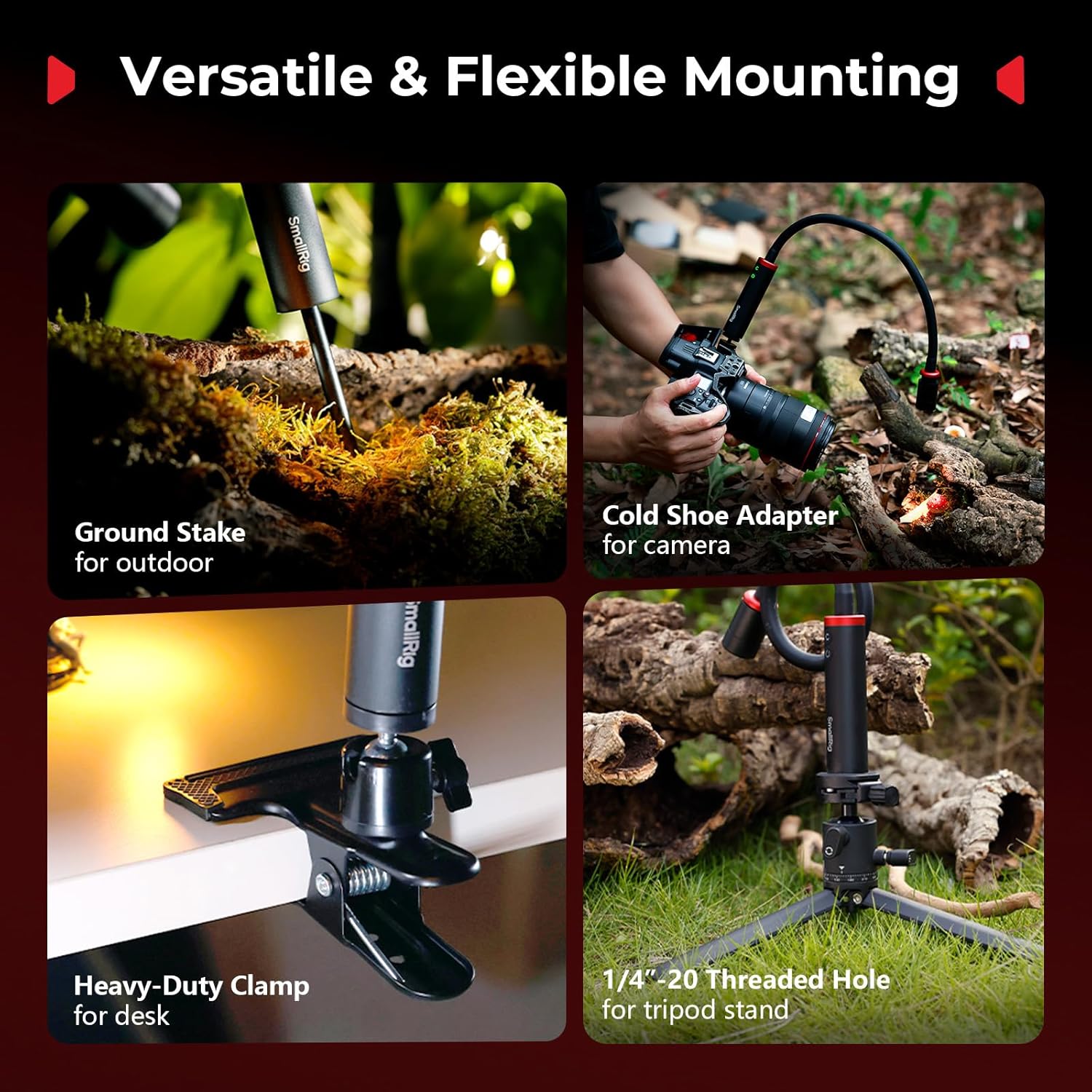
Image: A collage illustrating the versatile mounting options: using the ground stake for outdoor scenes, the cold shoe adapter for camera mounting, the heavy-duty clamp for desktop use, and the 1/4"-20 threaded hole for tripod attachment.

Image: The flexible arm of the SmallRig RM 03 light bent to precisely illuminate a small mushroom, highlighting its effortless and precise positioning capabilities.
7. නඩත්තු කිරීම
7.1 පිරිසිදු කිරීම
Wipe the light and accessories with a soft, dry cloth. Avoid using harsh chemicals or abrasive materials.
7.2 කාලගුණ ප්රතිරෝධය
The RM 03 light has an IP54 rating, meaning it is protected against dust ingress and splashing water from any direction. While suitable for outdoor use in light rain or dusty conditions, it is not designed for submersion or heavy downpours. Ensure the USB-C port cover is securely closed when exposed to moisture.
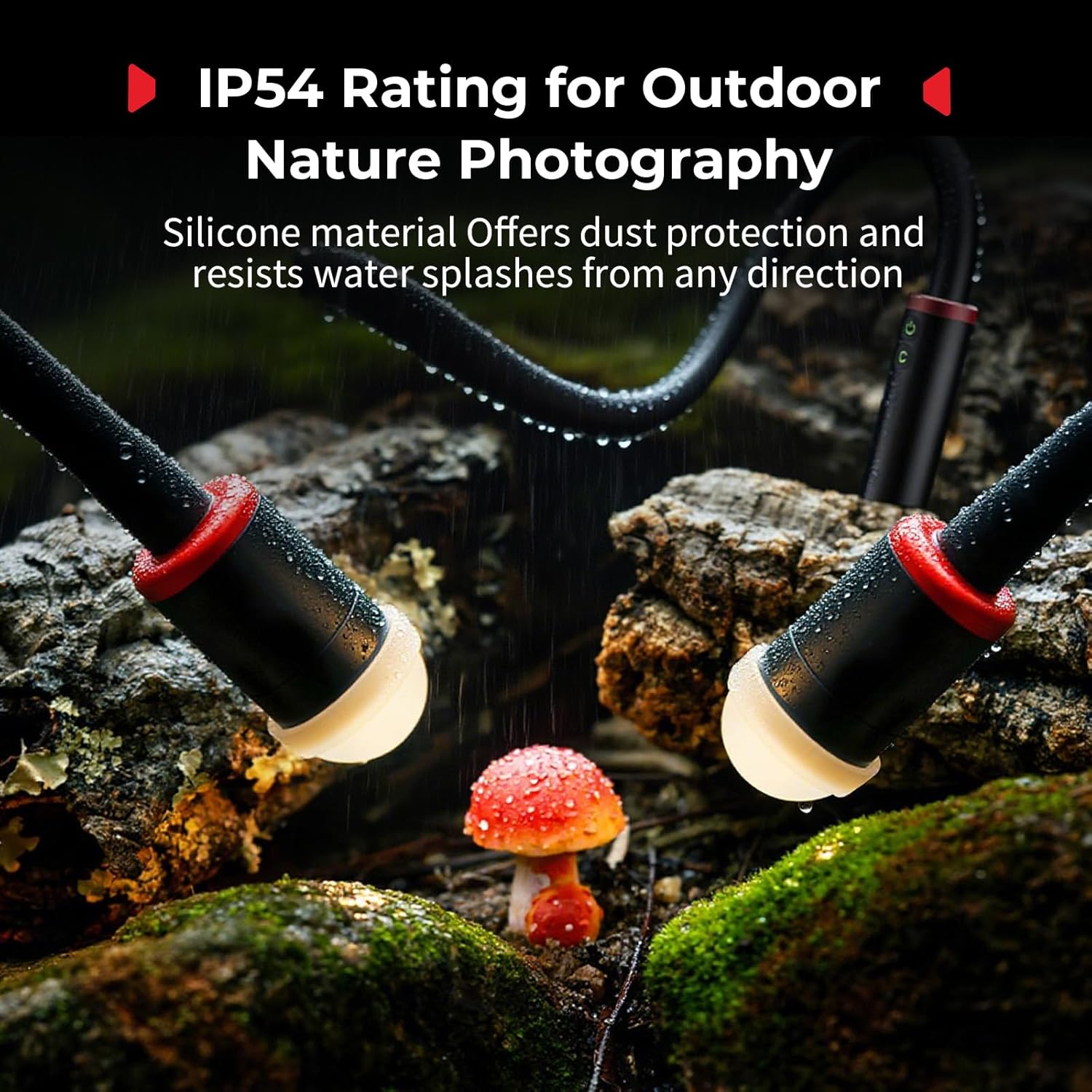
Image: Two RM 03 lights illuminating a mushroom in a damp, mossy environment, demonstrating its IP54 weather resistance for outdoor nature photography.
7.3 ගබඩා කිරීම
භාවිතයේ නොමැති විට සෘජු හිරු එළියෙන් සහ අධික උෂ්ණත්වයන්ගෙන් ඈත්ව සිසිල් වියළි ස්ථානයක උපාංගය ගබඩා කරන්න.
8. දෝශ නිරාකරණය
- ආලෝකය ක්රියාත්මක නොවේ: බැටරිය ආරෝපණය වී ඇති බවට වග බලා ගන්න. USB-C කේබලය භාවිතයෙන් බල ප්රභවයකට සම්බන්ධ කරන්න.
- ආලෝක ප්රතිදානය අඳුරුයි: Check the brightness setting and ensure the battery is sufficiently charged.
- USB-C port cover issues: Ensure the cover is properly seated to maintain IP54 rating. If it becomes loose, contact customer support.
- For other issues, refer to the contact information in the Support section.
9. පිරිවිතර

Image: A visual summary of the RM 03 Macro Photography Light, including its components and a table detailing its technical specifications.
| විශේෂාංගය | විස්තර |
|---|---|
| ආදර්ශ අංකය | 5480 |
| බල ප්රතිදානය (උපරිම) | 3W |
| ආදානය | 5V / 1A |
| LED වර්ණ | Red, Green, Blue, Cold White (6500K), Warm White (2200K) |
| CRI | 95 |
| TLCI | 92 |
| කදම්භ කෝණ සකස් කිරීම | 4° සිට 32° දක්වා |
| බැටරි ධාරිතාව | 2000mAh (3.7V / 7.4Wh) |
| බැටරි ආයු කාලය | Up to 140 minutes (at full brightness) |
| ආරෝපණ වරාය | USB Type-C |
| කාලගුණ ප්රතිරෝධය | IP54 Rating (Dust protected, splash water resistant) |
| නිෂ්පාදන මානයන් | 530.0 x 28.0mm (අඟල් 20.9 x 1.1) |
| අයිතමයේ බර | ග්රෑම් 300.0 (අවුන්ස 10.6) |
| ද්රව්ය | ඇලුමිනියම් මිශ්ර ලෝහය |
10. වගකීම් සහ සහාය
10.1 වගකීම් තොරතුරු
SmallRig products typically come with a limited warranty. Please refer to the warranty card included with your product or visit the official SmallRig website for detailed warranty terms and conditions specific to the RM 03 Macro Photography LED Light.
10.2 පාරිභෝගික සහාය
For technical assistance, product inquiries, or warranty claims, please contact SmallRig customer support through their official webවෙබ් අඩවිය හෝ ඔබේ මිලදී ගැනීමේ රිසිට්පතේ සපයා ඇති සම්බන්ධතා තොරතුරු.
SmallRig Official Webඅඩවිය: www.smallrig.com


