1. හැඳින්වීම
This manual provides comprehensive instructions for the safe and efficient operation of your TechniSat Viola under-cabinet kitchen radio. Please read this manual thoroughly before using the device and retain it for future reference. This device combines modern design with practical features for your kitchen or bedroom.
2 ආරක්ෂිත තොරතුරු
ගින්න, විදුලි කම්පනය සහ තුවාල ඇතිවීමේ අවදානම අවම කිරීම සඳහා මෙම නිෂ්පාදනය භාවිතා කරන විට සෑම විටම මූලික ආරක්ෂක පියවරයන් අනුගමනය කරන්න.
- උපාංගය වැසි හෝ තෙතමනය නිරාවරණය නොකරන්න.
- c එක අරින්න එපාasing. සියලුම සේවා සුදුසුකම් ලත් පුද්ගලයින් වෙත යොමු කරන්න.
- බල සැපයුම් පරිමාව සහතික කරන්නtage උපාංගයේ දක්වා ඇති අවශ්යතා සමග ගැලපේ.
- උපාංගය තාප ප්රභවයන් අසල හෝ සෘජු හිරු එළියේ තැබීමෙන් වළකින්න.
- දරුවන්ට ළඟා විය නොහැකි ලෙස තබා ගන්න.
3. පැකේජ අන්තර්ගතය
The TechniSat Viola kitchen radio package includes the following items:
- TechniSat Viola Kitchen Radio (Anthracite)
- ලූප් ඇන්ටනා
- බල ඇඩැප්ටරය
- සවිකරන උපාංග
- පරිශීලක අත්පොත
4. නිෂ්පාදන අවසන්view
Familiarize yourself with the components and controls of your TechniSat Viola radio.
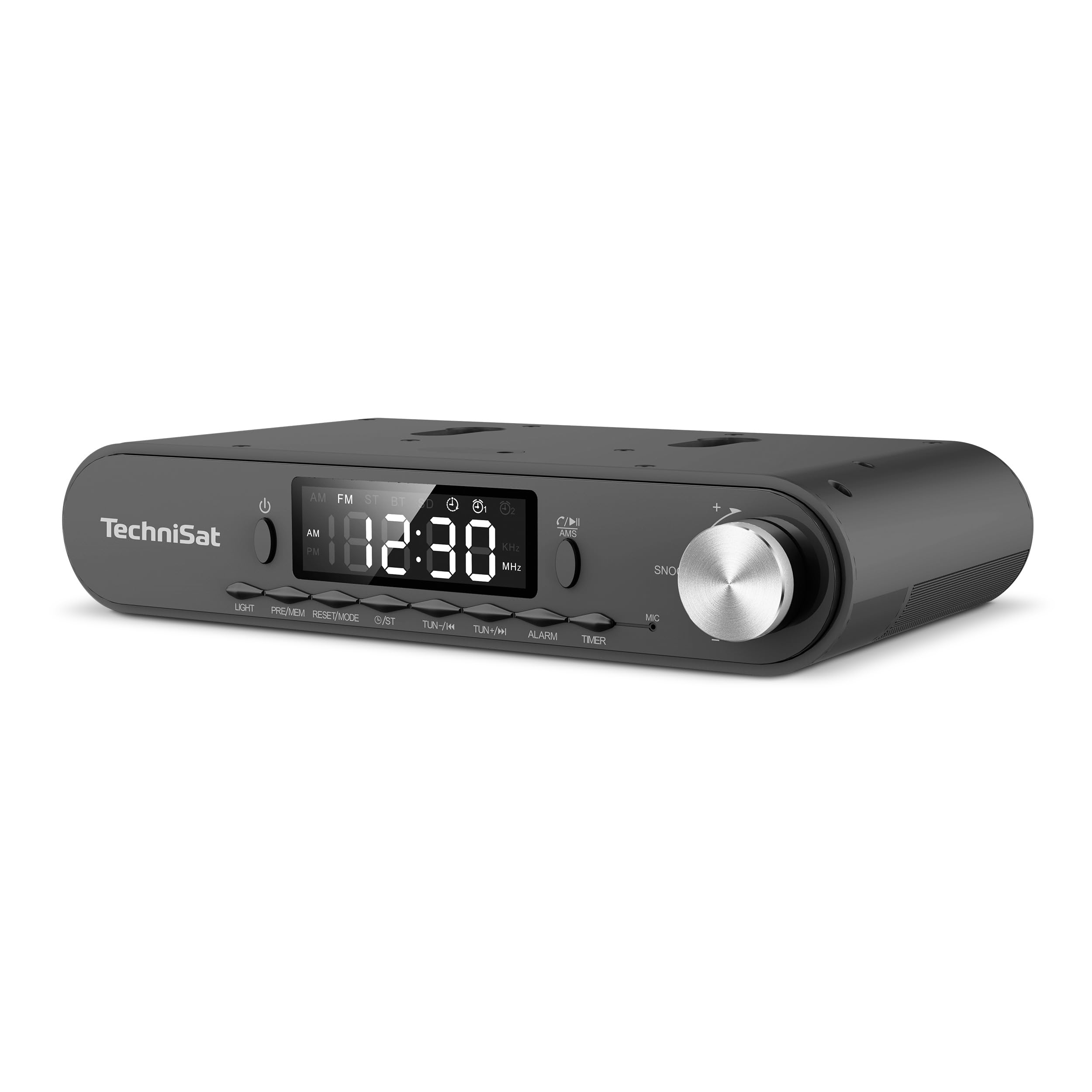
රූපය 1: Front panel of the TechniSat Viola radio. This image displays the front panel of the TechniSat Viola radio, showing the LED display, control buttons (LIGHT, MODE/RESET, MEM/PRE, TUN-/K, TUN+/I, ALARM, TIMER), power button, and the volume/snooze knob. The TechniSat logo is visible on the left.
පාලක පැනල පිරිසැලසුම:
- බල බොත්තම: උපාංගය සක්රිය හෝ අක්රිය කරයි.
- නායකත්වය විදහා: Shows time, frequency, and mode information.
- ආලෝක බොත්තම: Activates the integrated LED work light.
- MODE/RESET Button: Switches between operating modes and resets settings.
- MEM/PRE Button: Stores and recalls radio station presets.
- TUN-/K and TUN+/I Buttons: Adjusts tuning frequency or navigates tracks.
- අනතුරු ඇඟවීමේ බොත්තම: අනතුරු ඇඟවීමේ කාර්යයන් සකසා කළමනාකරණය කරයි.
- TIMER බොත්තම: Accesses and controls the cooking timer.
- Volume/Snooze Knob: Adjusts volume; press for snooze function.
- MIC: Microphone for hands-free function.
5. පිහිටුවීම
Follow these steps to set up your TechniSat Viola radio:
- ඇසුරුම්: ඇසුරුම්කරණයෙන් සියලුම සංරචක ප්රවේශමෙන් ඉවත් කරන්න.
- ඇන්ටෙනා සම්බන්ධතාවය: Connect the provided loop antenna to the external antenna port on the back of the radio. Position the antenna for optimal reception.
- බල සම්බන්ධතාවය: Connect the power adapter to the DC input port on the radio and then plug the adapter into a standard electrical outlet.
- Placement/Mounting: Decide whether to use the radio as a standalone unit on a flat surface or mount it under a cabinet. Use the provided mounting accessories for under-cabinet installation, ensuring it is securely fastened.
- මූලික බලය සක්රිය කිරීම: Press the Power button to turn on the radio. The LED display will illuminate.
6. මෙහෙයුම් උපදෙස්
6.1. Radio Operation (FM)
- FM මාදිලිය තෝරන්න: ඔබන්න මාදිලිය/නැවත සකසන්න 'FM' දර්ශනය වන තුරු බොත්තම ඔබාගෙන සිටින්න.
- අත්පොත සුසර කිරීම: භාවිතා කරන්න TUN-/K or TUN+/I සංඛ්යාතය අතින් සකස් කිරීමට බොත්තම්.
- Automatic Scan (AMS): ඔබා අල්ලාගෙන සිටින්න MEM/PRE button to automatically scan and store available FM stations. The radio supports up to 40 favorite memory slots.
- නැවත කැඳවීමේ පෙරසිටුවීම්: කෙටියෙන් ඔබන්න MEM/PRE button to cycle through stored stations.
6.2. බ්ලූටූත් ක්රියාකාරීත්වය
The integrated Bluetooth receiver allows you to stream audio wirelessly from your smartphone or tablet.
- බ්ලූටූත් මාදිලිය ඇතුළු කරන්න: ඔබන්න මාදිලිය/නැවත සකසන්න button until 'BT' is displayed. The radio will enter pairing mode, indicated by a flashing Bluetooth icon.
- යුගල කිරීම: On your smartphone or tablet, enable Bluetooth and search for available devices. Select 'TechniSat Viola' from the list.
- ශ්රව්ය ප්රවාහය: Once paired, you can play music from your device, and the audio will be streamed through the radio's speakers.
- හෑන්ඩ්ස්-ෆ්රී ඇමතීම: When a call comes in while connected via Bluetooth, you can answer it using the radio's controls and speak through the built-in microphone (MIC).
6.3. ටයිමර් කාර්යය
The radio features a convenient cooking timer.
- ටයිමරය සකසන්න: ඔබන්න ටයිමර් button to access the timer settings. Use the TUN-/K or TUN+/I buttons to adjust the desired countdown time.
- Start/Stop Timer: ඔබන්න ටයිමර් button again to start or pause the countdown.
6.4. Alarm and Snooze
Utilize the alarm functions for daily reminders or wake-up calls.
- අනතුරු ඇඟවීම සකසන්න: ඔබන්න අනතුරු ඇඟවීම button to enter alarm setup. Use the TUN-/K or TUN+/I buttons to set the alarm time and select the alarm source (e.g., radio or buzzer).
- අනතුරු ඇඟවීම සක්රිය/අක්රිය කරන්න: ඔබන්න අනතුරු ඇඟවීම button repeatedly to toggle the alarm on or off.
- මඳක් නිදි කිරීමේ කාර්යය: අනතුරු ඇඟවීමේ ශබ්දය ඇසෙන විට, එය ඔබන්න Volume/Snooze Knob to activate the snooze function, pausing the alarm for a short period.
6.5. LED Work/Night Light
The integrated LED lighting can serve as a work light or a subtle night light.
- ආලෝකය සක්රිය කරන්න: ඔබන්න ආලෝකය LED ආලෝකය සක්රිය කිරීමට බොත්තම.
- Adjust/Deactivate Light: ඔබන්න ආලෝකය button again to cycle through brightness levels or turn off the light.
7. නඩත්තු කිරීම
Proper care ensures the longevity of your TechniSat Viola radio.
- පිරිසිදු කිරීම: Clean the radio with a soft, dry cloth. Do not use abrasive cleaners, solvents, or chemical sprays, as these can damage the surface.
- විදුලිය විසන්ධි කිරීම: Always unplug the device from the power outlet before cleaning or if it will not be used for an extended period.
- වාතාශ්රය: අධික උනුසුම් වීම වැළැක්වීම සඳහා වාතාශ්රය විවරයන් අවහිර නොවන බවට වග බලා ගන්න.
8. දෝශ නිරාකරණය
ඔබේ රේඩියෝව සමඟ ගැටළු ඇති වුවහොත්, පහත පොදු ගැටළු සහ විසඳුම් වෙත යොමු වන්න:
| ගැටලුව | විය හැකි හේතුව | විසඳුම |
|---|---|---|
| බලය නැත / උපාංගය ක්රියාත්මක නොවේ | බල ඇඩැප්ටරය සම්බන්ධ වී නැත හෝ දෝෂ සහිත අලෙවිසැලක්. | Check if the power adapter is securely plugged into the radio and a working electrical outlet. Try a different outlet. |
| ශබ්දයක් නැත | Volume too low; incorrect audio source selected. | Increase the volume using the knob. Ensure the correct mode (FM, Bluetooth) is selected. |
| දුර්වල ගුවන් විදුලි පිළිගැනීම | Antenna not properly positioned or connected; weak signal. | Adjust the position of the loop antenna. Ensure it is fully connected. Try moving the radio to a different location. |
| බ්ලූටූත් සම්බන්ධ නොවේ | Radio not in pairing mode; device too far; Bluetooth off on smartphone. | Ensure the radio is in Bluetooth pairing mode. Keep your smartphone within range. Check Bluetooth settings on your smartphone. |
9. පිරිවිතර
Key technical specifications for the TechniSat Viola 0000/2932 radio:
| විශේෂාංගය | විස්තර |
|---|---|
| වෙළඳ නාමය | TechniSat |
| ආදර්ශ අංකය | 0000/2932 |
| වර්ණය | ඇන්ත්රසයිට් |
| සම්බන්ධතා තාක්ෂණය | බ්ලූටූත් |
| විශේෂ ලක්ෂණ | Timer control via direct selection button, External antenna connection, Under-cabinet or standalone use, Aluminum volume/selection control, Bluetooth audio streaming, Alarm, Sleep, Snooze, LED work/night light |
| ගැළපෙන උපාංග | ස්මාර්ට් ජංගම දුරකථනය |
| බලශක්ති ප්රභවය | විදුලි කේබලය |
| සහාය දක්වන රේඩියෝ සංගීත කණ්ඩායම් | FM |
| සුසර කිරීමේ තාක්ෂණය | FM |
| නිෂ්පාදන මානයන් (L x W x H) | 21.2 cm x 12.1 cm x 4.2 cm |
| නිෂ්පාදකයා | TechniSat |
| මුල් රට | චීනය |
10. වගකීම් සහ සහාය
For warranty information and technical support, please refer to the documentation provided with your purchase or contact TechniSat customer service directly. Specific details regarding spare parts availability and software updates are not provided in this manual.


