1. හැඳින්වීම
This manual provides essential information for the safe and efficient operation of your Tornado 65UA5300E 65-inch 4K Frameless Android Smart TV. Please read it thoroughly before using the product and retain it for future reference.

රූපය 1.1: ඉදිරිපස view of the Tornado 65UA5300E Smart TV, showcasing its frameless design and included stand.
2 ආරක්ෂිත තොරතුරු
ගින්න, විදුලි කම්පනය සහ තුවාල ඇතිවීමේ අවදානම අවම කිරීම සඳහා මෙම රූපවාහිනිය භාවිතා කරන විට සෑම විටම මූලික ආරක්ෂක පියවරයන් අනුගමනය කරන්න.
- රූපවාහිනිය වර්ෂාවට හෝ තෙතමනයට නිරාවරණය නොකරන්න.
- නිසි වාතාශ්රය සහතික කරන්න; වාතාශ්රය විවරයන් අවහිර නොකරන්න.
- රූපවාහිනිය අස්ථායී කරත්තයක්, ස්ටෑන්ඩ් එකක්, ට්රයිපොඩ් එකක්, වරහනක් හෝ මේසයක් මත තබන්න එපා.
- අකුණු කුණාටු ඇති විට හෝ දිගු කාලයක් භාවිතා නොකළ විට රූපවාහිනිය විසන්ධි කරන්න.
- සියලුම සේවා සුදුසුකම් ලත් සේවා පුද්ගලයින් වෙත යොමු කරන්න.
3. පැකේජ අන්තර්ගතය
සියලුම අයිතම පැකේජයේ ඇති බව තහවුරු කරගන්න:
- Tornado 65UA5300E 65-inch 4K Frameless Android Smart TV
- දුරස්ථ පාලකය
- බල කේබලය
- රූපවාහිනී නැවතුම්පොළ (කෑලි 2)
- ස්ටෑන්ඩ් එකලස් කිරීම සඳහා ඉස්කුරුප්පු
- පරිශීලක අත්පොත (මෙම ලේඛනය)
4. පිහිටුවීම
4.1 ඇසිරීම
Carefully remove the TV from its packaging. It is recommended to keep the original packaging for potential future transport or servicing.
4.2 ස්ථාවරය සවි කිරීම
If you are not wall-mounting the TV, attach the included stand pieces. Place the TV face down on a soft, flat surface to prevent screen damage. Align each stand piece with the corresponding slots on the bottom of the TV and secure them with the provided screws.
රූපය 4.1: පහළ view of the TV, illustrating the designated areas for stand attachment.
4.3 බිත්ති සවි කිරීම
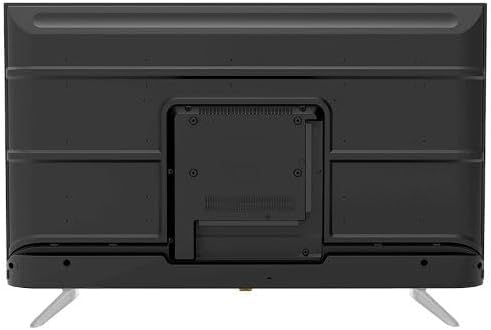
For wall mounting, remove the stand (if attached). Use a VESA-compatible wall mount (not included) that supports the TV's weight and dimensions. Consult a professional for wall mounting to ensure safety and proper installation.

රූපය 4.2: පසුපස view of the TV, highlighting the VESA mounting pattern and various input/output ports.
4.4 සම්බන්ධක පර්යන්ත
සුදුසු තොටවල් භාවිතයෙන් ඔබගේ බාහිර උපාංග රූපවාහිනියට සම්බන්ධ කරන්න:
- HDMI: For high-definition devices like Blu-ray players, gaming consoles, or set-top boxes. The TV has 3 HDMI ports, one with ARC support.
- USB: For connecting USB storage devices to play media (video, photos, music). The TV has 2 USB ports.
- LAN: රැහැන්ගත අන්තර්ජාල සම්බන්ධතාවයක් සඳහා.
- RF ආදානය: For connecting an antenna or satellite dish for the built-in digital receiver.
- ඩිජිටල් ශ්රව්ය ප්රතිදානය (ප්රකාශ): බාහිර ශ්රව්ය පද්ධතියකට සම්බන්ධ වීම සඳහා.
- හෙඩ්ෆෝන් ජැක් (මි.මී. 3.5): හෙඩ්ෆෝන් සම්බන්ධ කිරීම සඳහා.

රූපය 4.3: පැත්ත view of the TV, illustrating the accessible side input ports.
4.5 මූලික බල සක්රිය කිරීම සහ සැකසුම් විශාරදයා
After connecting the power cable, press the power button on the remote control or TV. The TV will guide you through an initial setup wizard, including language selection, network connection (Wi-Fi or LAN), channel scanning, and Google account setup for Android TV features.
5. රූපවාහිනිය ක්රියාත්මක කිරීම
5.1 දුරස්ථ පාලකය අවසන්view
The included remote control allows you to navigate the TV's functions. It features dedicated buttons for power, volume, channel, input selection, smart TV apps (Netflix, YouTube, Prime Video, Disney+), Google Assistant voice search, and menu navigation.
5.2 මූලික කාර්යයන්
- බලය සක්රිය / අක්රිය: බල බොත්තම ඔබන්න.
- ශබ්ද පාලනය: ශබ්දය ඉහළ/පහළ බොත්තම් භාවිතා කරන්න.
- නාලිකා තේරීම: නාලිකා ඉහළ/පහළ බොත්තම් හෝ සංඛ්යාත්මක යතුරු පුවරුව භාවිතා කරන්න.
- ආදාන මූලාශ්රය: Press the 'Input' button to select between HDMI, AV, TV, etc.
5.3 ස්මාර්ට් ටීවී විශේෂාංග (ඇන්ඩ්රොයිඩ් 11)
Your TV runs on Android 11, providing access to a wide range of smart features:
- යෙදුම්: Access pre-installed apps like Netflix, YouTube, Prime Video, Disney+, Shahid VIP, and download more from the Google Play Store.
- Google සහායක: සෙවීම, පාලනය සහ තොරතුරු සඳහා දුරස්ථ පාලකය හරහා හඬ විධාන භාවිතා කරන්න.
- Chromecast බිල්ට්: ඔබගේ ස්මාර්ට් ජංගම දුරකථනයෙන් හෝ ටැබ්ලටයෙන් අන්තර්ගතය කෙලින්ම රූපවාහිනියට විකාශය කරන්න.
- Web බ්රවුසරය: ඔබේ රූපවාහිනියෙන් කෙලින්ම අන්තර්ජාලය පිරික්සන්න.
- බ්ලූටූත් 5.0: රැහැන් රහිත හෙඩ්ෆෝන්, ස්පීකර් හෝ වෙනත් බ්ලූටූත් උපාංග සම්බන්ධ කරන්න.
5.4 පින්තූර සහ ශබ්ද සැකසුම්
ඔබේ අභිරුචිකරණය කරන්න viewරූපවාහිනියේ සැකසුම් මෙනුව හරහා බාගත කිරීමේ සහ සවන්දීමේ අත්දැකීම:
- පින්තූර මාදිලි: Select from Dynamic, Game, Sports, Cinema, or User-defined modes.
- වර්ණ උෂ්ණත්වය: Adjust to Normal, Cool, or Warm.
- ශබ්ද මාදිලි: Choose from Smart, User, Game, Movie, Music, or News.
- ඩොල්බි ඩිජිටල් ප්ලස්: Enhanced audio processing for compatible content.
6. නඩත්තු කිරීම
6.1 රූපවාහිනිය පිරිසිදු කිරීම
- තිරය: මෘදු, ලින්ට් රහිත රෙද්දකින් තිරය මෘදු ලෙස පිස දමන්න. මුරණ්ඩු සලකුණු සඳහා, තිරයට කෙලින්ම නොව, රෙදි වලට යොදන, රූපවාහිනී සඳහා විශේෂයෙන් නිර්මාණය කර ඇති තිර පිරිසිදු කරන්නෙකු භාවිතා කරන්න.
- ශරීරය: Wipe the TV's frame and back panel with a soft, dry cloth. Do not use abrasive cleaners or solvents.
6.2 මෘදුකාංග යාවත්කාලීන
Ensure your TV's software is up to date for optimal performance and security. Connect the TV to the internet and check for updates periodically through the settings menu.
7. දෝශ නිරාකරණය
ඔබට ගැටළු ඇති වුවහොත්, පහත පොදු විසඳුම් වෙත යොමු වන්න:
| ගැටලුව | හැකි විසඳුම |
|---|---|
| බලය නැත | Check if the power cable is securely plugged into the TV and the wall outlet. Ensure the outlet is functional. |
| පින්තූරයක් නැත, නමුත් ශබ්දය පවතී | ආදාන මූලාශ්රය පරීක්ෂා කරන්න. බාහිර උපාංග බලගන්වා නිවැරදිව සම්බන්ධ කර ඇති බව සහතික කර ගන්න. |
| ශබ්දයක් නැත, නමුත් පින්තූරය තිබේ | Check the volume level and mute status. Verify audio settings and external audio connections. |
| දුරස්ථ පාලකය ක්රියා නොකරයි | බැටරි මාරු කරන්න. දුරස්ථ පාලකය සහ රූපවාහිනියේ IR සංවේදකය අතර කිසිදු බාධාවක් නොමැති බවට වග බලා ගන්න. |
| Wi-Fi වෙත සම්බන්ධ විය නොහැක | ඔබේ රවුටරය සහ මොඩමය පරීක්ෂා කරන්න. Wi-Fi මුරපදය නැවත ඇතුළත් කරන්න. රූපවාහිනිය සහ රවුටරය නැවත ආරම්භ කිරීමට උත්සාහ කරන්න. |
ගැටලුව දිගටම පවතින්නේ නම්, පාරිභෝගික සහාය අමතන්න.
8. පිරිවිතර
| විශේෂාංගය | විස්තර |
|---|---|
| ආදර්ශ අංකය | 65UA5300E |
| තිර ප්රමාණය | අඟල් 65 |
| සංදර්ශක තාක්ෂණය | LED |
| විභේදනය | 4K UHD (3840 x 2160) |
| දර්ශන අනුපාතය | 16:9 |
| Viewing කෝණය | අංශක 178 |
| දීප්තිය | 250 cd/m² |
| Refresh Rate | 50/60 Hz |
| HDR සහාය | HDR10, HLG |
| ශ්රව්ය තාක්ෂණය | Dolby Digital Plus, Surround Sound |
| ශ්රව්ය ප්රතිදාන බලය | 10W x 2 |
| මෙහෙයුම් පද්ධතිය | Android 11 |
| අභ්යන්තර මතකය | 16 GB |
| සම්බන්ධතාවය | Wi-Fi, බ්ලූටූත් 5.0, LAN |
| යෙදවුම් | RF Input (Digital) x1, Video Input x1, HDMI x3 (ARC), USB x2, LAN x1 |
| ප්රතිදාන | Digital Audio Output (Optical) x1, Headphone Jack (3.5mm) x1 |
| බල සැපයුම | AC 90-240V / 50Hz |
| පොරොත්තු බලය | 0.5W |
| ස්ථාවරයකින් තොරව මානයන් (W x H x D). | 1446 x 832 x 84 මි.මී |
| ස්ථාවරය සහිත මානයන් (W x H x D). | 1446 x 892 x 305 මි.මී |
| ශුද්ධ බර | කිලෝ ග්රෑම් 15.32 කි |
| දළ බර | කිලෝ ග්රෑම් 21.32 කි |
| මුල් රට | ඊජිප්තුව |
9 වගකීම් සහතිකය
This Tornado TV comes with a 3-year full free warranty. Please retain your proof of purchase for warranty claims. For specific terms and conditions, refer to the warranty card included with your product or contact Tornado customer service.
10. සහාය
For further assistance, technical support, or service inquiries, please contact Tornado customer service. Contact details can typically be found on the manufacturer's official webවෙබ් අඩවිය හෝ වගකීම් කාඩ්පත මත.


