1. හැඳින්වීම
Thank you for choosing the JOMAA VM604 Wireless Ergonomic Vertical Mouse. This advanced mouse is designed to provide superior comfort and efficiency, reducing wrist strain during prolonged use. Featuring multi-device connectivity, adjustable DPI, and a unique multi-function dial, the VM604 is an ideal tool for various computing environments.
නිසි ක්රියාකාරිත්වය සහතික කිරීමට සහ එහි ආයු කාලය උපරිම කිරීමට නිෂ්පාදනය භාවිතා කිරීමට පෙර කරුණාකර මෙම අත්පොත හොඳින් කියවන්න.
2. නිෂ්පාදන අවසන්view
2.1 පැකේජයේ අන්තර්ගතය
- JOMAA VM604 Ergonomic Vertical Mouse
- USB ග්රාහකය (2.4G)
- USB-C ආරෝපණ කේබලය
- පරිශීලක අත්පොත
2.2 Mouse Components
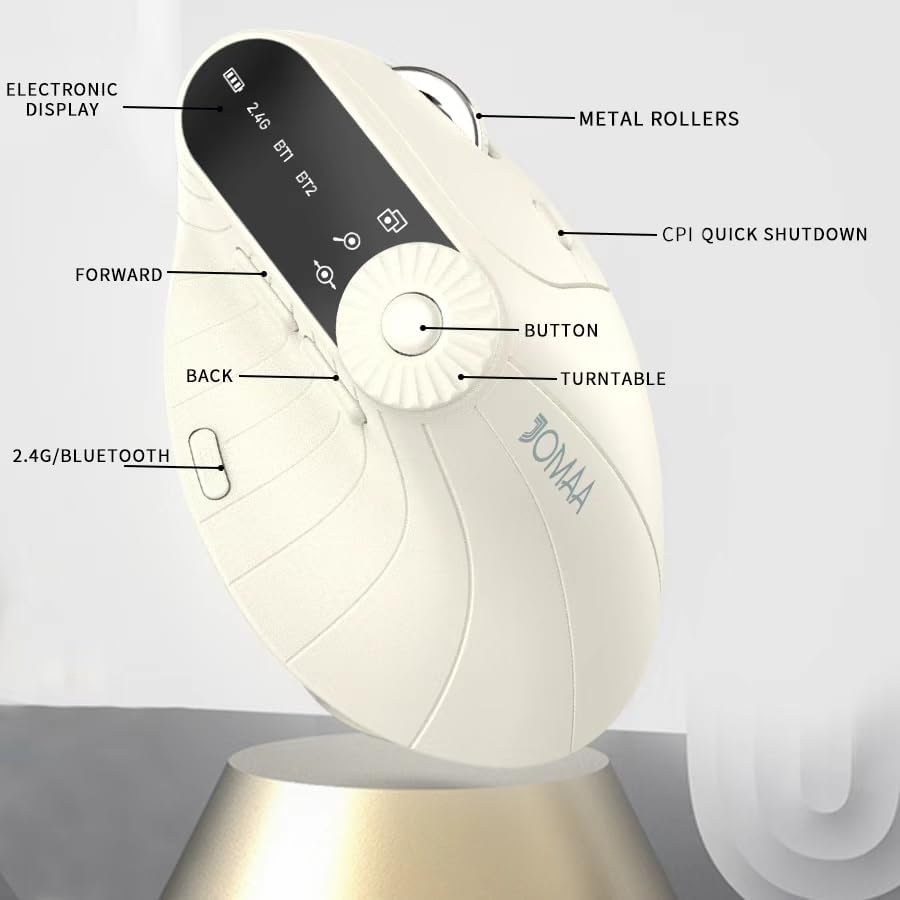
රූපය 1: Labeled components of the JOMAA VM604 mouse, highlighting the electronic display, metal rollers, CPI quick shutdown, forward/back buttons, turntable, and 2.4G/Bluetooth switch.
- වම් ක්ලික් බොත්තම: Standard left mouse function.
- දකුණු ක්ලික් බොත්තම: Standard right mouse function.
- අනුචලන රෝදය: සිරස් අනුචලනය සඳහා.
- ඉදිරි බොත්තම: ඉදිරියට සංචාලනය කරයි web බ්රවුසර හෝ file ගවේෂකයන්.
- පසුපස බොත්තම: පසුපසට සංචාලනය කරයි web බ්රවුසර හෝ file ගවේෂකයන්.
- Multi-function Turntable/Dial: Offers three functions: 1. Window switching, 2. Zoom in/out (for pages and images), 3. Page moves left/right (for Excel).
- DPI/CPI Adjustment Button: Cycles through DPI settings (1000/1200/1600/2400).
- ඉලෙක්ට්රොනික සංදර්ශකය: Shows battery level, connection mode (2.4G, BT1, BT2), and DPI setting.
- සම්බන්ධතා ප්රකාර ස්විචය (පහළ): Toggles between 2.4G, Bluetooth 1 (BT1), and Bluetooth 2 (BT2) modes.
- Power ON/OFF Switch (Bottom): මූසිකය සක්රිය හෝ අක්රිය කරයි.
- USB-C ආරෝපණ වරාය: Located at the front of the mouse.
- USB Receiver Storage Slot: Located at the bottom of the mouse.
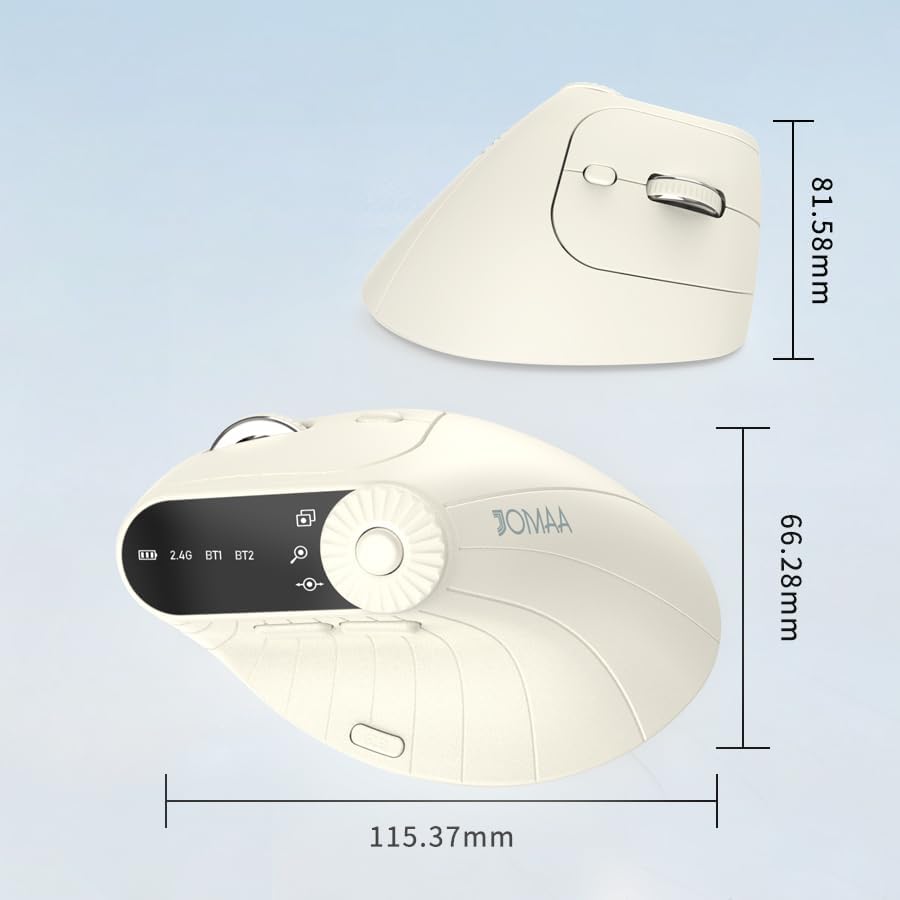
රූපය 2: Dimensions of the JOMAA VM604 mouse, showing its ergonomic vertical design.

රූපය 3: Illustration of the JOMAA VM604's 57-degree ergonomic design, promoting a natural handshake posture to reduce wrist pressure.
3. පිහිටුවීම
3.1 මූසිකය ආරෝපණය කිරීම
The JOMAA VM604 mouse features a built-in rechargeable battery. To charge:
- Connect the provided USB-C charging cable to the charging port at the front of the mouse.
- USB කේබලයේ අනෙක් කෙළවර USB බල ප්රභවයකට සම්බන්ධ කරන්න (උදා: පරිගණක USB පෝට් එක, USB බිත්ති ඇඩැප්ටරය).
- The electronic display will indicate charging status.

රූපය 4: The JOMAA VM604 mouse connected via USB-C for charging, with a visible charging indicator on the electronic display.
3.2 2.4G රැහැන් රහිත සම්බන්ධතාවය
For a stable and fast wireless connection:
- Locate the USB receiver stored in the slot at the bottom of the mouse.
- USB ග්රාහකය ඔබේ පරිගණකයේ තිබෙන USB පෝට් එකකට සම්බන්ධ කරන්න.
- Turn on the mouse using the ON/OFF switch at the bottom.
- Slide the connection mode switch to the '2.4G' position. The mouse should automatically connect to your computer.
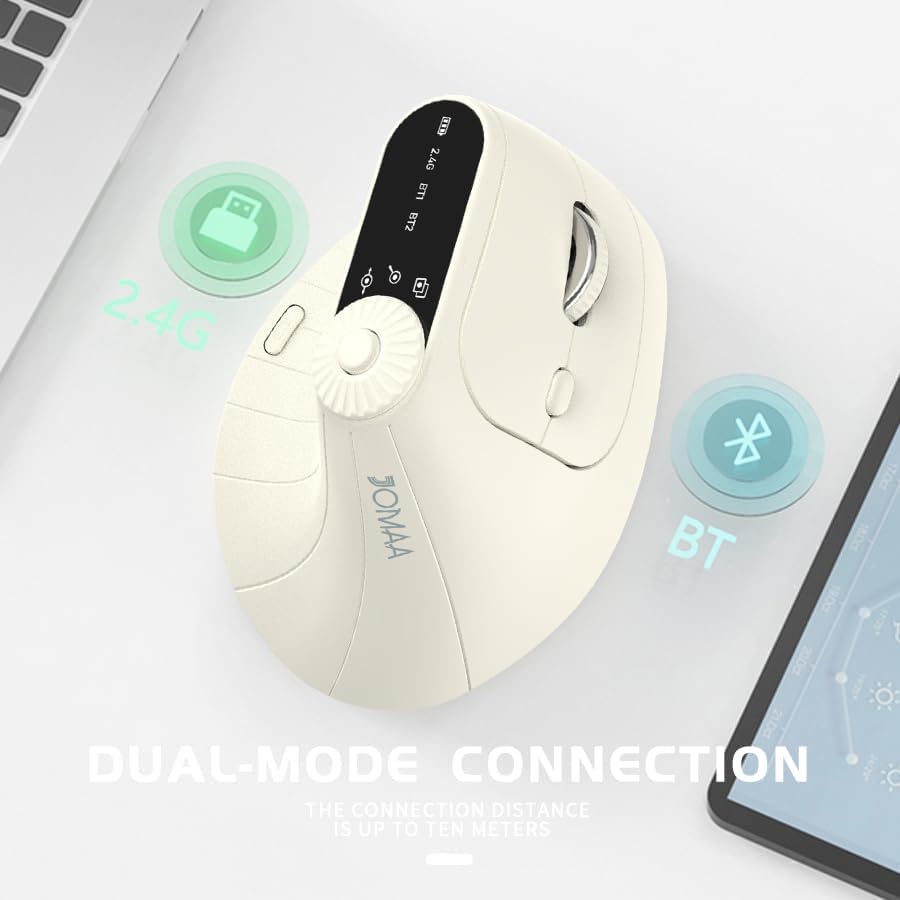
රූපය 5: The JOMAA VM604 mouse illustrating its dual-mode connection capabilities, including the 2.4G USB receiver and Bluetooth options.
3.3 Bluetooth Connection (BT1/BT2)
The mouse can connect to two different Bluetooth devices:
- Turn on the mouse using the ON/OFF switch at the bottom.
- Slide the connection mode switch to either 'BT1' or 'BT2' position.
- For the first Bluetooth connection or to reset a connection, press and hold the connection mode switch for 3-5 seconds until the Bluetooth indicator on the electronic display starts blinking.
- On your device (PC, Laptop, MacBook), go to Bluetooth settings and search for 'JOMAA VM604' (or similar name).
- Select the mouse to pair. The indicator light will stop blinking once connected.
- To switch between connected devices, simply double-click the connection mode switch to cycle through 2.4G, BT1, and BT2.
4. මෙහෙයුම් උපදෙස්
4.1 DPI ගැලපීම
Adjust the mouse sensitivity (DPI/CPI) to suit your preference:
- Press the DPI Adjustment Button (Component 7) located near the multi-function dial.
- Each press will cycle through the available DPI settings: 1000, 1200, 1600, and 2400.
- The electronic display will show the current DPI setting.
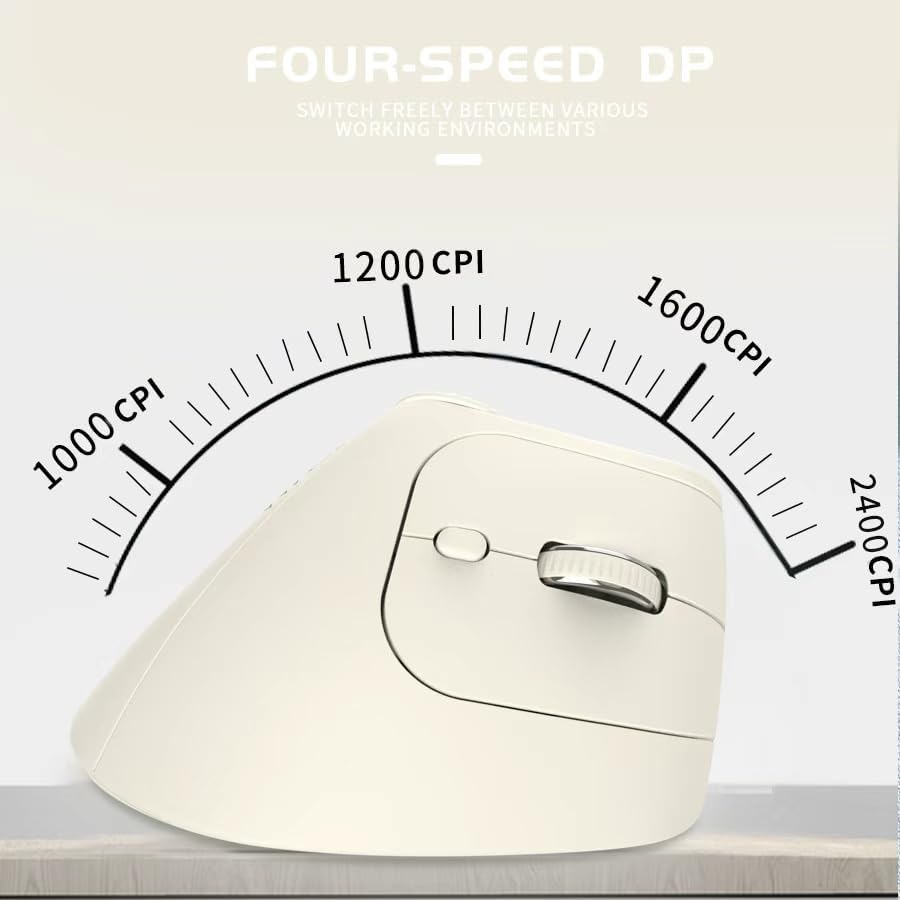
රූපය 6: The JOMAA VM604 mouse highlighting its four-speed CPI settings (1000, 1200, 1600, 2400) for precise optical tracking.
4.2 Multi-Function Turntable
The unique turntable (Component 6) provides enhanced control:
- Window Switching: Rotate the dial to quickly switch between open application windows.
- විශාලනය / පිටතට: Rotate the dial to zoom in or out on pages and images.
- Page Left/Right: Useful for navigating large spreadsheets in applications like Excel.

රූපය 7: The multi-function knob on the JOMAA VM604 mouse, demonstrating its uses for window switching, zooming in/out on pages and images, and moving pages left/right in applications like Excel.
4.3 ඉදිරියට/පසුපසට බොත්තම්
Use the Forward (Component 4) and Back (Component 5) buttons for quick navigation in web බ්රව්සර් සහ file ගවේෂකයන්.
5. නඩත්තු කිරීම
5.1 පිරිසිදු කිරීම
ප්රශස්ත කාර්ය සාධනය සහ සනීපාරක්ෂාව පවත්වා ගැනීම සඳහා:
- පිරිසිදු කිරීමට පෙර මූසිකය ක්රියා විරහිත කරන්න.
- මෘදු, ඩී භාවිතා කරන්නamp මූසිකයේ මතුපිට පිස දැමීමට රෙදි.
- දරුණු රසායනික ද්රව්ය හෝ උල්ෙල්ඛ ද්රව්ය භාවිතා කිරීමෙන් වළකින්න.
- Periodically clean the optical sensor at the bottom with a cotton swab.
5.2 බැටරි සත්කාර
බැටරි ආයු කාලය වැඩි කිරීම සඳහා:
- බැටරිය නිතර නිතර සම්පූර්ණයෙන්ම විසර්ජනය කිරීමෙන් වළකින්න.
- Charge the mouse regularly, even if not completely depleted.
- If the mouse will not be used for an extended period, turn it off.

රූපය 8: The JOMAA VM604 mouse demonstrating its intelligent hibernate mode, which activates after 60 seconds of inactivity to save power.
6. දෝශ නිරාකරණය
- මූසිකය ප්රතිචාර නොදක්වයි: Ensure the mouse is turned on and fully charged. Check the connection mode (2.4G or Bluetooth) and ensure it's correctly paired/connected to your device. For 2.4G, try plugging the USB receiver into a different port. For Bluetooth, try re-pairing the device.
- කර්සර චලනය අක්රමවත් ය: Clean the optical sensor at the bottom of the mouse. Ensure the surface you are using is clean and suitable for mouse operation. Adjust the DPI setting to a lower value if the cursor is too fast.
- බ්ලූටූත් සම්බන්ධතා ගැටළු: Ensure your device's Bluetooth is enabled. Try forgetting the device in your Bluetooth settings and re-pairing. Ensure the mouse is in the correct BT1 or BT2 mode and in pairing mode (blinking indicator).
- Multi-function dial not working: Ensure the mouse is properly connected. Some functions may require specific application support.
7. පිරිවිතර
| විශේෂාංගය | විස්තර |
|---|---|
| නිෂ්පාදන මානයන් | අඟල් 6 x 4 x 0.04 |
| අයිතමයේ බර | අවුන්ස 7.4 කි |
| අයිතම ආදර්ශ අංකය | VM604 |
| බැටරි | 1 9V batteries required (included) - Note: Product features built-in rechargeable battery, 9V battery information may be a listing error. |
| සම්බන්ධතා තාක්ෂණය | බ්ලූටූත්, USB (2.4G රැහැන් රහිත) |
| විශේෂ ලක්ෂණය | Ergonomic Design, Multi-function Turntable, Adjustable DPI, Rechargeable |
| චලන හඳුනාගැනීමේ තාක්ෂණය | ඔප්ටිකල් |
| DPI සැකසුම් | 1000/1200/1600/2400 |
| වර්ණය | Beiga |
8. වගකීම් සහ සහාය
JOMAA products are designed and manufactured to the highest quality standards. This product is covered by a limited warranty from the date of purchase. For detailed warranty information, technical support, or customer service inquiries, please refer to the contact information provided on the product packaging or visit the official JOMAA webඅඩවිය.
වගකීම් හිමිකම් සඳහා කරුණාකර ඔබගේ මිලදී ගැනීමේ සාක්ෂි තබා ගන්න.
9. නිල නිෂ්පාදන වීඩියෝව
වීඩියෝ 1: ඕවර් එකක්view of the JOMAA VM604 Ergonomic Mouse, showcasing its unique vertical design and comfortable grip. This video highlights the physical appearance and ergonomic benefits of the mouse.


