හැඳින්වීම
The Warmco D4 Pro is an 8-inch ultra-thin rechargeable portable fan designed for versatile use in various environments, including camping, outdoor activities, indoor spaces, and travel. It features a high-capacity 20000mAh battery, fast charging capabilities, an integrated LED light, and a programmable timer. This manual provides essential information for the safe and efficient operation and maintenance of your fan.
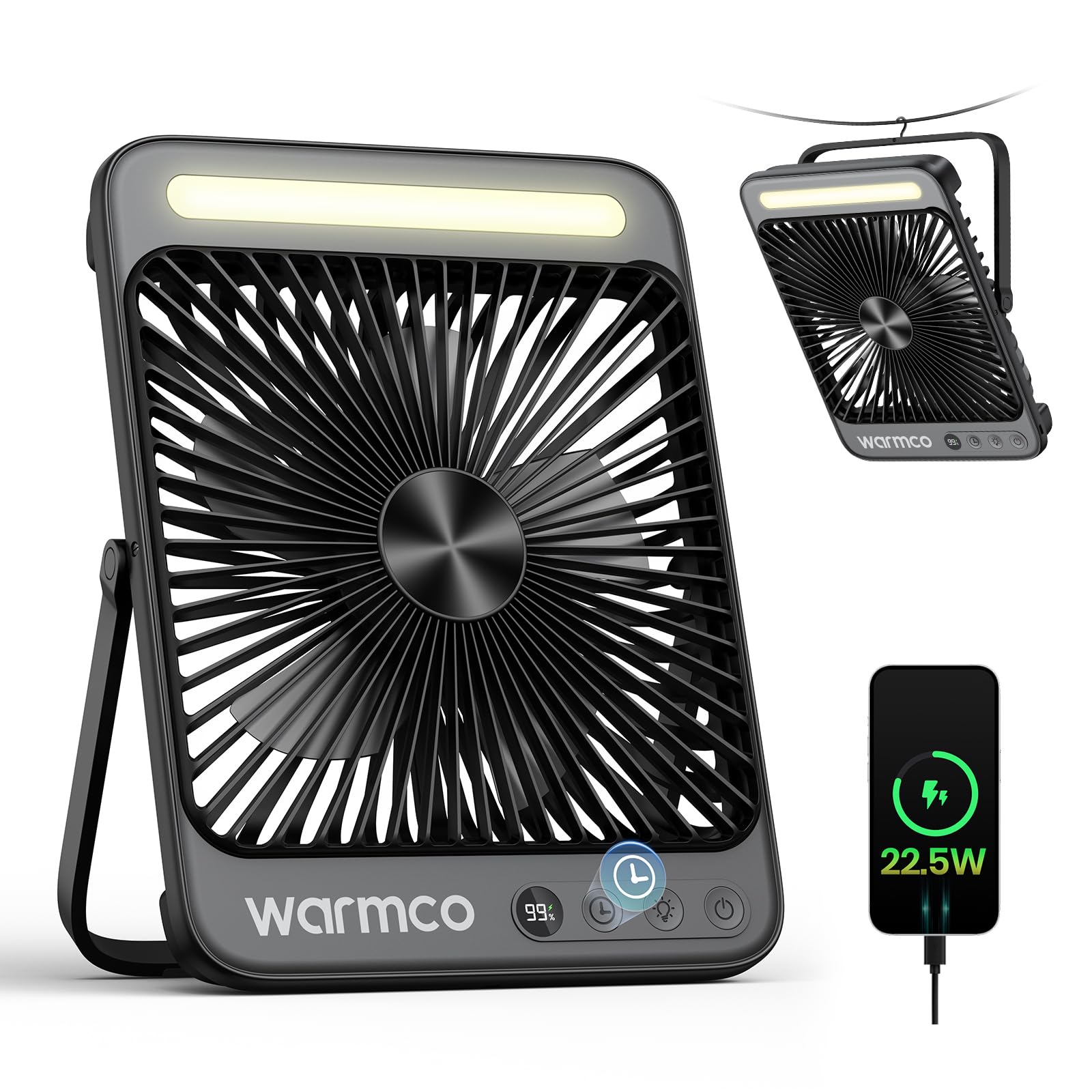
Figure 1: Warmco D4 Pro Portable Fan Overview
නිෂ්පාදන විශේෂාංග
- අධි-ධාරිතා බැටරි: Equipped with a 20000mAh battery, providing 15 to 48 hours of runtime depending on speed settings.
- වේගවත් ආරෝපණය: Supports 18W input for a full charge in approximately 7 hours and 22.5W output for efficient device charging.
- සංයුක්ත සහ අතේ ගෙන යා හැකි නිර්මාණය: Measures 1.77 x 8.27 x 10.71 inches and weighs 1.7 lbs, featuring a foldable stand and a built-in hanging hook for easy placement and transport.
- ඒකාබද්ධ LED ආලෝකය: A built-in LED light with 3 adjustable brightness levels, suitable for illumination in various settings.
- විස්පර්-නිහඬ මෙහෙයුම: Utilizes an efficient brushless motor to keep noise levels below 45dB, ensuring a peaceful environment.
- සකස් කළ හැකි වායු ප්රවාහය: Offers 4 fan speed settings to customize cooling intensity.
- ස්මාර්ට් විශේෂාංග: An LED display shows current battery level and selected fan speed.
- ටයිමර් කාර්යය: Programmable timer settings for 1, 2, 4, or 8 hours.
- පහසු නඩත්තු: Features a detachable front cover for convenient cleaning of the fan blades.

Figure 2: Extended Battery Life and Capacity

Figure 3: Ultra-thin and Portable Design
සැලසුම
- Unboxing: Carefully remove the fan and all included accessories (USB-C cable, instruction manual) from the packaging.
- මූලික ආරෝපණය: Before first use, fully charge the fan. Connect the provided USB-C cable to the fan's input port and to an 18W (or higher) power adapter (not included). The LED display will show the charging progress. A full charge takes approximately 7 hours.
- ස්ථානගත කිරීම:
- ඩෙස්ක්ටොප් භාවිතය: Extend the foldable stand at the back of the fan to position it on a flat surface.
- එල්ලෙන භාවිතය: Utilize the built-in metal hook at the top of the fan to suspend it in tents, on branches, or other suitable locations.
වීඩියෝව 1: විස්තරාත්මකවview of the Warmco D4 Pro fan's features and setup.
මෙහෙයුම් උපදෙස්
- බලය සක්රිය / අක්රිය: Press the power button (usually marked with a power symbol) once to turn the fan on. Press and hold the power button to turn it off.
- විදුලි පංකා වේගය සකසන්න: While the fan is on, press the fan speed button (often marked with fan blades or 'F') repeatedly to cycle through the 4 available speed settings. The LED display will indicate the current speed.
- LED ආලෝකය පාලනය කරන්න: Press the light button (often marked with a light bulb symbol) repeatedly to cycle through the 3 brightness levels of the integrated LED light. Press again to turn the light off.
- ටයිමරය සකසන්න: Press the timer button (often marked with a clock symbol) repeatedly to select a runtime of 1, 2, 4, or 8 hours. The fan will automatically turn off after the selected time.
- Use as Power Bank: Connect your external device (e.g., smartphone) to the fan's 22.5W output USB port using an appropriate charging cable. The fan will begin charging your device.

Figure 4: Quiet Performance and Timer Function

Figure 5: Power Bank Functionality
Video 2: Demonstration of the fan's portability and features for travel.
නඩත්තු කිරීම
නිතිපතා පිරිසිදු කිරීම ප්රශස්ත ක්රියාකාරිත්වය සහතික කරන අතර ඔබේ විදුලි පංකාවේ ආයු කාලය දීර්ඝ කරයි.
- විදුලි පංකා තල පිරිසිදු කිරීම: The front cover of the fan is detachable for easy cleaning. Unscrew the screws on both sides of the fan counter-clockwise to remove the cover. Gently wipe the fan blades with a soft, dry cloth. Do not use abrasive cleaners or immerse the fan in water.
- බාහිර පිරිසිදු කිරීම: විදුලි පංකාවේ බාහිර පෙනුම මෘදු, d රෙදි කඩකින් පිස දමන්න.amp රෙදි.
- ගබඩා: When not in use for extended periods, ensure the fan is clean and fully charged. Store it in a cool, dry place.

Figure 6: Detachable Front Panel for Easy Cleaning
දෝෂගවේෂණය
- විදුලි පංකාව ක්රියාත්මක නොවේ: Ensure the battery is sufficiently charged. Connect the fan to a power source using the USB-C cable and allow it to charge for at least 30 minutes before attempting to power on again.
- දුර්වල වායු ප්රවාහය: Check the selected fan speed setting and increase it if necessary. Ensure the fan blades are clean and free from obstructions.
- LED ආලෝකය ක්රියා නොකරයි: Verify the fan has adequate battery power. Press the light button to cycle through the brightness settings.
- Device Not Charging (Power Bank Function): Ensure the fan has sufficient battery charge. Check that the charging cable is securely connected to both the fan's output port and your device.
පිරිවිතර
| විශේෂාංගය | පිරිවිතර |
|---|---|
| වෙළඳ නාමය | Warmco |
| මාදිලියේ නම | ඩී 4 ප්රෝ |
| මානයන් (ඩී x ඩබ්ලිව් x එච්) | 1.77" x 8.27" x 10.71" |
| අයිතමයේ බර | රාත්තල් 1.76 (ග්රෑම් 800) |
| බලශක්ති ප්රභවය | බැටරි බලයෙන් |
| බැටරි ධාරිතාව | 20000mAh (2 Nonstandard Battery batteries included) |
| ආදාන බලය | 18W (Charging time ~7 hours) |
| ප්රතිදාන බලය | 22.5W (for charging devices) |
| විදුලි පංකා වේගය | මට්ටම් 4 ක් |
| ශබ්ද මට්ටම | ඩෙසිබල් 45 යි |
| LED ආලෝකය | Integrated, 3 levels |
| ටයිමර් | 1, 2, 4, හෝ 8 පැය |
| ඇතුළත් සංරචක | D4 Pro Portable Fan, Instruction Manual, USB C Cable |
වගකීම් සහ සහාය
The Warmco D4 Pro Portable Fan comes with a වසර 3ක ආදේශන පොරොන්දුව. For any product inquiries, technical support, or warranty claims, please refer to the contact information provided in your product packaging or visit the official Warmco webඅඩවිය.

Figure 7: 3-Year Replacement Promise


