හැඳින්වීම
Thank you for choosing the LogiLink BT0070 BT 6.0 Gaming Headset. This manual provides essential information for the proper setup, operation, and maintenance of your headset. Please read these instructions carefully before using the product to ensure optimal performance and longevity.
The LogiLink BT0070 is a versatile wireless gaming headset designed for clear communication and immersive audio experiences. It features a 360° microphone, comfortable ear pads, an adjustable headband, and a long-lasting battery.
ආරක්ෂිත තොරතුරු
- හෙඩ්සෙට් එක අධික උෂ්ණත්වයන්ට, ආර්ද්රතාවයට හෝ විඛාදන ද්රව්යවලට නිරාවරණය නොකරන්න.
- හෙඩ්සෙට් එක බිම හෙළීමෙන් හෝ දැඩි බලපෑම්වලට ලක් කිරීමෙන් වළකින්න.
- Do not attempt to disassemble or modify the headset. This will void the warranty and may cause damage.
- හෙඩ්සෙට් එක ජලය සහ අනෙකුත් ද්රව වලින් ඈත් කරන්න.
- නිශ්චිත ආරෝපණ පරිමාව පමණක් භාවිතා කරන්නtagඊ සහ ධාරාව.
- ඉහළ ශබ්ද මට්ටම්වල දීර්ඝ කාලයක් සවන් දීමෙන් ශ්රවණ හානි සිදුවිය හැකිය. ශබ්දය ආරක්ෂිත මට්ටමකට සකසන්න.
පැකේජයේ අන්තර්ගතය
කරුණාකර පහත අයිතම සඳහා පැකේජය පරීක්ෂා කරන්න:
- LogiLink BT0070 Gaming Headset
- USB ආරෝපණ කේබලය
- 3.5mm AUX ශ්රව්ය කේබලය
- පරිශීලක අත්පොත (මෙම ලේඛනය)
නිෂ්පාදනය අවසන්view
Familiarize yourself with the components of your LogiLink BT0070 Gaming Headset.

රූපය: ඉවරයිview of the LogiLink BT0070 headset highlighting its adjustable headband, adjustable microphone, soft memory earmuffs, and flexible design for various head shapes.
- සකස් කළ හැකි හෙඩ්බෑන්ඩ්: Allows for a customized and comfortable fit.
- Adjustable Microphone: A 360° noise-isolating microphone for clear voice communication.
- Soft Memory Ear Pads: Designed for extended comfort during long gaming sessions.
- පාලන බොත්තම්: (Specific button functions will be detailed in the Operating section).
- 3.5mm AUX port: For wired connection to devices.
- ආරෝපණ වරාය: අභ්යන්තර බැටරිය නැවත ආරෝපණය කිරීම සඳහා.
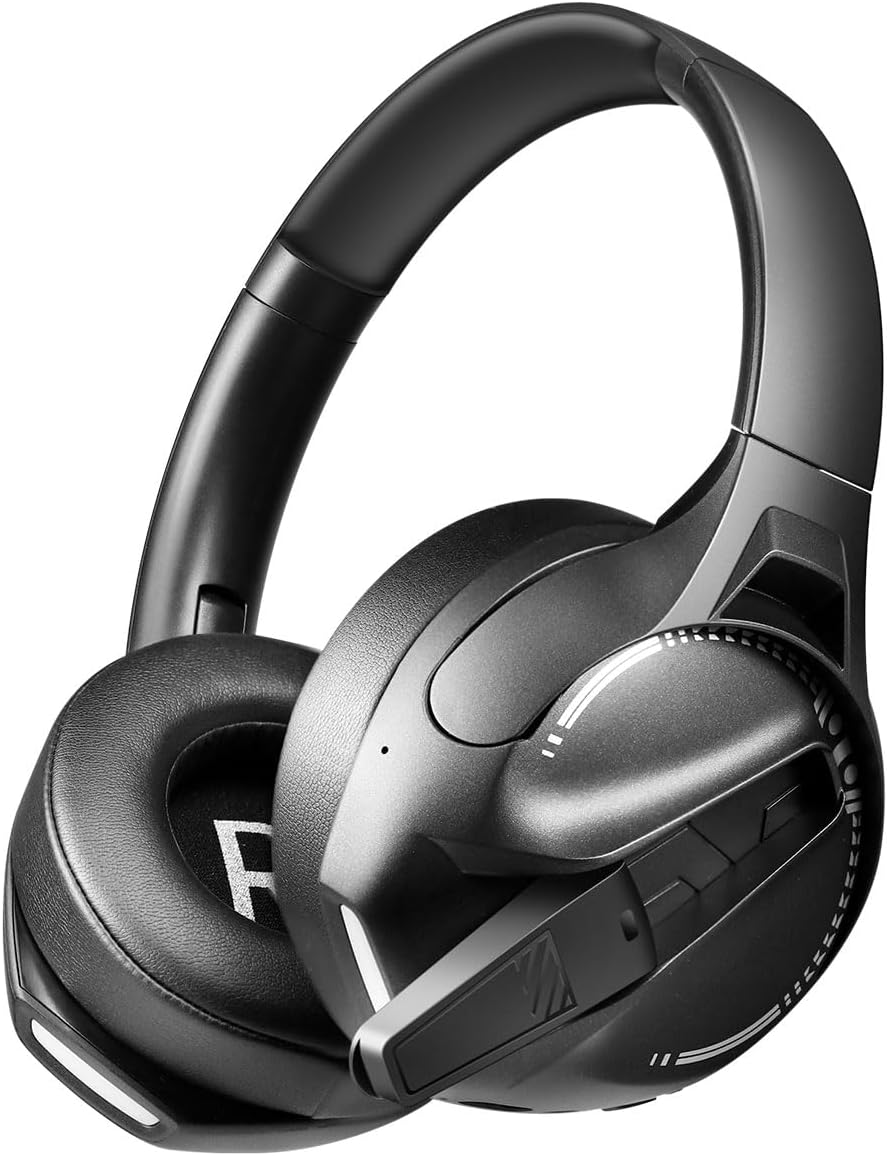
රූපය: පැත්ත view of the LogiLink BT0070 headset, showing the extended microphone arm and ear cup design.

රූපය: ඉදිරිපස view of the LogiLink BT0070 headset, showcasing එහි සමස්ත සැලසුම.
සැලසුම
1. හෙඩ්සෙට් එක ආරෝපණය කිරීම
Before first use, fully charge the headset. Connect the USB charging cable to the headset's charging port and the other end to a compatible USB power source (e.g., computer USB port, USB wall adapter).

රූපය: Illustration of power adapter requirements. Use a 3.0-3.0W power adapter. Note that a power adapter is not included with the headset.
- A full charge typically takes approximately [X] hours (specific time not provided, refer to product packaging or LED indicator).
- The LED indicator on the headset will change color or turn off once charging is complete.
- Ensure the power source provides 3.0-3.0W for optimal charging.
2. බල ගැන්වීම / අක්රිය කිරීම
- බල ගැන්වීමට: LED දර්ශකය දැල්වෙන තුරු බල බොත්තම තත්පර 3ක් පමණ ඔබාගෙන සිටින්න.
- බලය අක්රිය කිරීමට: LED දර්ශකය ක්රියා විරහිත වන තෙක් බල බොත්තම තත්පර 5ක් පමණ ඔබාගෙන සිටින්න.
3. බ්ලූටූත් යුගලනය
ඔබගේ හෙඩ්සෙට් එක රැහැන් රහිතව උපාංගයකට සම්බන්ධ කිරීමට:
- හෙඩ්සෙට් එක ක්රියා විරහිත කර ඇති බවට සහතික වන්න.
- Press and hold the Power button for approximately 5-7 seconds until the LED indicator flashes rapidly (usually blue and red), indicating pairing mode.
- ඔබගේ උපාංගයේ (ස්මාර්ට්ෆෝන්, ලැප්ටොප්, ආදිය), බ්ලූටූත් සක්රීය කර නව උපාංග සොයන්න.
- Select "LogiLink BT0070" from the list of available devices.
- Once paired, the LED indicator on the headset will typically flash slowly or turn solid blue.
4. Wired Connection (3.5mm AUX)
For a wired connection, use the included 3.5mm AUX audio cable:
- Plug one end of the 3.5mm audio cable into the AUX port on the headset.
- Plug the other end into the 3.5mm audio jack of your device.
- The headset will operate in passive mode, drawing no power from its battery.
5. Adjusting Fit
For optimal comfort and sound quality, adjust the headset to fit your head:
- Extend or retract the adjustable headband until the ear cups comfortably cover your ears.
- Ensure the soft memory ear pads create a good seal around your ears.
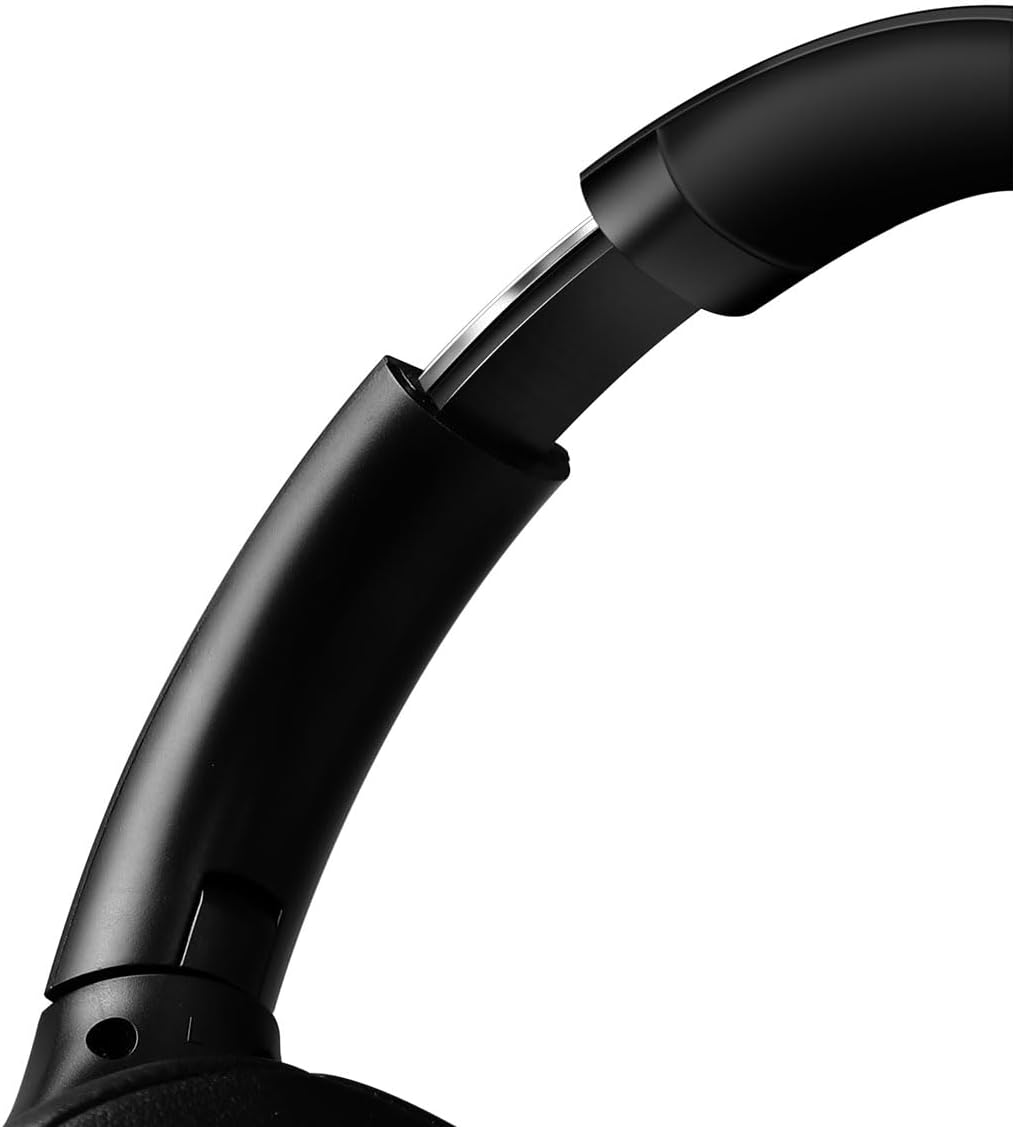
රූපය: සමීප රූපය view of the adjustable headband mechanism, demonstrating how to customize the fit.
හෙඩ්සෙට් එක ක්රියාත්මක කිරීම
1. මූලික පාලනයන්
The headset features intuitive controls, typically located on the ear cups:
- බල බොත්තම: Press and hold to power on/off. Short press for [X function, e.g., play/pause, answer call - specifics not provided, common functions listed].
- ශබ්දය වැඩි කිරීම/ඊළඟ ඛණ්ඩය: ශබ්දය වැඩි කිරීමට කෙටි ඔබන්න. ඊළඟ ධාවන පථය සඳහා දිගු ඔබන්න.
- වෙළුම පහළට/පෙර ඛණ්ඩය: ශබ්දය අඩු කිරීමට කෙටි ඔබන්න. පෙර ධාවන පථය සඳහා දිගු ඔබන්න.
- බහුකාර්ය බොත්තම (MFB): (Often combined with Power button) Single press to Play/Pause music or Answer/End calls. Double press to Redial last number.
2. මයික්රෆෝන භාවිතය
The integrated 360° noise-isolating microphone is designed for clear communication.
- මයික්රෆෝනය සකස් කිරීම: ප්රශස්ත හඬ ග්රහණය සඳහා මයික්රෆෝනය ඔබේ මුඛයට ආසන්නව ස්ථානගත කරන්න.
- නිශ්ශබ්ද කරන්න/නිශ්ශබ්ද කරන්න: (Specific button for mute not provided, common methods listed) Look for a dedicated mute button on the headset or use your device's software controls.
3. ක්රියාකාරී ශබ්ද අවලංගු කිරීම (ANC)
The headset features Active Noise Cancellation to reduce ambient noise.
- ANC සක්රිය කිරීම: (Specific button for ANC not provided, common methods listed) Look for a dedicated ANC button or a combination press on existing buttons.
- When ANC is active, you may notice a slight change in audio characteristics.

රූපය: Users experiencing immersive audio with the LogiLink BT0070 headset, emphasizing its 3D surround sound capabilities for gaming.
නඩත්තු කිරීම
1 පිරිසිදු කිරීම
- මෘදු, වියලි, ලින්ට් රහිත රෙද්දකින් හෙඩ්සෙට් එක පිස දමන්න.
- උල්ෙල්ඛ පිරිසිදු කරන්නන්, මධ්යසාර හෝ රසායනික ද්රාවක භාවිතා නොකරන්න.
- Clean the ear pads gently to remove any buildup.
2. ගබඩා කිරීම
- හෙඩ්සෙට් එක සෘජු හිරු එළියෙන් සහ අධික උෂ්ණත්වයන්ගෙන් ඈත්ව සිසිල් වියළි ස්ථානයක ගබඩා කරන්න.
- දිගු කාලයක් ගබඩා කරන්නේ නම්, බැටරි සෞඛ්යය ආරක්ෂා කර ගැනීම සඳහා බැටරිය අර්ධ වශයෙන් ආරෝපණය කර ඇති බවට වග බලා ගන්න (50% පමණ).

රූපය: The LogiLink BT0070 headset shown in a folded configuration, suitable for compact storage or transport.
3. බැටරි රැකවරණය
- බැටරිය නිතර නිතර සම්පූර්ණයෙන්ම විසර්ජනය කිරීමෙන් වළකින්න.
- Charge the headset regularly, even if not in use, to maintain battery health.
දෝෂගවේෂණය
ඔබේ හෙඩ්සෙට් එක සමඟ ගැටලු ඇති වුවහොත්, පහත පොදු ගැටලු සහ විසඳුම් වෙත යොමු වන්න:
| ගැටලුව | හැකි විසඳුම |
|---|---|
| හෙඩ්සෙට් එක ක්රියාත්මක නොවේ. | Ensure the headset is fully charged. Press and hold the Power button for the required duration. |
| බ්ලූටූත් හරහා යුගල කළ නොහැක. | Ensure the headset is in pairing mode (rapidly flashing LED). Turn off and on your device's Bluetooth. Move closer to the device. Clear previous Bluetooth connections on your device. |
| ශබ්දයක් නැත හෝ අඩු පරිමාවක් නැත. | Check headset and device volume levels. Ensure the headset is properly connected (Bluetooth or AUX). For Bluetooth, check audio output settings on your device. |
| මයික්රෆෝනය ක්රියා නොකරයි. | Ensure the microphone is not muted. Check microphone input settings on your device. Ensure the microphone is positioned correctly. |
| ශබ්දයේ ගුණාත්මක භාවය දුර්වලයි. | Ensure the headset is within Bluetooth range. Check for interference from other wireless devices. For wired connection, ensure the 3.5mm cable is fully inserted. |
පිරිවිතර
Key technical specifications for the LogiLink BT0070 Gaming Headset:
| විශේෂාංගය | විස්තර |
|---|---|
| ආකෘතිය | BT0070 |
| සම්බන්ධතා තාක්ෂණය | බ්ලූටූත් 6.0, 3.5mm AUX |
| රැහැන් රහිත සන්නිවේදනය | බ්ලූටූත් |
| හෙඩ්සෙට් වර්ගය | කට උඩින් |
| රියදුරු විෂ්කම්භය | 40 මි.මී |
| සම්බාධනය | 32 ඕම් |
| මයික්රෆෝනය | 360° Noise-isolating, Omnidirectional |
| ශබ්ද පාලනය | ක්රියාකාරී ශබ්ද අවලංගු කිරීම |
| බැටරි ආයු කාලය | පැය 50 දක්වා |
| වර්ණය | කළු |
| අයිතමයේ බර | ග්රෑම් 500 යි |
| නිෂ්පාදන මානයන් | 16.8 x 17.8 x 7.5 සෙ.මී |
| සමග ගැළපේ | Smartphone & Laptop |
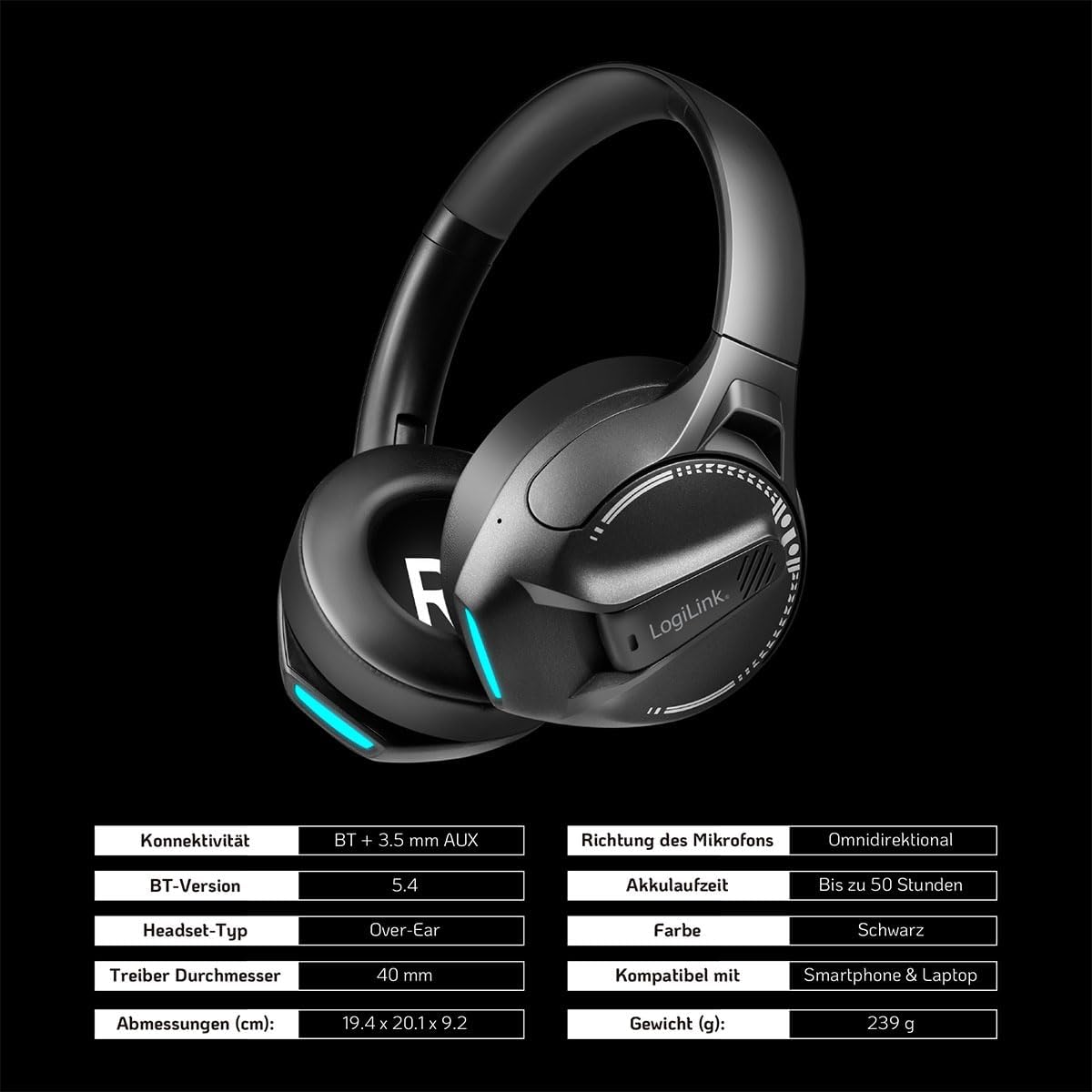
රූපය: Visual representation of key specifications for the LogiLink BT0070 headset, including connectivity, battery life, and dimensions. Note: The image lists Bluetooth version 5.4, while the product title specifies 6.0.
වගකීම් සහ සහාය
LogiLink products are designed and manufactured to the highest quality standards. For warranty information and technical support, please refer to the warranty card included with your product or visit the official LogiLink webඅඩවිය.
වගකීම් හිමිකම් සඳහා කරුණාකර ඔබගේ මිලදී ගැනීමේ සාක්ෂි තබා ගන්න.


