1. මූලික සැකසුම
This section guides you through the initial setup of your DOOGEE Tab A9 Pro tablet.
1.1 පැකේජයේ අන්තර්ගතය
සියලුම අයිතම පැකේජයේ ඇති බව තහවුරු කරගන්න:
- 1x DOOGEE Tab A9 Pro Tablet
- 1x Type-C USB කේබලය
- 1x චාජර්
- 1x ස්ටයිලස් (VIP සංස්කරණය)
- 1x Tempered Film (VIP Edition)
- 1x බ්ලූටූත් මවුස් (VIP සංස්කරණය)
- 1x සම් ආරක්ෂිත ආවරණය (VIP සංස්කරණය)
- 1x බ්ලූටූත් යතුරුපුවරුව (VIP සංස්කරණය)
- 1x ඇසුරුම් පෙට්ටිය
- 1x පරිශීලක අත්පොත

Image: DOOGEE Tab A9 Pro tablet shown with its complete set of accessories, including a stylus, tempered film, Bluetooth mouse, leather protective cover, and Bluetooth keyboard.
1.2 ටැබ්ලටය ආරෝපණය කිරීම
Before first use, fully charge the tablet. Connect the Type-C USB cable to the tablet's USB port and the charger to a power outlet. The tablet supports a maximum charging current of 10W.
1.3 බල ගැන්වීම සක්රිය / අක්රිය කිරීම
- බල ගැන්වීමට: Press and hold the power button until the DOOGEE logo appears.
- බලය අක්රිය කිරීමට: Press and hold the power button, then select "Power off" from the options on the screen.
1.4 මූලික වින්යාසය
Upon first power-on, follow the on-screen prompts to configure your tablet. This includes selecting your language, connecting to a Wi-Fi network, setting up your Google account, and configuring security options.

රූපය: ඉදිරිපස සහ පසුපස view of the DOOGEE Tab A9 Pro tablet, highlighting its sleek design and camera placement.
2. මෙහෙයුම් උපදෙස්
This section provides guidance on using the core features of your DOOGEE Tab A9 Pro tablet.
2.1 Android 15 අතුරුමුහුණත සැරිසැරීම
The tablet runs on Android 15. Familiarize yourself with gestures and navigation:
- ඉහළට ස්වයිප් කරන්න: යෙදුම් ලාච්චුව වෙත පිවිසෙන්න.
- පහළට ස්වයිප් කරන්න: ඉක්මන් සැකසුම් සහ දැනුම්දීම් වෙත ප්රවේශ වන්න.
- තට්ටු කරන්න: අයිතම තෝරන්න.
- දිගු මුද්රණ යන්ත්රය: සන්දර්භීය මෙනු වෙත ප්රවේශ වන්න හෝ අයිකන ගෙන යන්න.
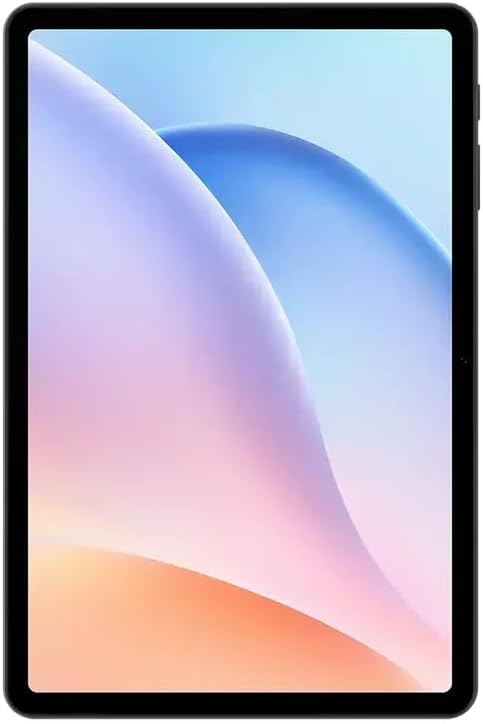
රූපය: ඉදිරිපස view of the DOOGEE Tab A9 Pro tablet, showcasing its 10.1-inch IPS HD display.
2.2 Wi-Fi සහ බ්ලූටූත් සම්බන්ධතාවය
Wi-Fi හෝ බ්ලූටූත් උපාංග වෙත සම්බන්ධ වීමට:
- වෙත යන්න සැකසීම්.
- තෝරන්න ජාලය සහ අන්තර්ජාලය Wi-Fi සඳහා හෝ සම්බන්ධිත උපාංග බ්ලූටූත් සඳහා.
- Toggle Wi-Fi or Bluetooth on and select the desired network or device to connect.
The tablet supports Wi-Fi 802.11 a/b/g/n/ac (2.4GHz/5GHz) and Bluetooth 5.0.
2.3 කැමරාව භාවිතා කිරීම
The tablet features a 5MP front camera and an 8MP rear camera with flash. Open the Camera app to capture photos and videos. Video recording supports FHD 30fps.
2.4 External Storage (TF Card)
The tablet includes a TF card slot, supporting up to 2TB of external storage. Insert a compatible TF card to expand your device's memory for photos, videos, and documents.
2.5 සම්බන්ධක පර්යන්ත
The VIP Edition includes a Bluetooth keyboard and mouse. Pair these devices via Bluetooth settings for enhanced productivity. The tablet also supports OTG (On-The-Go) functionality via its Type-C USB port for connecting other USB devices, and has a 3.5mm earphone jack.
3. නඩත්තු කිරීම
Proper maintenance ensures the longevity and optimal performance of your DOOGEE Tab A9 Pro.
3.1 ටැබ්ලටය පිරිසිදු කිරීම
- තිරය සහ ශරීරය පිරිසිදු කිරීමට මෘදු, ලින්ට් රහිත රෙද්දක් භාවිතා කරන්න.
- සැර රසායනික ද්රව්ය, උල්ෙල්ඛ පිරිසිදු කරන්නන් හෝ එයරොසෝල් ඉසින භාවිතා කිරීමෙන් වළකින්න.
- මුරණ්ඩු පැල්ලම් සඳහා, තරමක් dampජලය සමග රෙදි en.
3.2 බැටරි සත්කාර
ටැබ්ලටය 6580mAh බැටරියකින් සමන්විතයි. බැටරි ආයු කාලය උපරිම කිරීම සඳහා:
- අධික උෂ්ණත්වයෙන් වළකින්න.
- බැටරිය නිතර නිතර සම්පූර්ණයෙන්ම බැස යාමට ඉඩ නොදෙන්න.
- ප්රශස්ත ආරෝපණය සඳහා සපයා ඇති චාජරය භාවිතා කරන්න.

Image: Visual representation of the DOOGEE Tab A9 Pro's 6580mAh battery, highlighting its capacity and 10W fast charging capability.
3.3 මෘදුකාංග යාවත්කාලීන
ඔබගේ ටැබ්ලටයේ නවතම විශේෂාංග, ආරක්ෂක පැච් සහ කාර්ය සාධන වැඩිදියුණු කිරීම් ඇති බව සහතික කර ගැනීම සඳහා මෘදුකාංග යාවත්කාලීන කිරීම් නිතිපතා පරීක්ෂා කර ස්ථාපනය කරන්න. වෙත යන්න සැකසීම් > පද්ධතිය > පද්ධති යාවත්කාලීන කිරීම.
4. දෝශ නිරාකරණය
This section addresses common issues you might encounter with your DOOGEE Tab A9 Pro.
4.1 ටැබ්ලටය ක්රියාත්මක නොවේ
- ටැබ්ලටය ප්රමාණවත් ලෙස ආරෝපණය කර ඇති බවට වග බලා ගන්න. අවම වශයෙන් විනාඩි 30 ක් සඳහා එය චාජරයට සම්බන්ධ කරන්න.
- Try a forced restart by holding the power button for 10-15 seconds.
4.2 Wi-Fi සම්බන්ධතා ගැටළු
- Check if Wi-Fi is enabled in Settings.
- ඔබගේ Wi-Fi රවුටරය නැවත ආරම්භ කරන්න.
- ටැබ්ලට් සැකසුම් තුළ ජාලය අමතක කර නැවත සම්බන්ධ කරන්න.
- ඔබ Wi-Fi සංඥා පරාසය තුළ සිටින බව සහතික කර ගන්න.
4.3 මන්දගාමී කාර්ය සාධනය
- අනවශ්ය පසුබිම් යෙදුම් වසන්න.
- යෙදුම් සඳහා හැඹිලි දත්ත හිස් කරන්න.
- ප්රමාණවත් ගබඩා ඉඩක් ඇති බවට වග බලා ගන්න.
- ටැබ්ලටය නැවත ආරම්භ කරන්න.
4.4 තිරය ප්රතිචාර නොදක්වයි
- බලහත්කාරයෙන් නැවත ආරම්භ කිරීමක් සිදු කරන්න.
- If the issue persists, consider a factory reset (අවවාදයයි: This will erase all data).
5. තාක්ෂණික පිරිවිතර
Detailed specifications for the DOOGEE Tab A9 Pro tablet.

Image: Infographic detailing the 10.1-inch IPS HD display features, including 1280x800 resolution, 80.2% screen-to-body ratio, and 16.7 million screen colors.
| විශේෂාංගය | පිරිවිතර |
|---|---|
| ආකෘතිය | DOOGEE ටැබ් A9 Pro |
| මෙහෙයුම් පද්ධතිය | Android 15 |
| මානයන් | 242.5 x 160.9 x 9.7 මි.මී |
| බර | ග්රෑම් 512 |
| තිර ප්රමාණය | අඟල් 10.1 |
| සංදර්ශක වර්ගය | IPS LCD HD Display |
| විභේදනය | 1280 x 800 පික්සල |
| PPI | 149 |
| තිරයෙන් ශරීරයට අනුපාතය | 80.2% |
| සකසනය (CPU) | Unisoc T310 Octa-core (1x Arm Cortex-A75 @2.0GHz, 3x Arm Cortex-A55 @1.8GHz) |
| ග්රැෆික්ස් (GPU) | Arm Mali-G52 |
| RAM | 4GB LPDDR4 (with 16GB virtual RAM expansion, total 20GB) |
| අභ්යන්තර ගබඩාව (ROM) | 128GB eMMC |
| පුළුල් කළ හැකි ගබඩාව | TF Card Slot, up to 2TB |
| Wifi | 802.11 a / b / g / n / ac (2.4GHz / 5GHz) |
| බ්ලූටූත් | බ්ලූටූත් 5.0 |
| ඉදිරිපස කැමරාව | 5MP |
| පසුපස කැමරාව | ෆ්ලෑෂ් සහිත 8MP |
| බැටරි ධාරිතාව | 6580mAh |
| අයකිරීම | 10W Max Charging Current, Type-C USB |
| ඕඩියෝ ජැක් | 3.5 මි.මී |
| සංවේදක | G-සංවේදකය |
| වෙනත් විශේෂාංග | OTG support, Bluetooth keyboard connection support |
6. වගකීම් සහ සහාය
Your DOOGEE Tab A9 Pro comes with a warranty and access to customer support.
6.1 වගකීම් තොරතුරු
The DOOGEE Tab A9 Pro includes a මාස 12ක වගකීමක් from the date of purchase. This warranty covers manufacturing defects and malfunctions under normal use. It does not cover damage caused by misuse, accidents, unauthorized repairs, or normal wear and tear. Please retain your proof of purchase for warranty claims.
6.2 පාරිභෝගික සහාය
For technical assistance, warranty claims, or further inquiries, please contact DOOGEE customer support through their official website or the retailer where the product was purchased. Have your product model and purchase details ready when contacting support.


