1. හැඳින්වීම
Thank you for choosing the MAMAPRO PureMix Formula Maker MFD02. This device is designed to simplify baby formula preparation by automatically mixing formula with precise ratios and accurate temperature control. This manual provides essential information for safe operation, setup, maintenance, and troubleshooting to ensure optimal performance and consistent results for your baby's feeding needs.
2. වැදගත් ආරක්ෂක තොරතුරු
Please read all instructions carefully before using the PureMix Formula Maker. Failure to follow these instructions may result in injury or damage to the appliance.
- සෑම විටම උපකරණය දරුවන්ට ලබා ගත නොහැකි ලෙස තබා ගන්න.
- උපකරණය, විදුලි රැහැන හෝ ප්ලග් එක වතුරේ හෝ වෙනත් ද්රවවල ගිල්වන්න එපා.
- භූගත විදුලි අලෙවිසැලක් සමඟ පමණක් භාවිතා කරන්න.
- භාවිතයේ නොමැති විට සහ පිරිසිදු කිරීමට පෙර උපකරණය විසන්ධි කරන්න.
- උපකරණයට හානි වූ ලණුවක් හෝ ප්ලග් එකක් තිබේ නම්, හෝ එය ක්රියා විරහිත වී ඇත්නම් හෝ කිසියම් ආකාරයකින් හානි වී ඇත්නම් එය ක්රියාත්මක නොකරන්න.
- භාවිතයට පෙර සියලුම සංරචක නිවැරදිව එකලස් කර ඇති බවට වග බලා ගන්න.
- ජල ටැංකියේ පිරිසිදු, පානීය ජලය පමණක් භාවිතා කරන්න.
- Regularly clean and descale the appliance as instructed to prevent bacterial growth and ensure proper function.
- Always check the formula temperature before feeding your baby.
- Do not use silicone bottles with this device.
3. නිෂ්පාදන අවසන්view සහ සංරචක
The MAMAPRO PureMix Formula Maker consists of several key components designed for efficient formula preparation.
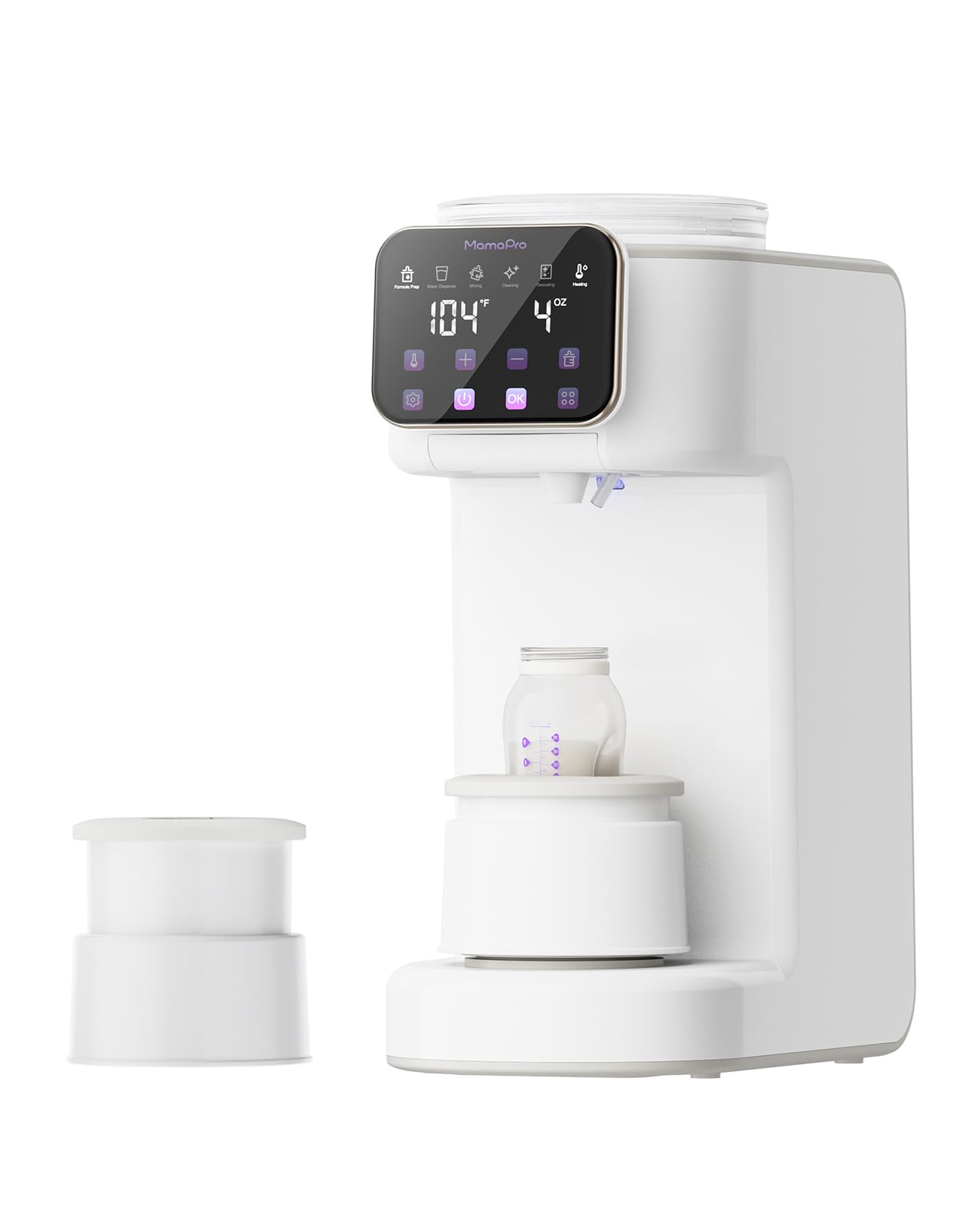
Figure 1: MAMAPRO PureMix Formula Maker MFD02. This image displays the complete unit, highlighting the water reservoir on the left, the formula powder container on the right, the central dispensing area with an LCD touch panel, and a bottle holder.
ප්රධාන සංරචක:
- Water Reservoir (67oz/2L): Holds water for formula mixing.
- Formula Powder Container: Stores dry formula powder, features a sealed design and twist-to-open lid.
- LCD Touch Panel: Intuitive interface for setting temperature, volume, and other functions.
- ඩිස්පෙන්සින් ස්පවුට්: Where mixed formula or warm water is dispensed.
- External Spinning Mixer: Ensures smooth, lump-free, and bubble-free formula.
- Interchangeable Bottle Holders: Two different heights to accommodate various bottle brands and sizes.
- බිංදු තැටි: ඕනෑම බිංදු හෝ කාන්දුවක් එකතු කරයි.
4. සැකසුම් මාර්ගෝපදේශය
4.1 ඇසුරුම් ඉවත් කිරීම සහ මූලික පිරිසිදු කිරීම
- ඇසුරුම්කරණයෙන් සියලුම සංරචක ප්රවේශමෙන් ඉවත් කරන්න.
- Wash the water tank, formula powder container, lid, and drip tray with warm soapy water. Rinse thoroughly and dry completely.
- දැන්වීම සමඟ ප්රධාන ඒකකය පිස දමන්නamp රෙදි. ප්රධාන ඒකකය ජලයේ ගිල්වන්න එපා.
4.2 එකලස් කිරීම
- ප්රධාන ඒකකය ස්ථාවර, පැතලි මතුපිටක් මත තබන්න.
- Insert the clean water tank into its designated slot on the left side of the unit.
- Place the clean formula powder container onto its slot on the right side. Ensure it is securely seated.
- Attach the appropriate bottle holder (tall or short) to the dispensing area.
- විදුලි රැහැන භූගත විදුලි අලෙවිසැලකට සම්බන්ධ කරන්න.
4.3 ජල ටැංකිය පිරවීම
- ජල ටැංකියේ පියන විවෘත කරන්න.
- Fill the tank with clean, potable water up to the MAX fill line.
- Close the water tank lid securely.
4.4 Adding Formula Powder
- Twist to open the lid of the formula powder container.
- Carefully pour your chosen baby formula powder into the container. Do not overfill.
- Close the lid securely by twisting it until it clicks into place.
5. මෙහෙයුම් උපදෙස්
5.1 Powering On and Initial Warm-up
Once plugged in, the device will power on. The LCD touch panel will illuminate. The machine may take a few minutes to warm the water to the default or last-used temperature. This warm-up time is normal.
5.2 LCD ස්පර්ශ පැනලය භාවිතා කිරීම
The intuitive LCD touch panel features 6 illuminated icons for easy navigation:
- උෂ්ණත්ව සැකසුම: Tap to cycle through 4 precise temperature options.
- පරිමාව සැකසීම: Tap to select dispensing volumes from 2oz to 10oz.
- Powder-to-Water Ratio: Adjust this setting according to your formula brand's instructions. Refer to your formula packaging for the correct ratio.
- බෙදා හැරීමේ බොත්තම: Initiates the mixing and dispensing process.
- Water-Only Mode: Dispenses warm water without formula.
- මතක කාර්යය: The machine automatically stores your last-used settings for quick future use.
5.3 Preparing a Formula Bottle
- Ensure the water tank is filled and the formula container has sufficient powder.
- Place an empty baby bottle (not silicone) on the bottle holder, ensuring it is centered under the dispensing spout.
- On the LCD panel, select your desired temperature.
- Select the desired dispensing volume (e.g., 4oz, 6oz).
- Adjust the powder-to-water ratio according to your formula brand's instructions. This is crucial for proper nutrition.
- Press the "Dispense" button. The machine will begin mixing and dispensing the formula. The external spinning mixer will ensure a smooth, clump-free mixture.
- Once dispensing is complete, remove the bottle. Always check the formula temperature on your wrist before feeding your baby.
5.4 Water-Only Dispense Mode
To dispense warm water only, select the "Water-Only Mode" icon on the LCD panel, choose your desired volume and temperature, then press the "Dispense" button. This is useful for quick bottle rinses or other baby needs.
6. පිරිසිදු කිරීම සහ නඩත්තු කිරීම
Regular cleaning and maintenance are essential for hygiene and optimal performance of your PureMix Formula Maker.
6.1 දිනපතා පිරිසිදු කිරීම
- පිරිසිදු කිරීමට පෙර උපකරණය විසන්ධි කරන්න.
- දිනපතා ජල ටැංකිය හිස් කර සෝදා හරින්න. නැවුම් ජලයෙන් නැවත පුරවන්න.
- Remove and clean the drip tray with warm soapy water.
- යන්ත්රයේ බාහිර කොටස දැන්වීමකින් පිස දමන්නamp රෙදි.
6.2 Cleaning the Formula Container and Mixing System
- Periodically empty any remaining formula powder from the container.
- Wash the formula container and its lid with warm soapy water. Ensure it is completely dry before refilling with powder.
- The external spinning mixer should also be cleaned regularly. Refer to the specific instructions in the full manual for detailed cleaning of the mixing components to prevent clumping.
6.3 අවලංගු කිරීම
The machine features a descaling reminder. When prompted, follow these steps:
- වතුර ටැංකිය හිස් කරන්න.
- Fill the water tank with a descaling solution (e.g., a mixture of white vinegar and water, or a commercial descaling agent suitable for baby appliances) according to the solution's instructions.
- Run several cycles of "Water-Only Mode" to flush the system with the descaling solution.
- Rinse the water tank thoroughly and fill with fresh water. Run several more "Water-Only Mode" cycles to flush out any descaling residue.
- Ensure no descaling solution remains in the system before preparing formula.
7. දෝශ නිරාකරණය
If you encounter issues with your PureMix Formula Maker, refer to the following common problems and solutions:
| ගැටලුව | විය හැකි හේතුව | විසඳුම |
|---|---|---|
| "Powder Low" error displayed, but container is full. | Sensor obstruction, powder clumping, or sensor malfunction. |
|
| Machine stops mid-bottle. | Low water level, low powder level, or internal error. |
|
| Formula portion is incorrect. | Incorrect powder-to-water ratio setting, clogged dispensing mechanism, or formula type incompatibility. |
|
| Water takes a long time to warm up. | Normal operation, or descaling needed. |
|
මෙම විසඳුම් උත්සාහ කිරීමෙන් පසුවත් ගැටලුව පවතින්නේ නම්, කරුණාකර පාරිභෝගික සහාය අමතන්න.
8. නිෂ්පාදන පිරිවිතර
- ආදර්ශ අංකය: MFD02
- නිෂ්පාදන මානයන්: 49.81 x 39.4 x 25.2 සෙ.මී
- අයිතමයේ බර: කිලෝ ග්රෑම් 6.12 කි
- ද්රව්ය සංයුතිය: ABS
- ජල ටැංකි ධාරිතාව: අවුන්ස 67 (ලීටර් 2)
- Dispensing Volume Options: 2oz to 10oz
- උෂ්ණත්ව සැකසුම්: 4 precise options
- බලශක්ති ප්රභවය: AC (Batteries not required)
- නිෂ්පාදකයා: Shenzhen Yingfusi Technology Co.,Ltd
9. වගකීම් සහ පාරිභෝගික සහාය
9.1 වගකීම් තොරතුරු
MAMAPRO products are manufactured to high-quality standards. For specific warranty details, including coverage period and terms, please refer to the warranty card included with your product or visit the official MAMAPRO webවෙබ් අඩවිය. වගකීම් හිමිකම් සඳහා මිලදී ගැනීමේ සාක්ෂියක් ලෙස ඔබේ මිලදී ගැනීමේ රිසිට්පත තබා ගන්න.
9.2 පාරිභෝගික සහාය
If you have any questions, require assistance, or need to report an issue that cannot be resolved using the troubleshooting guide, please contact MAMAPRO customer support. Contact information can typically be found on the product packaging or the official MAMAPRO webඅඩවිය.
