හැඳින්වීම
This manual provides comprehensive instructions for the installation, operation, and maintenance of your Imou Cell 3C AIO 5MP Solar Surveillance Camera. Please read this manual thoroughly before use and retain it for future reference.
The Imou Cell 3C AIO is a wireless, rechargeable surveillance camera featuring an integrated 2.2W solar panel for continuous power. It offers 5MP (3K) resolution, IP66 weather resistance, smart color night vision, and advanced human detection with smart tracking. Key features include a built-in siren and spotlight for deterrence, flexible storage options via microSD card or Imou Cloud, and a privacy mode for enhanced security.
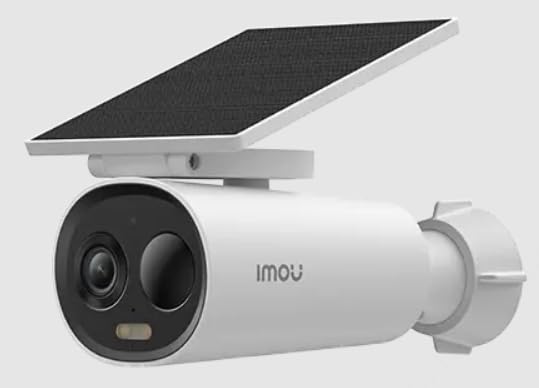
Image of the Imou Cell 3C AIO 5MP Solar Surveillance Camera, showcasing its compact design and integrated solar panel.
සැලසුම
Follow these steps for initial setup of your Imou Cell 3C AIO camera:
- ඇසුරුම් ඉවත් කර පරීක්ෂා කරන්න: Carefully remove all components from the packaging and ensure everything is present and undamaged.
- මූලික ගාස්තුව: Although solar-powered, it is recommended to fully charge the camera using a 5V USB adapter (not included) before the first use to ensure optimal performance.
- Imou Life යෙදුම බාගන්න: ඔබගේ ස්මාර්ට් ජංගම දුරකතනයේ යෙදුම් ගබඩාවෙන් (iOS සහ Android මත තිබේ) "Imou Life" යෙදුම බාගත කර ස්ථාපනය කරන්න.
- ගිණුම් නිර්මාණය: Imou Life යෙදුම විවෘත කර නව ගිණුමක් සාදන්න හෝ පවතින ගිණුමකට ලොග් වන්න.
- උපාංගය එක් කරන්න: Follow the in-app instructions to add your camera. This typically involves scanning a QR code on the camera or its packaging.
- සවිකරන ස්ථානය: Select a suitable outdoor location for mounting. Ensure the solar panel receives direct sunlight for several hours daily to maintain battery charge. The camera is IP66 weather-resistant, suitable for various outdoor conditions.
- ආරක්ෂිත සවි කිරීම: Use the provided mounting hardware to securely attach the camera to the chosen surface. Adjust the camera angle for optimal surveillance coverage.
මෙහෙයුම් උපදෙස්
Utilize the Imou Life app to access and control your camera's features:
- සජීවීව View: Imou Life යෙදුම විවෘත කර උපාංග ලැයිස්තුවෙන් ඔබේ කැමරාව තෝරන්න view තත්ය කාලීන වීඩියෝ සංග්රහය.
- චලන හඳුනාගැනීම සහ ලුහුබැඳීම: The camera features advanced human detection and smart tracking. Configure detection sensitivity, activity zones, and alert preferences within the app settings.
- රාත්රී දර්ශනය: The camera supports smart color night vision, which automatically activates in low-light conditions to provide clear, full-color images.
- Siren and Spotlight: The integrated spotlight and siren can be configured to activate automatically upon detection of an intruder, or they can be manually triggered through the Imou Life app to deter potential threats.
- වීඩියෝ ගබඩාව:
- MicroSD කාඩ්පත: Insert a microSD card (up to 256GB, not included) into the designated slot for local video storage.
- ඉමූ වලාකුළු: Subscribe to Imou Cloud for secure cloud storage of your video recordings. Refer to the app for subscription details and free trial availability.
- රහස්යතා ප්රකාරය: Activate the privacy mode within the Imou Life app. This feature physically covers the camera lens, ensuring your privacy when desired.
නඩත්තු කිරීම
නිසි නඩත්තුව ඔබේ කැමරාවේ ආයු කාලය සහ ප්රශස්ත ක්රියාකාරිත්වය සහතික කරයි:
- පිරිසිදු කිරීම: Regularly clean the camera lens and the surface of the solar panel with a soft, damp cloth. Avoid using abrasive cleaners or harsh chemicals, as these can damage the components.
- ස්ථිරාංග යාවත්කාලීන කිරීම්: Periodically check for and install firmware updates through the Imou Life app. Updates often include performance improvements, new features, and security enhancements.
- පාරිසරික සත්කාර: While IP66 rated, extreme environmental conditions (e.g., prolonged exposure to direct salt spray, very high humidity, or temperatures outside the specified operating range) should be minimized to prevent potential damage.
- බැටරි සෞඛ්යය: Ensure the solar panel receives adequate sunlight daily to maintain the internal battery's charge. If the camera is in a shaded area, occasional manual charging via USB may be required.
දෝෂගවේෂණය
පොදු ගැටළු සඳහා විසඳුම් සඳහා මෙම කොටස බලන්න:
- කැමරාව ක්රියාත්මක නොවේ:
- Check if the solar panel is obstructed or receiving insufficient sunlight.
- Ensure the internal battery has sufficient charge. If necessary, manually charge the camera via USB.
- Wi-Fi වෙත සම්බන්ධ විය නොහැක:
- Verify that the camera is within range of your Wi-Fi router.
- Double-check the Wi-Fi password entered in the Imou Life app.
- කැමරාව සහ ඔබේ Wi-Fi රවුටරය යන දෙකම නැවත ආරම්භ කරන්න.
- දුර්වල රූපයේ ගුණාත්මකභාවය:
- ඕනෑම අපිරිසිදුකමක් හෝ පැල්ලම් ඉවත් කිරීමට කැමරා කාචය පිරිසිදු කරන්න.
- Ensure there is adequate lighting in the surveillance area, especially for optimal color night vision.
- Check your network connection stability, as a weak signal can affect video streaming quality.
- චලන හඳුනාගැනීම ක්රියා නොකරයි:
- Verify that motion detection is enabled and configured correctly in the Imou Life app settings.
- Adjust the detection sensitivity and ensure activity zones are properly defined.
- කැමරාව අවහිර කරන භෞතික බාධා නොමැති බවට වග බලා ගන්න. view හඳුනාගැනීමේ ප්රදේශයේ.
පිරිවිතර
| විශේෂාංගය | විස්තර |
|---|---|
| ආදර්ශ අංකය | IPC-K9DC-5M0WEH-V2 හඳුන්වා දීම |
| වෙළඳ නාමය | Imou |
| විභේදනය | මෙගාපික්සල් 5 (3K) |
| ඒකාබද්ධ සූර්ය පැනලය | වොට් 2.2 |
| කාලගුණ ප්රතිරෝධය | IP66 සහතික කර ඇත |
| මානයන් (L x W x H) | 16.8 x 7.2 x 6 සෙ.මී |
| බර | ග්රෑම් 650 කි |
| බලශක්ති පරිභෝජනය | වොට් 3.5 |
| වෙළුමtage | වෝල්ට් 5 |
| ගබඩා විකල්ප | MicroSD card (up to 256GB), Imou Cloud |
| විශේෂාංග | Human Detection, Smart Tracking, Smart Color Night Vision, Siren, Spotlight, Privacy Mode |
වගකීම් සහ සහාය
For detailed warranty information, technical assistance, or customer support, please visit the official Imou website or contact their authorized service centers. Retain your proof of purchase for any warranty claims.


