1. හැඳින්වීම
Thank you for choosing the Baseus E20 True Wireless Earbuds. These earbuds are designed to provide a high-quality audio experience with powerful bass, clear calls, and reliable connectivity. This manual will guide you through the setup, operation, and maintenance of your new earbuds.
2. පෙට්ටියේ ඇති දේ
- Baseus E20 True Wireless Earbuds (Left and Right)
- අයකිරීමේ නඩුව
- USB-C ආරෝපණ කේබලය
- පරිශීලක අත්පොත

Image: Baseus E20 True Wireless Earbuds shown inside their charging case, highlighting key features like powerful bass, IPX5 water resistance, 33 hours listening time, and environmental noise cancellation.
3. නිෂ්පාදන අවසන්view
3.1 ඉයර්බඩ් සංරචක
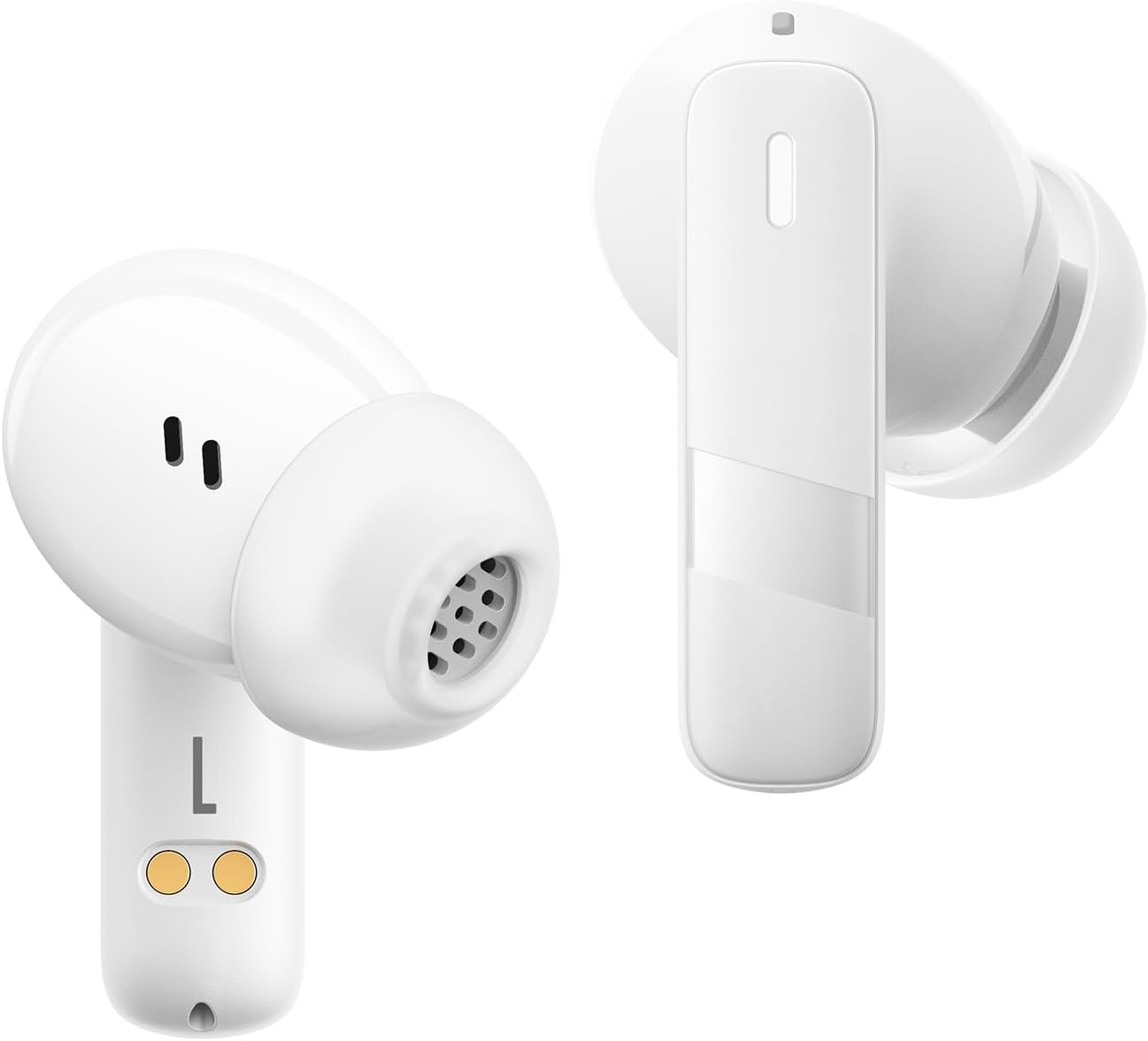
රූපය: සමීප ඡායාරූපයක් view of the Baseus E20 True Wireless Earbuds, showing the ergonomic design, speaker grille, and charging contacts.
- ස්පර්ශ පාලන ප්රදේශය: නැවත ධාවනය, ඇමතුම් සහ මාතයන් කළමනාකරණය කිරීම සඳහා.
- මයික්රෆෝනය: For calls and voice commands (2 ENC Mics).
- කථානායක: Delivers audio (12mm drivers).
- ආරෝපණ සම්බන්ධතා: For charging the earbuds in the case.
අයකිරීමේ නඩුව
- ආරෝපණ වරාය: නඩුව ආරෝපණය කිරීම සඳහා USB-C පෝට් එක.
- දර්ශක ආලෝකය: Shows charging status and battery level.
4. පිහිටුවීම
4.1 ඉයර්බඩ් සහ කේස් ආරෝපණය කිරීම
පළමු භාවිතයට පෙර, ඉයර්බඩ් සහ ආරෝපණ පෙට්ටිය සම්පූර්ණයෙන්ම ආරෝපණය කරන්න.
- ඉයර්බඩ් ආරෝපණ පෙට්ටියට දමන්න. ආරෝපණ සම්බන්ධතා පෙළගස්වා ඇති බවට වග බලා ගන්න.
- USB-C ආරෝපණ කේබලය නඩුවේ ආරෝපණ වරායට සහ බල ප්රභවයකට සම්බන්ධ කරන්න.
- The indicator light on the case will show the charging status. Once fully charged, the light will indicate completion or turn off.

Image: The Baseus E20 charging case is shown connected to a USB-C charging cable, illustrating the charging process and highlighting the 33-hour total listening time.
4.2 බ්ලූටූත් යුගල කිරීම
Pair your Baseus E20 earbuds with your device for the first time.
- Open the charging case. The earbuds will automatically enter pairing mode, and their indicator lights will flash.
- ඔබගේ උපාංගයේ (ස්මාර්ට්ෆෝන්, ටැබ්ලටය, ලැප්ටොප්) බ්ලූටූත් සක්රීය කරන්න.
- ඒ සඳහා සොයන්න "Baseus E20" in the list of available Bluetooth devices and select it to connect.
- සම්බන්ධ වූ පසු, ඉයර්බඩ් දර්ශක ලයිට් නිවී යනු ඇත හෝ ස්ථාවර ආලෝකයක් පෙන්වනු ඇත, එවිට ඔබට තහවුරු කිරීමේ ස්වරයක් ඇසෙනු ඇත.
සටහන: මූලික යුගල කිරීමෙන් පසු, ඉයර්බඩ් නඩුවෙන් පිටතට ගත් විට, උපාංගයේ බ්ලූටූත් සක්රීය කර ඇත්නම්, අවසන් වරට යුගල කළ උපාංගයට ස්වයංක්රීයව සම්බන්ධ වේ.

Image: A detailed diagram illustrating the Bluetooth 5.3 chip, emphasizing a more stable and efficient connection for the Baseus E20 earbuds.
5. මෙහෙයුම් උපදෙස්
The Baseus E20 earbuds feature intuitive touch controls. The following table outlines the common functions:

Image: A visual guide to the touch control areas on the Baseus E20 earbuds, detailing single, double, and triple tap functions for various operations.
| ක්රියාව | කාර්යය |
|---|---|
| දෙවරක් තට්ටු කරන්න (වම් හෝ දඟර) | Answer/Hang up Call, Play/Pause Music |
| ත්රිත්ව තට්ටු කිරීම (L හෝ R) | හඬ සහායක සක්රිය කරන්න |
| Long Press (L or R) | Cycle Noise Cancellation Modes (Default > Normal > Transparency) |
| Long Press (L or R) | Cycle Spatial Audio Modes (Music Mode > Theater Mode > Normal) |
සටහන: Specific functions may vary slightly depending on your connected device and operating system.
5.1 ඇමතුම් කළමනාකරණය
- පිළිතුර/අවසන් ඇමතුම: ඉයර්බඩ් දෙකෙන් එකක් දෙවරක් තට්ටු කරන්න.
- ඇමතුම ප්රතික්ෂේප කරන්න: ඉයර්බඩ් එකක් තත්පර 2ක් ඔබාගෙන සිටින්න.

Image: An internal diagram of the Baseus E20 earbud highlighting the dual-mic Environmental Noise Cancellation (ENC) system for clear calls.
5.2 සංගීත වාදනය
- වාදනය/විරාමය: ඉයර්බඩ් දෙකෙන් එකක් දෙවරක් තට්ටු කරන්න.
5.3 හ oice සහකාර
- හ oice සහකාර සක්රිය කරන්න: ඉයර්බඩ් දෙකෙන් එකක් තුන් වරක් තට්ටු කරන්න.
5.4 ශබ්ද පාලන ක්රම
The Baseus E20 earbuds offer different noise control modes:
- Noise Cancellation (Default): ගිලී යන සවන්දීමේ අත්දැකීමක් සඳහා අවට ශබ්දය අඩු කරයි.
- සාමාන්ය මාදිලිය: Standard audio playback without active noise control.
- විනිවිදභාවය ප්රකාරය: ශ්රව්යවලට සවන් දෙන අතරතුර ඔබේ වටපිටාවට සවන් දීමට ඔබට ඉඩ සලසයි.
To cycle through modes: Long press either earbud.
6. නඩත්තු කිරීම
6.1 පිරිසිදු කිරීම
- Regularly clean the earbuds, especially the ear tips and speaker grilles, with a soft, dry, lint-free cloth.
- ආරෝපණ ගැටළු වළක්වා ගැනීම සඳහා ඉයර්බඩ් සහ කේස් දෙකෙහිම ආරෝපණ සම්බන්ධතා පිරිසිදු හා වියලි බව සහතික කර ගන්න.
- Do not use abrasive materials, solvents, or harsh chemicals.
6.2 ගබඩා කිරීම
- ඉයර්බඩ් ආරක්ෂා කිරීමට සහ ඒවා ආරෝපණය කර තබා ගැනීමට භාවිත නොකරන විට ඒවායේ ආරෝපණ පෙට්ටියේ ගබඩා කරන්න.
- අධික උෂ්ණත්වයේ හෝ අධික ආර්ද්රතාවයේ ගබඩා කිරීමෙන් වළකින්න.
6.3 ජල ප්රතිරෝධය (IPX5)
The Baseus E20 earbuds are IPX5 water-resistant, meaning they can withstand splashes and sweat. They are not designed for submersion in water or exposure to pressurized water jets. Ensure earbuds are dry before placing them back in the charging case to prevent damage.

Image: The Baseus E20 earbuds and charging case are depicted with water splashing around them, illustrating their IPX5 water-resistant capability for reliable performance in various conditions.
7. දෝශ නිරාකරණය
| ගැටලුව | හැකි විසඳුම |
|---|---|
| ඉයර්බඩ් යුගල නොවේ |
|
| එක් ඉයර්බඩ් එකකින් ශබ්දයක් නැත |
|
| ආරෝපණ නඩුව ආරෝපණය නොවේ |
|
| දුර්වල ඇමතුම් ගුණාත්මකභාවය |
|
8. පිරිවිතර
| විශේෂාංගය | විස්තර |
|---|---|
| මාදිලියේ නම | E20 |
| බ්ලූටූත් අනුවාදය | 5.3 |
| රියදුරු ප්රමාණය | 12 මි.මී |
| සම්පූර්ණ ක්රීඩා කාලය | පැය 33 දක්වා (ආරෝපණ පෙට්ටිය සමඟ) |
| Earbuds Playback Time | පැය 6ක් දක්වා (තනි ආරෝපණයකින්) |
| ජල ප්රතිරෝධය | IPX5 |
| මයික්රොෆෝන | 2 ENC Mics for Clear Calls |
| පාලන වර්ගය | ස්පර්ශ පාලනය |
| ආරෝපණ වරාය | USB-C |
| අයිතමයේ බර | අවුන්ස 3.2 කි |
| ගැළපෙන උපාංග | Cellphones, Laptops, Tablets, Devices with Bluetooth Audio Capability (iOS, Android, Windows, Mac OS, Switch) |

Image: A cutaway diagram illustrating the 12mm PU diaphragm driver, emphasizing its role in producing strong and accurate ultra-low frequencies for powerful bass.
9. නිෂ්පාදන අවසන්view වීඩියෝ
වීඩියෝ: නිලධාරියෙක් අවසන්view of the Baseus E20 True Wireless Earbuds, demonstrating features such as touch controls, powerful bass, IPX5 water resistance, 33-hour battery life, ENC for clear calls, and Bluetooth 5.3 connectivity. The video shows the earbuds in various usage scenarios, including listening to music, making calls, and being used in different weather conditions.
10. වගකීම් සහ සහාය
Baseus products come with a standard manufacturer's warranty. For detailed warranty information, product support, or service inquiries, please refer to the warranty card included in your product packaging or visit the official Baseus webවෙබ් අඩවිය. වගකීම් හිමිකම් සඳහා මිලදී ගැනීමේ සාක්ෂියක් ලෙස ඔබේ මිලදී ගැනීමේ රිසිට්පත තබා ගන්න.
මාර්ගගත සහාය: වැඩිදුර සහාය සඳහා, කරුණාකර පිවිසෙන්න Baseus Official Store on Amazon හෝ ඔවුන්ගේ නිල webඅඩවිය.


