1. හැඳින්වීම
This manual provides essential information for setting up, operating, and maintaining your Telefunken 65FTV825 65-inch 4K UHD Smart TV. Please read it thoroughly before using the television to ensure safe and optimal performance. Keep this manual for future reference.
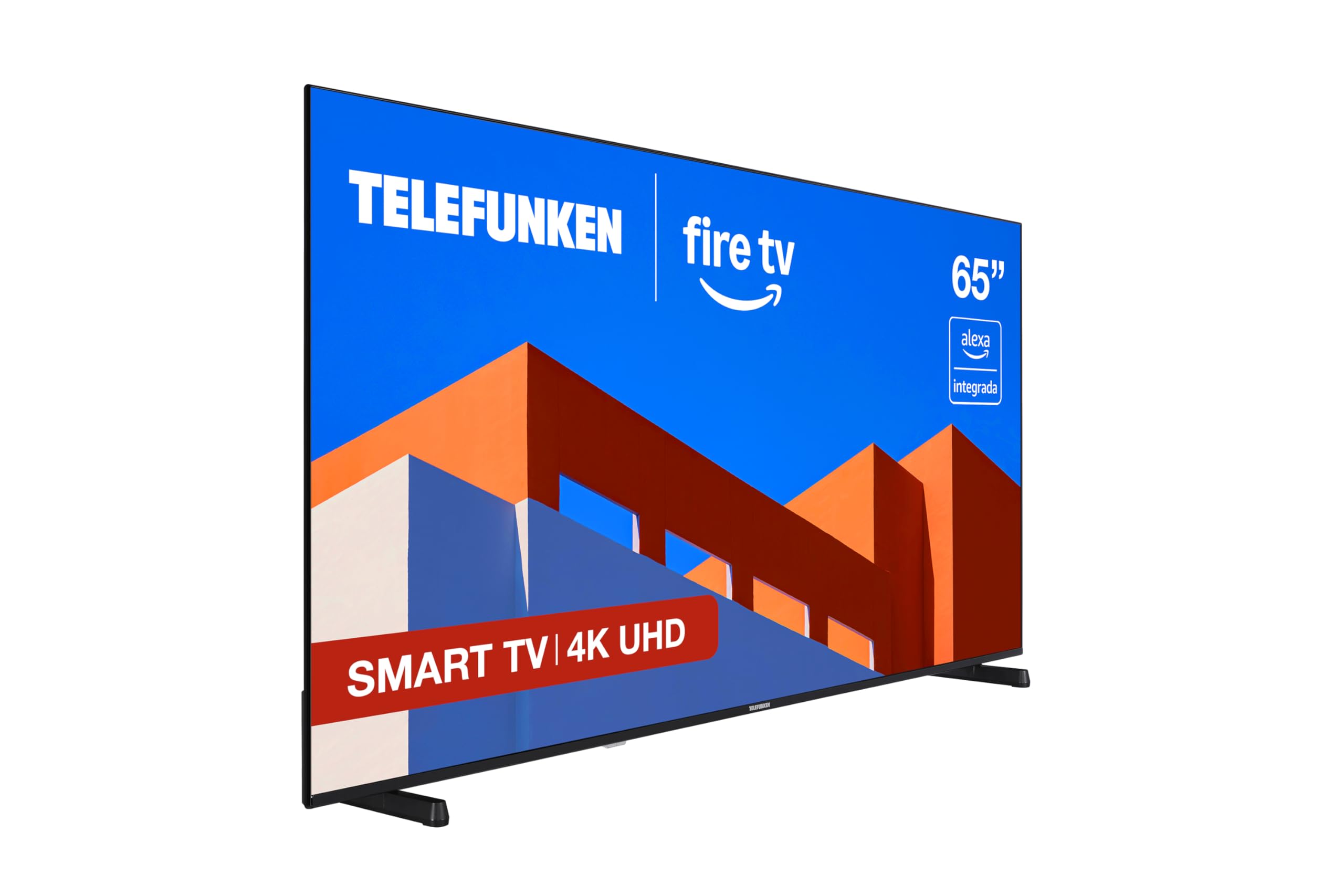
රූපය 1.1: ඉදිරිපස view of the Telefunken 65FTV825 65-inch 4K UHD Fire TV.
2. වැදගත් ආරක්ෂක තොරතුරු
Always follow basic safety precautions when using this television to reduce the risk of fire, electric shock, and injury. Keep the television away from moisture, direct sunlight, and heat sources. Ensure proper ventilation. Do not block ventilation openings. Use only attachments/accessories specified by the manufacturer. Refer to the full safety instructions in the printed manual included with your product.
3. පෙට්ටියේ ඇති දේ
Your Telefunken 65FTV825 package should contain the following items:
- Telefunken 65FTV825 65-inch 4K UHD Smart TV
- දුරස්ථ පාලකය
- දුරස්ථ පාලක සඳහා බැටරි
- පරිශීලක අත්පොත (මෙම ලේඛනය)
- බල කේබලය
- රූපවාහිනී නැවතුම (බිත්තියේ සවි කර නොමැති නම්)
4. පිහිටුවීම
4.1. ස්ථාවරය හෝ බිත්ති සවි කිරීම සවි කිරීම
Carefully place the TV face down on a soft, clean surface. Attach the stand using the provided screws, ensuring it is securely fastened. If wall-mounting, follow the instructions provided with your VESA-compatible wall mount (not included).
4.2. පර්යන්ත සම්බන්ධ කිරීම
Connect your devices (e.g., cable box, gaming console, Blu-ray player) to the TV's HDMI ports. The TV features multiple HDMI ports for versatile connectivity. Connect your antenna or cable for live TV. For internet access, connect an Ethernet cable or use Wi-Fi during the initial setup.
4.3. මූලික බලය ක්රියාත්මක කිරීම සහ පළමු වරට සැකසීම
Plug the power cable into the TV and a power outlet. Press the power button on the remote control. The TV will guide you through the initial setup process, including language selection, network connection, and Fire OS account setup.
5. ඔබේ ටෙලිෆන්කන් ස්මාර්ට් රූපවාහිනිය ක්රියාත්මක කිරීම
5.1. දුරස්ථ පාලකයview
The included remote control allows you to navigate the TV's features. It includes dedicated buttons for power, volume, channel selection, and direct access to streaming services. The remote also features an Alexa voice button for voice commands.

Image 5.1: The remote control for your Telefunken Fire TV, featuring an integrated Alexa voice button.
5.2. Smart TV Features (Fire OS)
Your TV comes with Fire OS integrated, providing access to a wide range of streaming applications and services. Navigate through the intuitive interface to find movies, TV shows, live TV, and personalized recommendations.

Image 5.2: The Fire TV interface, offering access to numerous streaming applications and services.
5.3. ඇලෙක්සා සමඟ හඬ පාලනය
Press the Alexa button on your remote to use voice commands. You can change channels, adjust volume, search for content, or manage compatible smart home devices. For example, say "Alexa, show me the baby's room camera" to view a live feed from a connected smart camera.

රූපය 5.3: View your smart home cameras directly on your TV screen using Alexa voice commands.
5.4. පින්තූර සහ ශබ්ද සැකසුම්
Experience stunning visuals with 4K UHD resolution and HDR10 technology, providing vibrant colors and deep contrasts. Dolby Audio ensures immersive and clear sound. The TV also features MEMC (Motion Estimation, Motion Compensation) for smoother motion in fast-paced scenes.
5.5. ඇපල් එයාර්ප්ලේ
Share content from your Apple devices directly to your TV using Apple AirPlay. Stream photos, videos, or mirror your iPhone, iPad, or Mac screen effortlessly.
5.6. ක්රීඩා විශේෂාංග
The Fire TV supports features like ALLM (Auto Low Latency Mode) and VRR (Variable Refresh Rate) for a smoother and more responsive gaming experience, reducing input lag and screen tearing.

Image 5.4: Enhance your gaming experience with features like ALLM and VRR for fluid gameplay.
5.7. නිෂ්පාදන අවසන්view වීඩියෝ
වීඩියෝ 5.1: කෙටි නිෂ්පාදනයක් පිළිබඳ විස්තරයක්view highlighting key features of the Telefunken Fire TV. This video is provided by the seller.
6. නඩත්තු කිරීම
6.1. රූපවාහිනිය පිරිසිදු කිරීම
Unplug the TV before cleaning. Use a soft, dry cloth to wipe the screen and cabinet. For stubborn marks, lightly dampරෙදි කැබැල්ල වතුරෙන් හෝ මෘදු, උල්ෙල්ඛ නොවන තිර පිරිසිදු කරන්නෙකුගෙන් ආවරණය කරන්න. කිසි විටෙකත් පිරිසිදුකාරකය කෙලින්ම තිරය මත ඉසින්න එපා.
6.2. මෘදුකාංග යාවත්කාලීන
Ensure your TV is connected to the internet to receive automatic software updates. Updates provide new features, performance improvements, and security enhancements. You can manually check for updates in the TV's settings menu.
7. දෝශ නිරාකරණය
ඔබේ රූපවාහිනිය සමඟ ගැටළු ඇති වුවහොත්, පහත පොදු ගැටළු සහ විසඳුම් වෙත යොමු වන්න:
- බලය නැත: Check if the power cable is securely connected and the outlet is working. Try a different power outlet.
- පින්තූරයක් නැත, නමුත් ශබ්දය: නිවැරදි ආදාන මූලාශ්රය තෝරාගෙන ඇති බව සහතික කර ගන්න. බාහිර උපාංග වෙත කේබල් සම්බන්ධතා පරීක්ෂා කරන්න.
- ශබ්දයක් නැත, නමුත් පින්තූරය: Check volume levels on both the TV and any connected audio devices. Ensure mute is not activated.
- දුරස්ථ පාලකය ක්රියා නොකරයි: බැටරි මාරු කරන්න. දුරස්ථ පාලකය සහ රූපවාහිනිය අතර කිසිදු බාධාවක් නොමැති බවට වග බලා ගන්න.
- Wi-Fi සම්බන්ධතා ගැටළු: Restart your router and modem. Re-enter your Wi-Fi password in the TV settings. Ensure the TV is within range of your Wi-Fi network.
- මන්දගාමී කාර්ය සාධනය: Close unused applications. Clear cache if available in settings. Ensure sufficient internet bandwidth for streaming.
For more complex issues, consult the online support resources or contact Telefunken customer service.
8. පිරිවිතර
Below are the technical specifications for the Telefunken 65FTV825 model:
| විශේෂාංගය | පිරිවිතර |
|---|---|
| නිෂ්පාදකයා | ටෙලිෆන්කන් |
| ආදර්ශ අංකය | 65FTV825 |
| නිෂ්පාදන මානයන් (W x D x H) | 145.3 x 26.6 x 87.2 සෙ.මී |
| නිෂ්පාදන බර | කිලෝ ග්රෑම් 17.57 කි |
| තිර ප්රමාණය | අඟල් 65 |
| සංදර්ශක තාක්ෂණය | LED |
| විභේදනය | 4K UHD (3840 x 2160 පික්සල) |
| Refresh Rate | 120 Hz |
| විශේෂ ලක්ෂණ | ඇලෙක්සා අනුකූල, බෙසල්-අඩු නිර්මාණය, VESA බිත්ති සවිකිරීම, HDR - HLG, ස්මාර්ට් ටීවී |
| සම්බන්ධතා තාක්ෂණය | බ්ලූටූත්, ඊතර්නෙට්, HDMI, USB, Wi-Fi |
| දර්ශන අනුපාතය | 16:9 |
| මෙහෙයුම් පද්ධතිය | ගිනි මෙහෙයුම් පද්ධතිය |
| ශ්රව්ය තාක්ෂණය | ඩොල්බි ඕඩියෝ |
| බලශක්ති කාර්යක්ෂමතා ශ්රේණිගත කිරීම | E |
| Product Launch Date | 17 සැප්තැම්බර් 2025 |
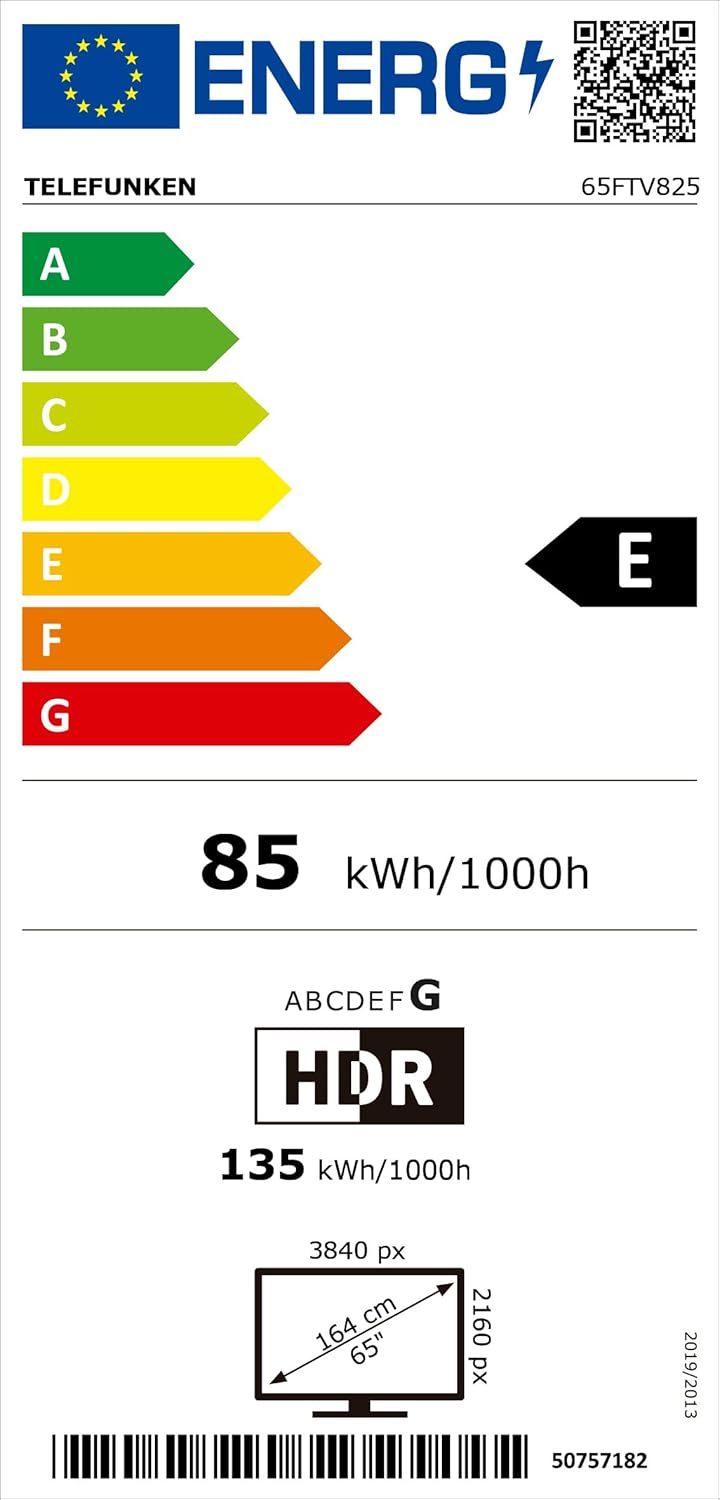
Image 8.1: Energy label for the Telefunken 65FTV825, indicating its energy efficiency class E. For more details, visit eprel.ec.europa.eu/qr/2400042.
9. වගකීම් සහ සහාය
Your Telefunken 65FTV825 television is covered by a manufacturer's warranty. Please refer to the warranty card included in your product packaging for specific terms and conditions. For technical support, troubleshooting assistance, or service requests, please contact Telefunken customer support through their official webවෙබ් අඩවිය හෝ ඔබගේ වගකීම් ලියකියවිලිවල සපයා ඇති සම්බන්ධතා තොරතුරු.


