හැඳින්වීම
Thank you for choosing the HONOR Choice Earbuds Clip. These open-ear wireless headphones are designed for comfortable listening with advanced features like Bluetooth 5.2 connectivity, AI call noise cancellation, and a long-lasting battery. This manual provides detailed instructions for setup, operation, maintenance, and troubleshooting to ensure optimal performance and user experience.
පැකේජයේ අන්තර්ගතය
- HONOR Choice Earbuds Clip (Left and Right Earbuds)
- රැහැන් රහිත ආරෝපණ නඩුව
- USB ආරෝපණ කේබලය
- පරිශීලක අත්පොත
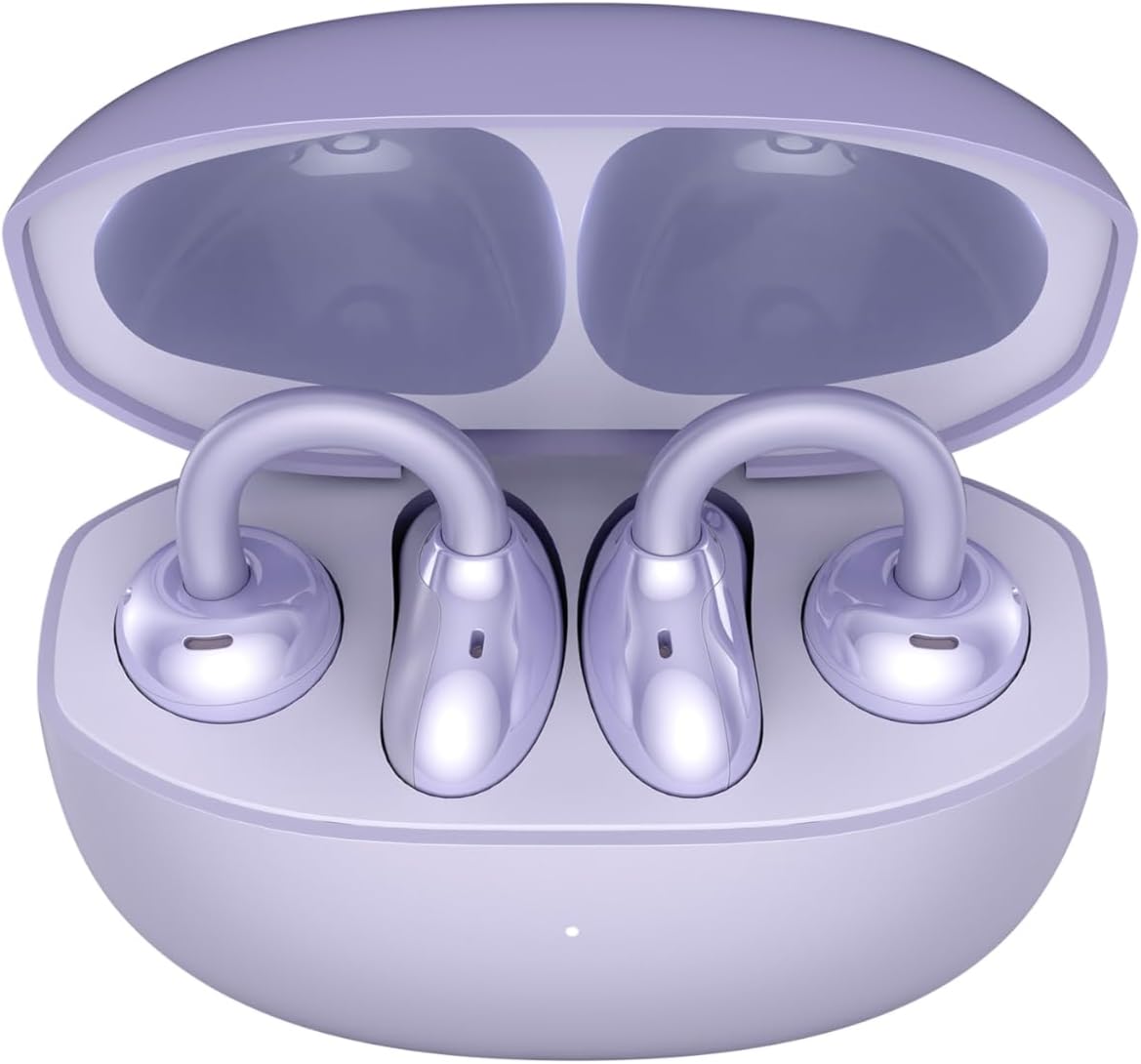
Image: The HONOR Choice Earbuds Clip, showing both earbuds inside their open charging case.
නිෂ්පාදනය අවසන්view
The HONOR Choice Earbuds Clip features an innovative design and advanced technology for a superior audio experience.
ප්රධාන ලක්ෂණ:
- Titanium Arch Bridge Design: High-performance titanium alloy material covered with scratch and corrosion-resistant PC material for strength and lightweight comfort.
- Asymmetrical Open-Ear Design: Adapts naturally to the ear cup, combined with two rear vents for direct sound waves and reduced sound leakage.
- Dual Magnetic Driver: 10.8 mm driver with PEEK + Pen titanium-coated membrane for stronger bass, lower distortion, and higher sensitivity.
- දිගු බැටරි ආයු කාලය: Up to 7 hours of single-song playback, extendable to 36 hours with the charging case.
- AI Call Noise Cancellation (DNN): Dual highly sensitive microphones intelligently filter ambient noise for crystal clear calls.
- බ්ලූටූත් 5.2 සම්බන්ධතාව: ස්ථාවර සහ කාර්යක්ෂම රැහැන් රහිත සම්බන්ධතාවයක් සහතික කරයි.
- IP54 ජල ප්රතිරෝධය: Provides protection against dust and splashes.

Image: Diagram highlighting the Titanium Alloy Arch Design of the earbuds, emphasizing comfort and aesthetics.
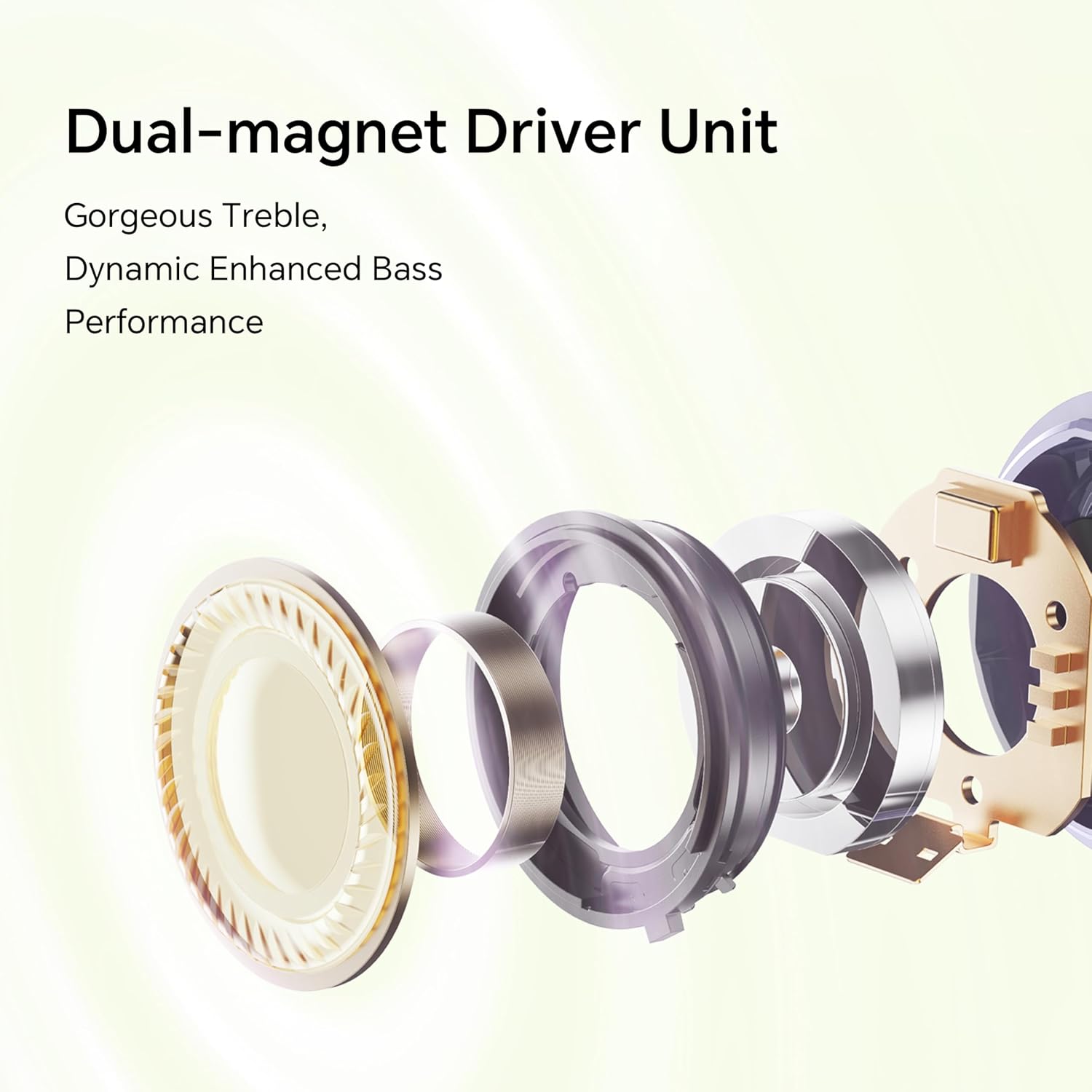
රූපය: පුපුරා ගියේය view diagram of the dual-magnet driver unit, illustrating its components for enhanced audio performance.
සැලසුම
1. ඉයර්බඩ් සහ කේස් ආරෝපණය කිරීම
පළමු භාවිතයට පෙර, ඉයර්බඩ් සහ ආරෝපණ පෙට්ටිය සම්පූර්ණයෙන්ම ආරෝපණය කරන්න.
- ආරෝපණ පෙට්ටිය තුළට ඉයර්බඩ් දෙකම තබන්න.
- USB ආරෝපණ කේබලයක් භාවිතයෙන් ආරෝපණ පෙට්ටිය බල ප්රභවයකට සම්බන්ධ කරන්න.
- The indicator light on the charging case will show the charging status. A full charge provides up to 36 hours of total listening time.

Image: Graphic illustrating the 36-hour extended battery life of the earbuds with their charging case.
2. උපාංගයක් සමඟ යුගල කිරීම
Follow these steps to pair your HONOR Choice Earbuds Clip with your Bluetooth-enabled device.
- ඉයර්බඩ් ආරෝපණ පෙට්ටියේ ඇති බවත්, ආවරණ පියන විවෘතව ඇති බවත් සහතික කර ගන්න.
- On your device (e.g., smartphone, laptop), go to the Bluetooth settings.
- ඒ සඳහා සොයන්න available devices and select "HONOR Choice Earbuds Clip" from the list.
- සම්බන්ධ වූ පසු, ඔබට ශ්රව්ය විමසුමක් ඇසෙනු ඇති අතර, ඉයර්බඩ් භාවිතයට සූදානම් වනු ඇත.
3. ඉයර්බඩ් පැළඳීම
The open-ear clip design ensures a comfortable and secure fit.
- Gently clip each earbud onto your ear, ensuring the sound outlet is positioned towards your ear canal.
- Adjust for a comfortable and stable fit. The asymmetrical curve is designed to adapt naturally to the ear cup.

Image: A woman demonstrating the proper way to wear the HONOR Choice Earbuds Clip, highlighting its open clip design and natural fit.
මෙහෙයුම් උපදෙස්
ස්පර්ශ පාලන
ශ්රව්ය නැවත ධාවනය සහ ඇමතුම් කළමනාකරණය කිරීම සඳහා ඉයර්බඩ් වල බුද්ධිමය ස්පර්ශ පාලන ඇත.
- වාදනය/විරාමය: ඉයර්බඩ් දෙකෙන් එකක් මත එක තට්ටු කරන්න.
- ඊළඟ ධාවන පථය: දකුණු ඉයර්බඩ් එක දෙවරක් තට්ටු කරන්න.
- පෙර ධාවන පථය: වම් ඉයර්බඩ් එක දෙවරක් තට්ටු කරන්න.
- පිළිතුර/අවසන් ඇමතුම: ඉයර්බඩ් දෙකෙන් එකක් මත එක තට්ටු කරන්න.
- ඇමතුම ප්රතික්ෂේප කරන්න: ඉයර්බඩ් දෙකෙන් එකක් තත්පර 2ක් ඔබාගෙන සිටින්න.
- හ oice සහකාර සක්රිය කරන්න: ඉයර්බඩ් දෙකෙන් එකක් තුන් වරක් තට්ටු කරන්න.
AI ඇමතුම් ශබ්ද අවලංගු කිරීම
The earbuds utilize dual microphones and an AI multi-channel call noise cancellation algorithm (DNN) to reduce ambient noise during calls, ensuring your voice is clear to the recipient. This feature is automatically active during phone calls.
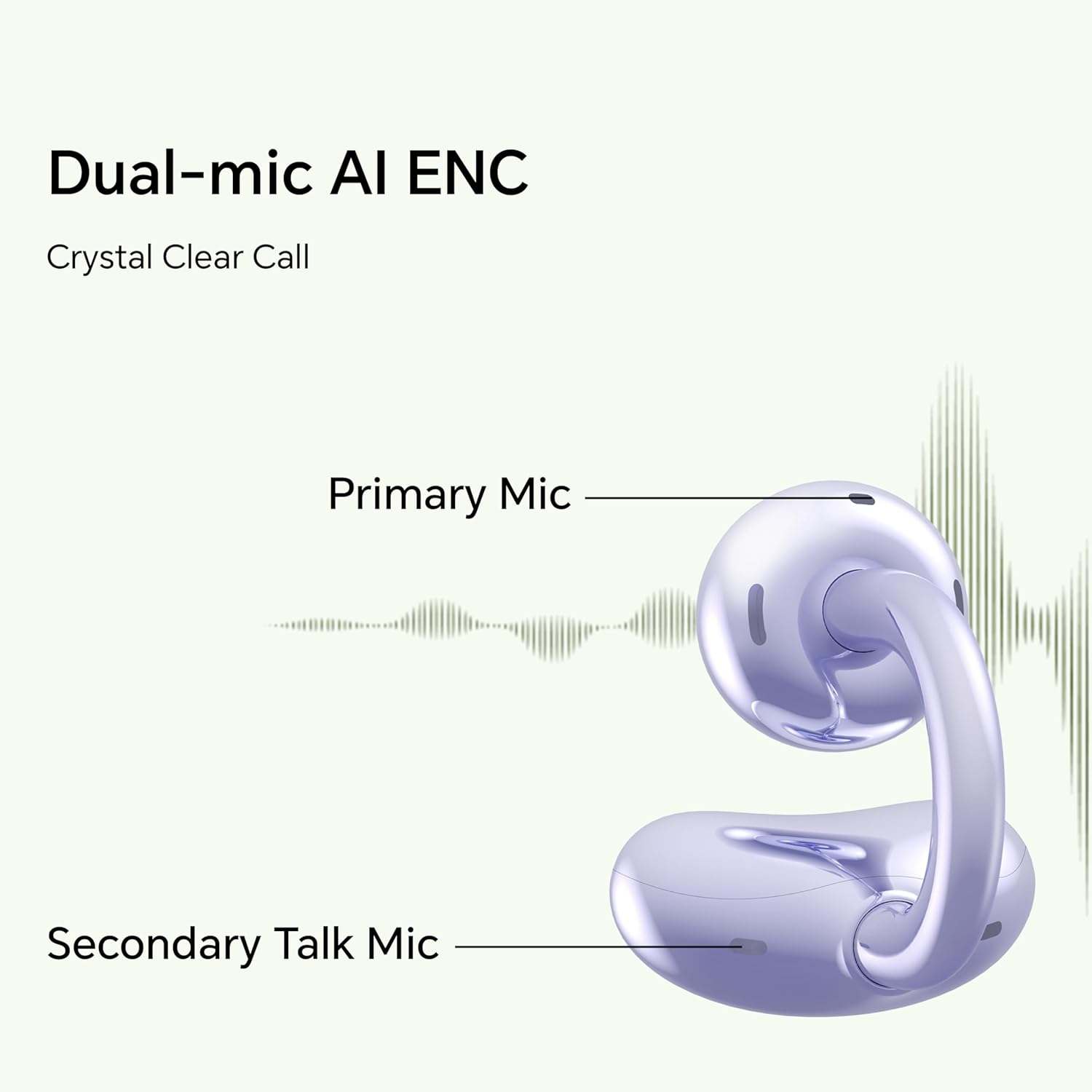
Image: Diagram illustrating the primary and secondary microphones used for AI Enhanced Noise Cancellation (ENC) during calls.
ද්විත්ව උපාංග සම්බන්ධතාවය
The HONOR Choice Earbuds Clip supports simultaneous connection to two devices. This allows for seamless switching between audio sources, such as listening to music on a laptop and answering a call on a smartphone.
- ඔබේ පළමු උපාංගය සමඟ ඉයර්බඩ් යුගල කරන්න.
- Disconnect from the first device (or put earbuds back in case and re-enter pairing mode if needed).
- ඔබේ දෙවන උපාංගය සමඟ ඉයර්බඩ් යුගල කරන්න.
- The earbuds will now remember both devices and automatically switch between them based on active audio or call.
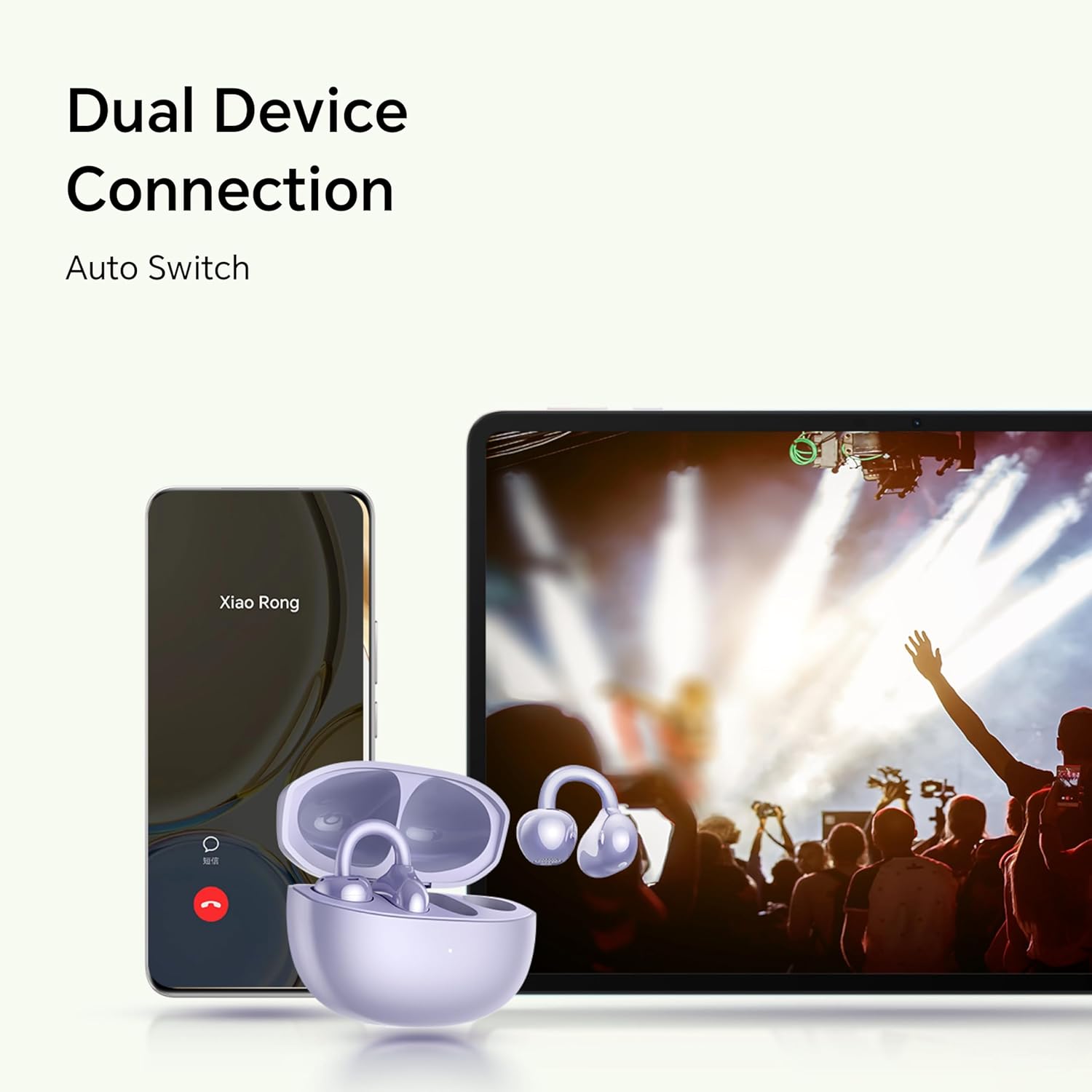
Image: Illustration showing the earbuds connected to both a smartphone and a tablet, demonstrating the dual device connection feature with automatic switching.
නඩත්තු කිරීම
නිසි නඩත්තුව ඔබේ ඉයර්බඩ් වල ආයු කාලය සහ ප්රශස්ත ක්රියාකාරිත්වය සහතික කරයි.
- පිරිසිදු කිරීම: Use a soft, dry, lint-free cloth to clean the earbuds and charging case. Avoid using abrasive materials or harsh chemicals.
- ජල ප්රතිරෝධය: The earbuds are IP54 rated, meaning they are protected against dust ingress and splashing water from any direction. Do not submerge them in water or expose them to heavy rain. Dry them thoroughly if they get wet.
- ගබඩා: භාවිතයේ නොමැති විට, ඉයර්බඩ් ආරක්ෂා කර ගැනීමට සහ ආරෝපණය කර තබා ගැනීමට ඒවායේ ආරෝපණ පෙට්ටියේ ගබඩා කරන්න. අධික උෂ්ණත්වයන්ගෙන් ඈත්ව සිසිල් වියළි ස්ථානයක ගබඩා කරන්න.
- ආරෝපණ සම්බන්ධතා: Periodically check and clean the charging contacts on both the earbuds and inside the case to ensure proper charging.
දෝෂගවේෂණය
If you encounter issues with your earbuds, refer to the following common solutions.
| ගැටලුව | විසඳුම |
|---|---|
| Earbuds do not turn on or charge. |
|
| ඉයර්බඩ් මගේ උපාංගය සමඟ යුගල නොවේ. |
|
| ශබ්දයක් නැත හෝ අඩු පරිමාවක් නැත. |
|
| ඇමතුම් ගුණාත්මකභාවය දුර්වලයි. |
|
| එක් ඉයර්බඩ් එකක් ක්රියා නොකරයි. |
|
පිරිවිතර
Detailed technical specifications for the HONOR Choice Earbuds Clip.
| මාදිලියේ නම | HONOR CHOICE ඉයර්බඩ්ස් ක්ලිප් එක |
| ආදර්ශ අංකය | 5504ADMY |
| වෙළඳ නාමය | ගෞරව |
| සම්බන්ධතා තාක්ෂණය | රැහැන් රහිත (බ්ලූටූත්) |
| බ්ලූටූත් අනුවාදය | 5.2 |
| කන් ස්ථානගත කිරීම | කන් විවෘත කරන්න |
| ආකෘති සාධකය | කනේ |
| ශබ්ද පාලනය | None (AI Call Noise Cancellation only) |
| විශේෂ ලක්ෂණය | Noise Cancellation (AI Call Noise Cancellation) |
| ශ්රව්ය ධාවක වර්ගය | ගතික ධාවකය |
| ශ්රව්ය ධාවක ප්රමාණය | මිලිමීටර් 10 යි |
| බැටරි ආයු කාලය (ඉයර්බඩ්) | පැය 7 (තනි ආරෝපණයකින්) |
| සම්පූර්ණ බැටරි ආයු කාලය (කේස් එක සමඟ) | පැය 36 දක්වා |
| පාලන වර්ගය | ස්පර්ශ පාලනය |
| ද්රව්ය | Titanium Alloy, Plastic |
| අයිතමයේ බර | කිලෝග්රෑම් 0.12 (අවුන්ස 4.2) |
| නිෂ්පාදන මානයන් | අඟල් 2.36 x 2.36 x 1.18 |
| IP ශ්රේණිගත කිරීම | IP54 |
| ඇතුළත් සංරචක | රැහැන් රහිත ආරෝපණ නඩුව |
වගකීම් සහ සහාය
For warranty information and customer support, please refer to the official HONOR website or contact your local HONOR service center. Keep your proof of purchase for warranty claims.
- මාර්ගගත සහාය: Visit the official HONOR support webනිතර අසන ප්රශ්න, ධාවක සහ මෘදුකාංග යාවත්කාලීන කිරීම් සඳහා අඩවිය.
- සබඳතා තොරතුරු: නිෂ්පාදන ඇසුරුම්කරණය හෝ නිල ඇසුරුම්කරණය වෙත යොමු වන්න. webපාරිභෝගික සේවා සම්බන්ධතා තොරතුරු සඳහා අඩවිය.


