හැඳින්වීම
This manual provides detailed instructions for the setup, operation, and maintenance of your LIGE EF21-I Smartwatch. Please read this manual thoroughly before using the device to ensure proper function and to maximize its features.
ආරක්ෂිත තොරතුරු
- ඔරලෝසුව විසුරුවා හැරීමට හෝ වෙනස් කිරීමට උත්සාහ නොකරන්න.
- අධික උෂ්ණත්වයෙන් සහ සෘජු හිරු එළියෙන් ඔරෙලෝසුව තබා ගන්න.
- Avoid exposing the watch to strong impacts or drops.
- Do not use corrosive chemicals to clean the watch.
- This device is not a medical device. Health data is for reference only and should not be used for medical diagnosis or treatment.
- ආරෝපණය කිරීමට පෙර ආරෝපණ සම්බන්ධතා පිරිසිදු හා වියලි බව සහතික කර ගන්න.
පැකේජයේ අන්තර්ගතය
ඔබගේ පැකේජයේ සියලුම අයිතම ඇති බව තහවුරු කරගන්න:
- LIGE EF21-I Smartwatch
- USB චුම්බක ආරෝපණ කේබලය
- Type-C ආරෝපණ කේබලය
- පරිශීලක අත්පොත

Image: The package includes both a USB magnetic charging cable and a Type-C charging cable for versatile power options.
සැකසුම් මාර්ගෝපදේශය
1. මූලික අයකිරීම
Before first use, fully charge your smartwatch. Connect the magnetic charging cable to the charging contacts on the back of the watch and the USB end to a power adapter (not included) or a computer USB port. The watch display will show the charging status.

Image: The smartwatch connected to its magnetic charger, indicating its 800 mAh battery capacity.
2. යෙදුම් ස්ථාපනය සහ යුගල කිරීම
To unlock all features, download and install the "Fit CloudPro" app on your smartphone.
- Scan the QR code in the manual or on the watch (if available) or search for "Fit CloudPro" in your phone's app store (compatible with Android 8.0+ and iOS 12.0+).
- යෙදුම විවෘත කර ගිණුමක් සාදන්න හෝ පුරනය වන්න.
- ඔබගේ ස්මාර්ට් ජංගම දුරකතනයේ බ්ලූටූත් සබල කර ඇති බව සහතික කර ගන්න.
- යෙදුම තුළ, උපාංග අංශයට ගොස් "උපාංගය එක් කරන්න" හෝ ඒ හා සමාන විකල්පයක් තෝරන්න.
- Select "EF21-I" from the list of available devices to pair.
- යුගල කිරීමේ ක්රියාවලිය සම්පූර්ණ කිරීමට තිරයේ විමසුම් අනුගමනය කරන්න.
යුගල කළ පසු, ඔරලෝසුව ඔබගේ දුරකථනය සමඟ කාලය සහ දත්ත සමමුහුර්ත කරයි.
මෙහෙයුම් උපදෙස්
මූලික සංචාලනය
- ස්පර්ශ තිරය: මෙනු සහ විශේෂාංග හරහා සංචාලනය කිරීමට වමට/දකුණට, ඉහළට/පහළට ස්වයිප් කරන්න. තේරීමට තට්ටු කරන්න.
- පැති බොත්තම්: Typically, one button acts as a power/back button, while others may be customizable shortcuts. Refer to the on-screen prompts for specific functions.

Image: The 1.43-inch AMOLED display offers brilliant colors and a fluid, efficient user experience.
බ්ලූටූත් ඇමතුම් කාර්යය
The EF21-I Smartwatch supports Bluetooth calls, allowing you to make and receive calls directly from your wrist.
- ඔරලෝසුව බ්ලූටූත් හරහා ඔබගේ ස්මාර්ට් ජංගම දුරකථනයට සම්බන්ධ කර ඇති බවට වග බලා ගන්න.
- Access the "Call" or "Phone" function on your watch.
- You can use the dial pad, access your contacts, or view ඇමතුම් ඉතිහාසය.
- Advanced noise cancellation ensures clear audio during calls.
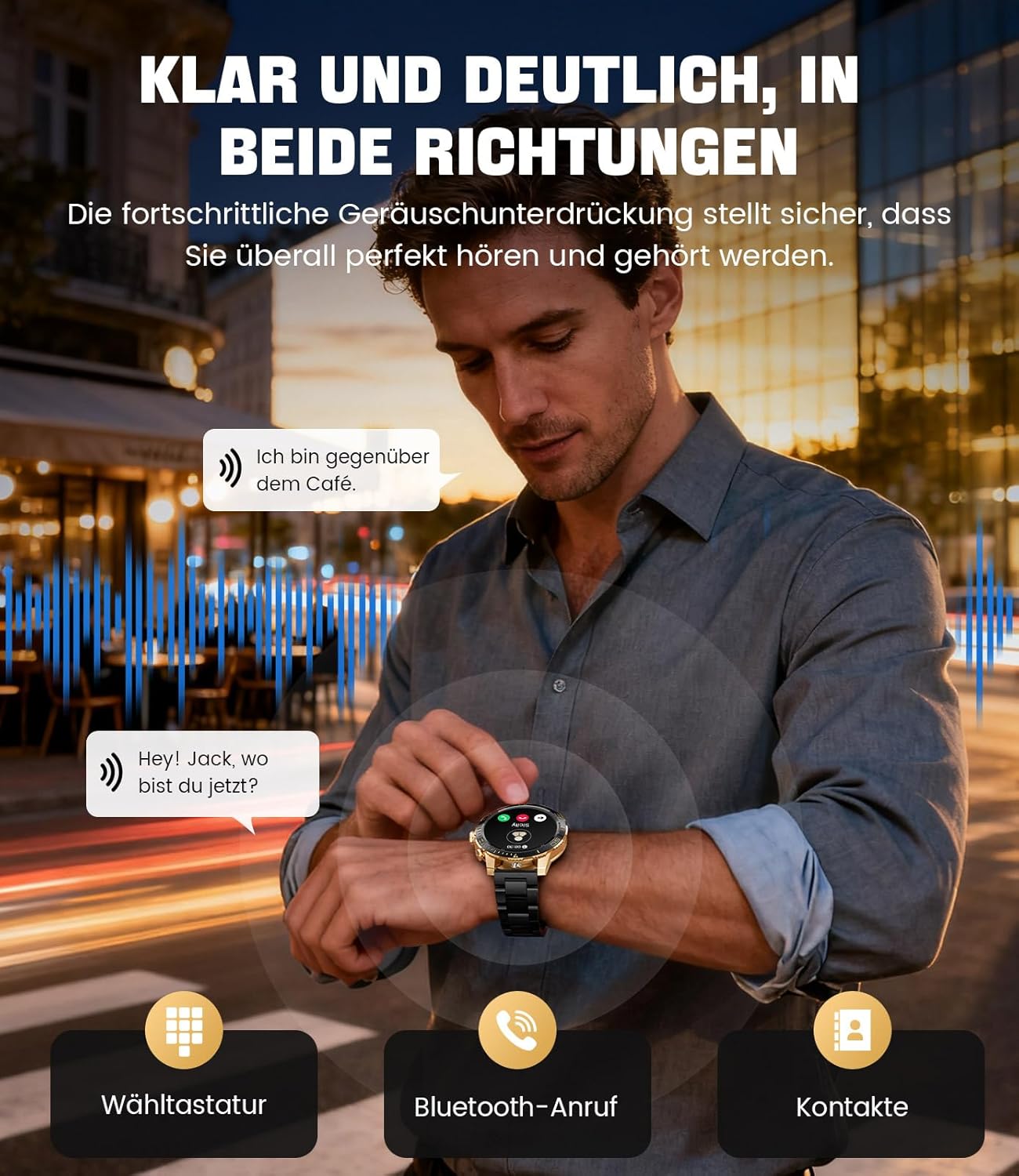
Image: The smartwatch allows clear two-way communication with advanced noise cancellation, featuring a dial pad, Bluetooth call option, and contacts access.
දැනුම්දීම්
Receive real-time notifications from your smartphone apps directly on your watch.
- Enable app notifications in the "Fit CloudPro" app settings.
- The watch will display incoming calls, SMS, and messages from social media apps (e.g., Facebook, Twitter, Instagරැම්, WhatsApp).
- A quick glance at your wrist allows you to stay informed discreetly.

Image: The smartwatch displays real-time notifications from various social media applications, keeping you informed discreetly.
සෞඛ්ය නිරීක්ෂණ
The EF21-I Smartwatch acts as your 24/7 health guardian, providing continuous monitoring of key health metrics.
- හෘද ස්පන්දන වේගය: දවස පුරාම ඔබේ හෘද ස්පන්දන වේගය නිරීක්ෂණය කරයි.
- රුධිර ඔක්සිජන් (SpO2): ඔබේ රුධිර ඔක්සිජන් සන්තෘප්ත මට්ටම් මැන බලයි.
- නින්ද ලුහුබැඳීම: Analyzes your sleep patterns, distinguishing between deep sleep, light sleep, and awake times.
- ආතතිය නිරීක්ෂණය: ආතති මට්ටම් නිරීක්ෂණය කරයි.
- වාඩි වී සිටින මතක් කිරීම්: අක්රිය කාල පරිච්ඡේදයකින් පසු චලනය වීමට ඔබට අනතුරු අඟවයි.
View detailed health data and trends in the "Fit CloudPro" app.
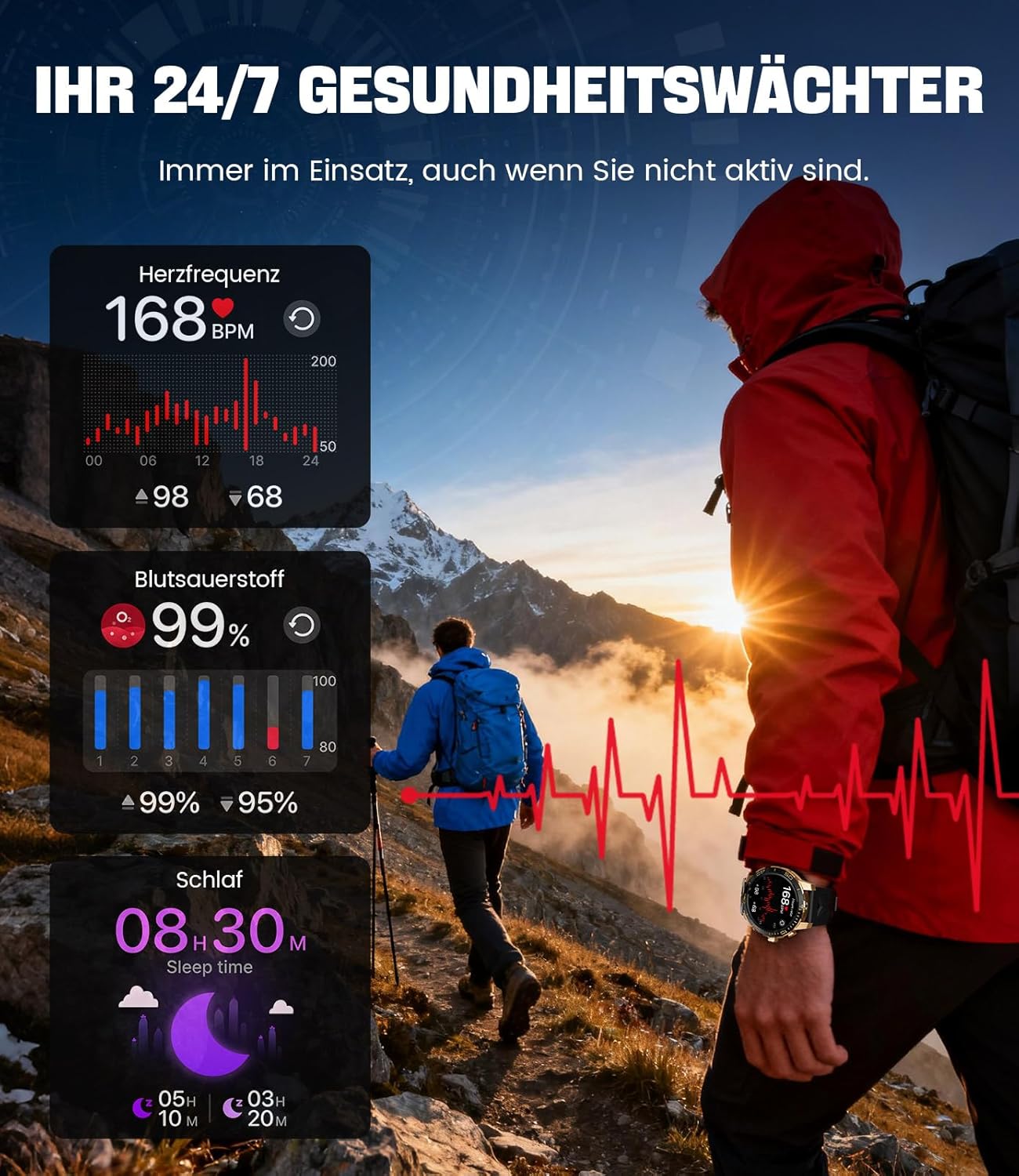
Image: The smartwatch functions as a 24/7 health guardian, monitoring heart rate, blood oxygen, and sleep patterns, even when you are not actively engaged in exercise.
ක්රීඩා මාතයන්
With over 200 sports modes, the watch helps you track your workouts and achieve your fitness goals.
- ඔරලෝසු මෙනුවෙන් ඔබට අවශ්ය ක්රීඩා මාදිලිය තෝරන්න.
- The watch records data such as heart rate, calories burned, and steps taken.
- Automatic recognition for walking, running, and cycling is supported.
- Review your activity data in the "Fit CloudPro" app for performance analysis.

Image: The smartwatch supports over 200 training modes, tracking heart rate, calories, and steps for various activities.
අභිරුචිකරණය කළ හැකි ඔරලෝසු මුහුණු
විවිධ ඔරලෝසු මුහුණු සමඟින් ඔබේ ස්මාර්ට් ඔරලෝසුව පුද්ගලීකරණය කරන්න.
- The watch comes with several pre-installed classic watch faces.
- Access over 200 additional designs through the "Fit CloudPro" app.
- You can also upload your own photos to create custom watch faces.
අමතර විශේෂාංග
- කාලගුණ අනාවැකිය: තත්ය කාලීන කාලගුණ යාවත්කාලීන කිරීම් ලබා ගන්න.
- අනතුරු ඇඟවීමේ ඔරලෝසුව: ඔබේ මැණික් කටුවෙන් කෙළින්ම අනතුරු ඇඟවීම් සකසන්න.
- දුරස්ථ කැමරා පාලනය: ඔබගේ දුරකථනයේ කැමරාව ක්රියාත්මක කිරීමට ඔබගේ ඔරලෝසුව භාවිතා කරන්න.
- ෆ්ලෑෂ් ලයිට්: Activate a flashlight function on your wrist.
- Phone Locator: Find your misplaced smartphone using the watch.

Image: The smartwatch features a wrist flashlight function, providing illumination for outdoor activities.
නඩත්තු කිරීම
පිරිසිදු කිරීම
- ඔරලෝසු තිරය සහ බඳ මෘදු, ලින්ට් රහිත රෙද්දකින් පිස දමන්න.
- මුරණ්ඩු පැල්ලම් සඳහා, ඩීampරෙදි කැබැල්ල වතුරෙන් තරමක් තෙත් කරන්න.
- Avoid using harsh chemicals, abrasive materials, or ultrasonic cleaners.
- ආරෝපණ සම්බන්ධතා පිරිසිදු හා සුන්බුන් වලින් තොර බව සහතික කර ගන්න.
ජල ප්රතිරෝධය (IP68)
The LIGE EF21-I Smartwatch is IP68 water-resistant, meaning it can withstand immersion in water up to 1.5 meters for up to 30 minutes. It is suitable for daily use, hand washing, and swimming.
- උණු වතුර, සෝනා හෝ වාෂ්ප කාමරවල ඔරලෝසුව භාවිතා නොකරන්න.
- දිය යට බොත්තම් එබීමෙන් වළකින්න.
- After exposure to water, especially saltwater, dry the watch thoroughly.
දෝෂගවේෂණය
ඔරලෝසුව ක්රියාත්මක නොවේ
- ඔරලෝසුව සම්පූර්ණයෙන්ම ආරෝපණය කර ඇති බවට වග බලා ගන්න. අවම වශයෙන් විනාඩි 30ක්වත් එය චාජරයට සම්බන්ධ කරන්න.
- තත්පර කිහිපයක් සඳහා බල බොත්තම ඔබාගෙන සිටින්න.
Unable to Pair with App
- ඔබගේ ස්මාර්ට් ජංගම දුරකතනයේ බ්ලූටූත් සක්රීය කර ඇති බවට වග බලා ගන්න.
- ඔරලෝසුව ප්රමාණවත් ලෙස ආරෝපණය කර ඇති බවට වග බලා ගන්න.
- ඔබගේ ස්මාර්ට් ජංගම දුරකථනය සහ ස්මාර්ට් ඔරලෝසුව නැවත ආරම්භ කරන්න.
- Try unpairing and re-pairing the device through the "Fit CloudPro" app.
- Check if the app has necessary permissions on your phone.
සාවද්ය සෞඛ්ය දත්ත
- ඔරලෝසුව ඔබේ මැණික් කටුවෙහි හොඳින් පැළඳ සිටින බවට වග බලා ගන්න, ඕනෑවට වඩා ලිහිල් හෝ තදින් නොවේ.
- ඔරලෝසුවේ පිටුපස ඇති සංවේදකය පිරිසිදු කරන්න.
- මිනුම් අතරතුර අධික චලනයන් වළක්වා ගන්න.
- Remember that health data is for reference and not for medical use.
දැනුම්දීම් නොලැබුණි
- ඔරලෝසුව බ්ලූටූත් හරහා ඔබගේ දුරකථනයට සම්බන්ධ වී ඇති බව තහවුරු කරගන්න.
- Check notification settings in the "Fit CloudPro" app.
- ඔබගේ දුරකථනයේ දැනුම්දීම් සැකසුම් යෙදුමට දැනුම්දීම් යැවීමට ඉඩ දෙන බවට වග බලා ගන්න.
- Disable any battery optimization settings for the "Fit CloudPro" app on your phone.
පිරිවිතර
| විශේෂාංගය | විස්තර |
|---|---|
| වෙළඳ නාමය | LIGE |
| ආදර්ශ අංකය | EF21-I |
| සංදර්ශක ප්රමාණය | අඟල් 1.43 |
| සංදර්ශක වර්ගය | AMOLED |
| බැටරි ධාරිතාව | 800 mAh (ලිතියම්-පොලිමර්) |
| සම්බන්ධතාවය | බ්ලූටූත් |
| මෙහෙයුම් පද්ධති අනුකූලතාව | ඇන්ඩ්රොයිඩ් 8.0+ සහ iOS 12.0+ |
| ජල ප්රතිරෝධක ශ්රේණිගත කිරීම | IP68 |
| මතක ගබඩා ධාරිතාව | 256 MB |
| විශේෂ ලක්ෂණ | Weather forecast, Sedentary reminder, Alarm clock, Touch screen, Always-on display, Bluetooth calling, Heart rate monitor, SpO2 monitor, Sleep monitor, 200+ sports modes, Phone locator |
| GPS | ස්මාර්ට් ජංගම දුරකථනය හරහා ජීපීඑස් |

Image: The smartwatch features impact resistance, indicated by a 'Military Grade Drop-Tested' badge.
වගකීම් සහ සහාය
වගකීම් තොරතුරු
The product is supported by a 12-month warranty. Please retain your proof of purchase for warranty claims.
පාරිභෝගික සහාය
For technical assistance, troubleshooting, or warranty inquiries, please contact LIGE customer support. Refer to the contact information provided with your purchase or visit the official LIGE webඅඩවිය.


