1. හැඳින්වීම
The Fender Mustang LTX100 is a 100-watt modeling combo amplifier designed for guitarists seeking versatile tone and performance. This ampජීවිත විශේෂාංග 25 amp models, 25 studio-quality effects, and 100 preset slots for extensive sound customization. It is equipped with a 12-inch Celestion G12FSD-100 speaker, an integrated color display with a chromatic tuner, Bluetooth audio streaming, and USB-C connectivity for recording and app control. This manual provides essential information for the proper setup, operation, and maintenance of your Mustang LTX100 ampජීවිතාරක්ෂකයා.

Figure 1.1: Fender Mustang LTX100 Amplifier with included accessories.
2 ආරක්ෂිත තොරතුරු
Please read and understand all safety instructions before operating your Fender Mustang LTX100 ampලිෆයර්. අනාගත යොමුව සඳහා මෙම අත්පොත තබා ගන්න.
- අවවාදයයි: To reduce the risk of fire or electric shock, do not expose this appliance to rain or moisture. Do not remove the cover. Refer servicing to qualified personnel only.
- අවවාදය: විදුලි කම්පනය වැලැක්වීම සඳහා, බ්ලේඩ් නිරාවරණය වැලැක්වීම සඳහා බ්ලේඩ් සම්පූර්ණයෙන්ම ඇතුල් කළ හැකි නම් මිස, දිගු රැහැනක්, භාජනයක් හෝ වෙනත් අලෙවිසැලක් සහිත මෙම (ධ්රැවීකරණය වූ) ප්ලග් එක භාවිතා නොකරන්න.
- අවවාදයයි: මෙම නිෂ්පාදනයේ පිළිකා සහ උපත් ආබාධ හෝ වෙනත් ප්රජනක හානි ඇති කිරීමට කැලිෆෝනියා ප්රාන්තය දන්නා රසායනික ද්රව්ය අඩංගු වේ.
- සහතික කරන්න amplifier is connected to a grounded power outlet.
- Do not block ventilation openings. Maintain adequate space around the ampනිසි වායු ප්රවාහය සඳහා ලයිෆයර්.
- තැබීමෙන් වළකින්න amplifier near heat sources such as radiators, heat registers, stoves, or other apparatus (including ampලිෆයර්) තාපය නිපදවන.
- විදුලි රැහැන ඇවිදීමෙන් හෝ ඇණ ගැසීමෙන්, විශේෂයෙන් ප්ලග්, පහසුව සඳහා භාජන සහ ඒවා උපකරණයෙන් පිටවන ස්ථානයේ ආරක්ෂා කරන්න.
- අකුණු කුණාටු වලදී හෝ දිගු කාලයක් භාවිතා නොකළ විට මෙම උපකරණය විසන්ධි කරන්න.
3. පිහිටුවීම
3.1 ඇසිරීම සහ ස්ථානගත කිරීම
ප්රවේශමෙන් ඉවත් කරන්න amplifier and all accessories from the packaging. Inspect the unit for any signs of damage. Place the amplifier on a stable, level surface, ensuring adequate space for ventilation.
3.2 බල සම්බන්ධතාවය
- සහතික කරන්න ampලයිෆයරයේ බල ස්විචය අක්රිය ස්ථානයේ ඇත.
- Connect the provided power cord to the INPUT POWER receptacle on the rear panel of the ampජීවිතාරක්ෂකයා.
- Plug the other end of the power cord into a suitable grounded AC power outlet.
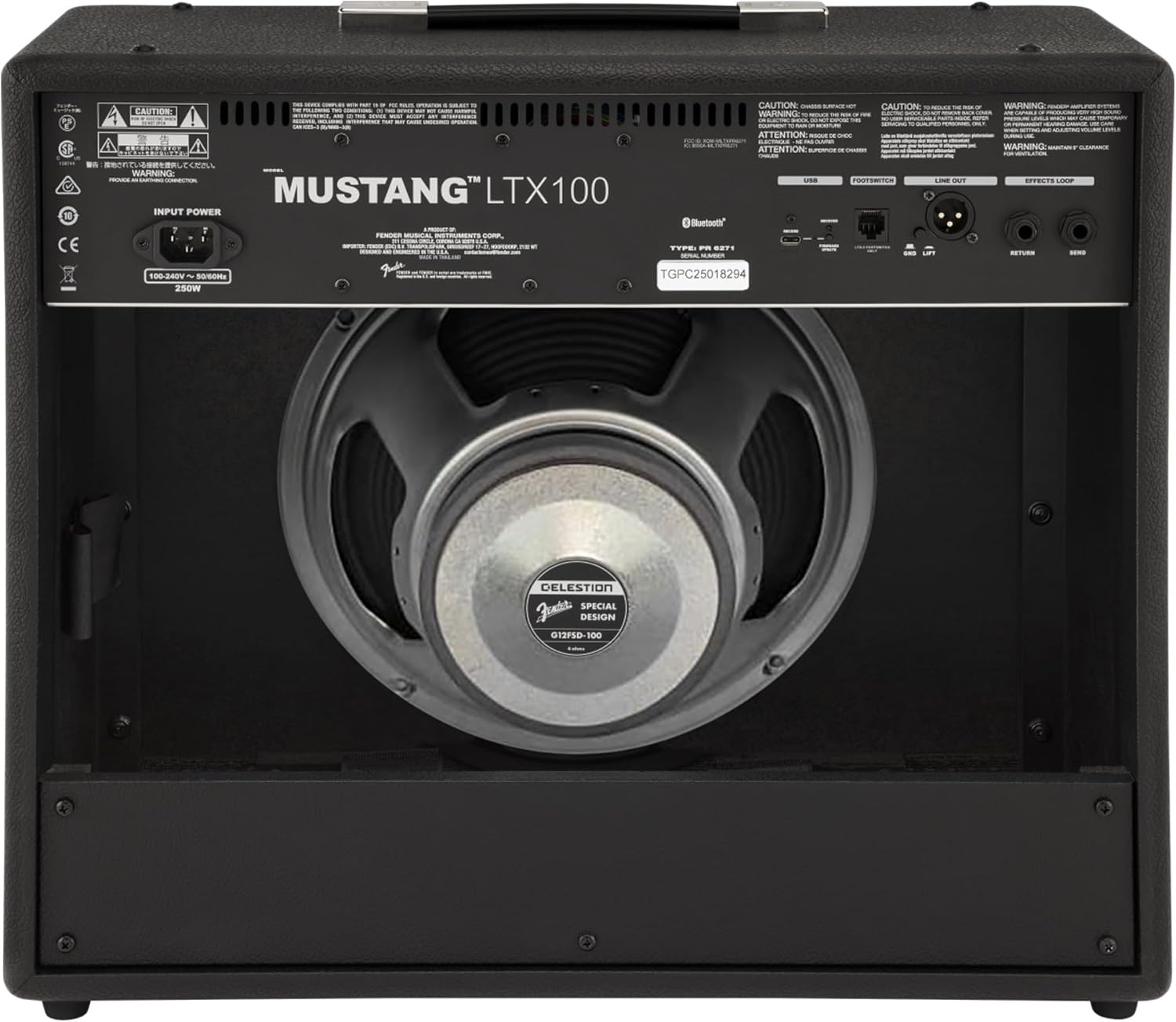
රූපය 3.1: පසුපස පැනල් සම්බන්ධතා
3.3 Instrument and Accessory Connections
- උපකරණ ආදානය: Connect your guitar using a standard 1/4-inch instrument cable to the INPUT jack on the front panel.
- සහායක ආදානය: For connecting external audio devices (e.g., MP3 player, phone), use a 3.5mm stereo cable to the AUX input on the front panel.
- හෙඩ්ෆෝන් ප්රතිදානය: For silent practice, connect headphones to the HEADPHONE OUT jack on the rear panel.
- XLR රේඛාව: For connecting to a PA system or recording interface, use XLR cables to the LINE OUT jacks on the rear panel. A ground lift switch is provided to eliminate hum.
- බලපෑම් ලූපය: External effects pedals can be connected via the SEND and RETURN jacks on the rear panel.
- USB-C: Connect to a computer for recording, firmware updates, and Fender Tone 3.0 app control.
4. මෙහෙයුම් උපදෙස්
4.1 ඉදිරිපස පැනල පාලනයන්view

රූපය 4.1: ඉදිරිපස පැනල පාලන
- ආදානය: ඔබේ ගිටාරය සම්බන්ධ කිරීම සඳහා අඟල් 1/4 ජැක් එකක්.
- AUX: 3.5mm stereo input for external audio devices.
- ලාභය: Controls the input level and amount of overdrive/distortion for the selected amp ආකෘතිය.
- වෙළුම: Adjusts the output level of the selected amp ආකෘතිය.
- උත්සන්න: අධි-සංඛ්යාත ප්රතිචාරය සකස් කරයි.
- මැද: මධ්ය-සංඛ්යාත ප්රතිචාරය සකස් කරයි.
- බාස්: අඩු සංඛ්යාත ප්රතිචාරය සකස් කරයි.
- මාස්ටර්: හි සමස්ත නිමැවුම් පරිමාව පාලනය කරයි ampජීවිතාරක්ෂකයා.
- දර්ශනය: Color LCD screen for navigating menus, selecting amp models, effects, and viewing tuner.
- ENCODER KNOB: Used to scroll through menus and adjust parameters on the display. Press to select.
- ආපසු: පෙර මෙනුවට හෝ තිරයට නැවත පැමිණේ.
- සුරකින්න: Stores current settings as a preset.
- මෙනු: Accesses the main menu for system settings, global parameters, and more.
- තට්ටු කරන්න: Used for setting delay and modulation effect tempos. Hold to activate the chromatic tuner.
- සක්රිය/අක්රිය: සඳහා බල ස්විචය ampජීවිතාරක්ෂකයා.
4.2 Powering On and Basic Operation
- Ensure all connections are secure and the MASTER volume is set to a low level.
- Press the ON/OFF switch to power on the amplifier. The display will illuminate.
- එකක් තෝරන්න amp model and effect using the encoder knob and display.
- Adjust the GAIN, VOLUME, TREBLE, MIDDLE, and BASS knobs to shape your desired tone.
- Gradually increase the MASTER volume to achieve the desired listening level.
4.3 භාවිතා කිරීම Amp ආකෘති සහ බලපෑම්
The Mustang LTX100 offers 25 distinct amp models and 25 studio-quality effects. Use the encoder knob to browse through the available options on the display. Once an amp model or effect is selected, its parameters can be adjusted using the encoder knob or the dedicated tone knobs (Treble, Middle, Bass) if applicable.
පෙරසිටර 4.4 ක්
ද amplifier comes with 70 factory presets and allows for 100 user-defined presets. To save your custom settings:
- Dial in your desired amp model, effects, and tone settings.
- SAVE බොත්තම ඔබන්න.
- Use the encoder knob to select a user preset slot.
- Press the encoder knob to confirm and save your preset.
4.5 බ්ලූටූත් ශ්රව්ය ප්රවාහය
To stream audio from a mobile device:
- ඔබගේ ජංගම උපාංගයේ බ්ලූටූත් සක්රිය කරන්න.
- මත amplifier, navigate to the Bluetooth menu via the display.
- Select "Pair New Device" and choose "Mustang LTX100" from your device's Bluetooth list.
- Once paired, you can play audio through the ampජීවිතාරක්ෂකයා.
4.6 Fender Tone 3.0 App
The Fender Tone 3.0 app (available for iOS and Android) provides wireless control over your amplifier. It allows you to edit, save, and share presets, as well as access additional features. Connect your amplifier to your mobile device via Bluetooth to use the app.
5. නඩත්තු කිරීම
5.1 පිරිසිදු කිරීම
- නිතරම විසන්ධි කරන්න amplifier from the power outlet before cleaning.
- බාහිර පෘෂ්ඨයන් පිරිසිදු කිරීම සඳහා මෘදු වියළි රෙද්දක් භාවිතා කරන්න.
- උල්ෙල්ඛ පිරිසිදු කරන්නන්, ද්රාවක හෝ ඉටි භාවිතා නොකරන්න, මන්ද මේවා නිමාවට හානි කළ හැකිය.
- Avoid spraying liquids directly onto the ampජීවිතාරක්ෂකයා.
5.2 ගබඩා කිරීම
- ගබඩා කරන්න amplifier in a dry, cool environment, away from direct sunlight and extreme temperatures.
- If storing for an extended period, cover the ampදූවිලි වලින් ආරක්ෂා කිරීම සඳහා ලිෆයර්.
6. දෝශ නිරාකරණය
| ගැටලුව | විය හැකි හේතුව | විසඳුම |
|---|---|---|
| බලය නැත | Power cord not connected; Power outlet not active; Ampලයිෆයර් බල ස්විචය අක්රියයි | Check power cord connection; Test outlet with another device; Ensure power switch is ON |
| ශබ්දයක් නැත | Instrument cable faulty/disconnected; Guitar volume off; Amplifier volume/master low; Headphones connected | Check/replace instrument cable; Turn up guitar volume; Increase amplifier volume/master; Disconnect headphones |
| විකෘති ශබ්දය | Gain too high; Master volume too high; Faulty cable/instrument | Reduce GAIN; Reduce MASTER volume; Test with different cable/instrument |
| බ්ලූටූත් සම්බන්ධතා ගැටළු | Device not in pairing mode; Amplifier not discoverable; Interference | Ensure device is in pairing mode; Re-initiate pairing on amplifier; Move closer to amplifier; Restart both devices |
7. පිරිවිතර
| විශේෂාංගය | විස්තර |
|---|---|
| මාදිලියේ නම | Mustang LTX100 |
| ආදර්ශ අංකය | 2311800000 |
| බලශක්ති ප්රතිදානය | වොට් 100 |
| කථානායක | 1 x 12″ Celestion G12FSD-100 |
| Amp ආකෘති | 25 |
| බලපෑම් | 25 (distortion, overdrive, compression, modulation, delay, reverb, octave, etc.) |
| පෙරසිටුවීම් | 70 factory presets + 100 user slots |
| ප්රදර්ශනය කරන්න | Color LCD with onboard chromatic tuner |
| සම්බන්ධතාවය | Bluetooth audio, USB-C bidirectional audio |
| ප්රතිදාන | XLR line out (with ground lift), headphone out |
| යෙදවුම් | 1/4″ instrument input, 3.5 mm aux input |
| යෙදුම් සහාය | Fender Tone 3.0 app (iOS/Android) |
| ඉදිකිරීම් | කොම්බෝ amplifier, rugged build |
| අයිතමයේ බර | රාත්තල් 26.4 කි |
| නිෂ්පාදන මානයන් | අඟල් 22.3 x 19.9 x 12.3 |
| ද්රව්ය | ලෝහ |
| බලශක්ති ප්රභවය | රැහැන්ගත විදුලි |
8. වගකීම් සහ සහාය
For detailed warranty information, product registration, and technical support, please visit the official Fender website. You can also find FAQs, software updates, and additional resources there.
Official Fender Store: ඇමේසන් හි ෆෙන්ඩර් වෙළඳසැල


