හැඳින්වීම
This manual provides detailed instructions for the safe and efficient use of your artfone CS181 senior mobile phone. Please read this manual carefully before using the device and keep it for future reference. The artfone CS181 is designed for ease of use, featuring large buttons, clear display, and essential functions for reliable communication.
පැකේජයේ අන්තර්ගතය
- artfone CS181 Mobile Phone
- බැටරි (800mAh)
- USB-C ආරෝපණ කේබලය
- පරිශීලක අත්පොත
- ලැන්යාඩ් (පැකේජය අනුව වෙනස් විය හැක)
උපාංගය අවසන්view
Familiarize yourself with the main components and design of your artfone CS181 phone.
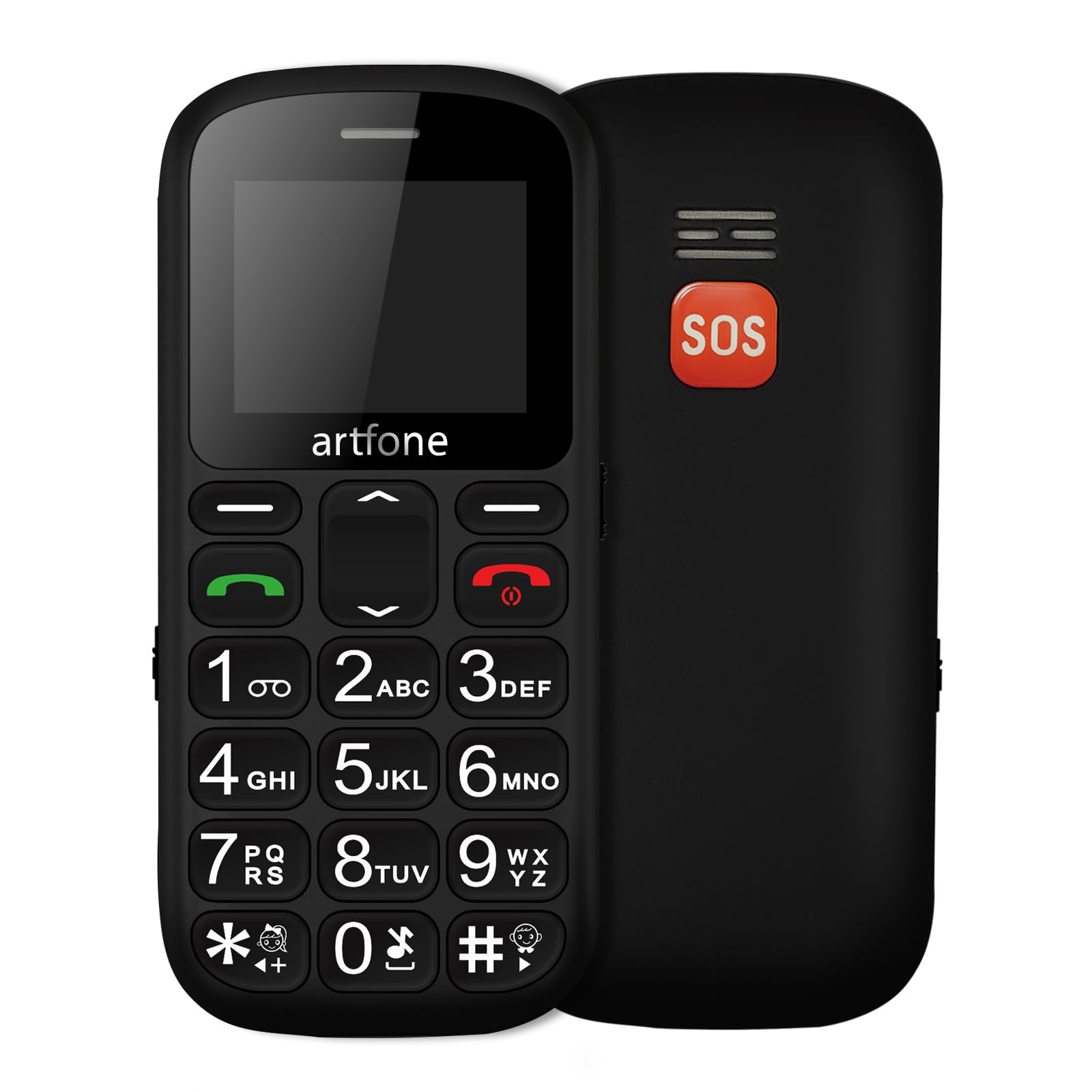
රූපය: ඉදිරිපස සහ පසුපස view of the artfone CS181 mobile phone, showcasing its large keypad and the SOS button on the rear.

රූපය: Diagram illustrating the dimensions of the artfone CS181 phone from various angles.
සැලසුම
1. Installing the Battery and SIM Cards
The artfone CS181 supports dual SIM cards (2G GSM network). Ensure the phone is powered off before installation.
- දුරකථනයේ පිටුපස කවරය මෘදු ලෙස නොච් එකෙන් විවෘත කර ඉවත් කරන්න.
- Insert the 800mAh Lithium-ion battery into its compartment, ensuring the contacts align correctly.
- Locate the SIM card slots. Insert your 2G GSM SIM card(s) into the designated slots, ensuring the gold contacts face downwards and the cut corner aligns correctly.
- (Optional) If using a memory card, insert it into the memory card slot.
- ආරක්ෂිතව ස්ථානයට ක්ලික් වන තුරු පිටුපස කවරය ප්රතිස්ථාපනය කරන්න.

රූපය: අභ්යන්තර view of the artfone CS181 showing the battery compartment, dual SIM card slots, and memory card slot.
2. දුරකථනය ආරෝපණය කිරීම
පළමු භාවිතයට පෙර, දුරකථන බැටරිය සම්පූර්ණයෙන්ම ආරෝපණය කරන්න.
- Connect the USB-C charging cable to the charging port on the phone.
- Connect the other end of the cable to a compatible USB power adapter (not always included) or a computer's USB port.
- The charging indicator on the phone's screen will show the charging status. Disconnect the charger once the battery is full.
3. බල ගැන්වීම / අක්රිය කිරීම
- බලය ක්රියාත්මක කිරීමට: ඔබා අල්ලාගෙන සිටින්න බලය/අවසන් ඇමතුම තිරය දැල්වෙන තුරු බොත්තම (රතු බොත්තම).
- බලය අක්රිය කිරීමට: ඔබා අල්ලාගෙන සිටින්න බලය/අවසන් ඇමතුම බලය අක්රිය කිරීමේ විකල්ප දිස්වන තුරු බොත්තම ඔබාගෙන සිටින්න, ඉන්පසු "බලය අක්රිය කරන්න" තෝරන්න.
4. මූලික සැකසුම්
Upon first power-on, you may be prompted to set the language, date, and time. Follow the on-screen instructions.
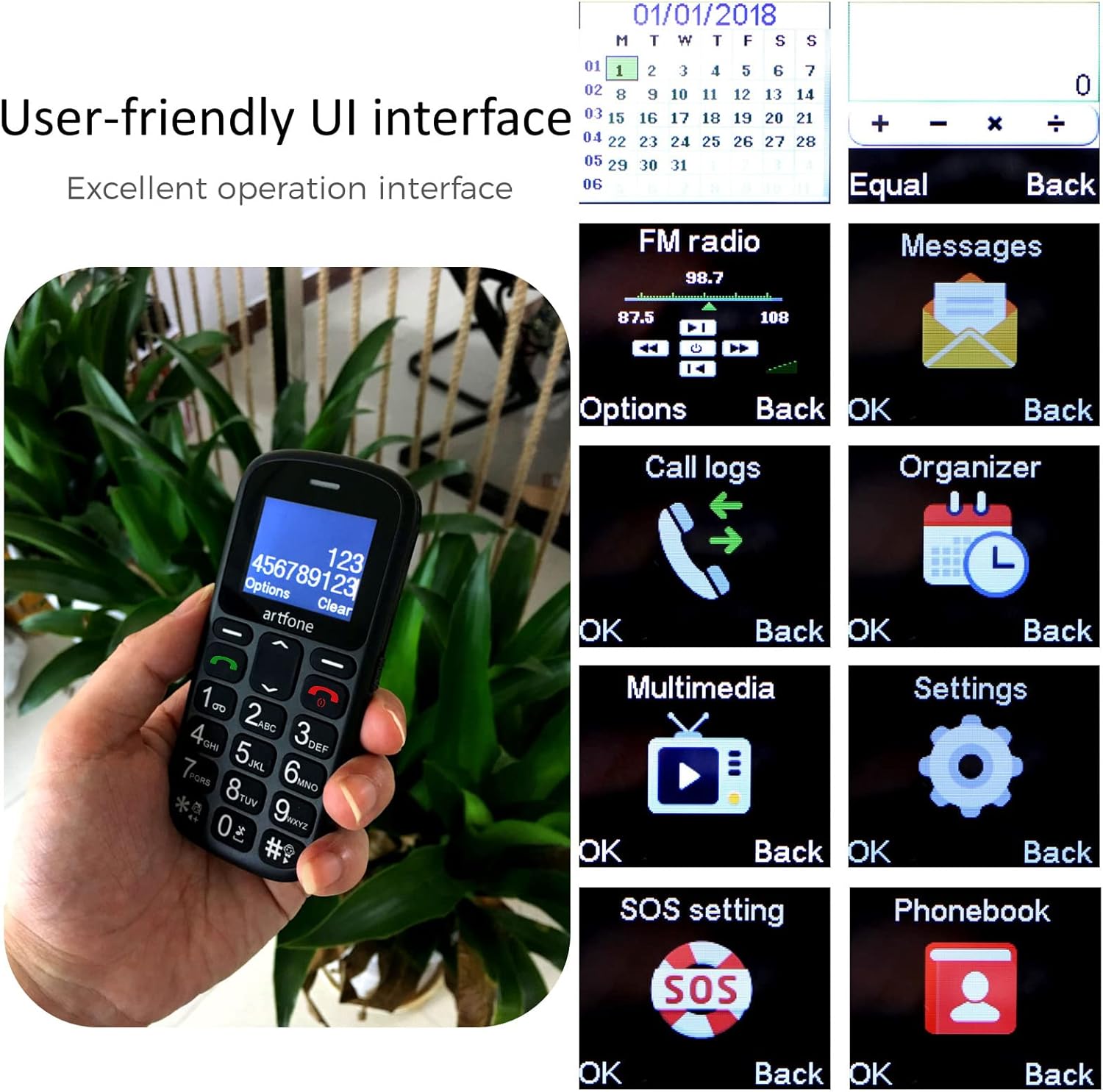
රූපය: The artfone CS181's user-friendly interface with large, clear menu icons for functions like FM radio, messages, call logs, and settings.
මෙහෙයුම් උපදෙස්
1. ඇමතුම් ලබා ගැනීම සහ ලබා ගැනීම
- ඇමතුමක් ගැනීමට: යතුරු පුවරුව භාවිතයෙන් දුරකථන අංකය ඇතුළත් කර බොත්තම ඔබන්න. අමතන්න බොත්තම (කොළ බොත්තම).
- ඇමතුමකට පිළිතුරු දීමට: ඔබන්න අමතන්න button (green button) when the phone rings.
- ඇමතුමක් අවසන් කිරීමට: ඔබන්න ඇමතුම අවසන් කරන්න බොත්තම (රතු බොත්තම).
- Voice Announcement: The phone can announce dialed numbers in English, German, French, Spanish, and Italian. This feature can be enabled or disabled in the settings menu.
2. SMS පණිවිඩ යැවීම සහ ලැබීම
- "පණිවිඩ" මෙනුව වෙත සංචාලනය කරන්න.
- Select "Write message" to compose a new SMS.
- ලබන්නාගේ අංකය ඇතුළත් කරන්න හෝ සම්බන්ධතා වලින් තෝරන්න, ඉන්පසු ඔබේ පණිවිඩය ටයිප් කරන්න.
- Press "Send" to transmit the message.
3. SOS Emergency Call Function
The SOS button is located on the back of the phone and is designed for quick access to emergency contacts.
- Setting up SOS numbers: වෙත යන්න Menu > Settings > SOS Settings. You can pre-program up to five emergency numbers and an emergency SMS message.
- SOS සක්රිය කිරීම: හදිසි අවස්ථාවකදී, ඔබාගෙන සිටින්න SOS බොත්තම for 3 seconds. The phone will automatically dial the pre-programmed numbers in sequence and send the emergency SMS.
- Canceling SOS: If activated by mistake, you can cancel the SOS call within 3 seconds by pressing any key.

රූපය: A finger pressing the prominent orange SOS button located on the back of the artfone CS181 phone.
4. ෆ්ලෑෂ් ලයිට්
The phone includes a bright flashlight for convenience.
- To turn on/off: Press the dedicated flashlight button on the left side of the phone.

රූපය: The artfone CS181 phone with its flashlight illuminated, showing the light beam and the location of the flashlight LED.
5. එෆ්එම් රේඩියෝව
ඔබේ ප්රියතම FM ගුවන් විදුලි මධ්යස්ථානවලට සවන් දෙන්න.
- Navigate to the "FM Radio" menu.
- Use the navigation keys to scan for stations or manually tune.
6. බ්ලූටූත්
Connect your phone to Bluetooth headsets or other devices.
- වෙත යන්න මෙනුව > සැකසීම් > බ්ලූටූත්.
- බ්ලූටූත් ක්රියාත්මක කර පවතින උපාංග සොයන්න.
- Select the desired device to pair.
7. Keypad Lock/Unlock
Prevent accidental key presses by locking the keypad.
- To lock: Press the dedicated keypad lock button on the right side of the phone.
- To unlock: Press the dedicated keypad lock button again.
8. Speed Dial Setup
Assign frequently called numbers to speed dial keys (1-9, *, #).
- වෙත යන්න Menu > Settings > Speed Dial.
- Select a key (e.g., "1") and assign a contact from your phonebook.
- To use: Press and hold the assigned speed dial key to call the contact.
නඩත්තු කිරීම
1. බැටරි රැකවරණය
- මුල් හෝ අනුමත චාජරය සහ බැටරිය පමණක් භාවිතා කරන්න.
- බැටරිය අධික උෂ්ණත්වයකට නිරාවරණය කිරීමෙන් වළකින්න.
- බැටරිය සිදුරු කිරීම, විසුරුවා හැරීම හෝ කෙටි පරිපථය සිදු නොකරන්න.
- If the phone will not be used for an extended period, charge it partially and store it in a cool, dry place.
2. පිරිසිදු කිරීම සහ ගබඩා කිරීම
- Clean the phone with a soft, dry cloth. Do not use liquid cleaners.
- Keep the phone away from dust, moisture, and direct sunlight.
- දුරකථනය බිම දැමීමෙන් හෝ දැඩි බලපෑම්වලට ලක් කිරීමෙන් වළකින්න.
දෝෂගවේෂණය
| ගැටලුව | විය හැකි හේතුව | විසඳුම |
|---|---|---|
| දුරකථනය ක්රියාත්මක නොවේ. | බැටරිය බැස ගොස් හෝ නිවැරදිව ස්ථාපනය කර නොමැත. | බැටරිය ආරෝපණය කරන්න. බැටරිය නිවැරදිව ඇතුළු කර ඇති බවට වග බලා ගන්න. |
| ඇමතුම් ගැනීමට හෝ ලබා ගැනීමට නොහැකිය. | ජාල සංඥාවක් නැත, SIM කාඩ්පත ඇතුළත් කර නැත, නැතහොත් SIM කාඩ්පතේ ගැටලුවක් ඇත. | ජාල ආවරණය පරීක්ෂා කරන්න. SIM කාඩ්පත නැවත ඇතුල් කරන්න. ඔබේ සේවා සපයන්නා අමතන්න. |
| SOS button activated by mistake. | Accidental press. | Press any key within 3 seconds of activation to cancel. |
| දුර්වල ඇමතුම් ගුණාත්මකභාවය. | Weak signal or environmental interference. | Move to an area with better signal. Avoid obstructions. |
| යතුරු පෑඩය ප්රතිචාර නොදක්වයි. | යතුරු පුවරුව අගුලු දමා ඇත. | Unlock the keypad using the dedicated side button. |
පිරිවිතර
| විශේෂාංගය | විස්තර |
|---|---|
| වෙළඳ නාමය | artfone |
| මාදිලියේ නම | CS181 |
| මෙහෙයුම් පද්ධතිය | artfone OS |
| තිර ප්රමාණය | අඟල් 2.4 |
| සම්බන්ධතාවය | 2G, GSM (850/900/1800/1900 MHz) |
| සිම් කාඩ්පත් සහාය | ද්විත්ව සිම් |
| බැටරි ධාරිතාව | 800 mAh ලිතියම්-අයන |
| පොරොත්තු කාලය | දින 7 දක්වා |
| කතා කාලය | පැය 5 දක්වා |
| අභ්යන්තර මතකය | 32MB + 24MB (RAM + ROM) |
| ආරෝපණ වරාය | USB Type-C |
| විශේෂ ලක්ෂණ | SOS Button, Large Keys, FM Radio, Bluetooth, Flashlight, Voice Announcement |
| මානයන් (L x W x T) | 121.6mm x 55.4mm x 14.3mm (4.78 in x 2.18 in x 0.56 in) |
වගකීම් සහ සහාය
Your artfone CS181 mobile phone comes with a standard manufacturer's warranty. Please refer to the warranty card included in your package for specific terms and conditions. For technical support, troubleshooting assistance, or warranty claims, please contact artfone customer service through their official webඔබ භාණ්ඩය මිලදී ගත් ස්ථානය හෝ සිල්ලර වෙළෙන්දා.
වැඩි විස්තර සඳහා පිවිසෙන්න artfone Brand Store.


