1. හැඳින්වීම
Thank you for choosing the KAIWEETS KC200D Digital Clamp Meter. This device is a compact, high-precision instrument designed for electrical measurements in various settings, including home, commercial, and industrial environments. It features True RMS technology for accurate readings of complex waveforms, Non-Contact Voltage (NCV) detection for enhanced safety, and a clear backlit LCD for easy readability. This manual provides essential information for safe and effective use of your clamp මීටර්.
2 ආරක්ෂිත තොරතුරු
To ensure safe operation, please read and understand all safety warnings and operating instructions before using this instrument. Failure to observe these warnings can result in serious injury or death.
- සෑම විටම දේශීය සහ ජාතික ආරක්ෂක කේතයන් පිළිපදින්න.
- මීටරයට හානි සිදුවී ඇති බව පෙනේ නම් හෝ පරීක්ෂණ ඊයම්වල පරිවරණය අවදානමට ලක්ව ඇත්නම් එය භාවිතා නොකරන්න.
- ශ්රේණිගත කළ පරිමාවට වඩා වැඩි ගණනක් යොදන්න එපාtage, as marked on the meter, between terminals or between any terminal and ground. The maximum operating voltage 600V වේ.
- වෙළුම සමඟ වැඩ කිරීමේදී අතිශයින්ම පරෙස්සම් වන්නtages above 60V DC or 30V AC RMS. These voltagකම්පන උවදුරක් ඇති කරයි.
- Keep your fingers behind the finger guards on the test leads during use.
- පුපුරන සුලු වායු, වාෂ්ප හෝ දූවිලි පරිසරයක මීටරය ක්රියාත්මක නොකරන්න.
- Remove the test leads from the circuit before changing functions.
- Always turn off the power to the circuit under test before connecting or disconnecting the test leads.
- මීටරය ක්රියාත්මක කිරීමට පෙර බැටරි කවරය ආරක්ෂිතව වසා ඇති බවට වග බලා ගන්න.
3. පැකේජ අන්තර්ගතය
Verify that all items listed below are present and undamaged:
- 1 x KAIWEETS KC200D Digital Clamp මීටර්
- 1 x පරිශීලක අත්පොත
- 1 x ගබඩා බෑගය
- පරීක්ෂණ ඊයම් 2 x (රතු සහ කළු)
- 2 x AAA 1.5V බැටරි
4. නිෂ්පාදන අවසන්view
The KAIWEETS KC200D is designed for ease of use and durability. Familiarize yourself with the main components:
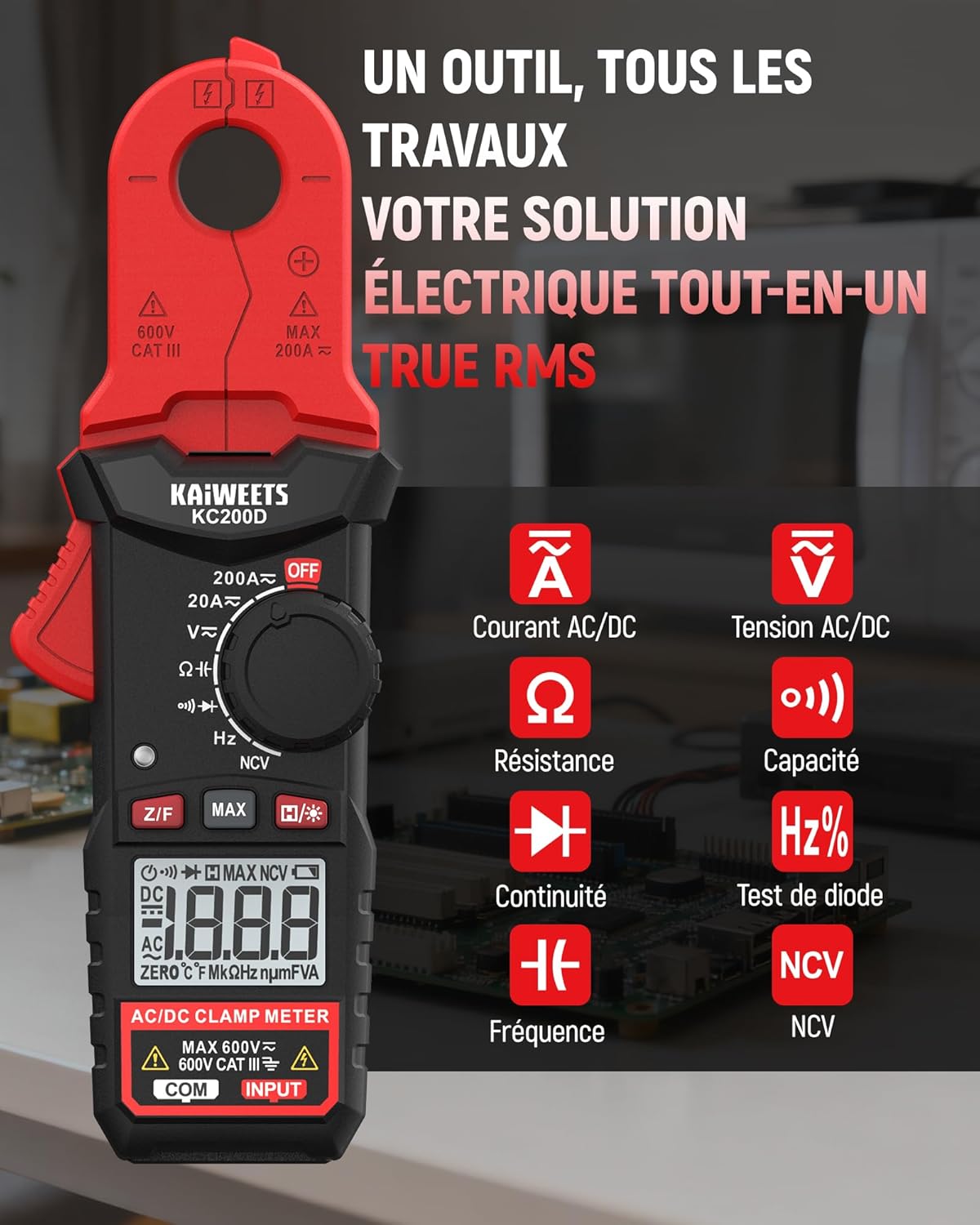
රූපය 4.1: KAIWEETS KC200D Clamp Meter with its various measurement functions highlighted, including AC/DC Current, AC/DC Voltage, Resistance, Capacitance, Frequency, Diode Test, Continuity, and NCV.
4.1 ප්රධාන සංරචක
- Clamp හකු: ස්පර්ශ නොවන AC/DC ධාරා මැනීම සඳහා භාවිතා වේ.
- කාර්යය ඩයල්: Rotary switch to select measurement modes.
- LCD සංදර්ශකය: මිනුම් කියවීම්, ඒකක සහ දර්ශක පෙන්වයි.
- බොත්තම්: For special functions like Data Hold, MAX/MIN, DC Zero, Backlight, and NCV.
- ආදාන පර්යන්ත: වෙළුම සඳහා පරීක්ෂණ ඊයම් සම්බන්ධ කිරීම සඳහාtage, resistance, capacitance, frequency, diode, and continuity measurements.
5. පිහිටුවීම
5.1 බැටරි ස්ථාපනය
The KC200D requires two AAA 1.5V batteries (included).
- මීටරය ක්රියා විරහිත කර ඇති බවට වග බලා ගන්න.
- මීටරයේ පිටුපස බැටරි මැදිරිය සොයා ගන්න.
- බැටරි මැදිරි කවරය විවෘත කිරීමට ඉස්කුරුප්පු නියනක් භාවිතා කරන්න.
- Insert the two AAA batteries, observing the correct polarity (+ and -).
- බැටරි මැදිරි කවරය ප්රතිස්ථාපනය කර එය ඉස්කුරුප්පු ඇණ සමඟ සවි කරන්න.
5.2 පරීක්ෂණ මඟ පෙන්වීම් සම්බන්ධ කිරීම
පරීක්ෂණ ඊයම් අවශ්ය මිනුම් සඳහා (වෙළුමtage, resistance, capacitance, frequency, diode, continuity):
- Insert the red test lead into the "INPUT" terminal.
- Insert the black test lead into the "COM" (Common) terminal.
6. මෙහෙයුම් උපදෙස්
Always select the appropriate function before making any measurement. Turn the function dial to the desired measurement mode.
6.1 AC/DC ධාරා මිනුම් (Clamp)
cl භාවිතා කරන්නamp jaw for non-contact current measurement. This method is ideal for safely measuring current without breaking the circuit.

රූපය 6.1: Clamp jaw of the KC200D measuring current on a single electrical wire, demonstrating its compact design and precision.
- ක්රියාකාරී ඩයල් එක වෙත හරවන්න 20A~ or 200A~ position for AC current, or 20A= or 200A= DC ධාරාව සඳහා.
- cl ඔබන්නamp හකු විවෘත කිරීමට ප්රේරකය.
- Encircle only එකක් conductor with the clamp හකු. cl කරන්න එපාamp around multiple wires, as this will result in an inaccurate reading.
- For DC current measurement, press the Z/F button to zero the display before clamping.
- LCD සංදර්ශකයේ වත්මන් අගය කියවන්න.
6.2 AC/DC වෙළුමtagඊ මැනීම
පරිමාව මැනීමටtage, use the test leads.
- ක්රියාකාරී ඩයල් එක වෙත හරවන්න V~ (AC වෙළුමtage) හෝ V= (DC Voltage) තනතුර.
- Connect the red test lead to the positive side of the circuit and the black test lead to the negative side (or ground).
- වෙළුම කියවන්නtagLCD සංදර්ශකය මත e අගය.
6.3 ප්රතිරෝධය මැනීම
ප්රතිරෝධය මැනීමට පෙර පරිපථය ක්රියා විරහිත කර ඇති බවට වග බලා ගන්න.
- ක්රියාකාරී ඩයල් එක වෙත හරවන්න Ω තනතුර.
- මැනිය යුතු සංරචකය හරහා පරීක්ෂණ ලීඩ් සම්බන්ධ කරන්න.
- LCD සංදර්ශකයේ ප්රතිරෝධක අගය කියවන්න.
6.4 ධාරිතාව මැනීම
Discharge capacitors completely before measurement to avoid damage to the meter or injury.
- ක්රියාකාරී ඩයල් එක වෙත හරවන්න ධාරිතාව position (often shared with Diode/Continuity, press FUNC to cycle).
- ධාරිත්රකය හරහා පරීක්ෂණ ලීඩ් සම්බන්ධ කරන්න.
- LCD සංදර්ශකයේ ධාරණ අගය කියවන්න.
6.5 සංඛ්යාත මැනීම
සංඛ්යාතය මැනීමට:
- ක්රියාකාරී ඩයල් එක වෙත හරවන්න Hz% තනතුර.
- Connect the test leads across the circuit where frequency is to be measured.
- LCD තිරයේ සංඛ්යාත අගය කියවන්න.
6.6 දියෝඩ පරීක්ෂණය
ඩයෝඩය පරිපථයෙන් විසන්ධි වී ඇති බවට වග බලා ගන්න.
- ක්රියාකාරී ඩයල් එක වෙත හරවන්න ඩයෝඩය position (often shared with Capacitance/Continuity, press FUNC to cycle).
- Connect the red test lead to the anode and the black test lead to the cathode.
- ඉදිරි වෙළුමtage drop will be displayed for a good diode. Reverse the leads; the display should show OL (Open Loop).
6.7 අඛණ්ඩ පරීක්ෂණය
පරිපථය විසන්ධි කර ඇති බවට වග බලා ගන්න.
- ක්රියාකාරී ඩයල් එක වෙත හරවන්න අඛණ්ඩ පැවැත්ම position (often shared with Diode/Capacitance, press FUNC to cycle).
- Connect the test leads across the component or wire.
- අඛණ්ඩතාව (අඩු ප්රතිරෝධය) තිබේ නම්, මීටරය ඇසෙන බීප් ශබ්දයක් නිකුත් කරයි.
6.8 සම්බන්ධතා නොවන වෙළුමtage (NCV) හඳුනාගැනීම
The NCV function allows for quick and safe detection of live AC voltagඊ සෘජු සම්බන්ධතා නොමැතිව.

රූපය 6.2: The KC200D performing Non-Contact Voltage (NCV) detection near an electrical outlet, showing visual indicators for low and high voltagඊ සිටීම.
- ක්රියාකාරී ඩයල් එක වෙත හරවන්න NCV තනතුර.
- Bring the top end of the meter near the conductor or outlet.
- The meter will emit an audible beep and illuminate LED indicators, with frequency increasing as voltage ශක්තිය වැඩි වේ.
6.9 විශේෂ කාර්යයන්

රූපය 6.3: The KC200D highlighting its user-friendly functions: MAX for peak value, Z/F for DC current zeroing, H for data hold, backlight for low-light conditions, and auto-off for battery saving.
- Data Hold (H/* button): සංදර්ශකයේ වත්මන් කියවීම කැටි කිරීමට ඔබන්න. මුදා හැරීමට නැවත ඔබන්න.
- MAX/MIN (MAX button): Press to display the maximum or minimum measured value. Press again to cycle.
- DC Current Zero (Z/F button): For DC current measurements, press this button before clamping to zero out any residual readings.
- Backlight (H/* long press): Long press the H/* button to turn the display backlight ON or OFF for improved visibility in low-light conditions.
- ස්වයංක්රීයව අක්රිය: The meter automatically powers off after approximately 15 minutes of inactivity to conserve battery life. Press any button or rotate the function dial to wake it up.
7. නඩත්තු කිරීම
7.1 පිරිසිදු කිරීම
වියළි මෘදු රෙද්දකින් මීටරය පිස දමන්න. උල්ෙල්ඛ හෝ ද්රාවක භාවිතා නොකරන්න.
7.2 බැටරි ප්රතිස්ථාපනය
When the battery indicator appears on the LCD, replace the batteries as described in the Setup section (5.1 Battery Installation).
7.3 ගබඩා කිරීම
If the meter is not used for an extended period, remove the batteries to prevent leakage and damage. Store the meter in its carrying bag in a cool, dry place.
8. දෝශ නිරාකරණය
| ගැටලුව | විය හැකි හේතුව | විසඳුම |
|---|---|---|
| මීටරය ක්රියාත්මක නොවේ | මිය ගිය බැටරි; වැරදි බැටරි ස්ථාපනය. | බැටරි මාරු කරන්න; බැටරි ධ්රැවීයතාව පරීක්ෂා කරන්න |
| Inaccurate current reading | Multiple conductors in clamp jaw; DC current not zeroed | Ensure only one conductor is clamped; Press Z/F button for DC current |
| "OL" දර්ශනය වේ (අධික බර) | Measurement exceeds range; Open circuit (for continuity/resistance) | Select a higher range (if available); Check circuit connections |
| No NCV detection | AC පරිමාවක් නැතtage present; Meter not close enough to source | AC පරිමාව සත්යාපනය කරන්නtage presence; Move meter closer to the live conductor |
9. පිරිවිතර
Technical specifications for the KAIWEETS KC200D Digital Clamp මීටරය:
| විශේෂාංගය | පිරිවිතර |
|---|---|
| ආදර්ශ අංකය | KC200D |
| ප්රදර්ශනය කරන්න | 2000 ගණන්, පසුතල ආලෝකය සහිත LCD |
| AC ධාරාව | 20A/200A (±(2.5% + 5 digits)) |
| DC ධාරාව | 20A/200A (±(2.5% + 5 digits)) |
| ඒසී වෙළුමtage | 2V/20V/200V/600V (±(1.0% + 5 digits)) |
| ඩීසී වෙළුමtage | 200mV/2V/20V/200V/600V (±(0.5% + 5 digits)) |
| ප්රතිරෝධය | 200Ω/2kΩ/20kΩ/200kΩ/2MΩ/20MΩ (±(1.0% + 5 digits)) |
| ධාරිතාව | 2nF/20nF/200nF/2µF/20µF/200µF/2mF/20mF (±(4.0% + 5 digits)) |
| සංඛ්යාතය | 2Hz/20Hz/200Hz/2kHz/20kHz/200kHz/2MHz/20MHz (±(1.0% + 3 digits)) |
| දියෝඩ පරීක්ෂණය | ඔව් |
| අඛණ්ඩ පරීක්ෂණය | ඔව් |
| NCV හඳුනා ගැනීම | ඔව් |
| බල සැපයුම | 2 x AAA 1.5V බැටරි |
| ආරක්ෂිත ශ්රේණිගත කිරීම | CAT III 600V, Pollution Level: 2 |
| මානයන් | 20.7 x 11.3 x 4.7 සෙ.මී. (පැකේජය) |
| බර | ග්රෑම් 308 (පැකේජය) |
10. වගකීම් සහ සහාය
KAIWEETS products are designed for reliability and performance. For warranty information, technical support, or service inquiries, please refer to the contact information provided on the KAIWEETS official webවෙබ් අඩවියට හෝ ඔබේ ප්රාදේශීය බෙදාහරින්නා අමතන්න. වගකීම් හිමිකම් සඳහා මිලදී ගැනීමේ සාක්ෂියක් ලෙස කරුණාකර ඔබේ මිලදී ගැනීමේ රිසිට්පත තබා ගන්න.


