1. හැඳින්වීම
Thank you for choosing the KTC H25T7-3 24.5 Inch 240Hz FHD Gaming Monitor. This manual provides essential information for setting up, operating, and maintaining your monitor. Please read it thoroughly before use to ensure optimal performance and safety.
ආරක්ෂිත තොරතුරු
- ගින්නක් හෝ විදුලි කම්පනයක් වළක්වා ගැනීම සඳහා මොනිටරය වර්ෂාවට හෝ තෙතමනයට නිරාවරණය නොකරන්න.
- මොනිටරය විවෘත නොකරන්න casinඋ. ඇතුළත පරිශීලක-සේවා කළ හැකි කොටස් නොමැත. සියලුම සේවා සුදුසුකම් ලත් පුද්ගලයින් වෙත යොමු කරන්න.
- වැටීම වැළැක්වීම සඳහා මොනිටරය ස්ථාවර, පැතලි මතුපිටක් මත තබන්න.
- අධික උනුසුම් වීම වැළැක්වීම සඳහා මොනිටරය වටා නිසි වාතාශ්රය සහතික කරන්න.
- Use only the power adapter and cables provided by KTC.
2. පෙට්ටියේ ඇති දේ
පහත සඳහන් සියලුම අයිතම ඔබගේ පැකේජයේ ඇති බව තහවුරු කරගන්න:
- KTC H25T7-3 24.5" FHD 240Hz Monitor (x1)
- Monitor Stand (x1)
- Quick Start Guide (QSG) (x1)
- DisplayPort (DP) Cable (x1)
- බල ඇඩැප්ටරය (x1)
- විදුලි රැහැන් (x1)
3. නිෂ්පාදන අවසන්view
The KTC H25T7-3 is a 24.5-inch Full HD (1920x1080) gaming monitor featuring a Fast IPS panel, 240Hz refresh rate, and 1ms MPRT response time for smooth visuals. It supports HDR400 and Adaptive-Sync technology to enhance your viewing සහ සූදු අත්දැකීම්.
ප්රධාන ලක්ෂණ
- 24.5" FHD Fast IPS Panel: Delivers crisp 1080p resolution with wide 178° viewing කෝණ.
- 240Hz නැවුම් කිරීමේ අනුපාතය සහ 1ms MPRT: Ensures ultra-smooth motion and minimal ghosting.
- අනුවර්තන-සමමුහුර්ත තාක්ෂණය: Synchronizes the monitor's refresh rate with your GPU for tear-free gameplay.
- HDR400 සහාය: Provides enhanced contrast and color depth for a more immersive visual experience.
- Ergonomic Stand: Offers tilt, pivot, and height adjustments for personalized viewසැනසිල්ල.
- අක්ෂි සත්කාර විශේෂාංග: Low blue light and flicker-free technology reduce eye strain during extended use.
- බහු සම්බන්ධතා විකල්ප: Includes 2x HDMI 2.0, 1x DisplayPort 1.4, and 1x USB 2.0.

රූපය 3.1: අවසන්view of KTC H25T7-3 monitor features including Fast IPS, 240Hz, HDR400, and adjustable stand.
4. පිහිටුවීම
4.1 ස්ථාවරය එකලස් කිරීම
- ඇසුරුම්කරණයෙන් මොනිටරය සහ ස්ටෑන්ඩ් සංරචක ප්රවේශමෙන් ඉවත් කරන්න.
- සපයා ඇති ඉස්කුරුප්පු භාවිතයෙන් ස්ථාවර පාදය ස්ථාවර බෙල්ලට සවි කරන්න.
- එකලස් කරන ලද ස්ථාවරය මොනිටරයේ පිටුපස සවිකරන ස්ලට් එක සමඟ පෙළගස්වා එය තදින් සවි කරන්න.

රූපය 4.1: ඉදිරිපස view of the KTC H25T7-3 monitor with its stand assembled.
4.2 VESA Wall Mounting (Optional)
The monitor supports a 100x100mm VESA mount. To wall mount the monitor:
- Remove the stand from the monitor if it is already attached.
- Attach your VESA-compatible wall mount bracket to the four screw holes on the back of the monitor. Ensure the screws are appropriate for the VESA standard and do not overtighten.
- Follow the instructions provided with your VESA mount for secure installation.

රූපය 4.2: පසුපස view of the KTC H25T7-3 monitor, highlighting the input ports and VESA mounting area.
4.3 සම්බන්ධක කේබල්
Connect the necessary cables to the corresponding ports on the monitor and your computer/device:
- බලය: Connect the power adapter to the monitor's DC input and then plug the power cord into a power outlet.
- DisplayPort (DP): For optimal performance (240Hz, Adaptive-Sync), connect the provided DisplayPort cable from your graphics card to the monitor's DP 1.4 port.
- HDMI: Alternatively, connect an HDMI cable from your device to one of the monitor's HDMI 2.0 ports.
- USB: The USB 2.0 port can be used for firmware upgrades or connecting peripherals.
5. මෙහෙයුම් උපදෙස්
5.1 බලය සක්රිය / අක්රිය
Press the power button (usually located on the back or bottom of the monitor) to turn the monitor on or off. The power indicator light will illuminate when the monitor is on.
5.2 OSD මෙනු සංචාලනය
The On-Screen Display (OSD) menu is controlled by a joystick button, typically located on the back of the monitor. Use the joystick to navigate through the menu options and adjust settings.
- ඇතුල් කරන්න: Enter/Confirm selection.
- උඩ යට: මෙනු විකල්ප හරහා සංචාලනය කරන්න.
- වම/දකුණ: අගයන් සකසන්න හෝ උප මෙනු අතර ගෙන යන්න.
5.3 දර්ශන සැකසුම් සකස් කිරීම
Access the OSD menu to configure various display settings:
- දීප්තිය / ප්රතිවිරුද්ධතාව: සමස්ත දීප්තිය සහ ප්රතිවිරුද්ධ මට්ටම් සකසන්න.
- වර්ණ සැකසුම්: වර්ණ උෂ්ණත්වය, ගැමා සහ තනි RGB අගයන් සියුම් ලෙස සකස් කරන්න.
- පින්තූර මාදිලිය: Select from preset modes (e.g., Standard, Game, Movie, sRGB) or customize your own.
- නැවුම් කිරීමේ අනුපාතය: Ensure your graphics card output is set to 240Hz for optimal performance.
- අනුවර්තන-සමමුහුර්ත: Enable this feature in the OSD menu and your graphics card control panel to eliminate screen tearing.
- HDR: Activate HDR400 for compatible content to experience enhanced dynamic range.
- අඩු නිල් ආලෝකය: Adjust the blue light filter to reduce eye strain.

Figure 5.1: Visual representation of the 240Hz refresh rate for smooth motion.
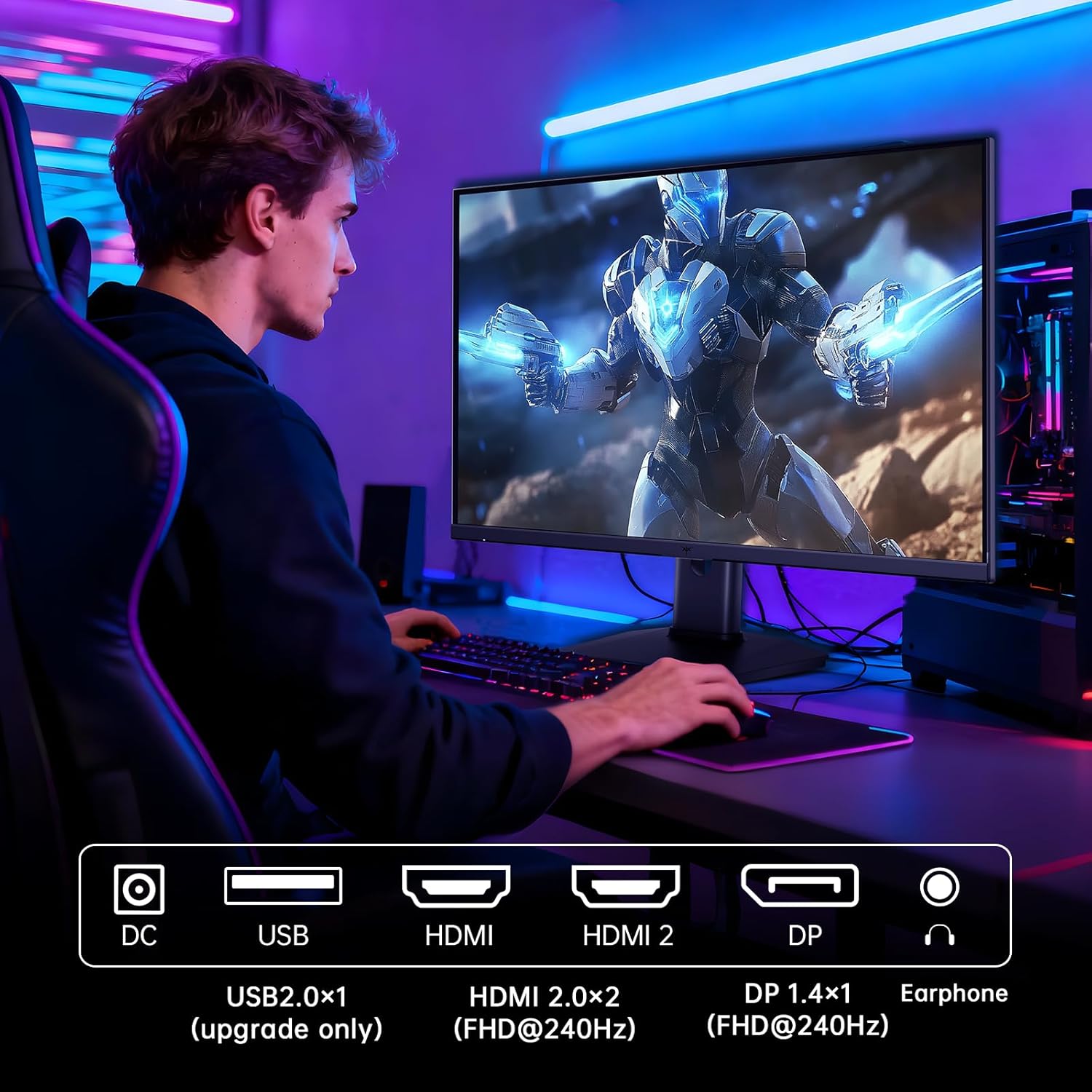
Figure 5.2: Comparison showing the effect of Adaptive-Sync on reducing stuttering and screen tearing.

Figure 5.3: Illustration of HDR400 technology delivering clear details in dark areas compared to HDR10.

Figure 5.4: Diagram illustrating hardware blue light reduction technology to filter harmful blue light bands.
5.4 කාර්යක්ෂමතා ගැලපීම්
මොනිටර ස්ථාවරය ඔබගේ ප්රශස්ත කිරීම සඳහා විවිධ ගැලපීම් සඳහා ඉඩ සලසයි viewතනතුර:
- ඇලවීම: තිර කෝණය ඉදිරියට හෝ පසුපසට (-5° සිට 20° දක්වා) සකසන්න.
- හැරවීම: පෝට්රේට් ප්රකාරය සඳහා තිරය 90° කරකවන්න.
- උස ගැලපීම: Raise or lower the screen by up to 110mm.
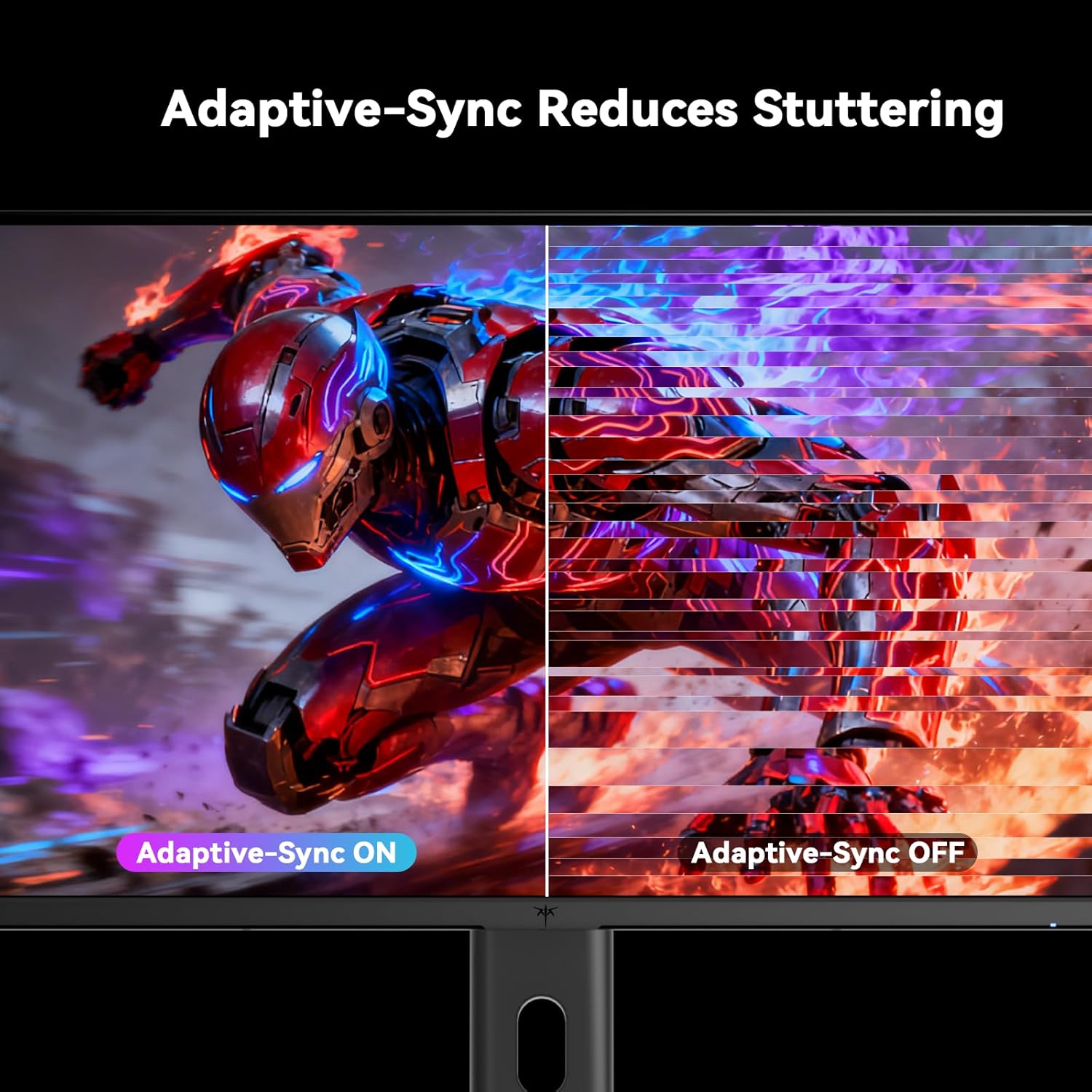
Figure 5.5: Diagram showing the tilt, pivot, and height adjustment capabilities of the monitor stand.
5.5 නිල නිෂ්පාදන වීඩියෝව
Video 5.1: An official product video from KTC-Official showcasing the 24.5 Inch FHD 240Hz Gaming Monitor, demonstrating its features and performance.
6. නඩත්තු කිරීම
6.1 මොනිටරය පිරිසිදු කිරීම
මොනිටර තිරය පිරිසිදු කිරීමට සහ සීasing:
- පිරිසිදු කිරීමට පෙර සෑම විටම මොනිටරය විදුලිබල අලෙවිසැලෙන් විසන්ධි කරන්න.
- මෘදු, ලින්ට් රහිත රෙද්දක් සැහැල්ලුවෙන් භාවිතා කරන්නampජලය හෝ සීරීම් ඇති නොවන තිර පිරිසිදු කරන්නෙකු සමඟ ආලේප කර ඇත.
- පිරිසිදුකාරකය කෙලින්ම තිරය මත ඉසින්න එපා.
- බෙන්සීන්, තිනර්, ඇමෝනියා මත පදනම් වූ පිරිසිදු කරන්නන් හෝ උල්ෙල්ඛ ද්රව්ය භාවිතා කිරීමෙන් වළකින්න.
6.2 සාමාන්ය රැකවරණය
- මොනිටරය සෘජු හිරු එළියෙන්, අධික තාපයෙන් හෝ සීතලෙන් ඈත් කර තබන්න.
- මොනිටරය හෝ එහි කේබල් මත බර වස්තූන් තැබීමෙන් වළකින්න.
- මොනිටරයේ වාතාශ්රය විවරයන් අවහිර නොකරන්න.
7. දෝශ නිරාකරණය
ඔබේ මොනිටරය සමඟ ගැටළු ඇති වුවහොත්, පහත සඳහන් පොදු ගැටළු සහ විසඳුම් වෙත යොමු වන්න:
| ගැටලුව | විය හැකි හේතුව | විසඳුම |
|---|---|---|
| බලය නැත | බල කේබලය සම්බන්ධ කර නැත; බල සැපයුම ක්රියා නොකරයි. | බල කේබලය ආරක්ෂිතව සම්බන්ධ කර ඇති බවට වග බලා ගන්න. වෙනත් උපාංගයක් සමඟ බල අලෙවිසැල පරීක්ෂා කරන්න. |
| සංඥා නැත | Video cable not connected; Incorrect input source selected; Computer/device not powered on | Check video cable connections. Select the correct input source via the OSD menu. Ensure your computer/device is on. |
| දිලිසෙන තිරය | Incorrect refresh rate; Cable issue; Adaptive-Sync not enabled | Set refresh rate to 240Hz. Try a different video cable. Enable Adaptive-Sync in OSD and GPU settings. |
| Image distortion/poor quality | Incorrect resolution; Graphics driver issue; Monitor settings | Set resolution to 1920x1080. Update graphics drivers. Adjust OSD settings (brightness, contrast, color). |
7.1 කර්මාන්තශාලා යළි පිහිටුවීම
If problems persist, you may perform a factory reset through the OSD menu. This will revert all monitor settings to their default values.
8. පිරිවිතර
Detailed technical specifications for the KTC H25T7-3 monitor:
| විශේෂාංගය | පිරිවිතර |
|---|---|
| ආදර්ශ අංකය | H25T7-3 |
| තිර ප්රමාණය | අඟල් 24.5 |
| පැනල් වර්ගය | වේගවත් IPS |
| විභේදනය | FHD 1080p (1920 x 1080 පික්සල) |
| දර්ශන අනුපාතය | 16:9 |
| Refresh Rate | 240Hz |
| ප්රතිචාර කාලය | 1ms (MPRT) |
| අනුවර්තන සමමුහුර්තකරණය | ඔව් |
| HDR සහාය | HDR400 |
| වර්ණ ගැමට් | 114% sRGB |
| පරස්පර අනුපාතය | 1000:1 |
| සංදර්ශක වර්ණ | මිලියන 16.7 කි |
| දීප්තිය | 350 cd/m² |
| Viewing කෝණය | 178° (H/V) |
| සම්බන්ධතාවය | 2x HDMI 2.0, 1x DisplayPort 1.4, 1x USB 2.0 |
| VESA මවුන්ට් අනුකූලතාව | 100x100 මි.මී |
| Ergonomic ගැලපීම් | Tilt, Pivot, Height |
| නිෂ්පාදන මානයන් (ස්ටෑන්ඩ් සමඟ) | අඟල් 7.6 x 21.97 x 18.23 |
| අයිතම බර (ස්ටෑන්ඩ් සමඟ) | රාත්තල් 11.58 කි |
| වෙළුමtage | 12 Volts (DC) |
9. වගකීම් සහ සහාය
9.1 වගකීම් තොරතුරු
KTC monitors are designed and manufactured to the highest quality standards. For specific warranty terms and conditions, please refer to the warranty card included with your product or visit the official KTC webවෙබ් අඩවිය. වගකීම් හිමිකම් සඳහා මිලදී ගැනීමේ සාක්ෂියක් ලෙස ඔබේ මිලදී ගැනීමේ රිසිට්පත තබා ගන්න.
9.2 පාරිභෝගික සහාය
If you have any questions, require technical assistance, or experience issues not covered in this manual, please contact KTC customer support. Contact details can typically be found on the official KTC webඅඩවියෙන් හෝ ඉක්මන් ආරම්භක මාර්ගෝපදේශයෙන්.


