1. හැඳින්වීම
Thank you for choosing the Havit Gamenote Huaxu-X1 Wireless Gaming Headset. This manual provides essential information for setting up, operating, maintaining, and troubleshooting your new headset. Please read this manual carefully before use to ensure optimal performance and longevity of your device. Keep this manual for future reference.
The Havit Gamenote Huaxu-X1 offers a superior audio experience with its 53mm drivers, virtual 7.1 surround sound support, and a high-sensitivity microphone. Designed for comfort and durability, it features ultra-soft ear cushions and versatile connectivity options for various devices.
2. නිෂ්පාදන අවසන්view
2.1 ප්රධාන ලක්ෂණ
- 53mm ස්පීකර් ධාවක: Delivers rich, immersive audio for gaming and multimedia.
- Virtual 7.1 Surround Sound Support: Enhances spatial awareness in games (where supported).
- බහු-මාදිලි සම්බන්ධතාවය: Supports 2.4GHz wireless (via Type-C/USB dongle), Bluetooth 5.3, and 3.5mm wired connections.
- දිගු කල් පවතින බැටරි: Integrated 600mAh lithium battery provides approximately 43 hours of usage on a single charge.
- අතිශය අඩු ප්රමාද ක්රීඩා මාදිලිය: Ensures minimal audio delay for a competitive gaming edge.
- අධි සංවේදී මයික්රෆෝනය: Provides clear voice communication.
- සුවපහසුව සහ කල්පැවැත්ම: Features ultra-soft ear cushions for extended wear.
2.2 පැකේජයේ අන්තර්ගතය
කරුණාකර පහත අයිතම සඳහා පැකේජය පරීක්ෂා කරන්න:
- Havit Gamenote Huaxu-X1 Wireless Gaming Headset
- 2.4GHz USB-C Wireless Dongle (may include USB-A adapter)
- 3.5mm ශ්රව්ය කේබල්
- USB-C ආරෝපණ කේබලය
- පරිශීලක අත්පොත (මෙම ලේඛනය)
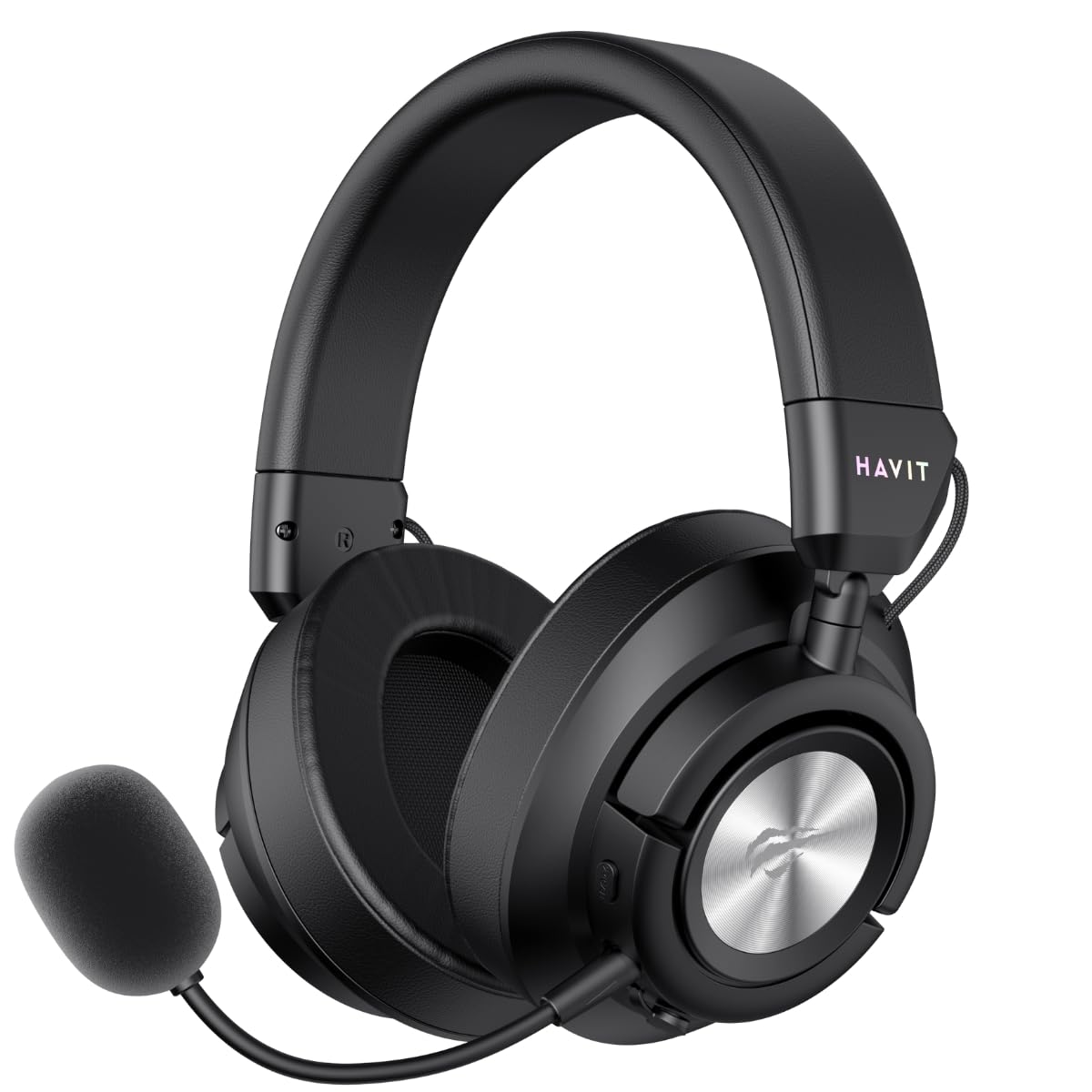
Figure 1: Havit Gamenote Huaxu-X1 Wireless Gaming Headset (Front-angled view with microphone attached)
3. පිහිටුවීම
3.1 හෙඩ්සෙට් එක ආරෝපණය කිරීම
- Connect the USB-C charging cable to the charging port on the headset.
- කේබලයේ අනෙක් කෙළවර USB බල ප්රභවයකට සම්බන්ධ කරන්න (උදා: පරිගණක USB පෝට් එක, බිත්ති ඇඩැප්ටරය).
- හෙඩ්සෙට් එකේ ඇති LED දර්ශකය ආරෝපණ තත්ත්වය පෙන්වයි. සම්පූර්ණ ආරෝපණයක් සඳහා ආසන්න වශයෙන් පැය 2.5 ක් ගතවේ.
- Once fully charged, the LED indicator will change or turn off. Disconnect the charging cable.
Note: It is recommended to fully charge the headset before first use.
3.2 හෙඩ්සෙට් එක සම්බන්ධ කිරීම
3.2.1 2.4GHz Wireless Connection (PC, PlayStation, Nintendo Switch)
- Insert the 2.4GHz USB-C wireless dongle into an available USB-C port on your device. If your device only has USB-A ports, use the provided USB-C to USB-A adapter.
- Power on the headset by pressing and holding the Power button.
- Switch the headset to 2.4GHz mode (refer to Section 4.2 for mode switching). The headset should automatically connect to the dongle.
- On your device, ensure the Havit Huaxu-X1 is selected as the audio output and input device in your sound settings.

Figure 2: Headset side view showing control buttons and ports for connectivity.
3.2.2 Bluetooth 5.3 Connection (Mobile Devices, PC)
- හෙඩ්සෙට් එකේ බලය.
- Switch the headset to Bluetooth mode (refer to Section 4.2). The LED indicator will flash, indicating pairing mode.
- On your mobile device or PC, enable Bluetooth and search for available devices.
- Select "Havit Huaxu-X1" from the list of devices to pair.
- Once paired, the LED indicator will stop flashing and remain solid.
3.2.3 3.5mm Wired Connection (Universal)
- Connect one end of the 3.5mm audio cable to the 3.5mm port on the headset.
- Connect the other end of the cable to the 3.5mm audio jack on your device.
- The headset will automatically switch to wired mode. No power is required for basic audio functionality in wired mode, but the microphone may require power.
4. මෙහෙයුම් උපදෙස්
4.1 බලය සක්රිය / අක්රිය
- බල ගැන්වීම: LED දර්ශකය දැල්වෙන තුරු බල බොත්තම තත්පර 3ක් පමණ ඔබාගෙන සිටින්න.
- විදුලිය විසන්ධි කිරීම: LED දර්ශකය ක්රියා විරහිත වන තෙක් බල බොත්තම තත්පර 3ක් පමණ ඔබාගෙන සිටින්න.
4.2 මාදිලිය මාරු කිරීම
The Huaxu-X1 supports multiple connection modes. Use the Mode button (or a combination of buttons, refer to specific button layout on your headset) to cycle between 2.4GHz wireless, Bluetooth, and 3.5mm wired modes. The LED indicator will change to reflect the active mode.
4.3 වෙළුම් පාලනය
Use the volume roller or buttons located on the earcup to adjust the audio output level. Roll up/press '+' to increase volume, roll down/press '-' to decrease volume.
4.4 Microphone Mute/Unmute
The headset features a dedicated microphone mute button or a switch. Press or toggle it to mute or unmute the microphone. An LED indicator on the microphone or headset may show its status (e.g., red for muted).
4.5 Gaming Mode (Ultra-Low Latency)
When connected via 2.4GHz wireless, you can activate Gaming Mode for ultra-low latency audio. This mode is ideal for competitive gaming. Refer to the specific button on your headset (often labeled 'Game Mode' or a dedicated button press) to toggle this feature. An audible prompt or LED change may indicate activation.
4.6 Virtual 7.1 Surround Sound
The headset supports virtual 7.1 surround sound for an enhanced immersive experience. This feature is typically available when connected via 2.4GHz wireless to a PC and may require specific software or driver installation. Consult Havit's official website for any necessary software downloads.
5. නඩත්තු කිරීම
නිසි නඩත්තුව ඔබේ හෙඩ්සෙට් එකේ ආයු කාලය සහ ක්රියාකාරිත්වය සහතික කරයි.
- පිරිසිදු කිරීම: Use a soft, dry cloth to wipe the headset. For ear cushions, a slightly damp cloth with mild soap can be used, but ensure they are completely dry before use. Do not use harsh chemicals or abrasive materials.
- ගබඩා: හෙඩ්සෙට් එක සෘජු හිරු එළියෙන් සහ අධික උෂ්ණත්වයන්ගෙන් ඈත්ව සිසිල් වියළි ස්ථානයක ගබඩා කරන්න. හෙඩ්සෙට් එක මත බර වස්තූන් තැබීමෙන් වළකින්න.
- බැටරි සත්කාර: බැටරි ආයු කාලය දීර්ඝ කිරීම සඳහා, හෙඩ්සෙට් එක නිතර නිතර සම්පූර්ණයෙන්ම විසර්ජනය කිරීමෙන් වළකින්න. දිගු කාලයක් භාවිතයේ නොතිබුණත්, එය නිතිපතා ආරෝපණය කරන්න.
- කේබල් කළමනාකරණය: හානි වළක්වා ගැනීම සඳහා කේබල්වල තියුණු නැමීම් හෝ ගැටීම් වළක්වා ගන්න.
6. දෝශ නිරාකරණය
If you encounter issues with your Havit Gamenote Huaxu-X1 headset, please refer to the following common solutions:
| ගැටලුව | හැකි විසඳුම |
|---|---|
| හෙඩ්සෙට් එකෙන් ශබ්දයක් නැහැ |
|
| මයික්රෆෝනය ක්රියා නොකරයි |
|
| හෙඩ්සෙට් එක රැහැන් රහිතව සම්බන්ධ නොවේ |
|
| කෙටි බැටරි ආයු කාලය |
|
7. පිරිවිතර
| විශේෂාංගය | විස්තර |
|---|---|
| මාදිලියේ නම | Huaxu-X1 |
| වෙළඳ නාමය | හැවිට් |
| සම්බන්ධතා තාක්ෂණය | Wired, Wireless (2.4GHz, Bluetooth 5.3, 3.5mm) |
| ස්පීකර් රියදුරන් | 53 මි.මී |
| බැටරි ධාරිතාව | 600mAh |
| බැටරි ආයු කාලය | ආසන්න වශයෙන්. පැය 43 යි |
| ආරෝපණ කාලය | ආසන්න වශයෙන්. පැය 2.5 යි |
| සංවේදීතාව | 99 dB |
| ආකෘති සාධකය | කනට උඩින් |
| ගැළපෙන උපාංග | Laptop, Desktop Computer, Gaming Console, Mobile Devices |
| වර්ණය | කළු |
8. වගකීම් සහ සහාය
8.1 වගකීම් තොරතුරු
The Havit Gamenote Huaxu-X1 Wireless Gaming Headset comes with a 2-Year Distributor Warranty. This warranty covers manufacturing defects and ensures your product is free from material and workmanship flaws under normal use. Please retain your proof of purchase for warranty claims.
අනිසි භාවිතය, අනතුරු, අනවසර වෙනස් කිරීම් හෝ සාමාන්ය ඇඳීම් සහ ඉරීම් නිසා සිදුවන හානිය වගකීම් සහතිකය මගින් ආවරණය නොවේ.
8.2 පාරිභෝගික සහාය
For technical assistance, warranty claims, or further inquiries, please contact Havit customer support through their official website or the retailer where you purchased the product. You may need to provide your product model number (Huaxu-X1) and proof of purchase.
Havit Official Webඅඩවිය: www.havit.com


