හැඳින්වීම
Thank you for choosing the OUKITEL Smartwatch. This device is designed to enhance your daily life with smart features, comprehensive health monitoring, and various sports modes. This manual provides detailed instructions to help you set up, operate, and maintain your smartwatch effectively. Please read this manual thoroughly before use to ensure optimal performance and longevity of your device.
පෙට්ටියේ ඇති දේ
- OUKITEL Smartwatch
- ආරෝපණ කේබලය
- පරිශීලක අත්පොත
සැකසුම් මාර්ගෝපදේශය
1. ස්මාර්ට් ඔරලෝසුව ආරෝපණය කිරීම
පළමු භාවිතයට පෙර, ඔබේ ස්මාර්ට් ඔරලෝසුව සම්පූර්ණයෙන්ම ආරෝපණය කරන්න. ඔරලෝසුවේ පිටුපස ඇති ආරෝපණ සම්බන්ධතා වලට චුම්බක ආරෝපණ කේබලය සම්බන්ධ කර USB කෙළවර බල ඇඩැප්ටරයකට (ඇතුළත් කර නැත) හෝ පරිගණකයේ USB පෝට් එකකට සම්බන්ධ කරන්න. සම්පූර්ණ ආරෝපණයක් සාමාන්යයෙන් පැය 2.5 ක් පමණ ගත වේ.

Image: The OUKITEL Smartwatch connected to its magnetic charging cable, displaying a charging icon on its screen.
A full charge provides approximately 5-10 days of normal usage and up to 30 days in standby mode.
2. යෙදුම් ස්ථාපනය සහ යුගල කිරීම
To unlock all features, download the companion app (e.g., "GloryFit" as mentioned in reviews) on your smartphone. The app is compatible with iOS 9.0+ and Android 6.0+ devices.
- Scan the QR code in the user manual or search for the app name in your phone's app store (Apple App Store for iOS, Google Play Store for Android).
- යෙදුම ස්ථාපනය කර විවෘත කරන්න.
- ගිණුමක් නිර්මාණය කර ඔබේ වෘත්තීය සේවකයා පිහිටුවීමට තිරයේ ඇති උපදෙස් අනුගමනය කරන්න.file.
- ඔබගේ ස්මාර්ට් ජංගම දුරකතනයේ බ්ලූටූත් සක්රිය කරන්න.
- In the app, search for your OUKITEL Smartwatch and select it to pair. Confirm the pairing request on both your phone and the smartwatch.
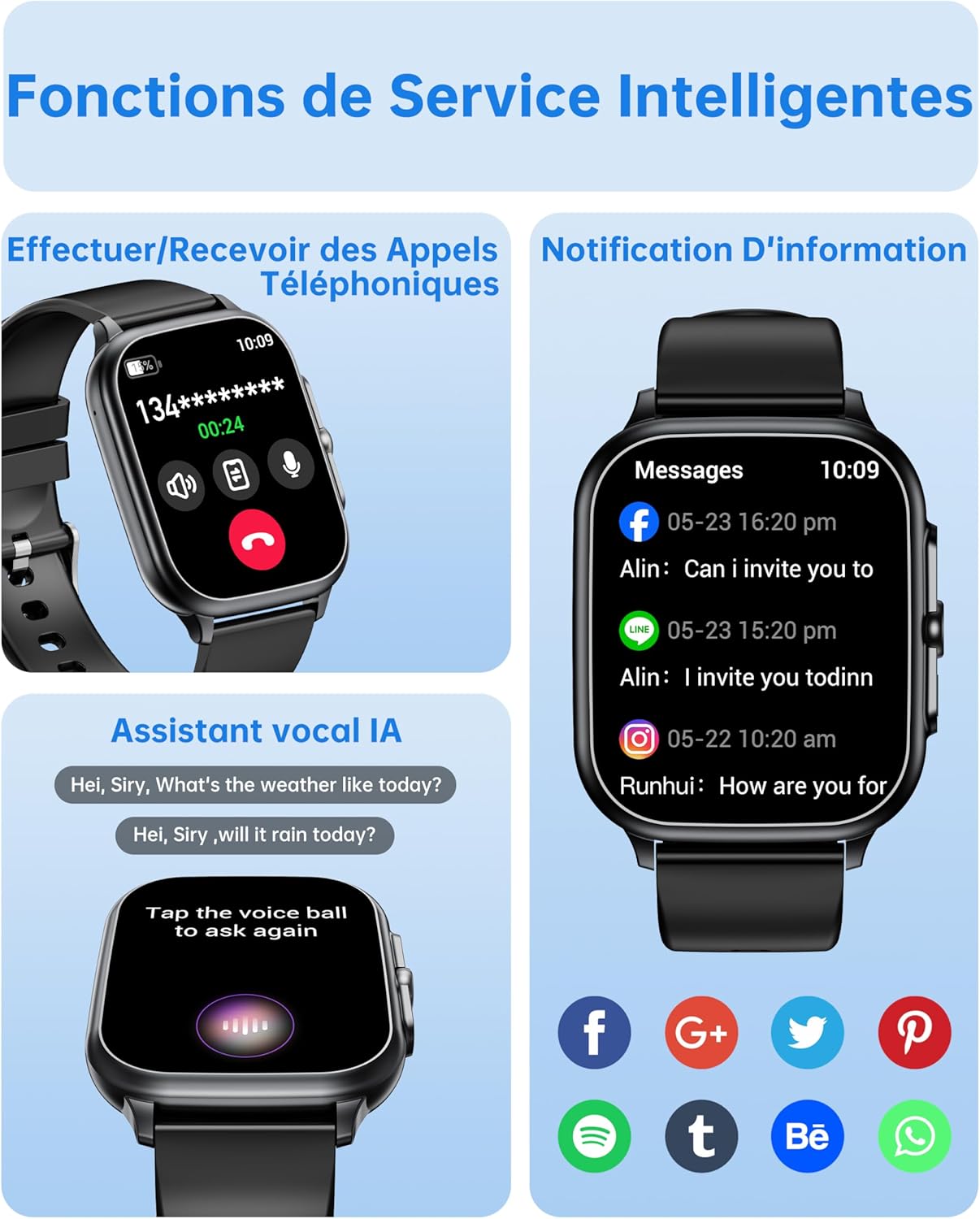
Image: The OUKITEL Smartwatch screen showing an incoming call interface, illustrating its Bluetooth call functionality and readiness for connection.
මෙහෙයුම් උපදෙස්
මූලික සංචාලනය
The OUKITEL Smartwatch features a 1.91-inch HD touchscreen for intuitive control. Swipe left, right, up, or down to navigate through menus and functions. Press the side button to return to the home screen or access the app list.
ස්මාර්ට් කාර්යයන්
- බ්ලූටූත් ඇමතුම්: Once paired with your phone, you can make and receive calls directly from your smartwatch. Access the dial pad, call history, or contacts on your watch.
- AI හඬ සහායක: Utilize the integrated AI voice assistant (e.g., Alexa) to perform voice commands such as asking questions, checking the weather, or initiating calls.
- දැනුම්දීම්: Receive real-time notifications for calls, SMS, and various social media apps (WhatsApp, Facebook, etc.) directly on your wrist.
- සංගීත පාලනය: Control music playback on your smartphone (play, pause, skip tracks) directly from your smartwatch.
- වෙනත් කාර්යයන්: Includes weather forecasts, stopwatch, timer, alarm clock, remote camera control, and a "Find My Phone" feature.

Image: A composite image showing the smartwatch interface for making/receiving calls, displaying app notifications, and interacting with the AI voice assistant.
සෞඛ්ය නිරීක්ෂණ
The smartwatch provides 24/7 health tracking to help you monitor your well-being.
- හෘද ස්පන්දන වේගය නිරීක්ෂණය කිරීම: දවස පුරාම ඔබේ හෘද ස්පන්දන වේගය අඛණ්ඩව නිරීක්ෂණය කරයි. View real-time data and historical trends in the app.
- රුධිර ඔක්සිජන් (SpO2) නිරීක්ෂණය: ඔබේ රුධිර ඔක්සිජන් සන්තෘප්ත මට්ටම් මැන බලයි.
- නින්ද ලුහුබැඳීම: නින්දේ ගුණාත්මකභාවය වැඩි දියුණු කිරීමට උපකාරී වීම සඳහා ගැඹුරු නින්ද, සැහැල්ලු නින්ද සහ අවදි වන වේලාවන් ඇතුළුව ඔබේ නින්දේ රටා විශ්ලේෂණය කරයි.
- ආතතිය නිරීක්ෂණය: Monitors your stress levels.

Image: A composite image showing the smartwatch displaying heart rate, blood oxygen levels, and sleep duration data, alongside a person running outdoors.
ක්රීඩා ක්රම සහ ක්රියාකාරකම් ලුහුබැඳීම
The smartwatch offers over 100 indoor and outdoor sports modes, including walking, running, cycling, hiking, basketball, and football. It records exercise data such as steps, heart rate, and calories burned.

Image: A person on a bicycle, with the smartwatch displaying various sports modes and an activity analysis screen showing duration, heart rate, calories, and steps.
අභිරුචිකරණය
Personalize your smartwatch with over 100 built-in watch faces. You can also upload your favorite photos to create unique custom dials through the companion app. The watch supports 6 different menu styles.

Image: The OUKITEL Smartwatch showcasing different menu styles and customizable watch faces, including options to use personal photos.
නඩත්තු කිරීම
ජල ප්රතිරෝධය (IP68)
The OUKITEL Smartwatch is IP68 waterproof, meaning it is resistant to splashes, rain, and sweat. It can withstand daily water exposure like hand washing. However, it is සුදුසු නොවේ for hot baths, saunas, diving, or exposure to corrosive liquids like seawater.

Image: The OUKITEL Smartwatch highlighting its IP68 water resistance with icons representing protection against rain, hand washing, and perspiration.
පිරිසිදු කිරීම සහ රැකවරණය
- මෘදු, වියළි රෙද්දකින් ඔරලෝසුව සහ පටිය නිතිපතා පිස දමන්න.
- දරුණු රසායනික ද්රව්ය හෝ උල්ෙල්ඛ ද්රව්ය භාවිතා කිරීමෙන් වළකින්න.
- ආරෝපණය කිරීමට පෙර ආරෝපණ සම්බන්ධතා පිරිසිදු හා වියලි බවට වග බලා ගන්න.
දෝෂගවේෂණය
| ගැටලුව | හැකි විසඳුම |
|---|---|
| ස්මාර්ට් ඔරලෝසුව ක්රියාත්මක නොවේ. | ඔරලෝසුව සම්පූර්ණයෙන්ම ආරෝපණය කර ඇති බවට වග බලා ගන්න. අවම වශයෙන් විනාඩි 30ක්වත් එය චාජරයට සම්බන්ධ කරන්න. |
| ස්මාර්ට් ජංගම දුරකථනය සමඟ යුගල කළ නොහැක. |
|
| Inaccurate health data readings. |
|
| Screen turns on too frequently (as noted in reviews). | Check the watch settings for "Raise to Wake" or "Wrist Sense" features. You may be able to adjust sensitivity or disable it if it's causing unwanted screen activation. |
| දැනුම්දීම් නොපෙන්වයි. |
|
පිරිවිතර
| වෙළඳ නාමය | OUKITEL |
| ආදර්ශ අංකය | B0FXGFXMT5 |
| මෙහෙයුම් පද්ධතිය | iOS, Android |
| තිර ප්රමාණය | අඟල් 1.91 |
| සම්බන්ධතා තාක්ෂණය | බ්ලූටූත් |
| විශේෂ ලක්ෂණ | AI Voice Assistant & Notifications, 100+ Sports Modes, 1.91 Inch HD Screen |
| ගැළපෙන උපාංග | ස්මාර්ට් ජංගම දුරකථනය |
| ජල ප්රතිරෝධය | IP68 |
| GPS | GPS නැත |
| හැඩය | සෘජුකෝණාස්රාකාර |
| ඉලක්කගත ප්රේක්ෂකයින් | Women, Men |
වගකීම් සහ සහාය
The OUKITEL Smartwatch comes with a වසර 1ක නිෂ්පාදකයාගේ වගකීමක්. මෙම වගකීම් සහතිකය සාමාන්ය භාවිතය යටතේ ද්රව්ය හා වැඩ කිරීමේ දෝෂ ආවරණය කරයි.
For technical support, troubleshooting assistance, or warranty claims, please contact OUKITEL customer service through their official website or the contact information provided with your purchase. Please have your model number (B0FXGFXMT5) and proof of purchase ready when contacting support.


