1. හැඳින්වීම
The KZ Duonic USB C Headphones are designed to deliver a high-fidelity audio experience. Featuring a triple-magnet planar magnetic driver and super-linear dynamic dual drivers, these in-ear monitors offer studio-grade resolution and customizable sound tuning. This manual provides essential information for setting up, operating, and maintaining your KZ Duonic headphones.
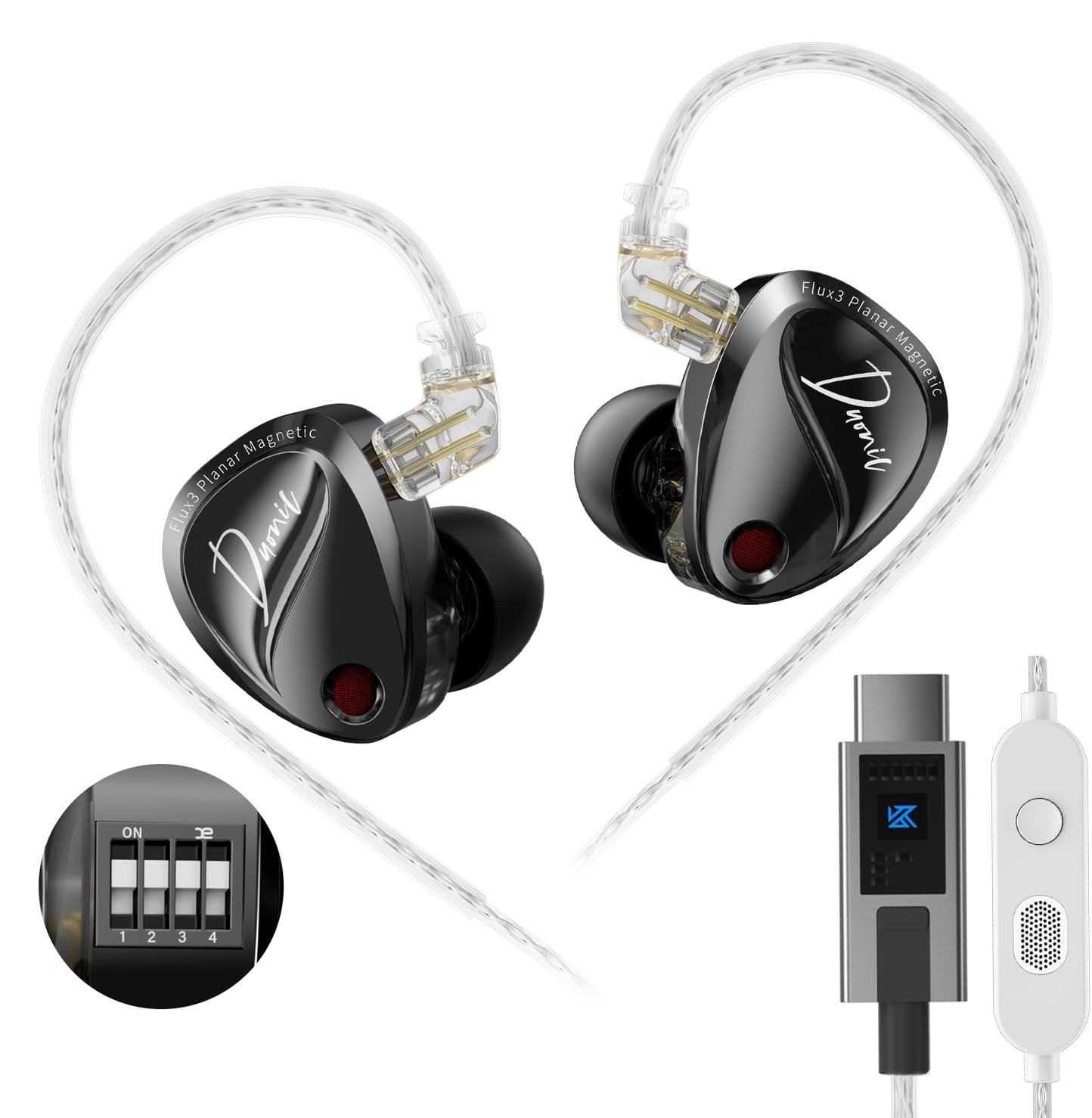
Image 1: KZ Duonic USB C Headphones, showcasing their sleek design and in-ear fit.
2. නිෂ්පාදන ලක්ෂණ
- Triple-Magnet Planar Magnetic Driver: Industry-first design for exceptional sound quality and detail.
- Super-Linear Dynamic Dual Driver: Provides powerful bass and clear audio across all frequencies.
- Studio-Grade Resolution: Engineered for audiophiles and music professionals, delivering high-resolution sound.
- Comfort-fit and Noise Isolation: Ergonomic design with 3 sizes of silicone ear tips for up to 36 dB noise isolation.
- Dedicated Tuning Switches: 4 switches for user-customized sound adjustments (DSP version).
- High-Definition Decoding USB-C Cable: 0.78mm 2-pin high-purity silver-plated oxygen-free copper cable for precise signal transmission.
- Detachable Cable Design: Extends earphone lifespan and allows for upgrades (e.g., KZ Bluetooth Module).

Image 2: Illustration of the Triple-Magnet Planar Magnetic Driver, highlighting its innovative structure.

Image 3: Demonstrates the headphones' suitability for gaming and overall sound performance.
3. පැකේජ අන්තර්ගතය
ඔබගේ පැකේජයේ සියලුම අයිතම ඇති බවට වග බලා ගන්න:
- 1 pair of KZ Duonic Earphones
- 1 Earphone Cable (USB-C)
- 3 pairs of Silicone Ear Tips (S, M, L - one pair pre-installed)
- 1 Tuning Rod (only for tuning version)
- 1 වගකීම් කාඩ්පත
- 1 Exquisite Packaging Box

Image 4: Visual representation of the items included in the KZ Duonic package.
4. පිහිටුවීම
4.1 කේබලය සම්බන්ධ කිරීම
- කේබලයේ වම් (L) සහ දකුණු (R) කන් පෙති සහ අනුරූප සම්බන්ධක හඳුනා ගන්න.
- Align the 2-pin connector on the cable with the port on the earpiece.
- Gently push the connector into the earpiece until it is securely seated. Do not force the connection.
4.2 Selecting and Attaching Ear Tips
Choose the ear tip size (Small, Medium, Large) that provides the most comfortable and secure fit, as well as optimal noise isolation. A proper seal is crucial for sound quality.
- Gently remove the pre-installed ear tip by twisting and pulling.
- Select your preferred ear tip size.
- Push the new ear tip onto the nozzle of the earphone, ensuring it is fully seated.
4.3 ඉයර්ෆෝන් පැළඳීම
The KZ Duonic headphones are designed for an over-ear fit with ergonomic ear hooks.
- Place the earpiece into your ear canal.
- Guide the cable over the top of your ear, using the pre-formed ear hook to secure it.
- Adjust the earpiece and cable for a snug and comfortable fit.
4.4 ඔබගේ උපාංගයට සම්බන්ධ වීම
Plug the USB-C connector of the cable into the USB-C port of your compatible device (e.g., Android smartphone, tablet, laptop, Nintendo Switch, iPad Pro/Air).
Video 1: Official product video demonstrating the KZ Duonic in-ear monitors and their features.
5. මෙහෙයුම් උපදෙස්
5.1 Basic Controls (In-line Microphone/Remote)
The in-line remote on the cable provides convenient control over your audio and calls:
- කෙටි මාධ්ය: සංගීතය වාදනය කරන්න/විරාම කරන්න, ඇමතුමට පිළිතුරු දෙන්න/අවසන් කරන්න.
- දිගු මුද්රණ යන්ත්රය: ඇමතුමක් ප්රතික්ෂේප කරන්න.
- දෙවරක් ඔබන්න: ඊළඟ ගීතයට යන්න.
- තුන් වරක් ඔබන්න: Go to the previous song.

Image 5: Diagram illustrating the button functions on the in-line microphone/remote.
5.2 Sound Tuning (DSP Version Only)
The Duonic DSP version features 4 dedicated switches on each earpiece, allowing for user-customized sound adjustments. Use the included tuning rod to adjust the switches.
- 1 මාරු කරන්න: Adjusts bass response.
- 2 මාරු කරන්න: Further adjusts bass response.
- 3 මාරු කරන්න: Adjusts mid-high frequency.
- 4 මාරු කරන්න: Further adjusts mid-high frequency.
Refer to the tuning guide provided with your product for specific combinations and their effects on the sound signature. Experiment with different settings to find your preferred tonality.

Image 6: Close-up of the tuning switches on the KZ Duonic earpiece.

Image 7: Graph illustrating the effects of different tuning switch combinations on the frequency response.
වීඩියෝ 2: කෙටි පෙරවදනක්view video from the KZ Official shop demonstrating the KZ Duonic in-ear monitors.
6. නඩත්තු කිරීම
6.1 Cleaning the Earphones and Ear Tips
- මෘදු, d පිරිසිදුකාරකයකින් කන් කෙළවර නිතිපතා පිරිසිදු කරන්න.amp කන් ඉටි සහ සුන්බුන් ඉවත් කිරීමට රෙදි.
- Wipe the earpieces with a dry, soft cloth. Avoid using harsh chemicals or abrasive materials.
- Ensure the nozzles are clear of any obstructions to maintain optimal sound quality.
6.2 කේබල් සත්කාරය
- Store the cable neatly to prevent tangling and damage.
- තියුණු නැමීම් හෝ කේබලය අධික ලෙස ඇදීම වළක්වා ගන්න.
- If the cable becomes damaged, it can be replaced due to the detachable design.
7. දෝශ නිරාකරණය
7.1 ශබ්දයක් නැත හෝ අඩු ශබ්දයක්
- Ensure the USB-C cable is securely connected to both the earphones and your device.
- ඔබගේ උපාංගයේ ශබ්ද මට්ටම පරීක්ෂා කරන්න.
- Verify that the correct audio output device is selected on your computer or smartphone.
- Inspect ear tips and nozzles for any blockages.
7.2 Distorted Sound or Poor Quality
- Ensure ear tips provide a proper seal in your ear canal.
- ගුණාත්මක ගැටළු සඳහා ශ්රව්ය මූලාශ්රය පරීක්ෂා කරන්න.
- For DSP versions, review the tuning switch settings. Incorrect settings might lead to undesirable sound profiles.
7.3 මයික්රෆෝනය ක්රියා නොකරයි
- Ensure the cable is fully connected.
- Check your device's settings to ensure the external microphone is selected.
8. පිරිවිතර
| විශේෂාංගය | පිරිවිතර |
|---|---|
| මාදිලියේ නම | Duonic |
| වෙළඳ නාමය | KZ |
| සම්බන්ධතා තාක්ෂණය | රැහැන්ගත (USB-C) |
| ශ්රව්ය ධාවක වර්ගය | Triple-Magnet Planar Magnetic + Super-Linear Dynamic Dual Driver |
| සංඛ්යාත ප්රතිචාරය | 20Hz - 20000Hz |
| සංවේදීතාව | 103 dB |
| සම්බාධනය | 24 ඕම් |
| ශබ්ද පාලනය | ශබ්ද හුදකලා කිරීම |
| කේබල් විශේෂාංගය | Detachable 0.78mm 2-pin |
| ගැළපෙන උපාංග | Android smartphones/tablets, Gaming devices with USB-C, Laptops, Nintendo Switch, iPad Pro/Air models |
| අයිතමයේ බර | අවුන්ස 2.39 කි |
9. වගකීම් සහ සහාය
Your KZ Duonic USB C Headphones come with a manufacturer's warranty. Please refer to the included Warranty Card for details on coverage and duration. For technical support, troubleshooting assistance, or warranty claims, please contact KZ customer service through their official webඔබ භාණ්ඩය මිලදී ගත් ස්ථානය හෝ සිල්ලර වෙළෙන්දා.
අමතර තොරතුරු සහ සම්පත් සඳහා, ඔබට පිවිසිය හැකිය KZ Official Store on Amazon.