1. හැඳින්වීම
ස්තූතියි, උදව් කළාටasing the TMY T02 4K Projector. This manual provides essential information for setting up, operating, and maintaining your projector to ensure optimal performance and longevity. Please read this manual thoroughly before use and retain it for future reference.
2. පෙට්ටියේ ඇති දේ
Upon unboxing, please ensure all the following items are included:
- TMY T02 4K Projector
- HDMI කේබලය
- විදුලි රැහැන්
- දුරස්ථ පාලකය
- පිරිසිදු කිරීමේ කට්ටලය
- පරිශීලක අත්පොත
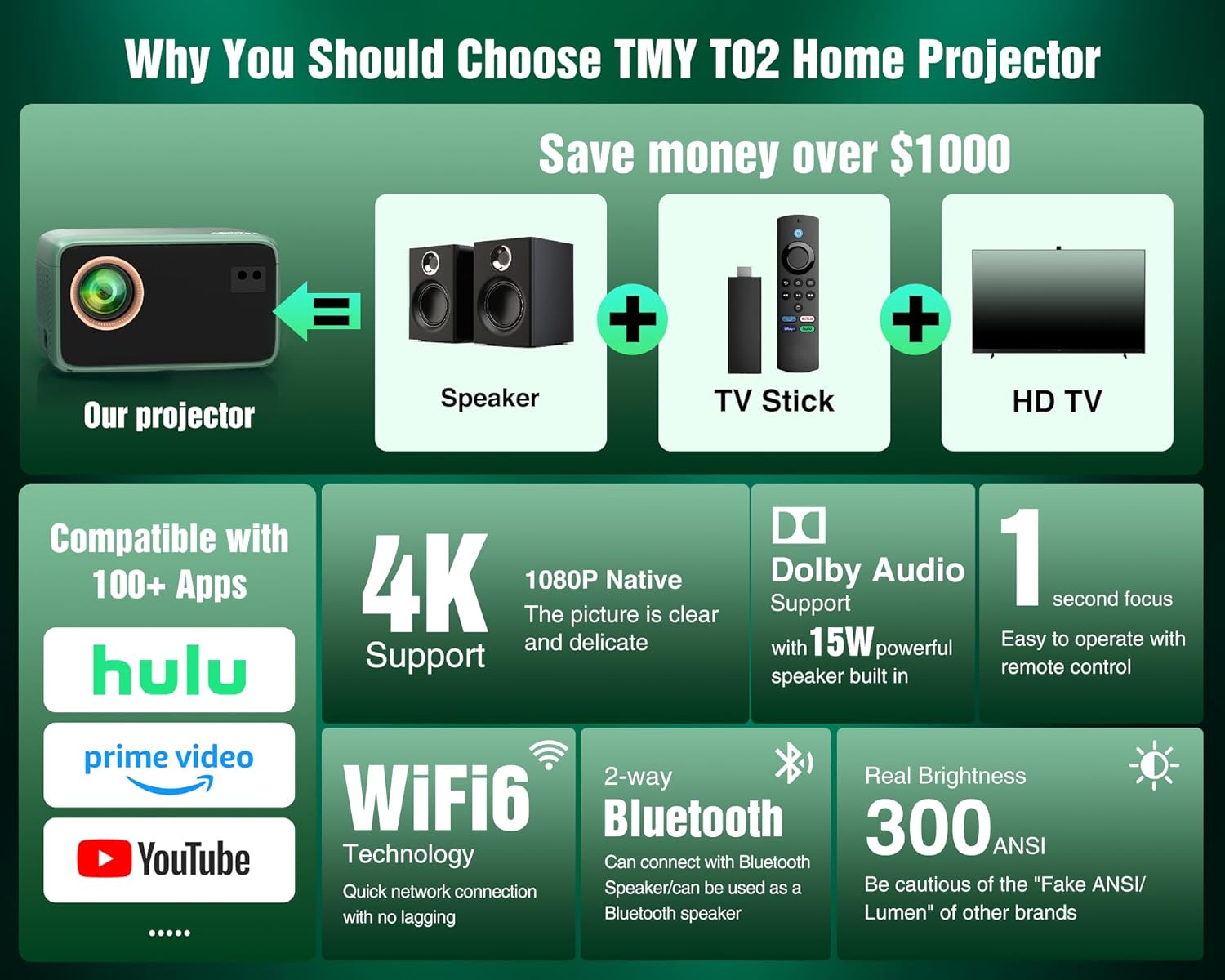
Image: The TMY T02 4K Projector is shown alongside its accessories, including the remote control, power cord, HDMI cable, and cleaning kit, all neatly arranged on a wooden surface.
3. නිෂ්පාදන ලක්ෂණ
- True 1080P Native & 300 ANSI Lumens: Experience stunning picture quality with true 1080P Native resolution and 300 ANSI lumens high brightness for clear viewing indoors and vivid outdoor movies.
- All-in-One Entertainment Hub: Compatible with Netflix, Prime Video, and YouTube, with these apps pre-installed for immediate use.
- Immersive Dolby Audio & Robust Connectivity: Enjoy rich, powerful, and spatial surround sound with certified Dolby Audio. Connect effortlessly via Dual-Band WiFi and Bluetooth.
- Built-in WiFi & Bluetooth: Seamless connectivity for streaming and pairing Bluetooth speakers/headphones.
- Ultra-Portable for Versatile Fun: Compact design ideal for creating a huge screen (up to 300") anywhere, suitable for family movie nights, camping, or gaming.
- Smart Features for Effortless Enjoyment: Auto Keystone Correction and Fast Remote Focus simplify setup. Intuitive interface and long-lasting lamp life ensure reliable entertainment.
- Smart Home Theater Projector: Versatile with HDMI, USB, and screen mirroring for gaming consoles, presentations, or streaming.
4. පිහිටුවීම
4.1 මූලික බල-සක්රියතාවය සහ සම්බන්ධතා
- විදුලි රැහැන ප්රොජෙක්ටරයට සහ විදුලිබල ජාලයකට සම්බන්ධ කරන්න.
- එය ක්රියාත්මක කිරීමට ප්රොජෙක්ටරයේ හෝ දුරස්ථ පාලකයේ බල බොත්තම ඔබන්න.
- Connect your media source (e.g., laptop, streaming stick, gaming console) using the provided HDMI cable or a USB drive.
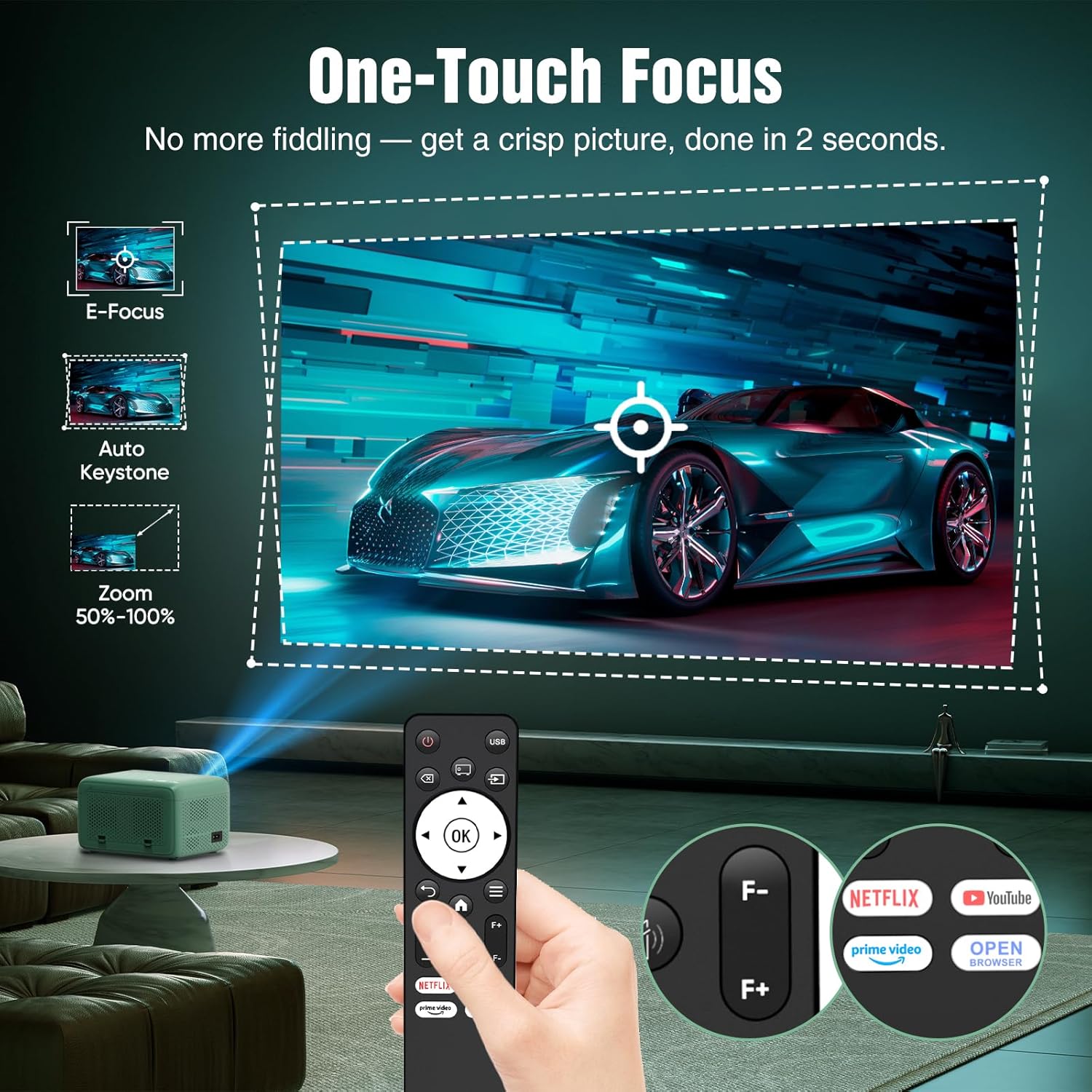
Image: The TMY T02 4K Projector projects an image onto a wall, with a hand holding the remote control pointing towards the focus buttons. This illustrates the one-touch focus feature.
4.2 නාභිගත කිරීම සහ කීස්ටෝන් ගැලපීම
- Use the focus ring on the projector or the remote control's focus buttons (F+/F-) to sharpen the image.
- The projector features Auto Keystone Correction. If the image appears distorted (trapezoidal shape), the projector will automatically adjust it. Manual adjustment options are available in the settings menu if needed.
4.3 WiFi and Bluetooth Pairing
- දුරස්ථ පාලකය භාවිතයෙන් 'සැකසීම්' මෙනුව වෙත සංචාලනය කරන්න.
- Select 'Network' or 'WiFi' to connect to your home network.
- For Bluetooth audio, select 'Bluetooth' in the settings to pair with your external speakers or headphones. The projector supports two-way Bluetooth, acting as both a receiver and a speaker.

Image: The TMY T02 4K Projector is shown in two modes: 'Projector Mode' where it connects to a soundbar via Bluetooth, and 'Speaker Mode' where a phone connects to the projector via Bluetooth to play music.
5. මෙහෙයුම් උපදෙස්
5.1 Navigation and Source Selection
- Use the arrow keys and 'OK' button on the remote control to navigate the on-screen menu.
- Select 'Source' to choose your input (HDMI, USB, Screen Mirroring).
- Pre-installed apps like Netflix, Prime Video, and YouTube can be accessed directly from the home screen.
5.2 තිර දර්පණය
- For iOS devices, select 'iOS Cast' or 'iOS Wired Screen' and follow the on-screen instructions to mirror your device.
- For Android devices, select 'Miracast' and follow the on-screen instructions.
5.3 පින්තූර සහ ශබ්ද සැකසුම්
- Access 'Settings' to adjust picture modes (Standard, Dynamic), brightness, contrast, color, and sharpness.
- Adjust sound modes and volume directly from the remote or the 'Settings' menu.
6. Media Integration Examples
6.1 නිෂ්පාදන රූප


6.2 නිල නිෂ්පාදන වීඩියෝ
7. නඩත්තු කිරීම
7.1 කාච පිරිසිදු කිරීම
Use the provided cleaning kit to gently clean the projector lens. Avoid using abrasive materials or harsh chemicals that could damage the lens coating.
7.2 සිසිලන පද්ධතිය
The TMY T02 Projector features a built-in cooling system. Ensure that the ventilation vents are not obstructed during operation to prevent overheating. Regular cleaning of the vents can help maintain optimal airflow.
8. දෝශ නිරාකරණය
- බොඳ රූපය: Adjust the focus ring or use the remote's focus buttons. Check keystone correction settings.
- ශබ්දයක් නැත: Ensure external speakers are properly connected via Bluetooth or audio cable. Check volume levels on both the projector and external devices.
- සංඥා නැත: Verify that the HDMI or USB cable is securely connected to both the projector and the source device. Select the correct input source from the menu.
- WiFi/Bluetooth Connectivity Issues: Ensure the projector is within range of your router or Bluetooth device. Restart both the projector and the connecting device.
9. පිරිවිතර
| වෙළඳ නාමය | ටී.එම්.වයි |
| ආදර්ශ අංකය | T02 |
| සංදර්ශක විභේදනය | 1920 x 1080 (ස්වදේශීය 1080P) |
| දීප්තිය | 300 ANSI ලුමෙන්ස් |
| සම්බන්ධතා තාක්ෂණය | Wi-Fi (Dual-Band), Bluetooth |
| විශේෂ ලක්ෂණ | Built-In Cooling System, Built-In Speaker, Built-In Wi-Fi, Auto Keystone Correction, Fast Remote Focus |
| අයිතමයේ බර | රාත්තල් 3.5 කි |
| පැකේජ මානයන් | අඟල් 11.61 x 7.48 x 6.18 |
| නිර්දේශිත භාවිතයන් | Home Cinema, Gaming, Outdoor Movie |
10. වගකීම් සහ සහාය
To activate your product warranty, please visit the official TMY website. You can register within 3 days of receiving the product to add 1 more year to your original warranty. For customer service and technical support, please visit www.tmyservice.com හෝ අප අමතන්න us@tmyservice.com.
The product comes with a standard return policy allowing for refund/replacement within 30 days.


