1. හැඳින්වීම
This manual provides essential information for setting up, operating, maintaining, and troubleshooting your new HP OmniDesk Desktop PC M02-0224. Please read this manual thoroughly before using your computer to ensure proper functionality and to maximize its lifespan. This desktop is designed for seamless performance and enhanced productivity, suitable for both business and student use.
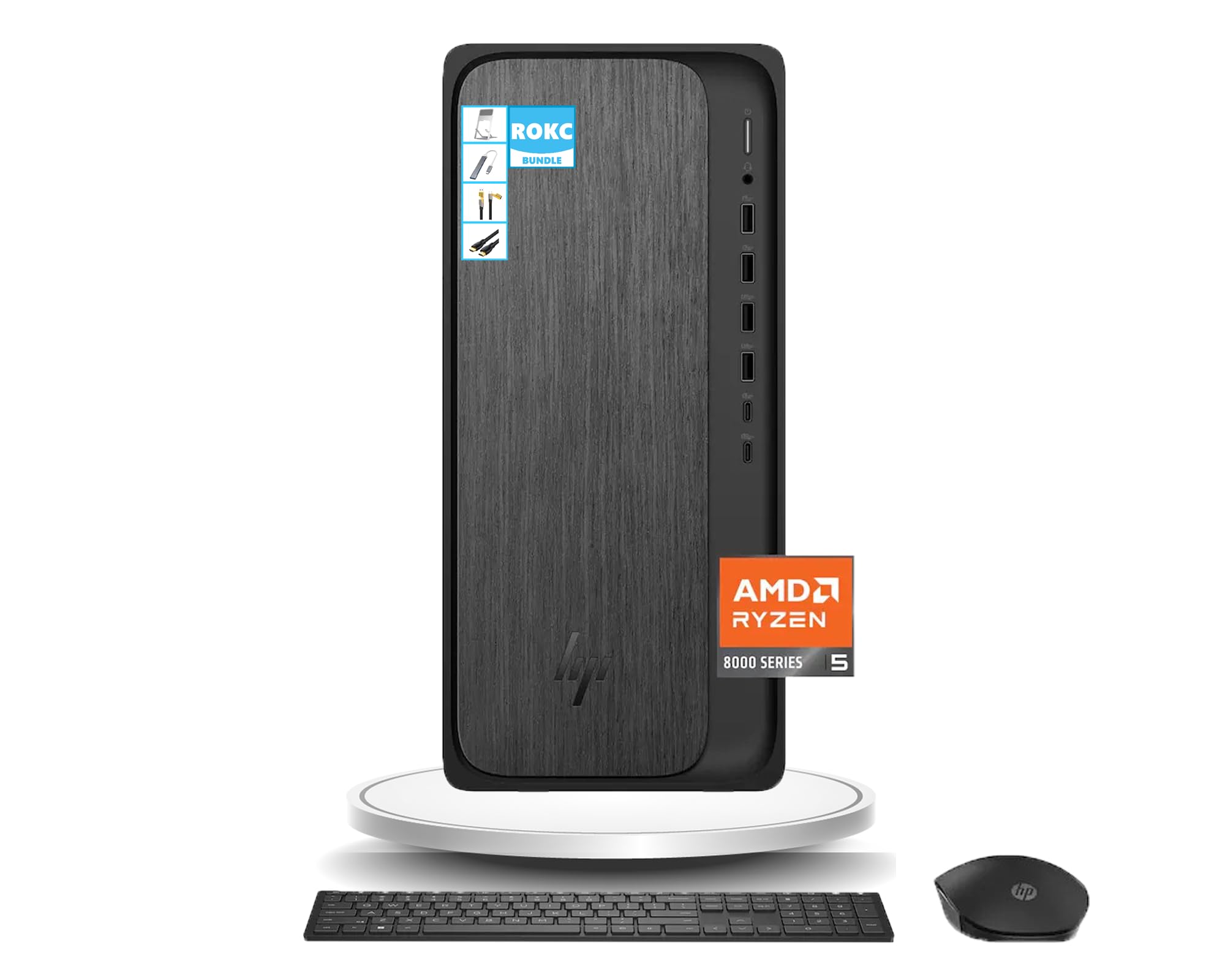
Figure 1: HP OmniDesk Desktop PC M02-0224
The HP OmniDesk Desktop PC M02-0224 is equipped with an AMD Ryzen 5 8500G processor, 16GB DDR5 RAM, and a 1TB SSD, providing robust performance for various tasks. Integrated AMD Radeon 740M Graphics ensure smooth visual experiences. Connectivity options include Wi-Fi 6, Bluetooth, and a comprehensive selection of USB, HDMI, and DisplayPort connections.
2. පෙට්ටියේ ඇති දේ
සියලුම සංරචක ප්රවේශමෙන් ඉවත් කර පහත අයිතම ඇති බවට වග බලා ගන්න:
- HP OmniDesk Desktop PC M02-0224
- HP කළු රැහැන් රහිත යතුරුපුවරුව
- HP කළු රැහැන් රහිත මූසිකය
- 280W 80 Plus Platinum Certified Power Supply
- සැකසුම් උපදෙස්
- ROKC Multifunctional Folding Universal Holder
- ROKC 65W Mecha 4-IN-1 Data Cable
- ROKC USB/Type-C 4-IN-1 HUB
- ROKC HDMI Cable

Figure 2: Main components included in the box.

Figure 3: ROKC Exclusive Accessories Bundle.
3. සැකසුම් උපදෙස්
- ස්ථානගත කිරීම: Place the HP OmniDesk Desktop PC on a stable, flat surface with adequate ventilation. Ensure no vents are blocked.
- මොනිටරය සම්බන්ධ කරන්න: Connect your monitor to the desktop using the provided HDMI cable or a DisplayPort cable (not included). The desktop supports 1 x HDMI and 1 x DisplayPort.
- පර්යන්ත සම්බන්ධ කරන්න: Connect the wireless keyboard and mouse using their respective USB receivers to any available USB-A ports. Connect any other desired peripherals (e.g., printer, external storage) to the appropriate ports.
- බල සම්බන්ධතාවය: Connect the power supply cable to the desktop's power input and then to a grounded electrical outlet.
- ජාල සම්බන්ධතාවය: For wired internet, connect an Ethernet cable to the RJ-45 port. For wireless internet, the desktop features built-in Wi-Fi 6.
- බල ගැන්වීම: Press the power button on the front of the desktop. The system will boot up, and Windows 11 will guide you through the initial setup process.
4. මෙහෙයුම් උපදෙස්
4.1 බලය සක්රිය / අක්රිය
- බල ගැන්වීමට: ඉදිරිපස පුවරුවේ පිහිටා ඇති බල බොත්තම ඔබන්න.
- වසා දැමීමට: Windows 11 හි Start බොත්තම ක්ලික් කරන්න, ඉන්පසු Power > Shut down තෝරන්න.
- නැවත ආරම්භ කිරීමට: ආරම්භක බොත්තම ක්ලික් කරන්න, පසුව බලය > නැවත ආරම්භ කරන්න තෝරන්න.
- නිදා ගැනීමට: ආරම්භක බොත්තම ක්ලික් කරන්න, පසුව බලය > නින්ද තෝරන්න.
4.2 Windows 11 Basics
Your HP OmniDesk PC comes with Windows 11 pre-installed. Familiarize yourself with the new interface, including the centered Start menu, redesigned taskbar, and Snap Layouts for efficient multitasking.
4.3 Using the ROKC Accessories
- Multifunctional Folding Universal Holder: Adjust the holder to your desired angle for optimal viewing of tablets or smartphones.
- 65W Mecha 4-IN-1 Data Cable & USB/Type-C 4-IN-1 HUB: Use these for versatile connectivity and charging of various devices. Refer to the accessory's specific instructions for detailed usage.
- ROKC HDMI Cable: Connect this cable between your desktop and a compatible display for high-definition video and audio output.
5. Connectivity & Ports
The HP OmniDesk Desktop PC offers a wide range of ports for connecting peripherals and external devices:

Figure 4: Front and Rear Port Layout.
5.1 ඉදිරිපස වරායන්
- 1 x හෙඩ්ෆෝන්/මයික්රොෆෝන් කොම්බෝ ජැක්
- 2 x USB Type-A 5Gbps ports
- 2 x USB Type-A 10Gbps ports
- 1 x USB Type-C 5Gbps port
- 1 x USB Type-C 10Gbps port
5.2 පසුපස වරායන්
- 4 x USB 2.0 Type-A ports
- 1 x RJ-45 Ethernet port
- 1 x HDMI අවුට් පෝට්
- 1 x DisplayPort 1.4
5.3 රැහැන් රහිත සම්බන්ධතාව
- Wi-Fi 6: For high-speed wireless internet connection.
- බ්ලූටූත්: For connecting wireless peripherals like headphones or speakers.
6. පිරිවිතර
Detailed technical specifications for your HP OmniDesk Desktop PC M02-0224:

රූපය 5: නිෂ්පාදන මානයන්.
| විශේෂාංගය | පිරිවිතර |
|---|---|
| ප්රොසෙසරය | AMD Ryzen 5 8500G (Up to 5 GHz) |
| RAM | 16GB DDR5 SDRAM |
| ගබඩා කිරීම | 1TB SSD |
| ග්රැෆික්ස් | AMD Radeon 740M ග්රැෆික්ස් (ඒකාබද්ධ) |
| මෙහෙයුම් පද්ධතිය | වින්ඩෝස් 11 |
| රැහැන් රහිත සම්බන්ධතාව | Wi-Fi 6, බ්ලූටූත් |
| මානයන් (H x W x D) | අඟල් 13.27 x 6.1 x 12.4 |
| බර | රාත්තල් 12.72 |
| වර්ණය | Gray Wood |
| බල සැපයුම | 280W 80 Plus Platinum Certified |
7. නඩත්තු කිරීම
Regular maintenance helps ensure the longevity and optimal performance of your HP OmniDesk Desktop PC:
- එය පිරිසිදුව තබා ගන්න: Regularly clean the exterior of the desktop with a soft, dry cloth. Use compressed air to clear dust from vents and ports to prevent overheating.
- මෘදුකාංග යාවත්කාලීන: Keep your Windows 11 operating system and all drivers updated to the latest versions. This ensures security and performance improvements.
- ප්රති-වයිරස ආරක්ෂණය: අනිෂ්ට මෘදුකාංග සහ වෛරස් වලින් ආරක්ෂා වීමට ප්රති-වයිරස මෘදුකාංග ස්ථාපනය කර නිතිපතා යාවත්කාලීන කරන්න.
- දත්ත උපස්ථ: වැදගත් දේවල් කලින් කලට උපස්ථ කරන්න fileදත්ත නැතිවීම වැළැක්වීම සඳහා බාහිර ධාවකයකට හෝ වලාකුළු ගබඩාවකට s.
- නිසි වසා දැමීම: පරිගණකය නිකම්ම විසන්ධි කිරීමට වඩා මෙහෙයුම් පද්ධතිය හරහා සෑම විටම නිසි ලෙස වසා දමන්න.
8. දෝශ නිරාකරණය
If you encounter issues with your HP OmniDesk Desktop PC, try the following troubleshooting steps:
- බලය නැත: Ensure the power cable is securely connected to both the desktop and the electrical outlet. Check if the outlet is functional.
- සංදර්ශකය නැත: Verify that the monitor is powered on and correctly connected to the desktop. Try a different video cable or monitor if available.
- පර්යන්තය ක්රියා නොකරයි: Ensure USB devices are properly plugged into the correct ports. Try connecting them to a different USB port. For wireless devices, check battery levels and ensure receivers are correctly installed.
- මන්දගාමී කාර්ය සාධනය: Close unnecessary applications. Check for background updates or scans. Ensure sufficient free space on the SSD.
- අන්තර්ජාල සම්බන්ධතා ගැටළු: For Wi-Fi, check your router and modem. For wired connection, ensure the Ethernet cable is securely connected and your network is active.
- පද්ධතිය කැටි වේ: If the system becomes unresponsive, press and hold the power button for 10 seconds to force a shutdown, then restart the PC.
If these steps do not resolve the issue, please refer to the HP support webවැඩිදුර සහාය සඳහා වෙබ් අඩවියට පිවිසෙන්න හෝ පාරිභෝගික සේවාව අමතන්න.
9. වගකීම් සහ සහාය
Your HP OmniDesk Desktop PC M02-0224 comes with a standard manufacturer's warranty. For specific warranty terms and conditions, please refer to the documentation included with your product or visit the official HP support webවෙබ් අඩවිය. වගකීම් හිමිකම් සඳහා ඔබේ මිලදී ගැනීමේ සාක්ෂි තබා ගන්න.
තාක්ෂණික සහාය, ධාවක බාගැනීම් සහ අමතර සම්පත් සඳහා, කරුණාකර නිල HP සහාය වෙත පිවිසෙන්න. website. You can typically find contact information for customer service on the HP webවෙබ් අඩවියේ හෝ ඔබේ නිෂ්පාදනයේ ලියකියවිලිවල.