1. නිෂ්පාදන අවසන්view
The ROPVACNIC Robot Vacuum Cleaner S1 is a versatile 2-in-1 device designed for both vacuuming and mopping. It features powerful suction, intelligent navigation, and smart control options to maintain clean floors.
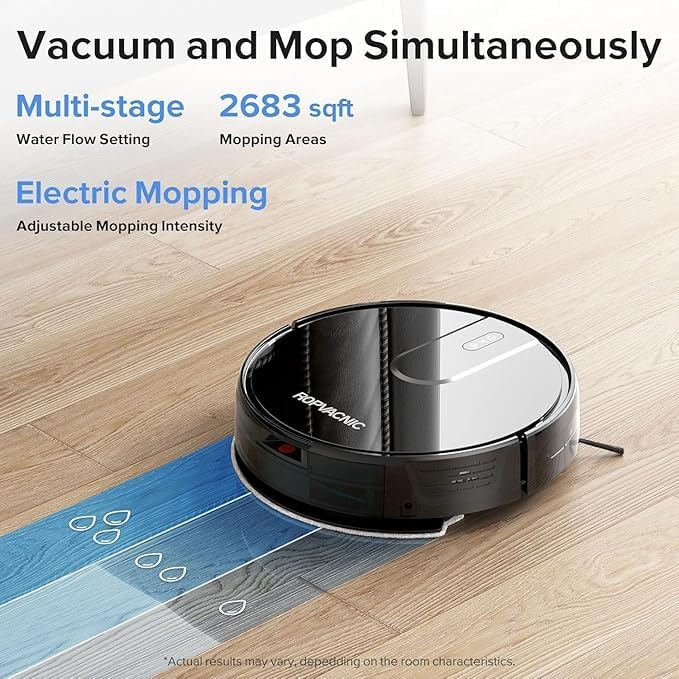
Image: ROPVACNIC Robot Vacuum Cleaner S1. This image shows the top-down view of the robot vacuum cleaner, highlighting its sleek, round design.
2. පැකේජ අන්තර්ගතය
Before setup, ensure all components are present in the package:
- Robotic Vacuum and Mop Cleaner
- මොප් පෑඩ් හෝල්ඩර්
- ආරෝපණ පදනම
- බල ඇඩැප්ටරය
- Electrically Controlled Water Tank
- මොපිං රෙදි
- අමතර HEPA පෙරහන
- 4 පැති බුරුසු
- පිරිසිදු කිරීමේ බුරුසුව
- පරිශීලක අත්පොත
- APP උපදෙස්

Image: Contents of the ROPVACNIC S1 package. This image displays all included accessories such as the robot, charging base, remote, brushes, and manuals.
3. සැකසුම් මාර්ගෝපදේශය
3.1 ආරෝපණ පාදක ස්ථානගත කිරීම
ආරෝපණ පදනම විවෘත ප්රදේශයක බිත්තියකට එරෙහිව තබන්න, පැතිවලට මීටර 1 (අඩි 3) ක් සහ පාදම ඉදිරිපිට මීටර් 2 (අඩි 6) ක් ඇතුළත කිසිදු බාධකයක් නොමැති බව සහතික කර ගන්න. බල ඇඩැප්ටරය ආරෝපණ පදනමට සම්බන්ධ කර එය බල අලෙවිසැලකට සම්බන්ධ කරන්න.
3.2 මූලික ගාස්තුව
Place the robot vacuum onto the charging base. Ensure the charging contacts on the robot align with those on the base. The robot will begin charging automatically. For first-time use, fully charge the robot before operation.

Image: Robot vacuum returning to its charging base. This image illustrates the robot automatically docking for recharge.
3.3 යෙදුම් සම්බන්ධතාවය
To utilize smart features, connect your ROPVACNIC S1 to the mobile application:
- Refer to the APP Instruction manual included in the package.
- Download the "ROPVACNIC Smart" app from your device's app market.
- එය ක්රියාත්මක කිරීමට රොබෝවෙහි බල බොත්තම තත්පර 5ක් ඔබාගෙන සිටින්න.
- " දිගු ඔබන්න"සහ"" buttons simultaneously for 5 seconds until the green light flashes. This indicates pairing mode.
- ඔබගේ ස්මාර්ට් ජංගම දුරකථනය 2.4GHz Wi-Fi ජාලයකට සම්බන්ධ කරන්න.
- Open the ROPVACNIC Smart app and follow the on-screen instructions to add your S1 robot vacuum.
For direct download, scan the QR code or visit: https://a.smart321.com/ropvacnicsmart

Image: Step-by-step guide for connecting the ROPVACNIC S1 to the mobile application, showing app interface screenshots.
3.4 Voice Control Setup
The ROPVACNIC S1 is compatible with Amazon Alexa and Google Assistant. Follow the instructions in the app to link your robot vacuum with your preferred voice assistant for hands-free control.

Image: A user relaxing on a couch while the robot vacuum cleans, with speech bubbles indicating voice commands for Amazon Alexa and Google Assistant.
4. මෙහෙයුම් උපදෙස්
4.1 පිරිසිදු කිරීම ආරම්භ කිරීම සහ නැවැත්වීම
- අතින් ආරම්භ කිරීම: රොබෝවෙහි බල බොත්තම හෝ දුරස්ථ පාලකයේ 'පිරිසිදු කරන්න' බොත්තම ඔබන්න.
- යෙදුම් පාලනය: Use the ROPVACNIC Smart app to start, pause, or stop cleaning.
- හඬ විධානය: Use connected voice assistants (e.g., "Alexa, turn on vacuum cleaner.").
4.2 Cleaning Modes and Settings
The robot offers multiple cleaning modes and personalized settings:
- බහු පිරිසිදු කිරීමේ ක්රම: Select from various modes like Auto, Spot, Edge, or Scheduled cleaning via the app or remote.
- සකස් කළ හැකි චූෂණ බලය: The 5200Pa suction power can be adjusted to different levels (e.g., Gentle, Normal, Strong) to suit various floor types and debris.
- Electric Mopping: The integrated mopping system features a four-stage personalized water adjustment system. Adjust water flow (Low, Medium, High) through the app for different stain levels and floor types.

Image: The ROPVACNIC S1 simultaneously vacuuming and mopping a hard floor, showing water flow patterns and cleaning coverage.

Image: Screenshots of the ROPVACNIC Smart app interface, demonstrating options for cleaning modes, suction power, and water control settings.
4.3 සංචාලනය සහ බාධක වළක්වා ගැනීම
The S1 robot is equipped with an advanced high-coverage sensing system and multiple algorithmic data points. This enables it to detect obstacles, adjust direction, and navigate efficiently around furniture and other objects. Its slim design (2.99 inches high) allows it to clean under low-clearance furniture.

Image: Diagram illustrating the robot vacuum's intelligent sensing system, showing blue light beams detecting objects and mapping its environment.

Image: The ROPVACNIC S1 robot vacuum cleaning under a bed, demonstrating its low profile for accessing hard-to-reach areas.
4.4 ස්වයංක්රීය නැවත ආරෝපණය කිරීම
When the battery is low, the robot will automatically return to its charging base to recharge. Ensure the charging base is accessible and powered on.
Video: This video demonstrates the ROPVACNIC S1 robot vacuum's automatic self-charging feature, showing it navigating back to its charging dock.
5. නඩත්තු කිරීම
නිතිපතා නඩත්තු කිරීම ප්රශස්ත ක්රියාකාරිත්වය සහතික කරන අතර ඔබේ රොබෝ රික්තකයේ ආයු කාලය දීර්ඝ කරයි.
5.1 Emptying Dustbin and Water Tank
After each cleaning cycle, or when indicated by the app, empty the dustbin and clean the water tank. The wet/dry tanks are designed for easy removal and cleaning.
5.2 පිරිසිදු කිරීමේ බුරුසු
- පැති බුරුසු: Regularly check and clean the side brushes for tangled hair or debris. Replace them if they are worn or damaged (4 spare brushes are included).
- Main Brush (if applicable): While the S1 features a no-entanglement design for pet hair, periodically check the main brush area for any accumulated debris and clean as needed.
5.3 පිරිසිදු කිරීමේ පෙරහන්
The S1 uses a multi-layer optimized high-efficiency filtration system. Clean the HEPA filter regularly by tapping out dust or using the cleaning brush. Replace the HEPA filter every 3-6 months, or as needed (a spare HEPA filter is included).
5.4 Mopping Cloth Maintenance
Remove the mopping cloth after each use and wash it thoroughly. Allow it to air dry completely before reattaching. Replace the mopping cloth when it shows signs of wear or reduced effectiveness.

රූපය: පුපුරා ගිය එකක් view of the robot vacuum's cleaning module, highlighting the electrically controlled water tank, mop pad, and filtration system components.
6. දෝශ නිරාකරණය
If you encounter issues with your ROPVACNIC S1, refer to the following common solutions:
| ගැටලුව | විය හැකි හේතුව | විසඳුම |
|---|---|---|
| රොබෝවරයා ක්රියාත්මක නොවේ | බැටරිය අඩුයි; බල බොත්තම නිවැරදිව ඔබා නැත. | Ensure robot is fully charged. Press and hold the power button for 3-5 seconds. |
| රොබෝව ආරෝපණය නොවේ | Charging contacts dirty; Charging base not powered; Robot not properly docked | Clean charging contacts on both robot and base. Ensure base is plugged in. Re-dock the robot, ensuring proper alignment. |
| රොබෝව නිතරම හිරවෙනවා | Too many obstacles; Loose cables or rugs | Clear the cleaning area of small objects, cables, and thick rugs. Use virtual boundaries if available in the app. |
| දුර්වල පිරිසිදු කිරීමේ කාර්ය සාධනය | Dustbin full; Brushes tangled; Filter clogged; Suction power too low | Empty dustbin. Clean side brushes and main brush. Clean or replace HEPA filter. Increase suction power via app. |
| පිරිසිදු කිරීම ඵලදායී නොවේ | Water tank empty; Mopping cloth dirty/dry; Water flow setting too low | Fill water tank. Clean or wet the mopping cloth. Increase water flow setting in the app. |
| යෙදුම් සම්බන්ධතා ගැටළු | Incorrect Wi-Fi band; Robot not in pairing mode; App outdated | Ensure 2.4GHz Wi-Fi. Re-enter pairing mode (long press "" and "" for 5s). Update app. Restart router and robot. |
7. පිරිවිතර
Key technical specifications for the ROPVACNIC Robot Vacuum Cleaner S1:
- මාදිලියේ නම: S1
- වෙළඳ නාමය: ROPVACNIC
- නිෂ්පාදන මානයන්: 12"අඟල් x 12"අඟල් x 2.99"උ
- අයිතමයේ බර: රාත්තල් 7.26 කි
- චූෂණ බලය: 5200Pa
- බැටරි ආයු කාලය: මිනිත්තු 120 දක්වා
- බලශක්ති ප්රභවය: බැටරි බලයෙන්
- පාලන ක්රමය: App, Remote, Voice (Amazon Echo, Google Home)
- පෙරහන් වර්ගය: Multi-layer Optimized High-Efficiency Filtration
- ජල ටැංකි ධාරිතාව: 250 mL (Electrically Controlled)
- මතුපිට නිර්දේශය: Hardwood Floors, Low Pile Carpets
- විශේෂ ලක්ෂණ: Adjustable Electric Mopping, Intelligent Auto Docking, Advanced Obstacle Avoidance, Personalized Intensity Settings, Multiple Cleaning Modes, Designed for Pet Hair

Image: Graphic displaying the 5200 mAh battery capacity and the ability to clean up to 2683 sqft on a single charge.
8. වගකීම් සහ සහාය
8.1 වගකීම් තොරතුරු
For detailed warranty information, please refer to the warranty card included in your product packaging or visit the official ROPVACNIC webවෙබ් අඩවිය. වගකීම් හිමිකම් සඳහා මිලදී ගැනීමේ සාක්ෂියක් ලෙස ඔබේ මිලදී ගැනීමේ රිසිට්පත තබා ගන්න.
8.2 පාරිභෝගික සහාය
If you have any questions, require technical assistance, or need to report an issue, please contact ROPVACNIC customer support through the official website or the contact information provided in your product's user manual.


