හැඳින්වීම
Thank you for choosing GOBOULT Tenet TWS Earbuds. This manual provides essential information for setting up, operating, and maintaining your earbuds. Please read it carefully before use to ensure optimal performance and longevity of your device.

රූපය: අවසන්view of GOBOULT Tenet TWS Earbuds features.
පෙට්ටියේ ඇති දේ
- GOBOULT Tenet TWS Earbuds (Left and Right)
- අයකිරීමේ නඩුව
- USB Type-C ආරෝපණ කේබලය
- කන් කුෂන් (විවිධ ප්රමාණ)
- පරිශීලක අත්පොත
- වගකීම් කාඩ්පත
නිෂ්පාදනය අවසන්view
The GOBOULT Tenet TWS Earbuds are designed for a seamless audio experience with advanced features.
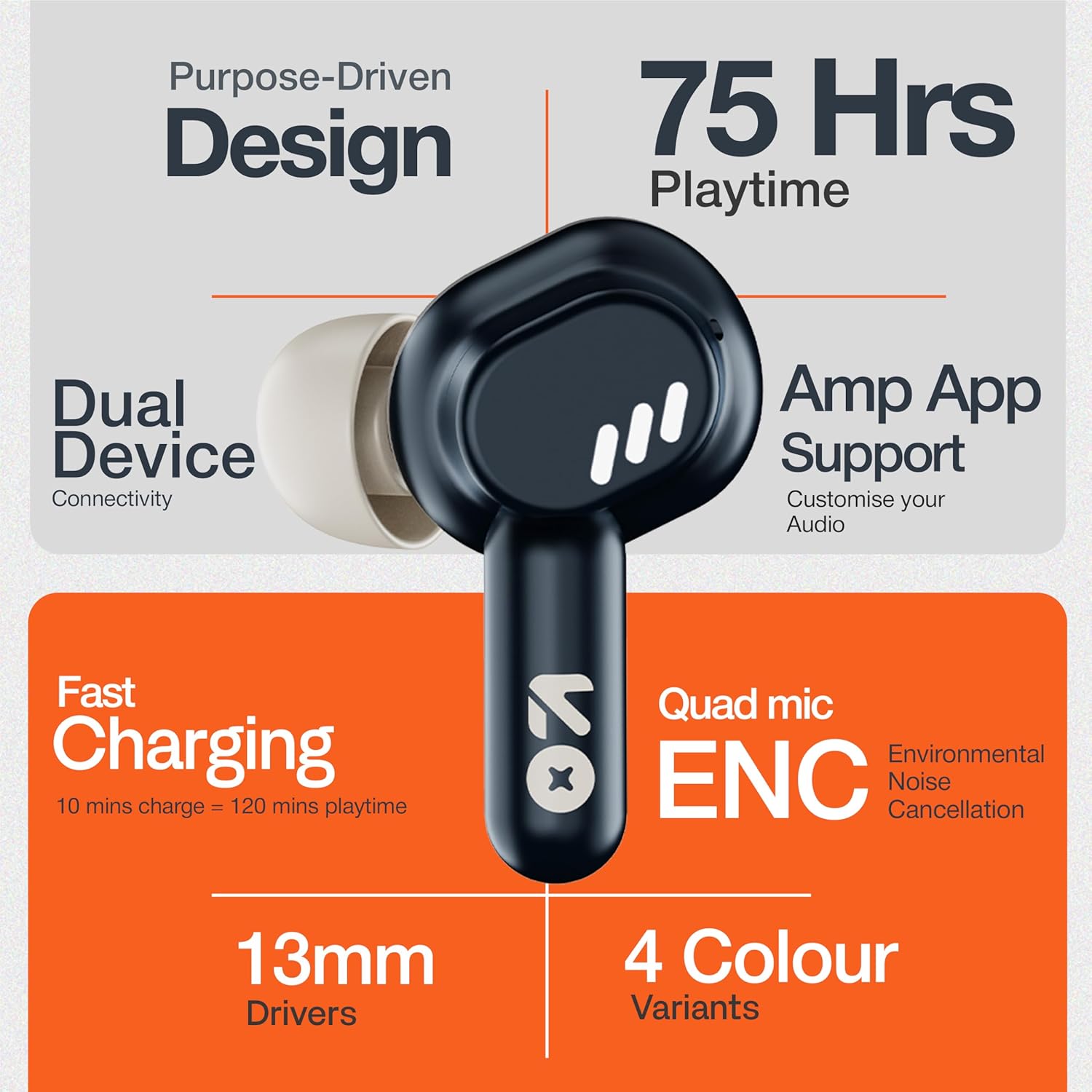
Image: GOBOULT Tenet TWS Earbuds and Charging Case.
සංරචක:
- කරාබු: Left and Right earbuds with touch control surfaces and built-in microphones.
- අයකිරීමේ නඩුව: Stores and charges the earbuds, featuring a USB Type-C port for charging.
- LED දර්ශක: On both earbuds and the charging case to show battery status and pairing mode.

Image: Quad Mic Environmental Noise Cancellation (ENC) technology.
සැලසුම
1. ඉයර්බඩ් සහ කේස් ආරෝපණය කිරීම
පළමු භාවිතයට පෙර, ඉයර්බඩ් සහ ආරෝපණ පෙට්ටිය සම්පූර්ණයෙන්ම ආරෝපණය කරන්න.
- ඉයර්බඩ් ආරෝපණ පෙට්ටියට දමන්න. ඒවා නිවැරදිව සවි කර ඇති බවට වග බලා ගන්න.
- USB Type-C ආරෝපණ කේබලය නඩුවේ ආරෝපණ වරායට සහ බල ප්රභවයකට සම්බන්ධ කරන්න.
- නඩුවේ ඇති LED දර්ශකය ආරෝපණ තත්ත්වය පෙන්වයි. සම්පූර්ණ ආරෝපණයක් සාමාන්යයෙන් පැය 1.5 ක් පමණ ගත වේ.
වේගවත් ආරෝපණය: A 10-minute charge provides up to 120 minutes of playtime.

Image: Charging the GOBOULT Tenet TWS Earbuds.
2. උපාංගයක් සමඟ යුගල කිරීම
- ආරෝපණ පෙට්ටිය විවෘත කරන්න. ඉයර්බඩ් ස්වයංක්රීයව යුගල කිරීමේ ප්රකාරයට ඇතුළු වන අතර, එය LED ලයිට් දැල්වීමෙන් දැක්වේ.
- ඔබගේ උපාංගයේ (ස්මාර්ට්ෆෝන්, ටැබ්ලටය, ලැප්ටොප්) බ්ලූටූත් සක්රීය කරන්න.
- ඒ සඳහා සොයන්න "GOBOULT Tenet" in the list of available Bluetooth devices and select it to connect.
- Once connected, the earbud LEDs will stop flashing.
ද්විත්ව උපාංග සම්බන්ධතාවය: The earbuds support simultaneous connection to two devices. After pairing with the first device, connect to the second device. The earbuds will intelligently switch between them.

Image: Dual Device Connectivity.
3. Amp යෙදුම් සහාය
Enhance your listening experience by downloading the GOBOULT Amp App. The app allows for custom EQ settings, control customization, and other audio preferences.
- Download the "GOBOULT Amp" app from your device's app store.
- Open the app and follow the on-screen instructions to connect your Tenet earbuds.

Image: GOBOULT Amp App for custom audio tuning.
මෙහෙයුම් උපදෙස්
ඉයර්බඩ් පැළඳීම
Insert the earbuds gently into your ears and rotate them slightly to find a comfortable and secure fit. Choose the appropriate ear cushion size for optimal sound quality and comfort.
බලය සක්රිය / අක්රිය
- බල ගැන්වීම: Open the charging case, or long-press the touch control area on both earbuds for 3 seconds.
- විදුලිය විසන්ධි කිරීම: Place the earbuds back into the charging case and close the lid, or long-press the touch control area on both earbuds for 5 seconds.
ස්පර්ශ පාලන
The GOBOULT Tenet TWS Earbuds feature intuitive touch controls on each earbud.

Image: Touch Controls and AI Assistant.
| ක්රියාව | වම් ඉයර්බඩ් | දකුණු අර්බඩ් |
|---|---|---|
| සංගීතය වාදනය/විරාම කරන්න | තනි තට්ටු කිරීම | තනි තට්ටු කිරීම |
| ඊළඟ ධාවන පථය | දෙවරක් තට්ටු කරන්න | දෙවරක් තට්ටු කරන්න |
| පෙර ධාවන පථය | ත්රිත්ව තට්ටු කරන්න | ත්රිත්ව තට්ටු කරන්න |
| ඇමතුමට පිළිතුරු දෙන්න/අවසන් කරන්න | තනි තට්ටු කිරීම | තනි තට්ටු කිරීම |
| ඇමතුම ප්රතික්ෂේප කරන්න | දිගු ඔබන්න (තත්පර 2) | දිගු ඔබන්න (තත්පර 2) |
| හඬ සහායක සක්රිය කරන්න | දිගු ඔබන්න (තත්පර 2) | දිගු ඔබන්න (තත්පර 2) |
නඩත්තු කිරීම
පිරිසිදු කිරීම
- මෘදු, වියලි, ලින්ට් රහිත රෙද්දකින් ඉයර්බඩ් සහ ආරෝපණ පෙට්ටිය නිතිපතා පිරිසිදු කරන්න.
- දරුණු රසායනික ද්රව්ය, පිරිසිදු කිරීමේ ද්රාවණ හෝ ශක්තිමත් ඩිටර්ජන්ට් භාවිතා නොකරන්න.
- නිසි ආරෝපණය සහතික කිරීම සඳහා ඉයර්බඩ් සහ කේස් දෙකෙහිම ආරෝපණ සම්බන්ධතා පිරිසිදු කරන්න.
ගබඩා කිරීම
- භාවිතයේ නොමැති විට, ඉයර්බඩ් ආරක්ෂා කර ගැනීමට සහ ආරෝපණය කර තබා ගැනීමට ඒවායේ ආරෝපණ පෙට්ටියේ ගබඩා කරන්න.
- අධික උෂ්ණත්වයන්ගෙන් සහ සෘජු හිරු එළියෙන් ඈත්ව සිසිල් වියළි ස්ථානයක ගබඩා කරන්න.
ජල ප්රතිරෝධය
The GOBOULT Tenet TWS Earbuds are rated IPX5 ජල ප්රතිරෝධක, meaning they are protected against low-pressure water jets from any direction. This makes them suitable for workouts and light rain. However, they are not designed for swimming or submersion in water.
දෝෂගවේෂණය
If you encounter any issues with your GOBOULT Tenet TWS Earbuds, please refer to the following common solutions:
- ඉයර්බඩ් යුගල නොවේ:
- ඉයර්බඩ් දෙකම ආරෝපණය කර ඇති බව සහතික කර ගන්න.
- Place earbuds back in the case, close the lid, wait 5 seconds, then open again to re-enter pairing mode.
- ඔබගේ උපාංගයේ බ්ලූටූත් අක්රිය කර ක්රියාත්මක කරන්න.
- Forget/delete "GOBOULT Tenet" from your device's Bluetooth list and try pairing again.
- එක් ඉයර්බඩ් එකක් පමණක් ක්රියා කරයි:
- ඉයර්බඩ් දෙකම ආරෝපණය කර ඇති බව සහතික කර ගන්න.
- ඉයර්බඩ් දෙකම නැවත ආරෝපණ පෙට්ටියට දමා, පියන වසා, පසුව එය නැවත විවෘත කරන්න.
- Try resetting the earbuds (refer to the Amp App or GOBOULT support for specific reset instructions).
- ශබ්දයක් නැත හෝ අඩු පරිමාවක්:
- ඔබගේ උපාංගයේ සහ ඉයර්බඩ් දෙකෙහිම ශබ්ද මට්ටම පරීක්ෂා කරන්න.
- ඉයර්බඩ් ඔබේ උපාංගයට නිසි ලෙස සම්බන්ධ වී ඇති බවට වග බලා ගන්න.
- ඉයර්බඩ් ස්පීකර් දැලෙන් ඕනෑම සුන්බුන් පිරිසිදු කරන්න.
- ආරෝපණ ගැටළු:
- ආරෝපණ කේබලය නඩුවට සහ බල ප්රභවයට ආරක්ෂිතව සම්බන්ධ කර ඇති බවට වග බලා ගන්න.
- ඉයර්බඩ්වල සහ කේස් එක ඇතුළත ආරෝපණ සම්බන්ධතා පිරිසිදු කරන්න.
- වෙනස් USB Type-C කේබලයක් සහ බල ඇඩැප්ටරයක් උත්සාහ කරන්න.
If the issue persists, please contact GOBOULT customer support.
පිරිවිතර

Image: 13mm Dynamic Drivers for enhanced audio.
| විශේෂාංගය | විස්තර |
|---|---|
| මාදිලියේ නම | එයාර්බාස් ඉයර්බඩ්ස් |
| සම්බන්ධතා තාක්ෂණය | බ්ලූටූත් 5.4 |
| ශ්රව්ය ධාවක ප්රමාණය | 13mm ගතික ධාවකය |
| බැටරි ආයු කාලය (මුළු) | පැය 75 දක්වා |
| වේගවත් ආරෝපණය | මිනිත්තු 10 ක ආරෝපණය = මිනිත්තු 120 ක ක්රීඩා කාලය |
| ආරෝපණ වරාය | USB Type-C |
| මයික්රෆෝනය | පාරිසරික ශබ්ද අවලංගු කිරීම (ENC) සහිත ක්වාඩ් මයික් |
| ජල ප්රතිරෝධය | IPX5 |
| පාලන ක්රමය | ස්පර්ශ කරන්න |
| හඬ සහායක | Built-In (Google Assistant, Siri) |
| ද්විත්ව උපාංග යුගල කිරීම | සහාය දුන්නා |
| සංඛ්යාත ප්රතිචාරය | 20 KHz |
| සංවේදීතාව | 105 dB |
| අයිතමයේ බර | ග්රෑම් 54.5 යි |
| නිෂ්පාදන මානයන් (නඩුව) | 6.7 x 2.2 x 5.6 සෙ.මී |
වගකීම් සහ සහාය
වගකීම් තොරතුරු
The GOBOULT Tenet TWS Earbuds come with a වසර 1ක නිෂ්පාදක වගකීම මිලදී ගත් දින සිට. මෙම වගකීම නිෂ්පාදන දෝෂ ආවරණය කරයි. වගකීම් හිමිකම් සඳහා කරුණාකර ඔබේ මිලදී ගැනීමේ සාක්ෂි තබා ගන්න.
අනිසි භාවිතය, අනතුරු, අනවසර වෙනස් කිරීම් හෝ සාමාන්ය ඇඳීම් සහ ඉරීම් නිසා සිදුවන හානිය වගකීම් සහතිකය මගින් ආවරණය නොවේ.
පාරිභෝගික සහාය
For any questions, technical assistance, or warranty claims, please contact GOBOULT customer support through their official webවෙබ් අඩවිය හෝ ඔබගේ වගකීම් කාඩ්පතේ සපයා ඇති සම්බන්ධතා තොරතුරු.
Please have your product model number (Airbass Earbuds) and proof of purchase ready when contacting support.


