හැඳින්වීම
Thank you for choosing the FiiO EH11 Retro On-Ear Bluetooth Headphones. These headphones combine classic design with modern wireless technology, offering high-resolution audio and versatile connectivity. This manual provides essential information for the proper use, setup, and maintenance of your EH11 headphones.
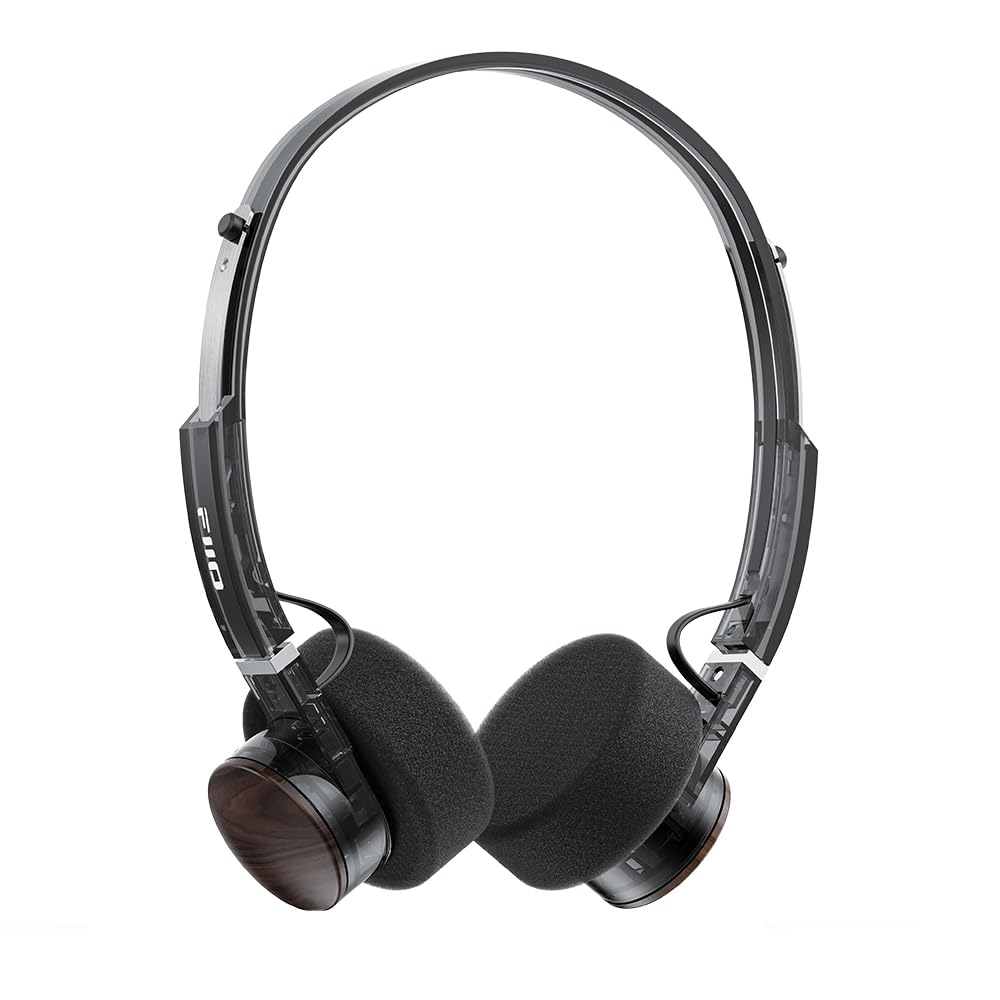
Image: FiiO EH11 Retro On-Ear Bluetooth Headphones, Transparent Black variant. This image displays the overall design of the headphones, highlighting the on-ear form factor and retro aesthetic.
ආරක්ෂිත තොරතුරු
- හෙඩ්ෆෝන් අධික උෂ්ණත්වයන්ට, ආර්ද්රතාවයට හෝ විඛාදන පරිසරයන්ට නිරාවරණය නොකරන්න.
- ශ්රවණාබාධ වැළැක්වීම සඳහා දිගු කාලයක් සඳහා ඉහළ ශබ්ද මට්ටම්වලට සවන් දීමෙන් වළකින්න.
- උපාංගය ඔබම විසුරුවා හැරීම, අලුත්වැඩියා කිරීම හෝ වෙනස් කිරීම නොකරන්න. සහාය සඳහා බලයලත් සේවා පුද්ගලයින් අමතන්න.
- උපකරණය ළමයින් සහ සුරතල් සතුන්ගෙන් ඈත් කරන්න.
- දේශීය රෙගුලාසිවලට අනුව නිෂ්පාදනය සහ එහි බැටරිය වගකීමෙන් යුතුව බැහැර කරන්න.
පැකේජයේ අන්තර්ගතය
කරුණාකර ඔබගේ පැකේජයේ සියලුම අයිතම තිබේදැයි පරීක්ෂා කරන්න:
- FiiO EH11 Retro On-Ear Bluetooth Headphones
- Foam earpads (2 pairs)
- USB A to Type-C charging cable (1)
- Quick guide (1)
නිෂ්පාදනය අවසන්view
Familiarize yourself with the main components and controls of your FiiO EH11 headphones.
පාලන සහ වරාය
- බල/බහුකාර්ය බොත්තම: Used for power on/off, play/pause, answering/ending calls.
- වෙළුම් බොත්තම: Rotatable knob for volume adjustment and track control.
- USB Type-C Port: හෙඩ්ෆෝන් ආරෝපණය කිරීම සඳහා.
- මයික්රෆෝනය: Built-in for calls and voice commands.
- LED දර්ශකය: බලය, ආරෝපණය සහ බ්ලූටූත් තත්ත්වය පෙන්වයි.
Note: Specific button functions and LED indicator behaviors are detailed in the 'Operating' section.
සැලසුම
1. හෙඩ්ෆෝන් ආරෝපණය කිරීම
- USB Type-C ආරෝපණ කේබලය හෙඩ්ෆෝන්වල ආරෝපණ වරායට සම්බන්ධ කරන්න.
- කේබලයේ අනෙක් කෙළවර USB බල ඇඩැප්ටරයකට (ඇතුළත් කර නැත) හෝ පරිගණකයේ USB පෝට් එකකට සම්බන්ධ කරන්න.
- LED දර්ශකය ආරෝපණ තත්ත්වය පෙන්වනු ඇත (උදා: ආරෝපණය වන විට රතු, සම්පූර්ණයෙන්ම ආරෝපණය වූ විට අක්රිය).
- A full charge takes approximately 1.5 hours and provides up to 30 hours of playback.
Description: Connect the provided USB-C cable to the headphone's charging port and a power source to charge the internal battery.
2. බල ගැන්වීම / අක්රිය කිරීම
- බල ගැන්වීම: Press and hold the Power/Multi-function button for approximately 3 seconds until the LED indicator lights up and you hear a power-on prompt.
- විදුලිය විසන්ධි කිරීම: Press and hold the Power/Multi-function button for approximately 5 seconds until the LED indicator turns off and you hear a power-off prompt.
3. බ්ලූටූත් යුගලනය
- හෙඩ්ෆෝන් ක්රියා විරහිත කර ඇති බවට සහතික වන්න.
- Press and hold the Power/Multi-function button for approximately 5-7 seconds until the LED indicator flashes red and blue alternately, indicating pairing mode.
- ඔබගේ උපාංගයේ (ස්මාර්ට්ෆෝන්, ටැබ්ලටය, පරිගණකය), බ්ලූටූත් සක්රීය කර පවතින උපාංග සොයන්න.
- Select "FiiO EH11" from the list of found devices.
- Once connected, the LED indicator will flash blue periodically, and you will hear a connection prompt.
4. ද්විත්ව උපාංග සම්බන්ධතාවය
The EH11 supports simultaneous connection to two Bluetooth devices.
- ඉහත විස්තර කර ඇති පරිදි පළමු උපාංගය සමඟ හෙඩ්ෆෝන් යුගල කරන්න.
- පළමු උපාංගයේ බ්ලූටූත් අක්රිය කරන්න. හෙඩ්ෆෝන් යුගල කිරීමේ ප්රකාරයට නැවත ඇතුළු වනු ඇත.
- දෙවන උපාංගය සමඟ හෙඩ්ෆෝන් යුගල කරන්න.
- පළමු උපාංගයේ බ්ලූටූත් නැවත සක්රිය කරන්න. හෙඩ්ෆෝන් ස්වයංක්රීයව උපාංග දෙකටම සම්බන්ධ විය යුතුය.
- You can now seamlessly switch between audio sources from the two connected devices.
5. FiiO පාලන යෙදුම
Download the FiiO Control App from your device's app store to unlock additional features and customization options, including EQ presets and gaming mode settings.
- ඒ සඳහා සොයන්න "FiiO Control" in the App Store (iOS) or Google Play Store (Android).
- Install the app and ensure your EH11 headphones are connected via Bluetooth.
- Open the app to access settings such as EQ, gaming mode, and firmware updates.
මෙහෙයුම් උපදෙස්
සංගීත වාදනය
- වාදනය/විරාමය: බල/බහුකාර්ය බොත්තම කෙටියෙන් ඔබන්න.
- පරිමාව: Rotate the Volume knob clockwise.
- ශබ්දය පහළට: Rotate the Volume knob counter-clockwise.
- ඊළඟ ධාවන පථය: Double-click the Volume knob.
- පෙර ධාවන පථය: Triple-click the Volume knob.
ඇමතුම් කළමනාකරණය
- පිළිතුර/අවසන් ඇමතුම: බල/බහුකාර්ය බොත්තම කෙටියෙන් ඔබන්න.
- ඇමතුම ප්රතික්ෂේප කරන්න: තත්පර 2ක් සඳහා බල/බහු ක්රියාකාරී බොත්තම ඔබාගෙන සිටින්න.
ක්රීඩා මාදිලිය
Activate Gaming Mode via the FiiO Control App to enhance in-game audio cues like footsteps and gunshots for a more immersive experience. This mode also optimizes latency.
LDAC High-Resolution Audio
The FiiO EH11 supports LDAC codec for high-resolution wireless audio. Ensure your source device also supports LDAC and that it is enabled in your device's Bluetooth settings for the best audio quality.
නඩත්තු කිරීම
පිරිසිදු කිරීම
- මෘදු, වියලි, ලින්ට් රහිත රෙද්දකින් හෙඩ්ෆෝන් පිස දමන්න.
- දරුණු රසායනික ද්රව්ය, පිරිසිදු කිරීමේ ද්රාවණ හෝ ශක්තිමත් ඩිටර්ජන්ට් භාවිතා නොකරන්න.
- ඕනෑම විවරයකට තෙතමනය ලබා ගැනීමෙන් වළකින්න.
කන් පෑඩ් ආදේශ කිරීම
The foam ear pads are detachable for easy cleaning and replacement. Gently pull the ear pads off the earcups to remove them. Align the new ear pads with the earcups and press them firmly into place until they are securely attached.
Two pairs of different-colored official ear pads are included in the package for customization.
ගබඩා කිරීම
When not in use, store the headphones in a cool, dry place, away from direct sunlight and extreme temperatures. Avoid placing heavy objects on the headphones.
දෝෂගවේෂණය
- බලය නැත:
- හෙඩ්ෆෝන් සම්පූර්ණයෙන්ම ආරෝපණය වී ඇති බවට වග බලා ගන්න.
- Try connecting to a different charging cable or power source.
- උපාංගය සමඟ යුගල කළ නොහැක:
- හෙඩ්ෆෝන් යුගල කිරීමේ මාදිලියේ ඇති බවට වග බලා ගන්න (LED රතු සහ නිල් පැහැයෙන් දැල්වෙයි).
- ඔබගේ උපාංගයේ බ්ලූටූත් සබල කර ඇති බවට වග බලා ගන්න.
- හෙඩ්ෆෝන් ඔබේ උපාංගයට සමීප කරන්න.
- හෙඩ්ෆෝන් සහ ඔබගේ උපාංගය දෙකම නැවත ආරම්භ කිරීමට උත්සාහ කරන්න.
- ඔබගේ උපාංගයේ පෙර බ්ලූටූත් සම්බන්ධතා හිස් කරන්න.
- ශබ්දයක් හෝ අඩු හඬක් නැත:
- හෙඩ්ෆෝන් සහ ඔබේ සම්බන්ධිත උපාංගය යන දෙකෙහිම ශබ්ද මට්ටම පරීක්ෂා කරන්න.
- හෙඩ්ෆෝන් ඔබේ උපාංගයට නිසි ලෙස සම්බන්ධ වී ඇති බවට වග බලා ගන්න.
- වෙනත් යෙදුමකින් හෝ මූලාශ්රයකින් ශ්රව්ය වාදනය කිරීමට උත්සාහ කරන්න.
- දුර්වල ශ්රව්ය ගුණාත්මකභාවය:
- හෙඩ්ෆෝන් සහ ඔබගේ උපාංගය අතර කිසිදු බාධාවක් නොමැති බවට වග බලා ගන්න.
- බාධා කරන ප්රභවයන්ගෙන් (උදා: Wi-Fi රවුටර්, අනෙකුත් බ්ලූටූත් උපාංග) ඈත් වන්න.
- If using LDAC, ensure your source device supports it and it is enabled.
පිරිවිතර
| විශේෂාංගය | පිරිවිතර |
|---|---|
| මාදිලියේ නම | EH11 |
| සම්බන්ධතා තාක්ෂණය | බ්ලූටූත් |
| රැහැන් රහිත සන්නිවේදන තාක්ෂණය | බ්ලූටූත් |
| ශ්රව්ය ධාවක වර්ගය | ගතික ධාවකය (මි.මී. 40) |
| ඉයර්පීස් හැඩය | ඔන්-කන් |
| බැටරි ආයු කාලය | පැය 30 දක්වා |
| ආරෝපණ කාලය | ආසන්න වශයෙන්. පැය 1.5 යි |
| බර | ආසන්න වශයෙන්. 92g (අවුන්ස 3.25) |
| විශේෂ ලක්ෂණය | LDAC High-Resolution Bluetooth Audio, Dual Device Connection, FiiO Control App Support, Gaming Mode |
| ඇතුළත් සංරචක | Foam earpads*2, Quick guide*1, USB A to Type-C charging cable*1 |
වගකීම් සහ සහාය
FiiO products come with a limited warranty. For detailed warranty information, technical support, or service inquiries, please refer to the official FiiO webඅඩවියට හෝ ඔබේ ප්රාදේශීය බෙදාහරින්නා අමතන්න.
ඔබට වැඩිදුර තොරතුරු සහ සම්බන්ධතා තොරතුරු සොයා ගත හැක FiiO නිල වෙළඳසැල.