1. හැඳින්වීම
This manual provides essential instructions for the safe and efficient operation of your COMISO Portable Wireless Bluetooth Speaker U832. Please read this manual thoroughly before using the product and retain it for future reference.
2. නිෂ්පාදන අවසන්view
The COMISO U832 is a compact and portable wireless Bluetooth speaker designed for high-definition audio playback and hands-free calling. It features a durable construction and versatile connectivity options.

රූපය 2.1: ඉදිරිපස view of the COMISO U832 Portable Wireless Bluetooth Speaker.

රූපය 2.2: අවසන්view of the COMISO U832 speaker, highlighting its compact dimensions (60.4mm x 90mm x 31.1mm) and key features such as CSR 4.0 Bluetooth, 5W driver, built-in microphone, 5-hour playing time, A2DP support, 33-feet range, IP67 waterproof rating, and dustproof design.
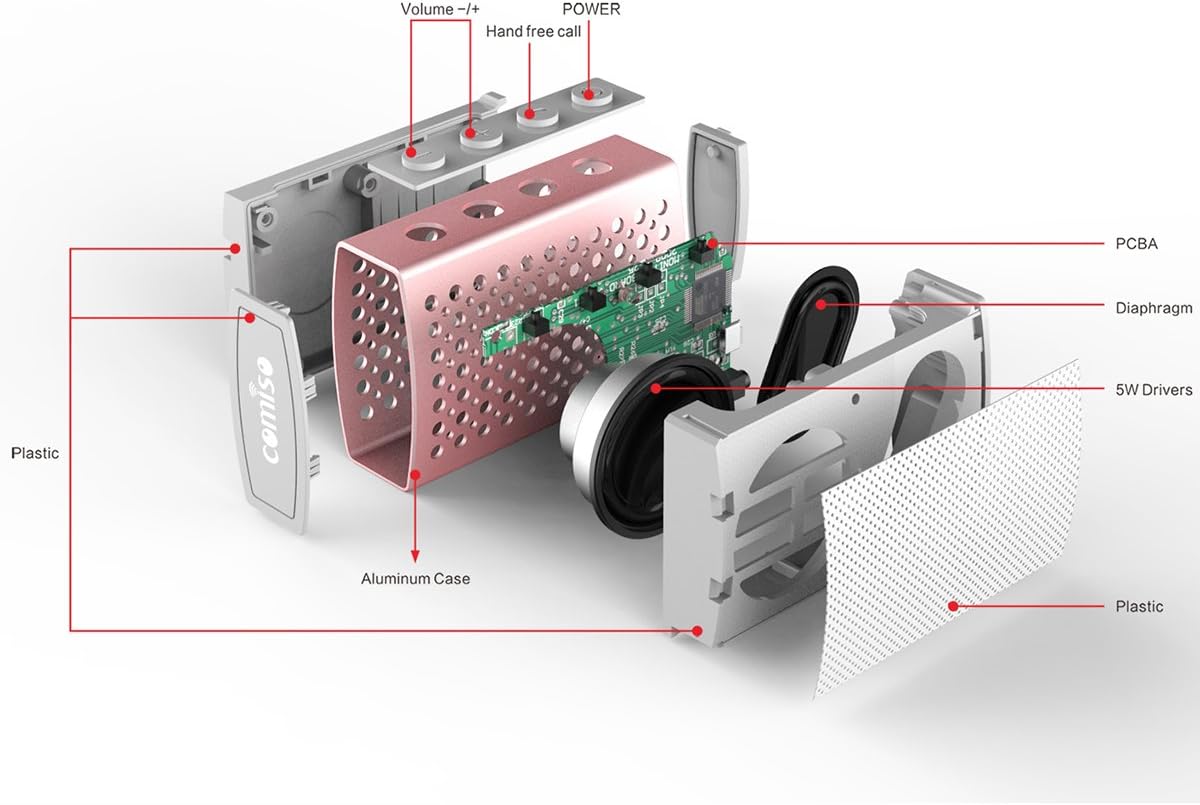
රූපය 2.3: පුපුරා ගියේය view illustrating the internal components of the COMISO U832 speaker, including the aluminum case, PCBA (Printed Circuit Board Assembly), diaphragm, 5W drivers, and plastic housing. Control buttons for Volume -/+, Hand-free call, and Power are also visible.
3. විශේෂාංග
- අතේ ගෙන යා හැකි නිර්මාණය: පහසු ප්රවාහනය සඳහා සංයුක්ත සහ සැහැල්ලු.
- රැහැන් රහිත බ්ලූටූත් සම්බන්ධතාවය: අනුකූල උපාංග වලින් බාධාවකින් තොරව ශ්රව්ය ප්රවාහය.
- බිල්ට් මයික්රෆෝනය: හෑන්ඩ්ස්-ෆ්රී ඇමතුම් සබල කරයි.
- AUX පේළිය: රැහැන්ගත ශ්රව්ය සම්බන්ධතා සඳහා.
- HD Sound and Bass: Optimized audio performance.
- IP67 ජල ආරක්ෂිත සහ දූවිලි ආරක්ෂිත: Provides protection against water immersion and dust ingress.
- 5W Speaker Output: Delivers clear and powerful sound.
- දිගු බැටරි ආයු කාලය: එක් ආරෝපණයකින් පැය 5ක් දක්වා නැවත ධාවනය.
4. පිහිටුවීම
4.1 කථිකයා ආරෝපණය කිරීම
Before initial use, fully charge the speaker. Connect the provided USB charging cable to the speaker's charging port and the other end to a USB power adapter (not included) or a computer's USB port. The charging indicator light will illuminate during charging and turn off when fully charged.

Figure 4.1: The COMISO U832 speaker connected for charging and AUX audio input.
4.2 බ්ලූටූත් යුගල කිරීම
- ස්පීකරය සම්පූර්ණයෙන්ම ආරෝපණය වී ඇති බව සහතික කර ගන්න.
- Press and hold the Power button on the speaker until you hear an audible prompt and the Bluetooth indicator light begins to flash, indicating it is in pairing mode.
- ඔබගේ ජංගම උපාංගයේ, බ්ලූටූත් සැකසුම් වෙත ගොස් බ්ලූටූත් සක්රීය කරන්න.
- ඒ සඳහා සොයන්න available devices. Select "COMISO U832" from the list.
- යුගලනය කළ පසු, ස්පීකරය ශ්රව්ය තහවුරු කිරීමක් නිකුත් කරන අතර, බ්ලූටූත් දර්ශක ආලෝකය දැල්වීම නවතා ඝනව පවතිනු ඇත.
The speaker will automatically attempt to reconnect to the last paired device when powered on, if the device is within range and has Bluetooth enabled.
4.3 AUX සම්බන්ධතාවය
To connect a device without Bluetooth, use a 3.5mm audio cable (not included). Insert one end of the cable into the speaker's AUX input port and the other end into the audio output jack of your device. The speaker will automatically switch to AUX mode.
5. මෙහෙයුම් උපදෙස්
5.1 බලය සක්රිය / අක්රිය
- බල ගැන්වීම: බල බොත්තම ඔබාගෙන තත්පර 3ක් පමණ අල්ලාගෙන සිටින්න.
- විදුලිය විසන්ධි කිරීම: බල බොත්තම ඔබාගෙන තත්පර 3ක් පමණ අල්ලාගෙන සිටින්න.
5.2 වෙළුම් පාලනය
- පරිමාව වැඩි කරන්න: '+' බොත්තම ඔබන්න.
- ශබ්දය අඩු කරන්න: '-' බොත්තම ඔබන්න.
5.3 Playback Control (Bluetooth Mode)
- වාදනය/විරාමය: Press the Play/Pause button (often integrated with the hands-free call button).
- ඊළඟ ධාවන පථය: '+' බොත්තම ඔබා අල්ලාගෙන සිටින්න.
- පෙර ධාවන පථය: '-' බොත්තම ඔබා අල්ලාගෙන සිටින්න.
5.4 අත් රහිත ඇමතුම
බ්ලූටූත් හරහා සම්බන්ධ වූ විට, ස්පීකරයේ ඇති මයික්රෆෝනය හෑන්ඩ්ස්-ෆ්රී ඇමතුම් සඳහා ඉඩ සලසයි.
- පිළිතුරු ඇමතුම: Press the Hands-free Call button once.
- ඇමතුම අවසන් කරන්න: Press the Hands-free Call button once during a call.
- ඇමතුම ප්රතික්ෂේප කරන්න: Press and hold the Hands-free Call button for approximately 2 seconds.
6. නඩත්තු කිරීම
- මෘදු වියළි රෙද්දකින් ස්පීකරය පිරිසිදු කරන්න. උල්ෙල්ඛ පිරිසිදු කරන්නන් හෝ ද්රාවක භාවිතා නොකරන්න.
- දිගු කාලයක් සඳහා කථිකයා අධික උෂ්ණත්වයට හෝ සෘජු හිරු එළියට නිරාවරණය කිරීමෙන් වළකින්න.
- භාවිතා නොකරන විට ස්පීකරය සිසිල් වියළි ස්ථානයක ගබඩා කරන්න.
- Ensure the charging port cover is securely closed to maintain IP67 water and dust resistance.
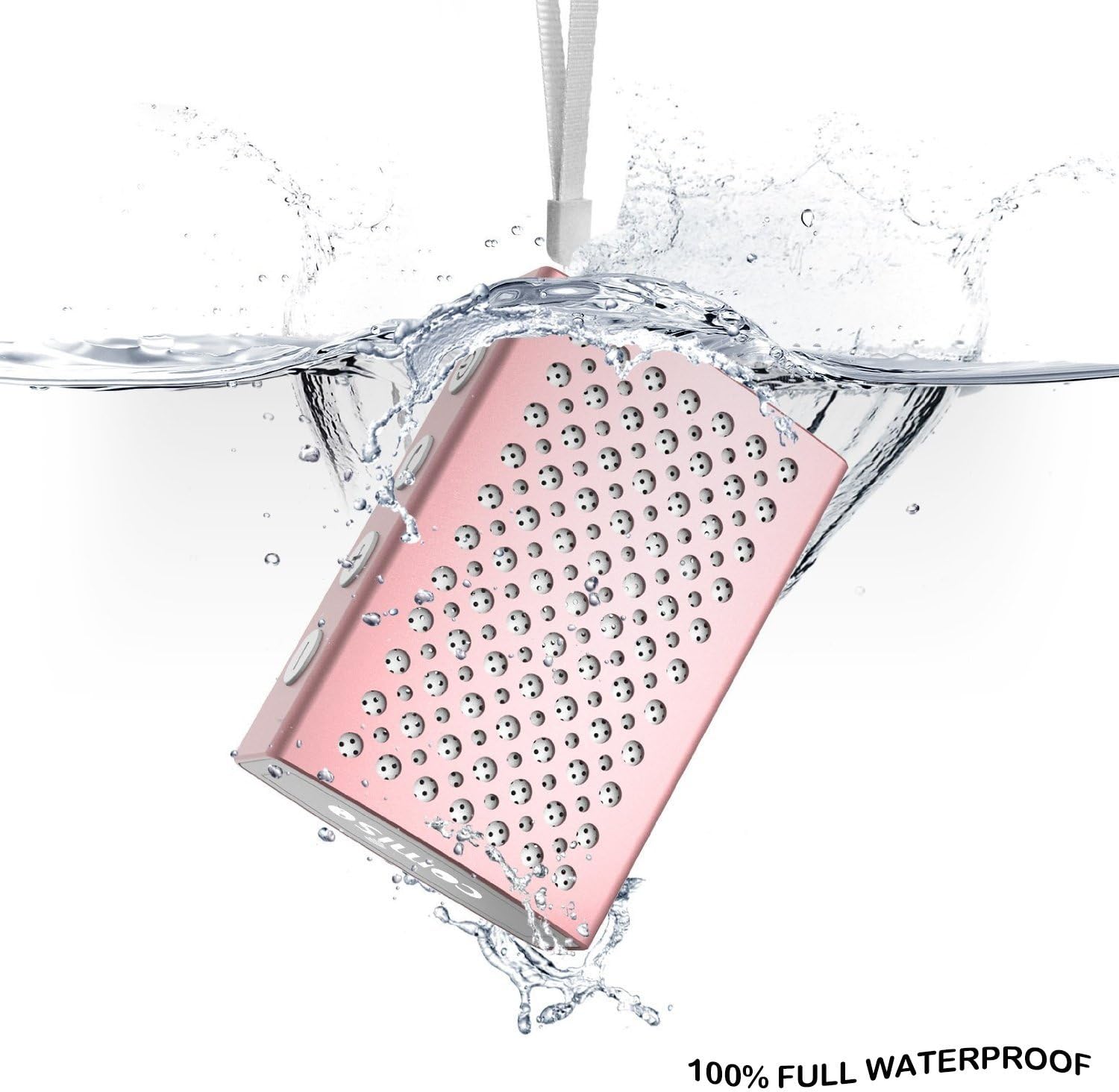
Figure 6.1: The COMISO U832 speaker demonstrating its 100% full waterproof capability, suitable for use in wet environments.
7. දෝශ නිරාකරණය
| ගැටලුව | විය හැකි හේතුව | විසඳුම |
|---|---|---|
| ස්පීකරය ක්රියාත්මක නොවේ. | අඩු බැටරි. | ස්පීකරය සම්පූර්ණයෙන්ම ආරෝපණය කරන්න. |
| බ්ලූටූත් හරහා යුගල කළ නොහැක. | ස්පීකරය යුගල කිරීමේ ආකාරයෙන් නොමැත; උපාංගයේ බ්ලූටූත් ක්රියා විරහිතයි; ස්පීකරයෙන් ඉතා දුරින්. | Ensure speaker is in pairing mode (flashing light). Turn on Bluetooth on your device. Move device closer to speaker (within 33 feet). |
| ශබ්දයක් නැත. | ශබ්දය ඉතා අඩුයි; වැරදි ආදාන ප්රකාරය; උපාංගය ශ්රව්ය වාදනය නොකරයි. | Increase speaker and device volume. Check if speaker is in correct mode (Bluetooth/AUX). Ensure audio is playing on your device. |
| දුර්වල ශබ්ද ගුණාත්මකභාවය හෝ විසන්ධි කිරීම්. | බාධාව; උපාංගය ඕනෑවට වඩා දුරයි; බැටරිය අඩුයි. | ස්පීකරය උපාංගයට සමීප කරන්න. බාධක වළක්වා ගන්න. ස්පීකරය ආරෝපණය කරන්න. |
8. පිරිවිතර
| විශේෂාංගය | විස්තර |
|---|---|
| වෙළඳ නාමය | COMISO |
| ආදර්ශ අංකය | U832 |
| සම්බන්ධතා තාක්ෂණය | බ්ලූටූත්, සහායක |
| ස්පීකර් උපරිම නිමැවුම් බලය | වොට් 5 |
| බලශක්ති ප්රභවය | බැටරි බලයෙන් |
| පාලන ක්රමය | ස්පර්ශ කරන්න |
| නිෂ්පාදන මානයන් | අඟල් 4.9 x 3.9 x 2.1 |
| අයිතමයේ බර | අවුන්ස 0.8 (දළ වශයෙන් ග්රෑම් 22.68) |
| විශේෂ ලක්ෂණ | Built-in Microphone, Portable, IP67 Waterproof |
| UPC | 742920066987 |
9. වගකීම් සහ සහාය
For warranty information or technical support, please refer to the documentation included with your purchase or visit the official COMISO webවෙබ් අඩවිය. වගකීම් හිමිකම් සඳහා ඔබේ මිලදී ගැනීමේ සාක්ෂි තබා ගන්න.
10 ආරක්ෂිත තොරතුරු
- ස්පීකරය විසුරුවා හැරීම, අලුත්වැඩියා කිරීම හෝ වෙනස් කිරීම නොකරන්න.
- Keep the speaker away from heat sources, direct sunlight, and sharp objects.
- Do not expose the speaker to fire or extreme temperatures.
- නිශ්චිත ආරෝපණ පරිමාව පමණක් භාවිතා කරන්නtagඊ සහ ධාරාව.
- දරුවන්ට ළඟා විය නොහැකි ලෙස තබා ගන්න.


